New to Telerik UI for WinForms? Start a free 30-day trial
Assign RadScreenTip to nodes
Updated on Aug 27, 2026
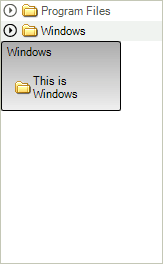
In order to assign RadScreenTip to the nodes of RadTreeView you should use the ScreenTipNeeded event.
If the item which needs a ScreenTip is a TreeNodeElement, you set the necessary properties of the globally instantiated RadOffice2007ScreenTip:
C#
RadOffice2007ScreenTipElement screenTip = new RadOffice2007ScreenTipElement();
Size size = new Size(120, 70);
Padding pad = new Padding(2);

void radTreeView1_ScreenTipNeeded(object sender, Telerik.WinControls.ScreenTipNeededEventArgs e)
{
    TreeNodeElement node = e.Item as TreeNodeElement;
    if (node != null)
    {
        screenTip.MainTextLabel.Image = node.ImageElement.Image;
        screenTip.MainTextLabel.TextImageRelation = TextImageRelation.ImageBeforeText;
        screenTip.MainTextLabel.Padding = pad;
        screenTip.MainTextLabel.Text = "This is " + node.ContentElement.Text;
        screenTip.MainTextLabel.Margin = new System.Windows.Forms.Padding(10);
        screenTip.CaptionLabel.Padding = pad;
        screenTip.CaptionLabel.Text = node.ContentElement.Text;
        screenTip.EnableCustomSize = true;
        screenTip.AutoSize = false;
        screenTip.Size = size;
        node.ScreenTip = this.screenTip;
    }
}