New to Telerik UI for WinForms? Start a free 30-day trial
Legend
Updated on May 7, 2026
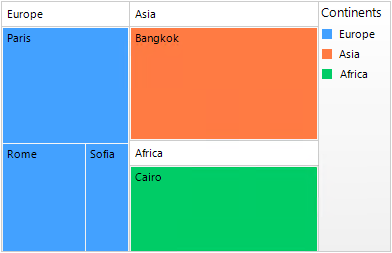
RadTreeMap has built-in support for a legend – descriptions about the treemap data on the plot. The ShowLegend property of RadTreeMap controls whether the legend is visible or not. The default value is false. The legend supports showing a legend title, which text can be set via the LegendTitle property of the TreeMapDataItemGroup. A sample approach to populate RadTreeMap with data is demonstrated in the Unbound Mode article >> Populating with Data at Run Time section.
RadTreeMap's legend
C#
this.radTreeMap1.ShowLegend = true;
this.radTreeMap1.LegendPosition = RadPosition.Right;
this.radTreeMap1.LegendTitle = "Continents";
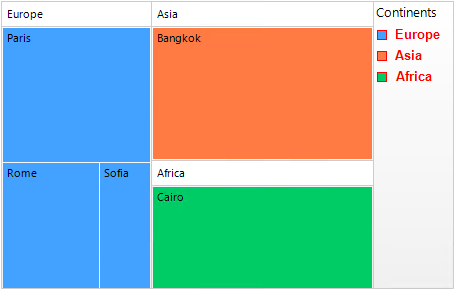
this.radTreeMap1.LegendOrientation = Orientation.Vertical;The TreeMapElement.LegendElement.VisualItemCreating event allows you to create custom legend elements or customize the default ones:
Customize the default LegendItemElement
C#
Font f = new Font("Arial", 10f, FontStyle.Bold);
private void LegendElement_VisualItemCreating(object sender,
    Telerik.WinControls.UI.TreeMap.LegendItemElementCreatingEventArgs e)
{
    Telerik.WinControls.UI.TreeMap.LegendItemElement legendElement =
        new Telerik.WinControls.UI.TreeMap.LegendItemElement(e.GroupItem);
    legendElement.Font = f;
    legendElement.TitleElement.ForeColor = Color.Red;
    legendElement.MarkerElement.DrawBorder = true;
    legendElement.MarkerElement.BorderBoxStyle = BorderBoxStyle.SingleBorder;
    legendElement.MarkerElement.BorderColor = Color.Red;
    legendElement.MarkerElement.BorderWidth = 1;
    e.ItemElement = legendElement;
}