New to Telerik UI for WinForms? Start a free 30-day trial
Customize Splash Content
Updated on Aug 27, 2026
The RadSplashScreenManager offers an overload of the Show method that accepts Type argument. This allows you to create a custom UserControl with the desired design for example and show it as a splash screen.
Custom Splash
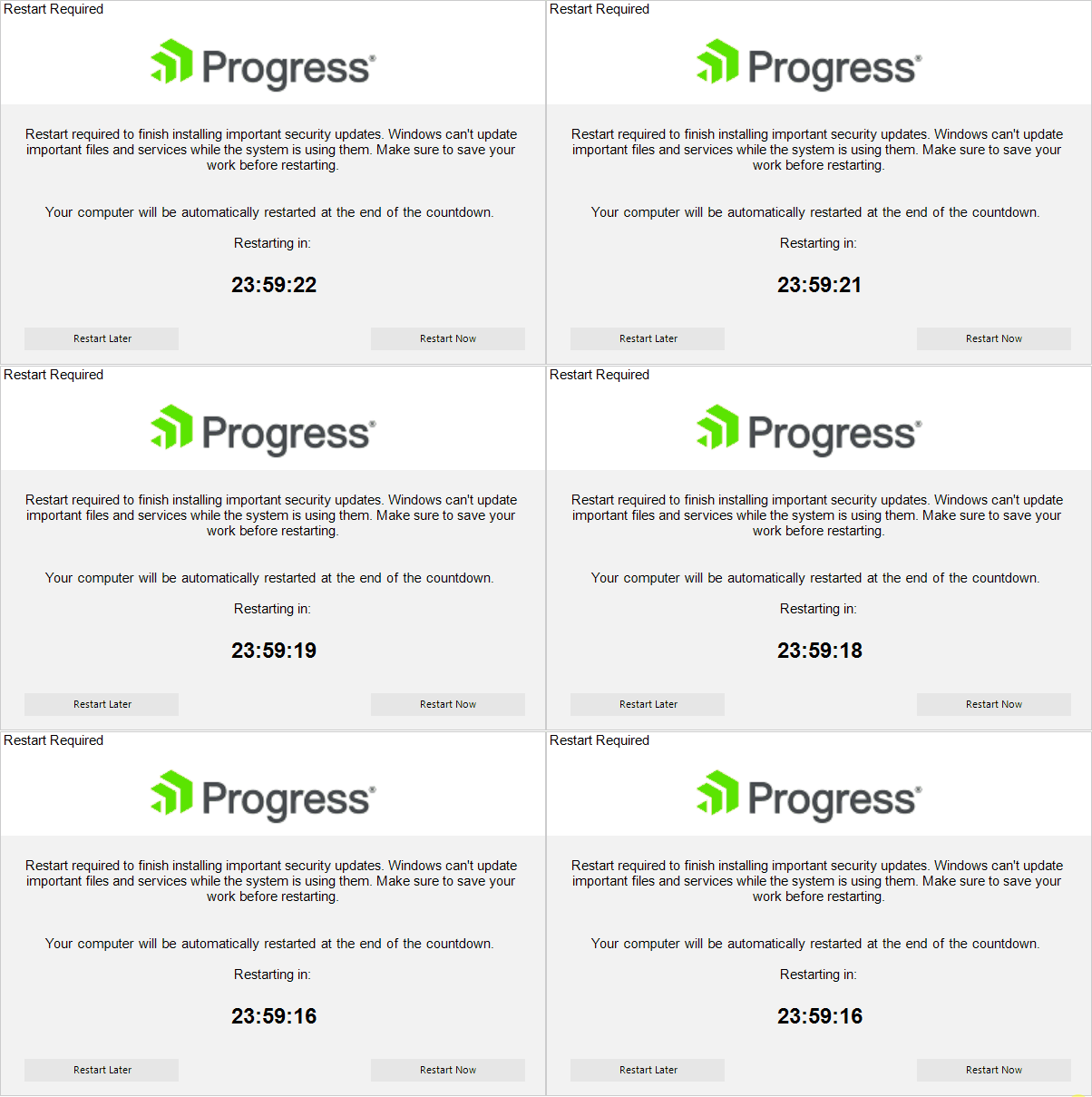
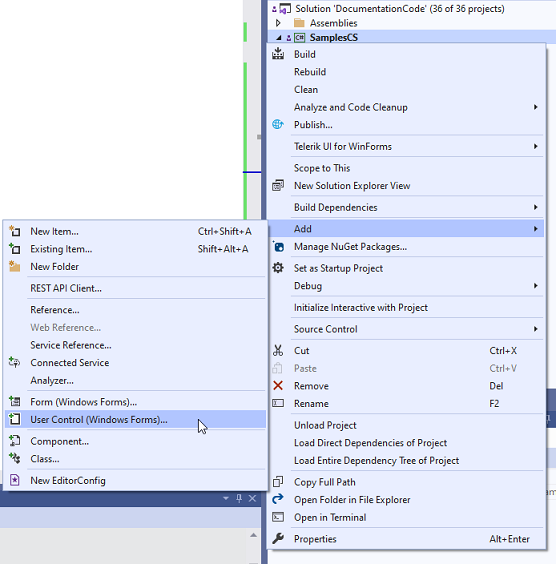
1. Create a new UserControl to your project, e.g. RestartRequiredUserControl.cs
2. Construct the UI according to the specific design you may have. For the above splash, it is necessary to add:
- RadLabel with the caption text, e.g. "Restart Required"
- RadPictureBox with the logo image
- RadLabel with the main text, e.g. "Restart required to finish installing important security updates. Windows can't update important files and services while the system is using them. Make sure to save your work before restarting".
- RadLabel with the description text , e.g. Your computer will be automatically restarted at the end of the countdown. Restarting in:
- RadLabel for displaying the remaining time
- RadButton for Restart Later action
- RadButton for Restart Now action
This is just a sample design of the UserControl. Feel free to construct the exact design that is required according to your specification.
RestartRequiredUserControl.Designer
C#
       private void InitializeComponent()
       {
           this.components = new System.ComponentModel.Container();
           this.radLabel1 = new Telerik.WinControls.UI.RadLabel();
           this.radPictureBox1 = new Telerik.WinControls.UI.RadPictureBox();
           this.radLabel2 = new Telerik.WinControls.UI.RadLabel();
           this.radLabel3 = new Telerik.WinControls.UI.RadLabel();
           this.radLabel4 = new Telerik.WinControls.UI.RadLabel();
           this.radButton1 = new Telerik.WinControls.UI.RadButton();
           this.radButton2 = new Telerik.WinControls.UI.RadButton();
           this.timer1 = new System.Windows.Forms.Timer(this.components);
           ((System.ComponentModel.ISupportInitialize)(this.radLabel1)).BeginInit();
           ((System.ComponentModel.ISupportInitialize)(this.radPictureBox1)).BeginInit();
           ((System.ComponentModel.ISupportInitialize)(this.radLabel2)).BeginInit();
           ((System.ComponentModel.ISupportInitialize)(this.radLabel3)).BeginInit();
           ((System.ComponentModel.ISupportInitialize)(this.radLabel4)).BeginInit();
           ((System.ComponentModel.ISupportInitialize)(this.radButton1)).BeginInit();
           ((System.ComponentModel.ISupportInitialize)(this.radButton2)).BeginInit();
           this.SuspendLayout();
           //
           // radLabel1
           //
           this.radLabel1.AutoSize = false;
           this.radLabel1.BackColor = System.Drawing.Color.White;
           this.radLabel1.Dock = System.Windows.Forms.DockStyle.Top;
           this.radLabel1.Font = new System.Drawing.Font("Arial", 11F);
           this.radLabel1.Location = new System.Drawing.Point(0, 0);
           this.radLabel1.Name = "radLabel1";
           this.radLabel1.Size = new System.Drawing.Size(600, 18);
           this.radLabel1.TabIndex = 0;
           this.radLabel1.Text = "Restart Required";
           //
           // radPictureBox1
           //
           this.radPictureBox1.BackColor = System.Drawing.Color.White;
           this.radPictureBox1.Dock = System.Windows.Forms.DockStyle.Top;
           this.radPictureBox1.Image = Properties.Resources.ProgressLogo;
           this.radPictureBox1.ImageLayout = Telerik.WinControls.UI.RadImageLayout.Center;
           this.radPictureBox1.Location = new System.Drawing.Point(0, 18);
           this.radPictureBox1.Name = "radPictureBox1";
           this.radPictureBox1.Size = new System.Drawing.Size(600, 96);
           this.radPictureBox1.TabIndex = 1;
           //
           // radLabel2
           //
           this.radLabel2.AutoSize = false;
           this.radLabel2.Dock = System.Windows.Forms.DockStyle.Top;
           this.radLabel2.Font = new System.Drawing.Font("Arial", 11F);
           this.radLabel2.Location = new System.Drawing.Point(0, 114);
           this.radLabel2.Name = "radLabel2";
           this.radLabel2.Size = new System.Drawing.Size(600, 103);
           this.radLabel2.TabIndex = 2;
           this.radLabel2.Text = "Restart required to finish installing important security updates. Windows can\'t u" +
   "pdate important files and services while the system is using them. Make sure to " +
   "save your work before restarting.";
           this.radLabel2.TextAlignment = System.Drawing.ContentAlignment.MiddleCenter;
           //
           // radLabel3
           //
           this.radLabel3.AutoSize = false;
           this.radLabel3.Dock = System.Windows.Forms.DockStyle.Top;
           this.radLabel3.Font = new System.Drawing.Font("Arial", 11F);
           this.radLabel3.Location = new System.Drawing.Point(0, 217);
           this.radLabel3.Name = "radLabel3";
           this.radLabel3.Size = new System.Drawing.Size(600, 68);
           this.radLabel3.TabIndex = 3;
           this.radLabel3.Text = "Your computer will be automatically restarted at the end of the countdown.\r\n\r\nRes" +
   "tarting in:";
           this.radLabel3.TextAlignment = System.Drawing.ContentAlignment.MiddleCenter;
           //
           // radLabel4
           //
           this.radLabel4.AutoSize = false;
           this.radLabel4.Dock = System.Windows.Forms.DockStyle.Top;
           this.radLabel4.Font = new System.Drawing.Font("Arial", 22F, System.Drawing.FontStyle.Bold);
           this.radLabel4.Location = new System.Drawing.Point(0, 285);
           this.radLabel4.Name = "radLabel4";
           this.radLabel4.Size = new System.Drawing.Size(600, 57);
           this.radLabel4.TabIndex = 4;
           this.radLabel4.Text = "24:00:00";
           this.radLabel4.TextAlignment = System.Drawing.ContentAlignment.MiddleCenter;
           //
           // radButton1
           //
           this.radButton1.Location = new System.Drawing.Point(26, 360);
           this.radButton1.Name = "radButton1";
           this.radButton1.Size = new System.Drawing.Size(170, 25);
           this.radButton1.TabIndex = 5;
           this.radButton1.Text = "Restart Later";
           //
           // radButton2
           //
           this.radButton2.Anchor = ((System.Windows.Forms.AnchorStyles)((System.Windows.Forms.AnchorStyles.Top | System.Windows.Forms.AnchorStyles.Right)));
           this.radButton2.Location = new System.Drawing.Point(408, 360);
           this.radButton2.Name = "radButton2";
           this.radButton2.Size = new System.Drawing.Size(170, 25);
           this.radButton2.TabIndex = 6;
           this.radButton2.Text = "Restart Now";
           //
           // timer1
           //
           this.timer1.Interval = 1000;
           this.timer1.Tick += new System.EventHandler(this.timer1_Tick);
           //
           // RestartRequiredUserControl
           //
           this.AutoScaleDimensions = new System.Drawing.SizeF(6F, 13F);
           this.AutoScaleMode = System.Windows.Forms.AutoScaleMode.Font;
           this.Controls.Add(this.radButton2);
           this.Controls.Add(this.radButton1);
           this.Controls.Add(this.radLabel4);
           this.Controls.Add(this.radLabel3);
           this.Controls.Add(this.radLabel2);
           this.Controls.Add(this.radPictureBox1);
           this.Controls.Add(this.radLabel1);
           this.Name = "RestartRequiredUserControl";
           this.Size = new System.Drawing.Size(600, 400);
           ((System.ComponentModel.ISupportInitialize)(this.radLabel1)).EndInit();
           ((System.ComponentModel.ISupportInitialize)(this.radPictureBox1)).EndInit();
           ((System.ComponentModel.ISupportInitialize)(this.radLabel2)).EndInit();
           ((System.ComponentModel.ISupportInitialize)(this.radLabel3)).EndInit();
           ((System.ComponentModel.ISupportInitialize)(this.radLabel4)).EndInit();
           ((System.ComponentModel.ISupportInitialize)(this.radButton1)).EndInit();
           ((System.ComponentModel.ISupportInitialize)(this.radButton2)).EndInit();
           this.ResumeLayout(false);

       }

       #endregion

       private Telerik.WinControls.UI.RadLabel radLabel1;
       private Telerik.WinControls.UI.RadPictureBox radPictureBox1;
       private Telerik.WinControls.UI.RadLabel radLabel2;
       private Telerik.WinControls.UI.RadLabel radLabel3;
       private Telerik.WinControls.UI.RadLabel radLabel4;
       private Telerik.WinControls.UI.RadButton radButton1;
       private Telerik.WinControls.UI.RadButton radButton2;
       private System.Windows.Forms.Timer timer1;
3. Start the timer to update the remaining time in the UserControl:
C#
public partial class RestartRequiredUserControl : UserControl
{
    TimeSpan remainingTime;
    public RestartRequiredUserControl()
    {
        InitializeComponent();
        remainingTime = TimeSpan.FromDays(1);
        timer1.Start();

        this.radPictureBox1.RootElement.EnableElementShadow = false;

    }

    private void timer1_Tick(object sender, EventArgs e)
    {
        remainingTime = remainingTime.Subtract(TimeSpan.FromSeconds(1));
        this.radLabel4.Text = remainingTime.ToString(@"hh\:mm\:ss");
    }
}C#
public partial class RestartRequiredUserControl : UserControl
{
    TimeSpan remainingTime;
    public RestartRequiredUserControl()
    {
        InitializeComponent();
        remainingTime = TimeSpan.FromDays(1);
        timer1.Start();

        this.radPictureBox1.RootElement.EnableElementShadow = false;

    }

    private void timer1_Tick(object sender, EventArgs e)
    {
        remainingTime = remainingTime.Subtract(TimeSpan.FromSeconds(1));
        this.radLabel4.Text = remainingTime.ToString(@"hh\:mm\:ss");
    }
}
4. Show the splash with the custom control from your main form:
C#
RadSplashScreenManager.Show(typeof(RestartRequiredUserControl));C#
RadSplashScreenManager.Show(typeof(RestartRequiredUserControl));