New to Telerik UI for WinForms? Start a free 30-day trial
Context Menu
Updated on Aug 27, 2026
RadPdfViewer has a default context menu - PdfViewerContextMenu which provides a quick way of performing a number of commands. However, you can replace this menu with a custom one by setting the RadContextMenu property of the RadPdfViewer.
New Context Menu
C#
this.radPdfViewer1.RadContextMenu = this.radContextMenu1;
You can also use the ShowMenu method to show the context menu programmatically at a specified location.
Show Context Menu
C#
private void buttonShowMenu_Click(object sender, EventArgs e)
{
    this.radPdfViewer1.PdfViewerElement.ShowMenu(new Point(100, 100));
}
The context menu can change dynamically. For example, when the Text Selection mode is enabled, Copy and Select All items are displayed in the menu with a separator below them:
| FixedDocumentViewerMode.Pan | FixedDocumentViewerMode.TextSelection |
|---|---|
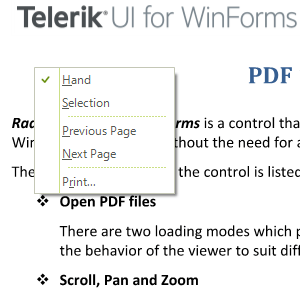 | 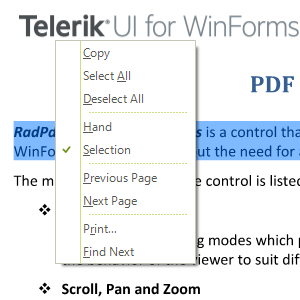 |
Additionally, you can easily add a custom menu item to the context menu. You can find below a sample code snippet:
Add New Menu Item
C#
public PdfUI()
{
    InitializeComponent();

    RadMenuItem item = new RadMenuItem("MyItem");
    item.Click += item_Click;
    this.radPdfViewer1.PdfViewerElement.ContextMenu.Items.Add(item);
}

private void item_Click(object sender, EventArgs e)
{
    RadMessageBox.Show("Perform your custom action here");
}