HTML-like Text Formatting
Introduction
Telerik UI for WinForms provide an advanced text styling mechanism, which can be applied to all Telerik products, because it enhances the smallest element in the Telerik Presentation Framework - the text primitive. The new rich text formatting mechanism uses plain HTML tags to display formatted text such as font style, font color, font size options and simple layouts. To turn on Html-like formatting the text must start with an <html> tag; use <size=[+|-]value> to set font size use, and <br> to create new line feed. To bold, underline and italic text, use the corresponding opening and closing tags. Font family is set through <font=Family>.
Supported Tags
| Tag | End Tag | Description |
|---|---|---|
| <font> | N/A | Specifies the font family |
| <color> | N/A | Specifies the text color. |
| <size> | N/A | Specifies the font size. |
| <b> | </b> | Defines bold text. |
| <i> | </i> | Defines italic text. |
| <u> | </u> | Defines underlined text. |
| <br> | N/A | Single line break. |
| <a> | </a> | Defines a hyperlink |
Example
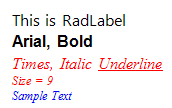
The following code snippet will produce the result shown in the screen-shot below:
Set HTML-like text formatting to RadLabel text
this.radLabel1.Text = "<html><size=12>This is RadLabel <br><b><font=Arial>Arial, Bold</b><br><i><color= Red><font=Times New Roman>Times, Italic <u>Underline</u><br><size=9>Size = 9<br><color= 0, 0, 255>Sample Text";Figure 1: HTML-like Text