New to Telerik UI for WinForms? Start a free 30-day trial
Tooltip
Updated on Aug 27, 2026
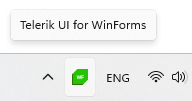
You can configure the tooltip that is displayed when the user hovers over the icon with the TooltipText property. The string set to this property will be shown as a content of the tooltip.
C#
void ShowNotifyIcon()
{
    RadNotifyIcon radNotifyIcon = new RadNotifyIcon();
    radNotifyIcon.TrayIcon = new System.Drawing.Icon("../../WinForms128x28.ico");
    radNotifyIcon.TooltipText = "Telerik UI for WinForms";
    radNotifyIcon.ShowTrayIcon = true;
}Figure 1: RadNotifyIcon with Tooltip