New to Telerik UI for WinForms? Start a free 30-day trial
Favorites and Libraries Nodes
Updated over 1 year ago
As of R3 2019 File Dialogs allow defining custom places to be displayed on the left side of the ExplorerControl's Main Pane. It is also possible to add multiple custom places like favorites and libraries nodes:
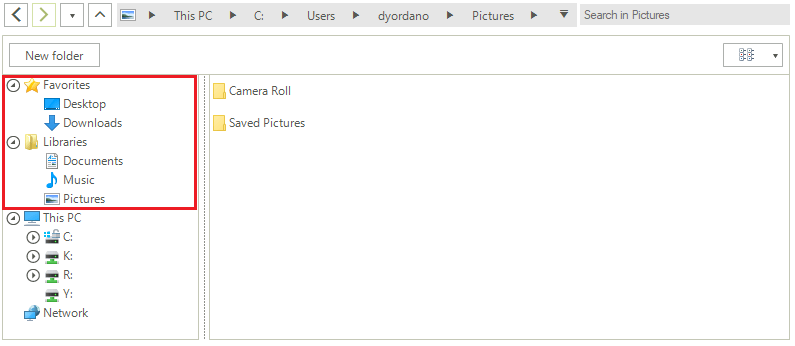
This will give you quick access to the custom-defined folders. Once a node in the Favorites/Libraries section is clicked, the respective folder is selected under This PC.
Defining Multiple Custom Places: Favorites and Libraries Nodes
C#
List<string> paths = new List<string>()
{
    @"C:\Users\"your_user_name"\Desktop",
    @"C:\Users\"your_user_name"\Downloads",
};

Image favoritesIcon = Properties.Resources.Favorites;
explorerControl1.AddCustomPlacesNode("Favorites", favoritesIcon, paths);

paths = new List<string>()
{
    @"C:\Users\"your_user_name"\Documents",
    @"C:\Users\"your_user_name"\Music",
    @"C:\Users\"your_user_name"\Pictures"
};

Image folderIcon = Properties.Resources.Folder;
explorerControl1.AddCustomPlacesNode("Libraries", folderIcon, paths);