New to Telerik UI for WinForms? Start a free 30-day trial
This article describes the inner structure and organization of the elements which build the RadDomainUpDown control.
RadDomainUpDown is a derivative of a RadDropDownList. Unlike RadDropDownList, RadDomainUpDown doesn't show a popup with the items:
Figure 1: RadDomainUpDown's Elements Hierarchy
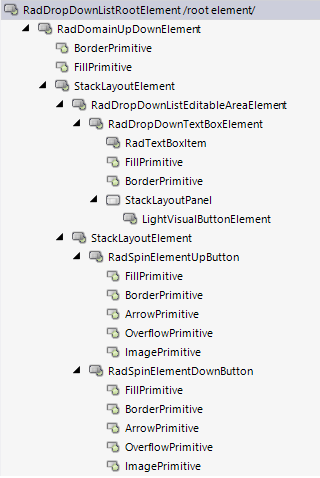
Figure 2: RadDomainUpDown's structure
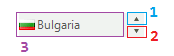
- RadDomainUpDownElement - the main element that holds the stack container of all inner elements.
- RadDropDownListEditableAreaElement - holds the text and image when the ReadOnly property is set to true;
- RadSpinElementUpButton - a button element that moves to the previous item in the list.
- RadSpinElementDownButton - a button element that moves to the next item in the list.
- RadDropDownTextBoxElement - holds the text when the ReadOnly property is set to false. It handles the user's input and allows entering free input.
- RadDropDownListEditableAreaElement - holds the text and image when the ReadOnly property is set to true;
See Also
Updated on Sep 1, 2026