Structure
This article describes the inner structure and organization of the elements which build the RadCalculatorDropDown control.
RadCalculatorDropDown consists of two parts - editable part which is the actual editor and a popup hosting the calculator.
Figure 1: RadCalculatorDropDown`s Element Hierarchy
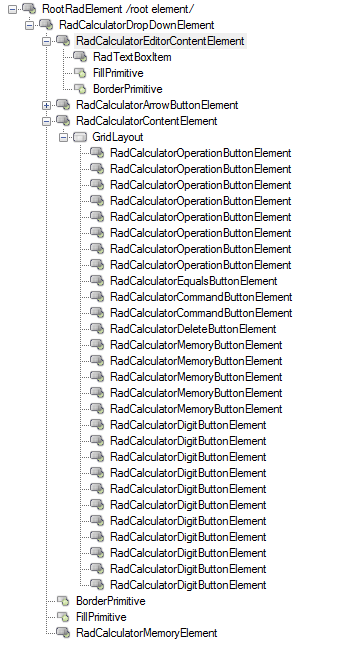
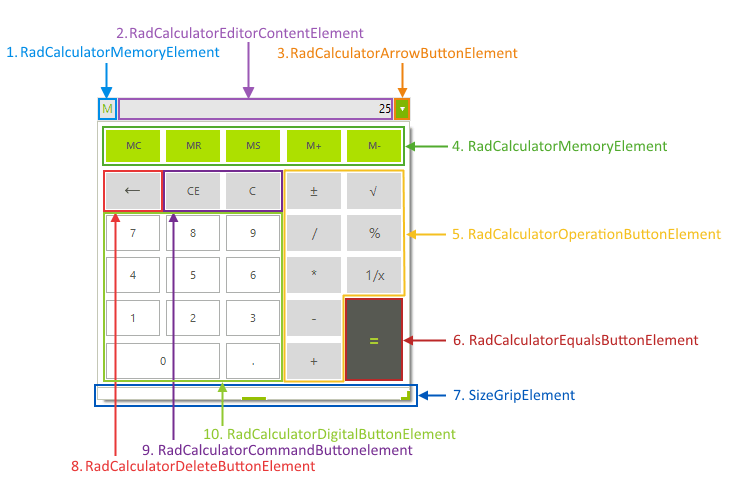
Figure 2: RadCalculatorDropDown Structure
Editable Area
The editable area consists of three elements:
-
Editable Area: Contains the editor repsponsible for handling user input.
-
RadCalculatorMemoryElement: This element gets visible when the memory functions of the calculator are used.
-
RadCalculatorEditorContentElement: This is the editable area of the control.
-
RadCalculatorArrowButtonElement: This the arrow button which opens the popup of the control.
-
Drop-down Part
The popup part consists of six elements:
-
Drop-Down: Handles the arithmetic operations.
-
RadCalculatorMemoryButtonElement: This is the type of the buttons for memory operations
-
RadCalculatorOperationButtonElement: This type is used by the buttons resposinble for different calculation operations (subscription, addition, etc).
-
RadCalculatorEqualsButtonElement: This class is used by the equals button.
-
RadCalculatorCommandButtonElement: This class is used by the command buttons (CE, C).
-
RadCalculatorDeleteButtonElement: This type is used by the delete button.
-
RadCalculatorDigitButtonElement: This type is used by the digit buttons.
-