New to Telerik UI for WinForms? Start a free 30-day trial
Smart Tag
Updated on Sep 1, 2026
The Smart Tag of RadAutoCompleteBox lets you quickly access common tasks involved with and customizing the layout or setting the theme.
Figure 1: The Smart Tag of RadAutoCompleteBox
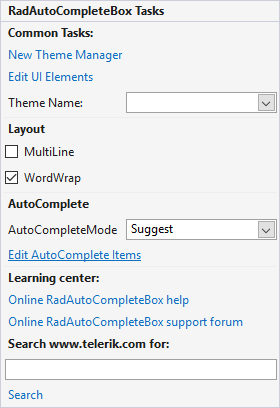
- Common Tasks
- New Theme Manager: Adds a new RadThemeManager component to the form.
- Edit UI elements: Opens a dialog that displays the Element Hierarchy Editor. This editor lets you browse all the elements in the control.
- Theme Name: Select a theme name from the drop down list of themes available for that control. Selecting a theme allows you to change all aspects of the controls visual style at one time.
- MultiLine: You can easily enable the multi-line functionality with this check box.
- WordWrap: This check box allows you to enable the word wrap.
- AutoCompleteMode: Use this to select the desired auto-complete mode.
- Edit AutoComplete Items: this link opens the Collection Editor which allows you to add/remove items.
- Learning Center: Navigate to the Telerik help, code library projects or support forum.
- Search: Search the Telerik site for a given string.