New to Telerik UI for WinForms? Start a free 30-day trial
AutoCompleteModes
Updated on May 7, 2026
The AutoCompleteMode property controls auto-complete behavior and can be set to None, Suggest, Append and SuggestAppend.
You can set the AutoCompleteMode as follows:
Set AutoCompleteMode
C#
this.radCheckedDropDownList1.AutoCompleteMode = AutoCompleteMode.SuggestAppend;- None: Nothing happens when a user begins to type into the text box portion of the control.
Figure 1: AutoCompleteMode.None

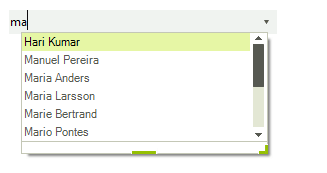
- Suggest: As the user types an entry into the text box, the drop-down portion of the control is shown, and the items that contains the entered text are displayed.
Figure 2: AutoCompleteMode.Suggest
- Append: As the user types, the next item in the list that matches the user input is automatically appended to the characters the user has already typed. The drop-down list is not shown without the user clicking the arrow.
Figure 3: AutoCompleteMode.Append

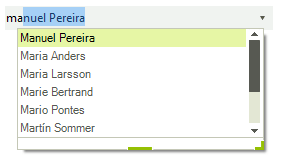
- SuggestAppend: Similar to the Append setting, but the drop-down list is shown and the suggested item is highlighted.
Figure 4: AutoCompleteMode.SuggestAppend