Change the Editor to a Bound RadDropDownList
This article will walk you through the process of changing the default editor to a bound drop down list, where the current value corresponds to a value within the drop down list data source. The case where the corresponding values are nullable is also handled.
Figure 1: DropDownListEditor
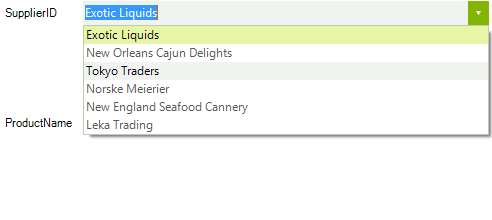
1. First you can subscribe to the BindingCreating, BindingCreated and EditorInitializing events of RadDataLayout (please note that this should be done before the control has been bound).
this.radDataLayout1.EditorInitializing += radDataLayout1_EditorInitializing;
this.radDataLayout1.BindingCreating += radDataLayout1_BindingCreating;
this.radDataLayout1.BindingCreated += radDataLayout1_BindingCreated;

this.radDataLayout1.DataSource = productsBinding;2. In the EditorInitializing event handler, you will be able to change the automatically generated editor with a RadDropDownList. In addition, you should set it up as needed. In this case we will set the DataSource, DisplayMember and ValueMember properties.
RadDropDownList radDropDownList1;

void radDataLayout1_EditorInitializing(object sender, Telerik.WinControls.UI.EditorInitializingEventArgs e)
{
    if (e.Property.Name == "SupplierID")
    {
        radDropDownList1 = new RadDropDownList();

        radDropDownList1.DataSource = suplierList;
        radDropDownList1.ValueMember = "SupplierID";
        radDropDownList1.DisplayMember = "CompanyName";

        e.Editor = radDropDownList1;
    }
}3. In order the values to be synchronized correctly, the bound property should be set in the BindingCreating event handler. In this case it should be set to the SelectedValue property.
void radDataLayout1_BindingCreating(object sender, Telerik.WinControls.UI.BindingCreatingEventArgs e)
{
    if (e.DataMember == "SupplierID")
    {
        e.PropertyName = "SelectedValue";
    }
}4. When the data source is using nullable values in order the user to be able to change the current value via the drop down list, the result value should be manually parsed. This can be done in the binding's Parse event. You can subscribe to this event in the BindingCreated event handler (in order this event to fire the formatting should be enabled).
void radDataLayout1_BindingCreated(object sender, BindingCreatedEventArgs e)
{
    if (e.DataMember == "SupplierID")
    {
        e.Binding.FormattingEnabled = true;
        e.Binding.Parse += new ConvertEventHandler(Binding_Parse);
    }
}

private void Binding_Parse(object sender, ConvertEventArgs e)
{
    int tmpvalue;
    int? result = int.TryParse(e.Value.ToString(), out tmpvalue) ? tmpvalue : (int?)null;

    e.Value = result;
}To make the example complete you can use the following classes.
public class ProductModel
{
    private int? _supplierID;
    private string _productName;

    public ProductModel(int? supplierID, string productName)
    {
        this._supplierID = supplierID;
        this._productName = productName;
    }

    public int? SupplierID
    {
        get
        {
            return this._supplierID;
        }
        set
        {
            this._supplierID = value;
        }
    }

    public string ProductName
    {
        get
        {
            return this._productName;
        }
        set
        {
            this._productName = value;
        }
    }
}

public partial class SupplierModel
{
    private int? _supplierID;
    private string _companyName;

    public SupplierModel(int? supplierID, string companyName)
    {
        this._supplierID = supplierID;
        this._companyName = companyName;
    }

    public int? SupplierID
    {
        get
        {
            return this._supplierID;
        }
        set
        {
            this._supplierID = value;
        }
    }

    public string CompanyName
    {
        get
        {
            return this._companyName;
        }
        set
        {
            this._companyName = value;
        }
    }
}You can initialize the data sources in the Form’s constructor.
List<ProductModel> productList;
List<SupplierModel> suplierList;
BindingSource productsBinding;

public DataLayoutChangeEditor()
{
    InitializeComponent();
    productList = new List<ProductModel>();
    suplierList = new List<SupplierModel>();

    productList.Add(new ProductModel(1, "Chai"));
    productList.Add(new ProductModel(2, "Chang"));
    productList.Add(new ProductModel(3, "Aniseed Syrup"));
    productList.Add(new ProductModel(4, "Chef Anton's Gumbo Mix"));
    productList.Add(new ProductModel(5, "Tofu"));
    productList.Add(new ProductModel(null, "Sir Rodney's Marmalade"));
    productList.Add(new ProductModel(6, "Boston Crab Meat"));
    productList.Add(new ProductModel(5, "Chartreuse verte"));
    productList.Add(new ProductModel(2, "Ravioli Angelo"));
    productList.Add(new ProductModel(4, "Perth Pasties"));

    suplierList.Add(new SupplierModel(1, "Exotic Liquids"));
    suplierList.Add(new SupplierModel(2, "New Orleans Cajun Delights"));
    suplierList.Add(new SupplierModel(3, "Tokyo Traders"));
    suplierList.Add(new SupplierModel(4, "Norske Meierier"));
    suplierList.Add(new SupplierModel(5, "New England Seafood Cannery"));
    suplierList.Add(new SupplierModel(6, "Leka Trading"));

    productsBinding = new BindingSource();
    productsBinding.DataSource = productList;
}