Validation
For the need of the validation process we made two events (ItemValidating, ItemValidated) that are firing when the Validating and Validated events occur in the editors. RadDataLayout provides three different ways to show to the users that some editors do not match the validation criteria – Validation Label, Error Provider and Validation Panel. In the following tutorial we will demonstrate how to use a validation panel together with Error provider.
1. For the purpose of this tutorial, we will create a new class Employee with a couple of exposed properties. By binding RadDataLayout to object from this type we will generate several items:
public class Employee
{
    [DisplayName("First Name")]
    public string FirstName { get; set; }

    [DisplayName("Family Name")]
    public string LastName { get; set; }

    public string Occupation { get; set; }

    public int Salary { get; set; }

    public DateTime StartingDate { get; set; }

    public bool IsMarried { get; set; }
}this.radDataLayout1.DataSource = new Employee()
{
FirstName = "Sarah",
LastName = "Blake",
Occupation = "Supplied Manager",
StartingDate = new DateTime(2005, 04, 12),
Salary = 1500,
IsMarried = true
};Figure 1: RadDataLayout Initialized
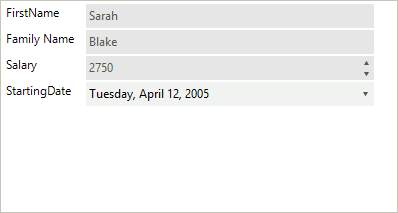
2. Set the ShowValidationPanel property to true. This will display the panel below the editors:
this.radDataLayout1.ShowValidationPanel = true;3. Set a padding to the LayoutControlContainerElement so that the error icons are visible. A suitable place to perform this operation is the handler of the BindingCreated.
private void radDataLayout1_BindingCreated(object sender, Telerik.WinControls.UI.BindingCreatedEventArgs e)
{
    this.radDataLayout1.LayoutControl.ContainerElement.Padding = new Padding(0, 0, 20, 0);
}4. Subscribe to the ItemValidated event of RadDataEntry:
private void radDataLayout1_ItemValidated(object sender, Telerik.WinControls.UI.DataLayoutItemValidatedEventArgs e)
{
    Employee employee = this.radDataLayout1.CurrentObject as Employee;
    if (e.Item.Text == "First Name")
    {
        if (employee.FirstName.Length < 2 || employee.FirstName.Length > 15)
        {
            e.ErrorProvider.SetError((sender as Control), "First Name should be between 2 and 15 chars long.");

            if (!this.radDataLayout1.ValidationPanel.PanelContainer.Controls.ContainsKey("FirstName"))
            {
                RadLabel label = new RadLabel();
                label.Name = "FirstName";
                label.Text = "<html><size=10><b><color= Red>FirstName : </b><color= Black>First Name should be between 2 and 15 chars long.";
                label.Dock = DockStyle.Top;
                label.AutoSize = false;
                label.BackColor = Color.Transparent;
                this.radDataLayout1.ValidationPanel.PanelContainer.Controls.Add(label);
            }
        }
        else
        {
            e.ErrorProvider.Clear();
            this.radDataLayout1.ValidationPanel.PanelContainer.Controls.RemoveByKey("FirstName");
        }
    }
    else if (e.Item.Text == "Family Name")
    {
        if (employee.LastName.Length < 2 || employee.LastName.Length > 15)
        {
            e.ErrorProvider.SetError((sender as Control), "Last Name should be between 2 and 15 chars long.");

            if (!this.radDataLayout1.ValidationPanel.PanelContainer.Controls.ContainsKey("LastName"))
            {
                RadLabel label = new RadLabel();
                label.Name = "LastName";
                label.Text = "<html><size=10><b><color= Red>LastName : </b><color= Black>Last Name should be between 2 and 15 chars long.";
                label.Dock = DockStyle.Top;
                label.AutoSize = false;
                label.BackColor = Color.Transparent;
                this.radDataLayout1.ValidationPanel.PanelContainer.Controls.Add(label);
            }
        }
        else
        {
            e.ErrorProvider.Clear();
            this.radDataLayout1.ValidationPanel.PanelContainer.Controls.RemoveByKey("LastName");
        }
    }
    else if (e.Item.Text == "Salary")
    {
        if (employee.Salary < 1400 || employee.Salary > 1800)
        {
            e.ErrorProvider.SetError((sender as Control), "Salary should be in range 1500 - 1700.");

            if (!this.radDataLayout1.ValidationPanel.PanelContainer.Controls.ContainsKey("Salary"))
            {
                RadLabel label = new RadLabel();
                label.Name = "Salary";

                label.Text = "<html><size=10><b><color= Red>Salary : </b><color= Black>Salary should be in range 1500 - 1700.";
                label.Dock = DockStyle.Top;
                label.AutoSize = false;
                label.BackColor = Color.Transparent;
                this.radDataLayout1.ValidationPanel.PanelContainer.Controls.Add(label);
            }
        }
        else
        {
            e.ErrorProvider.Clear();
            this.radDataLayout1.ValidationPanel.PanelContainer.Controls.RemoveByKey("Salary");
        }
    }
}Figure 2: Validaton Errors
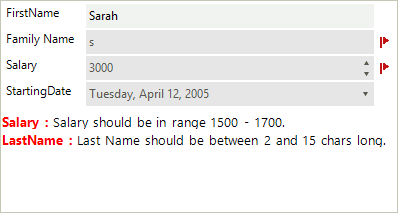
In this tutorial we also used an error provider to show error icon next to the editors. You can read more about Microsoft Error provider here - ErrorProvider Class