Properties, Events and Attributes
RadDataLayout exposes properties and events which are similar to the ones provided by the RadDataEntry control.
Properties
| Property | Description |
|---|---|
| DataSource | Through this property user can set the business object or a collection of objects that should be edited. When this property is set RadDataLayout generates editors for each public property which does not have its Browsable attribute set to false. |
| ColumnCount | Controls the amount of columns that RadDataLayout will use to arrange the generated controls. Default value is one. |
| FlowDirection | Defines the direction the editors will be generated. |
| ItemDefaultHeight | Sets the height that generated items should have, the default value is 26. |
| AutoSizeLabels | By default, the property value is false and the labels width will equals the longest label width. If you set this property to true, the labels will be sized according to their content. |
| ShowValidationPanel | Gets or sets a value indicating whether the validation panel should appear. |
| ItemDefaultHeight | Sets the height that generated items should have. |
Events
There are several events that you will find useful in the context of RadDataLayout:
| Event | Description |
|---|---|
| EditorInitializing | Occurs when editor is being initialized. In this event you can change the default editors with custom ones. |
| EditorInitialized | Raised when the editor is initialized. |
| BindingCreating | Occurs when a binding object for an editor is about to be created. This event is cancelable. |
| BindingCreated | Occurs when binding object is created. |
| ItemInitializing | This event is fired when the panel that contains the label, editor and validation label is about to be initialized. This event is cancelable. |
| ItemInitialized | Fires when the item is already initialized. |
| ItemValidating | This event is raised when any of the generated editors fires its Validating event. |
| ItemValidated | Occurs when any of the generated editors fires its Validated event. |
Attributes
RadDataLayout has support for several attributes that can be used to change the behavior of the control.
| Attribute | Description |
|---|---|
| Browsable | Defines which properties should be displayed. |
| DisplayName | Determines what text should be displayed in the label that is associated with the editor. |
| RadRangeAttribute | Defines a range that can be used into validation process. This attribute is provided in validation events. |
| __ReadOnlyAttribute __ | Determines whether a property can be edited in RadDataLayout or not. |
The Browsable attribute set to false will make the property on which it is used not bindable. This will prevent other controls which use the CurrencyManager object for extracting properties to bind to such a class. A suitable solution for this scenario is to leave the property Browsable set to true and handle the RadDataLayout.ItemInitializing setting the e.Cancel property to true for items which need to hidden in RadDataLayout.
Figure 1: Model With Attributes
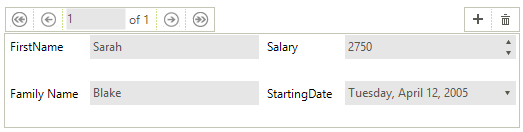
Using attributes.
public class Employee
{
    public string FirstName { get; set; }

    [DisplayName("Family Name")]
    public string LastName { get; set; }

    [Browsable(false)]
    public string Occupation { get; set; }

    [RadRange(2000, 3000)]
    public int Salary { get; set; }

    public DateTime StartingDate { get; set; }
}