WinForms Chat Replies
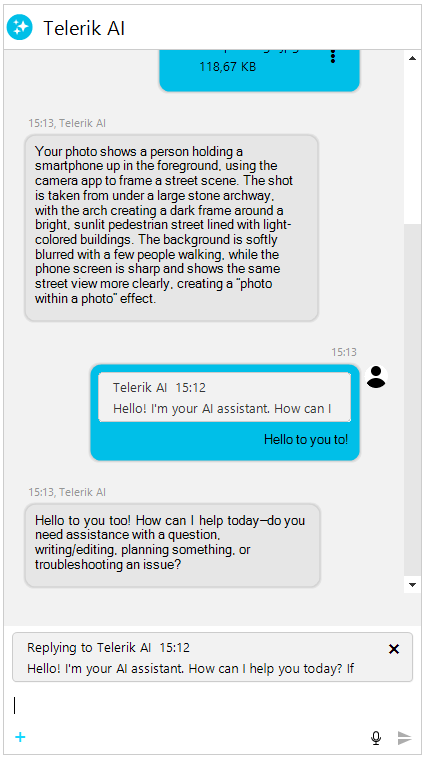
RadChat supports replying to messages, allowing users to quote one or more previous messages when composing a response. Replies appear as compact bubbles above the message text, providing visual context about which messages the response addresses.
Overview
The reply workflow in RadChat consists of:
- The user right-clicks a message and selects Reply with quote from the context menu.
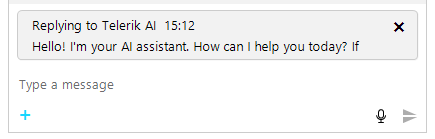
- A reply preview element appears above the input area, showing the quoted message.
- The user types a response and sends the message.
- The sent message displays with reply bubbles at the top of the message bubble, showing the quoted content.
Replies are stored in the ChatMessage.ReplyToMessages collection. Each message can reply to one or multiple messages (up to the configured MaxReplyMessages limit).
Enabling and Disabling Replies
The reply functionality is controlled by the EnableReplies property on RadChat. By default, replies are enabled.
Disabling the reply functionality
this.radChat1.EnableReplies = false;When EnableReplies is set to false, the Reply with quote context menu item is hidden and programmatic StartReply calls are ignored.
Starting a Reply
Users can start a reply through the message context menu. You can also start a reply programmatically using the StartReply method on RadChatElement:
Starting a reply programmatically
ChatMessage messageToReply = this.radChat1.ChatElement.MessagesViewElement.Items[0].Message;
this.radChat1.ChatElement.StartReply(messageToReply);The StartReply method returns true if the message was successfully added to the reply list, or false if the limit was reached or the message was a duplicate.
Multi-Message Replies
RadChat supports replying to multiple messages at once. The MaxReplyMessages property controls the maximum number of messages that can be quoted in a single reply. The default value is 5.
Configuring multi-message replies
this.radChat1.ChatElement.MaxReplyMessages = 3;When MaxReplyMessages is set to 1, each new reply replaces the previous one instead of accumulating. When the value is greater than 1, selecting Reply with quote on additional messages adds them to the existing reply list.
Canceling and Removing Replies
The user can cancel the reply by clicking the close button on the reply preview element. You can also cancel or modify replies programmatically:
Canceling and removing replies programmatically
// Cancel the entire reply operation
this.radChat1.ChatElement.CancelReply();

// Remove a specific message from a multi-reply
this.radChat1.ChatElement.RemoveFromReply(specificMessage);Reply State Properties
The RadChatElement exposes several properties to inspect the current reply state:
| Property | Type | Description |
|---|---|---|
| IsReplyMode | bool | Indicates whether the chat is currently in reply mode. |
| IsMultiReplyMode | bool | Indicates whether the chat is replying to more than one message. |
| ReplyToMessage | ChatMessage | The first message being replied to, or null if not in reply mode. |
| ReplyToMessages | IReadOnlyList<ChatMessage> | All messages currently being replied to. |
Message Reply Properties
The ChatMessage class exposes properties for inspecting reply relationships:
| Property | Type | Description |
|---|---|---|
| ReplyToMessages | IList<ChatMessage> | The list of messages this message is replying to. |
| ReplyToMessage | ChatMessage | Gets or sets the single message this replies to. Setting replaces the list. |
| IsReply | bool | Indicates whether this message is a reply. |
| IsMultiReply | bool | Indicates whether this message replies to more than one message. |
| ReplyToMessagesCount | int | The number of messages this message replies to. |
| ReplyToAuthor | Author | The author of the first replied-to message. |
| ReplyToAuthors | IEnumerable<Author> | The unique authors of all replied-to messages. |
| ReplyToMessagePreview | string | A truncated preview of the replied-to message text. |
Events
The following events are available on RadChatElement for monitoring reply activity:
| Event | Description |
|---|---|
| ReplyStarted | Raised when the user starts replying to one or more messages. |
| ReplyCancelled | Raised when the reply operation is cancelled. |
| ReplyBubbleClicked | Raised when the user clicks a reply bubble in a sent message, allowing navigation to the original message. |
Handling the ReplyStarted event
this.radChat1.ChatElement.ReplyStarted += this.OnReplyStarted;

private void OnReplyStarted(object sender, ReplyEventArgs e)
{
    Console.WriteLine("Replying to " + e.Messages.Count + " message(s)");
}Creating Reply Messages Programmatically
You can create a message that is a reply to another message by populating the ReplyToMessages collection:
Creating a reply message programmatically
ChatTextMessage originalMessage = new ChatTextMessage("What time is the meeting?", otherAuthor, DateTime.Now.AddMinutes(-5));
this.radChat1.AddMessage(originalMessage);

ChatTextMessage replyMessage = new ChatTextMessage("The meeting is at 3 PM.", this.radChat1.Author, DateTime.Now);
replyMessage.ReplyToMessages.Add(originalMessage);
this.radChat1.AddMessage(replyMessage);The reply message renders with a quoted bubble above the message text showing the original message content and author.