New to Telerik UI for WinForms? Start a free 30-day trial
Globalization Properties
Updated on Aug 27, 2026
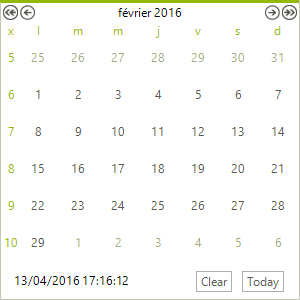
The Culture property can be set using the drop down list in the Properties Window or set in code. The screenshot below shows the Culture property set to "French (France)".
Figure 1: RadCalendar with French culture.
Setting CultureInfo in code
C#
radCalendar1.Culture = CultureInfo.GetCultureInfo("fr-FR");Additional properties that relate to globalization are:
| Property | Description |
|---|---|
| DayNameFormat | Specifies the display format for the days of the week on RadCalendar. Values for this property are Full , Short , FirstLetter , FirstTwoLetters , and Shortest . |
| Culture | Gets or sets the culture supported by this calendar. |
| CurrentCalendar | Gets the default System.Globalization.Calendar instance as specified by the default culture. |
| DayCellFormat | Gets or sets the formatting string that will be applied to the days in the calendar. The default value is "%d". |
| FirstDayOfWeek | Specifies the day to display as the first day of the week. Valid values are Default , Sunday , Monday , Tuesday , Wednesday , Thursday , Friday and Saturday . |
| TitleFormat | Gets or sets the format string that is applied to the calendar title. The default value is "MMMM yyyy". |
| CellToolTipFormat | Gets or sets the format string that is applied to the days cells tooltip. The default value is "dddd.MMMM dd, yyyy". |
| DateRangeSeparator | Gets or sets the separator string that will be put between start and end months in a multi view title. The default value is " - ". |