Telerik WinForms Upgrade Plugin
The Telerik WinForms Upgrade Plugin extends Microsoft's Upgrade Agent in GitHub Copilot CLI with Telerik-specific modernization workflows. It provides selectable scenarios for upgrading Telerik UI for WinForms, converting standard Microsoft WinForms controls, migrating Telerik assembly references to NuGet packages, and setting up licensing. It also injects Telerik guidance into Microsoft's .NET upgrade scenarios.
This plugin is separate from the Telerik WinForms MCP Server and its telerik_upgrade_assistant tool. The plugin works with GitHub Copilot CLI and Microsoft's Upgrade Agent.
Prerequisites
Before installing the plugin, make sure you have:
- GitHub Copilot CLI with Upgrade Agent support.
- A Telerik account with an active DevCraft or Telerik UI for WinForms license, or a free trial.
- .NET 8 or later to run the Telerik MCP tool server. The target WinForms application can use any supported .NET version, including .NET Framework.
Install the Plugin
Inside GitHub Copilot CLI install the Microsoft and Telerik marketplaces and Upgrade plugins:
Add the Microsoft and Telerik marketplaces:
/plugin marketplace add microsoft/upgrade-agent-plugins
/plugin marketplace add telerik/ai-plugins
Install the GitHub Copilot and Telerik Upgrade Plugins:
/plugin install upgrade-agent@upgrade-agent-plugins
/plugin install telerik-winforms-upgrade-plugin@telerik-ai-plugins
Select the Upgrade agent:
/agent to select Upgrade
Prompt the agent:
Upgrade my solution to .NET 10 and Telerik v2026.3.812Select a Telerik Modernization Scenario
The agent chooses a scenario based on the requested task. You can ask to upgrade Telerik, convert controls, migrate references, or configure licensing.
| Scenario | Use it when | What it does |
|---|---|---|
telerik-version-upgrade | The project already uses Telerik UI for WinForms and you want a newer Telerik version. | Updates the Telerik package version, can migrate assembly references to NuGet, configures licensing, and detects and addresses breaking changes. |
telerik-control-conversion | You want to replace standard Microsoft WinForms controls with Telerik controls. | Installs Telerik, configures licensing, converts forms one at a time, and applies a Telerik theme. |
telerik-assembly-to-nuget | You only want to replace direct Telerik assembly references with NuGet packages. | Detects the current Telerik version and reference style, configures the NuGet feed, maps assemblies to packages, and migrates the project without changing the Telerik version or .NET target. |
telerik-licensing | You want to activate, repair, or migrate Telerik licensing. | Detects the current licensing mechanism, applies the appropriate setup or repair, and verifies the result. |
The Telerik version-upgrade and control-conversion scenarios can lead into each other: after an upgrade, the agent can offer control conversion; after conversion, it can offer a Telerik version upgrade. The assembly-to-NuGet scenario is standalone and does not change the Telerik version or target framework.
Follow Scenario Progress
Scenarios move through lifecycle phases. The phase tracker and individual tasks are shown in the Upgrade Agent Dashboard. The exact tasks depend on the selected scenario and the project assessment.
| Phase | What happens |
|---|---|
| Initialize | Starts the scenario and establishes the project and workflow context. |
| Assess | Inspects the project and records relevant versions, target frameworks, reference style, prerequisites, and potential issues in the scenario assessment. |
| Plan | Creates an ordered task list based on the assessment, including dependencies and completion criteria. |
| Execute | Performs the planned tasks, updates task status, and validates changes. For example, a version upgrade can update Telerik references, address breaking changes, and build the project. |
| Done | Summarizes completed work, verification, and any remaining issues or follow-up actions. |
View the Upgrade Agent Dashboard
While the Upgrade Agent is running, it creates a local web dashboard on the customer's machine to show progress for the active scenario. The dashboard is available only during the local run and is not a published web page. The scenario view shows the phase tracker, task list and status, task details, and summary counts such as projects, incidents, and mandatory breaking changes.
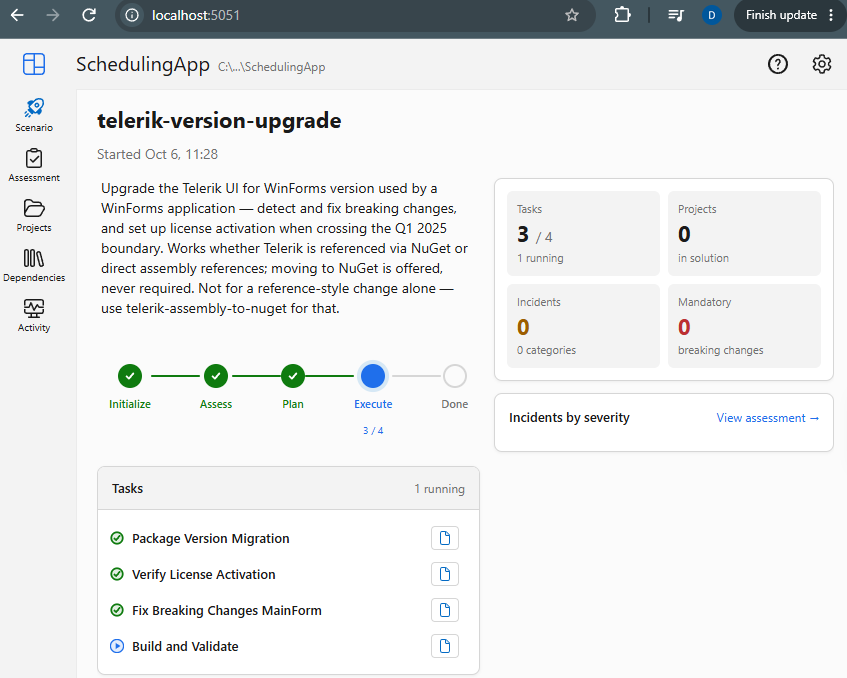
The dashboard also provides these views:
- Assessment displays assessment information when the scenario has produced it.
- Projects summarizes discovered projects, target framework upgrades, and incidents. You can filter and view project data as a table or graph.
- Dependencies summarizes packages, assemblies and runtime dependencies, version drift, project references, and compatibility.
- Activity provides a timeline and log of file changes, commits, and builds. It can group activity by file or project and includes workflow artifacts such as
assessment.md,plan.md, and task progress files.
The dashboard reflects the current local run; its counts, task names, and available assessment details change as the scenario progresses.
Extend Microsoft's .NET Upgrade Scenarios
The plugin also provides scenario extensions that add Telerik-specific guidance to Microsoft's existing .NET Upgrade Agent scenarios. These extensions are not selectable scenarios and do not replace the Microsoft workflows.
| Extension | Extends | Telerik-specific guidance |
|---|---|---|
telerik-for-dotnet-framework-upgrade | dotnet-framework-version-upgrade | Verifies whether Telerik UI for WinForms supports .NET Framework 4.8.1 and offers, but does not require, migration to NuGet references. |
telerik-for-dotnet-version-upgrade | dotnet-version-upgrade | Handles both modern .NET-to-newer .NET and .NET Framework-to-modern .NET upgrades. It offers NuGet migration for modern .NET projects and uses the standard reference approach for .NET Framework sources. |
When the task includes changing the application's .NET target, run Microsoft's dotnet-version-upgrade scenario first. The resulting target framework determines which Telerik versions are available. Then run telerik-version-upgrade to update Telerik. Neither the Telerik version-upgrade nor control-conversion scenario changes the project's <TargetFramework>.
Telerik Packages and License Activation
Both the Telerik version-upgrade and control-conversion scenarios can handle assembly-to-NuGet migration and license activation as part of the workflow:
- NuGet migration replaces direct Telerik DLL references with the
Telerik.UI.for.WinForms.AllControlspackage. - For Q1 2025 and later projects using Telerik NuGet packages,
Telerik.Licensingis included transitively. The shared license file activates the application without an explicit package reference. - A .NET Framework project that keeps direct Telerik assembly references must reference
Telerik.Licensingexplicitly.
The Telerik license key is shared between the MCP server and NuGet-based application activation. The version-upgrade and control-conversion scenarios require the key because they call Telerik MCP tools. The assembly-to-NuGet scenario checks for the key but can continue without it because its migration does not call telerik_* tools.
Save the license file as %AppData%\Telerik\telerik-license.txt, or as telerik-license.txt in the project or solution root, before running a scenario that requires it.