.NET MAUI CollectionView Filtering
The CollectionView provides the functionality to programmatically filter its data at runtime.
You can achieve this by adding different filter descriptors in the RadCollectionView.FilterDescriptors collection.
The following descriptor types are supported:
- Text Filter Descriptor
- Numerical Filter Descriptor
- DateTime Filter Descriptor
- TimeSpan Filter Descriptor
- Boolean Filter Descriptor
- Nested Property Text Filter Descriptor
- Distinct Values Filter Descriptor
- Composite Filter Descriptor
- Delegate Filter Descriptor
All FilterDescriptors are located in the Telerik.Maui.Controls.Data namespace.
Text Filter Descriptor
The TextFilterDescriptor represents a descriptor which filters by properties of the string data type.
The descriptor supports the following properties:
PropertyName—Defines the name of the property that is used to retrieve the filter value.Operator—Defines theTextOperatorvalue that defines how theValuemember is compared with each value from the items source.Value—Defines the value used in the comparisons. This is the right operand of the comparison.IsCaseSensitive—Defines a value that determines whether the text comparisons will be case-sensitive. The default value istrue.
Example with Text Filter Descriptor
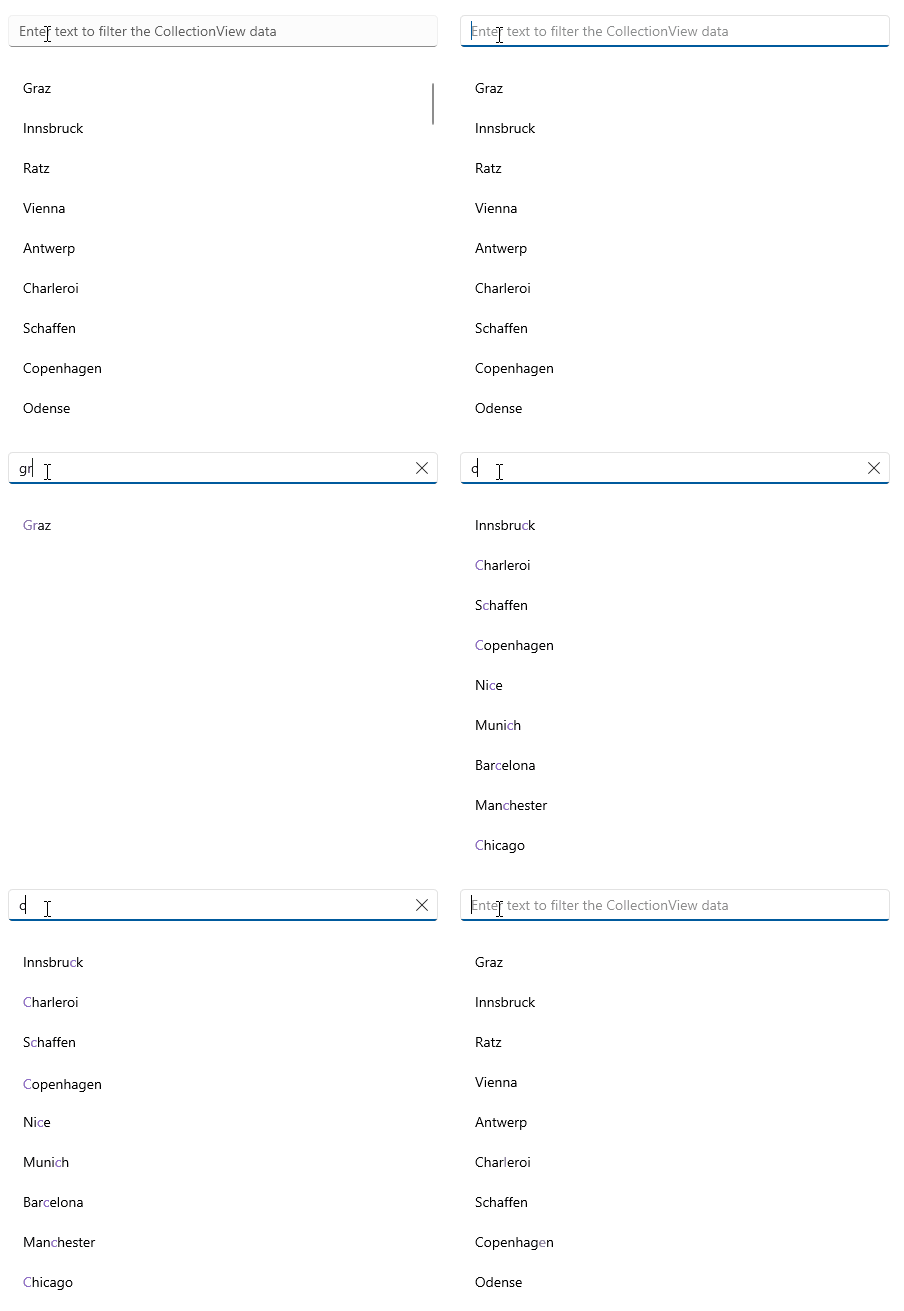
The following example implements a TextFilterDescriptor and uses a RadEntry control that allows the user to enter a string of text to filter the CollectionView data.
1. Define the RadCollectionView and RadEntry in XAML:
<Grid RowDefinitions="Auto, *"
      RowSpacing="20">
    <telerik:RadEntry x:Name="searchEntry"
                      Placeholder="Enter text to filter the CollectionView data"
                      ReserveSpaceForErrorView="False"
                      TextChanged="OnFilterChanged" />
    <telerik:RadCollectionView x:Name="collectionView"
                               Grid.Row="1"
                               ItemsSource="{Binding Locations}">
        <telerik:RadCollectionView.BindingContext>
            <local:ViewModel />
        </telerik:RadCollectionView.BindingContext>
        <telerik:RadCollectionView.ItemTemplate>
            <DataTemplate>
                <telerik:RadHighlightLabel UnformattedText="{Binding City}"
                                           HighlightText="{Binding Source={x:Reference searchEntry}, Path=Text}"
                                           HighlightTextColor="#8660C5"
                                           TextColor="Black"
                                           Padding="{Binding Source={RelativeSource AncestorType={x:Type telerik:RadCollectionViewItemView}}, Path=ActualPadding}"
                                           VerticalTextAlignment="Center" />
            </DataTemplate>
        </telerik:RadCollectionView.ItemTemplate>
    </telerik:RadCollectionView>
</Grid>
2. Add the telerik namespace:
xmlns:telerik="http://schemas.telerik.com/2022/xaml/maui"3. Create a sample DataModel:
public class DataModel : NotifyPropertyChangedBase
{
    private string continent;
    private string country;
    private string city;
    private int id;

    public string Continent
    {
        get => this.continent;
        set => this.UpdateValue(ref this.continent, value);
    }

    public string Country
    {
        get => this.country;
        set => this.UpdateValue(ref this.country, value);
    }

    public string City
    {
        get => this.city;
        set => this.UpdateValue(ref this.city, value);
    }

    public int Id
    {
        get => this.id;
        set => this.UpdateValue(ref this.id, value);
    }
}
4. Define the ViewModel class:
public class ViewModel : NotifyPropertyChangedBase
{
    public ViewModel()
    {
        this.Locations = new ObservableCollection<DataModel>
        {
            new DataModel { Continent = "Europe", Country = "Austria", City = "Graz", Id = 1 },
            new DataModel { Continent = "Europe", Country = "Austria", City = "Innsbruck", Id = 2 },
            new DataModel { Continent = "Europe", Country = "Austria", City = "Ratz", Id = 3 },
            new DataModel { Continent = "Europe", Country = "Austria", City = "Vienna", Id = 4 },
            new DataModel { Continent = "Europe", Country = "Belgium", City = "Antwerp", Id = 5 },
            new DataModel { Continent = "Europe", Country = "Belgium", City = "Charleroi", Id = 6 },
            new DataModel { Continent = "Europe", Country = "Belgium", City = "Schaffen", Id = 7 },
            new DataModel { Continent = "Europe", Country = "Denmark", City = "Copenhagen", Id = 8 },
            new DataModel { Continent = "Europe", Country = "Denmark", City = "Odense", Id = 9 },
            new DataModel { Continent = "Europe", Country = "France", City = "Nice", Id = 10 },
            new DataModel { Continent = "Europe", Country = "France", City = "Paris", Id = 11 },
            new DataModel { Continent = "Europe", Country = "Germany", City = "Baden-Baden", Id = 12 },
            new DataModel { Continent = "Europe", Country = "Germany", City = "Berlin", Id = 13 },
            new DataModel { Continent = "Europe", Country = "Germany", City = "Hamburg", Id = 14 },
            new DataModel { Continent = "Europe", Country = "Germany", City = "Munich", Id = 15 },
            new DataModel { Continent = "Europe", Country = "Germany", City = "Nuremberg", Id = 16 },
            new DataModel { Continent = "Europe", Country = "Italy", City = "Bari", Id = 17 },
            new DataModel { Continent = "Europe", Country = "Italy", City = "Rome", Id = 18 },
            new DataModel { Continent = "Europe", Country = "Netherlands", City = "Amsterdam", Id = 19 },
            new DataModel { Continent = "Europe", Country = "Netherlands", City = "Eindhoven", Id = 20 },
            new DataModel { Continent = "Europe", Country = "Netherlands", City = "Rotterdam", Id = 21 },
            new DataModel { Continent = "Europe", Country = "Portugal", City = "Lisbon", Id = 22 },
            new DataModel { Continent = "Europe", Country = "Portugal", City = "Porto", Id = 23 },
            new DataModel { Continent = "Europe", Country = "Spain", City = "Barcelona", Id = 24 },
            new DataModel { Continent = "Europe", Country = "Spain", City = "Madrid", Id = 25 },
            new DataModel { Continent = "Europe", Country = "United Kingdom", City = "London", Id = 26 },
            new DataModel { Continent = "Europe", Country = "United Kingdom", City = "Manchester", Id = 27 },
            new DataModel { Continent = "North America", Country = "United States", City = "New York", Id = 28 },
            new DataModel { Continent = "North America", Country = "United States", City = "Los Angeles", Id = 29 },
            new DataModel { Continent = "North America", Country = "United States", City = "Chicago", Id = 30 },
            new DataModel { Continent = "North America", Country = "United States", City = "Boston", Id = 31 },
            new DataModel { Continent = "North America", Country = "United States", City = "San Francisco", Id = 32 },
            new DataModel { Continent = "North America", Country = "Canada", City = "Toronto", Id = 33 },
            new DataModel { Continent = "North America", Country = "Canada", City = "Vancouver", Id = 34 },
            new DataModel { Continent = "North America", Country = "Canada", City = "Ottawa", Id = 35 },
            new DataModel { Continent = "South America", Country = "Brazil", City = "Rio de Janeiro", Id = 36 },
            new DataModel { Continent = "South America", Country = "Brazil", City = "Sao Paulo", Id = 37 },
            new DataModel { Continent = "South America", Country = "Brazil", City = "Salvador", Id = 38 },
            new DataModel { Continent = "South America", Country = "Argentina", City = "Buenos Aires", Id = 39 },
            new DataModel { Continent = "South America", Country = "Peru", City = "Lima", Id = 40 },
            new DataModel { Continent = "South America", Country = "Peru", City = "Cusco", Id = 41 },
            new DataModel { Continent = "South America", Country = "Colombia", City = "Bogota", Id = 42 },
            new DataModel { Continent = "South America", Country = "Bolivia", City = "La Paz", Id = 43 },
            new DataModel { Continent = "South America", Country = "Venezuela", City = "Caracas", Id = 44 },
            new DataModel { Continent = "South America", Country = "Chile", City = "Santiago", Id = 45 },
            new DataModel { Continent = "Asia", Country = "China", City = "Hong Kong", Id = 46 },
            new DataModel { Continent = "Asia", Country = "China", City = "Shanghai", Id = 47 },
            new DataModel { Continent = "Asia", Country = "China", City = "Macau", Id = 48 },
            new DataModel { Continent = "Asia", Country = "India", City = "Delhi", Id = 49 },
            new DataModel { Continent = "Asia", Country = "India", City = "Hyderabad", Id = 50 },
            new DataModel { Continent = "Asia", Country = "Japan", City = "Tokyo", Id = 51 },
            new DataModel { Continent = "Asia", Country = "Japan", City = "Osaka", Id = 52 },
            new DataModel { Continent = "Asia", Country = "Japan", City = "Kyoto", Id = 53 },
            new DataModel { Continent = "Asia", Country = "Vietnam", City = "Ho Chi Minh", Id = 54 },
            new DataModel { Continent = "Asia", Country = "Vietnam", City = "Hanoi", Id = 55 },
            new DataModel { Continent = "Asia", Country = "Thailand", City = "Bangkok", Id = 56 },
            new DataModel { Continent = "Asia", Country = "Thailand", City = "Phuket", Id = 57 },
            new DataModel { Continent = "Africa", Country = "Nigeria", City = "Lagos", Id = 58 },
            new DataModel { Continent = "Africa", Country = "Egypt", City = "Cairo", Id = 59 },
            new DataModel { Continent = "Africa", Country = "Algeria", City = "Algiers", Id = 60 },
            new DataModel { Continent = "Oceania", Country = "Australia", City = "Sydney", Id = 61 },
            new DataModel { Continent = "Oceania", Country = "Australia", City = "Melbourne", Id = 62 },
            new DataModel { Continent = "Oceania", Country = "Australia", City = "Canberra", Id = 63 },
            new DataModel { Continent = "Oceania", Country = "New Zealand", City = "Auckland", Id = 64 },
            new DataModel { Continent = "Oceania", Country = "New Zealand", City = "Wellington", Id = 65 },
        };
    }

    public ObservableCollection<DataModel> Locations { get; set; }
}
5. Add the TextFilterDescriptor to the RadCollectionView inside the RadEntry TextChanged event:
public partial class FilterDescriptor : ContentView
{
    private TextFilterDescriptor descriptor;

    public FilterDescriptor()
	{
		InitializeComponent();
	}

    private void OnFilterChanged(object sender, TextChangedEventArgs e)
    {
        var filterText = e.NewTextValue;
        if (this.descriptor != null)
        {
            this.collectionView.FilterDescriptors.Remove(this.descriptor);
        }

        this.descriptor = new TextFilterDescriptor
        {
            PropertyName = nameof(DataModel.City),
            IsCaseSensitive = false,
            Operator = TextOperator.Contains,
            Value = filterText,
        };

        this.collectionView.FilterDescriptors.Add(this.descriptor);
    }
}
This is the result:
For a runnable demo with the CollectionView Filtering example, see the SDKBrowser Demo Application and go to the CollectionView > Filtering category.
Numerical Filter Descriptor
The NumericalFilterDescriptor represents a descriptor which filters by properties of the numerical data type.
The descriptor exposes the following properties:
PropertyName—Defines the name of the property that is used to retrieve the filter value.Value—Defines the value used in the comparisons. This is the right operand of the comparison.Operator—Defines theNumericalOperatorvalue that defines the boolean logic behind the left and right operand comparison.
DateTime Filter Descriptor
The DateTimeFilterDescriptor is a descriptor which filters by properties of the System.DateTime data type.
The descriptor exposes the following properties:
PropertyName—Defines the name of the property that is used to retrieve the filter value.Value—Defines the value used in the comparisons. This is the right operand of the comparison.Operator—Defines theNumericalOperatorvalue that defines the boolean logic behind the left and right operand comparison.
TimeSpan Filter Descriptor
The TimeSpanFilterDescriptor is a descriptor which filters by properties of the System.TimeSpan data type.
The descriptor exposes the following properties:
PropertyName—Defines the name of the property that is used to retrieve the filter value.Value—Defines the value used in the comparisons. This is the right operand of the comparison.Operator—Defines theNumericalOperatorvalue that defines the boolean logic behind the left and right operand comparison.
Boolean Filter Descriptor
The BooleanFilterDescriptor is a descriptor which filters by properties of the System.Boolean data type.
The descriptor exposes the following properties:
PropertyName—Gets or sets the name of the property that is used to retrieve the filter value.Value—Gets or sets the value used in the comparisons. This is the right operand of the comparison.
Nested Property Text Filter Descriptor
The NestedPropertyTextFilterDescriptor is a descriptor which filters the nested properties.
The descriptor exposes the following properties:
PropertyName—Defines the name of the property that is used to retrieve the filter value.Operator—Defines theTextOperatorvalue that defines how theValuemember is compared with each value from the items source.Value—Defines the value used in the comparisons. This is the right operand of the comparison.IsCaseSensitive—Defines a value that determines whether the text comparisons will be case-sensitive. The default value istrue.
Distinct Values Filter Descriptor
The DistinctValuesFilterDescriptor is a descriptor which filters by distinct values.
The descriptor exposes the following properties:
PropertyName—Defines the name of the property that is used to retrieve the filter value.Value—Defines the value used in the comparisons. This is the right operand of the comparison.
Composite Filter Descriptor
The CompositeFilterDescriptor represents a special FilterDescriptorBase that stores an arbitrary number of other descriptors instances. The logical AND or OR operator is applied upon all composed filters to determine the result of the PassesFilter routine.
Delegate Filter Descriptor
The DelegateFilterDescriptor exposes the Filter property, which gets or sets the IFilter implementation used to check whether a data item passes the filter or not.
To use a DelegateFilterDescriptor, you need to create a class that implements the IFilter interface which will return the Key by which you want to filter. Then, you need to add a DelegateFilterDescriptor to the RadCollectionView.FilterDescriptors collection and set its Filter property.