or
1 answer
200 views
I'm using Telerik Reporting 2025 Q1 with the standalone Report Designer .NET.
I need to style my reports to match the background color of our application. I thought that using a Parameter to pass in the color would be a solution, but I can't seem to bind it to the Style.BackgroundColor of the header panel.
I added an Integer parameter called ThemeColor with the value of a hex color (1445712).
First off, there is no editor support for binding for the value of the BackgroundColor (i.e. there is no dropdown menu to select expressions only different color pickets), but I can type in an expression manually. I'm not sure if this indicates that the BackgroundColor doesn't support expressions or it's a quirk of the editor).
I've tried entering =Parameters.ThemeColor, but it says that '=Parameters.ThemeColor is not a valid value for Int32.'
I've also tried Parameters.ThemeColor.Value, but with the same error.
I've also tried =System.Drawing.Color.FromArgb(Parameters.ThemeColor), but the same error.
It only seems to accept named colors even through the documentation suggests that it should accept hex color.
https://docs.telerik.com/reporting/styling/styling-reports/styling-report-items
Thanks,
Canice

Dimitar
Telerik team

answered
on
14 May 2025
0 answers
118 views
Hello,
Few years ago, we have integrated your Web Report Designer into our angular application. However, once we updated to angular 18, when we use production build with aot, Report Designer fails to load with errors like 'Cannot read properties of null'. It works if we disable aot optimization, but that doubles the size of our scripts.
Do you have any advice?
Thank you,
Sergey
Sergey
Top achievements
 Rank 1
Rank 1
asked
on
13 May 2025
3 answers
193 views
Hi Team ,
I started using Telerik reporting , not sure how to use Cache mechanism , so telerik report should not connect production database every time instead cache data should be render ?
Tried few things like DatabaseCacheConfigurator.exe , but below error occurs .
Also any file cache mechanism available in Telerik Reporting ? , i can see all Cache mechanism are related to database like SQL Server , Postgre SQL , SQLLite etc....please help on this.

Dess | Tech Support Engineer, Principal
Telerik team
answered
on
09 May 2025
1 answer
223 views
Need assistance in how I can integrate the report viewer in my angular 19 application so I can have users pull up reports from our running Telerik report server.
I keep getting this error
Cannot access the Reporting REST service. (serviceUrl = 'http://localhost:81/api/reports'). Make sure the service address is correct and enable CORS if needed. (https://enable-cors.org)
I've created a route component for this function (which will be a hyperlink on the client) for pulling up a specific report.
the <task name>.component.html just has the <tr-viewer> element
the <task name>.component.ts has the implementation
Dimitar
Telerik team
answered
on
08 May 2025
1 answer
364 views
Good afternoon.
I'm hitting a new roadblock that I've never hit before with the standalone report viewer.
The crux of the problem - I have many reports with lengthy WITH () statements, none of them have caused issues to date. That said I have a particular data source with this as the second term of the query:
), L01 AS (
-- L0 without writeoffs
SELECT * FROM L0 WHERE [WriteoffTF] = 0
That works fine, if I run it alone in SSMS it runs in 7515 ms
I need to make a change based on an output mismatch the client noticed, it's a very simple change - only removing the WHERE clause:
), L01 AS (
-- L0 without writeoffs
SELECT * FROM L0
This query runs alone in SSMS in 8219 ms
In Telerik Standalone Report Viewer the first version works fine but the moment I remove the WITH statement I get this:
Execution Timeout Expired. The timeout period elapsed prior to completion of the operation or the server is not responding.
Where I'm stuck:
1) The connection string is in a .Net Core / Angular project (pulling from the .Net Core side) so there's no web.config until the app is published. The connection string being used is from my appsettings.json file.
2) Adding time to my connection string, like 'Connect Timeout=600', this unfortunately has no impact.
I also tried opening up the .trdp as a .zip and looking at the definition.xml but I couldn't find any reference to time and if I need to add something there I don't have any examples as to what the syntax should be.
I just went to File > Help to see which version of the standalone report viewer I'm using, it's 14.0.20.115.
Please let me know if you have any ideas on how I can resolve this as well as whether you need any additional information.
I'm hitting a new roadblock that I've never hit before with the standalone report viewer.
The crux of the problem - I have many reports with lengthy WITH () statements, none of them have caused issues to date. That said I have a particular data source with this as the second term of the query:
), L01 AS (
-- L0 without writeoffs
SELECT * FROM L0 WHERE [WriteoffTF] = 0
That works fine, if I run it alone in SSMS it runs in 7515 ms
I need to make a change based on an output mismatch the client noticed, it's a very simple change - only removing the WHERE clause:
), L01 AS (
-- L0 without writeoffs
SELECT * FROM L0
This query runs alone in SSMS in 8219 ms
In Telerik Standalone Report Viewer the first version works fine but the moment I remove the WITH statement I get this:
Execution Timeout Expired. The timeout period elapsed prior to completion of the operation or the server is not responding.
Where I'm stuck:
1) The connection string is in a .Net Core / Angular project (pulling from the .Net Core side) so there's no web.config until the app is published. The connection string being used is from my appsettings.json file.
2) Adding time to my connection string, like 'Connect Timeout=600', this unfortunately has no impact.
I also tried opening up the .trdp as a .zip and looking at the definition.xml but I couldn't find any reference to time and if I need to add something there I don't have any examples as to what the syntax should be.
I just went to File > Help to see which version of the standalone report viewer I'm using, it's 14.0.20.115.
Please let me know if you have any ideas on how I can resolve this as well as whether you need any additional information.
Ron
Top achievements
Rank 1
 Iron
Iron
 Iron
Iron
 Iron
Iron
Rank 1
Iron
Iron
Iron
answered
on
06 May 2025
1 answer
128 views
I'm using JsonConvert.SerializeObject(ds) to convert to JSON string dataset composed of three tables the resulting JSONcomes back with something the result shown below. These fields are part of header section in the report and they are giving me errors. Someone suggested to remove the square brackets in order to make it work and it did the trick. Is there a way I can access these fields in the header section without making changes to the resulting JSON?
Petar
Telerik team
answered
on
05 May 2025
1 answer
212 views
I think I want to do something simple. I just want to link PictureBox image to a file I uploaded into my Project in Visual Studio. See screenshot below.
What is the syntax I should use in a UserFunction to link the value of the PictureBox to the image located in the directory indicated below.
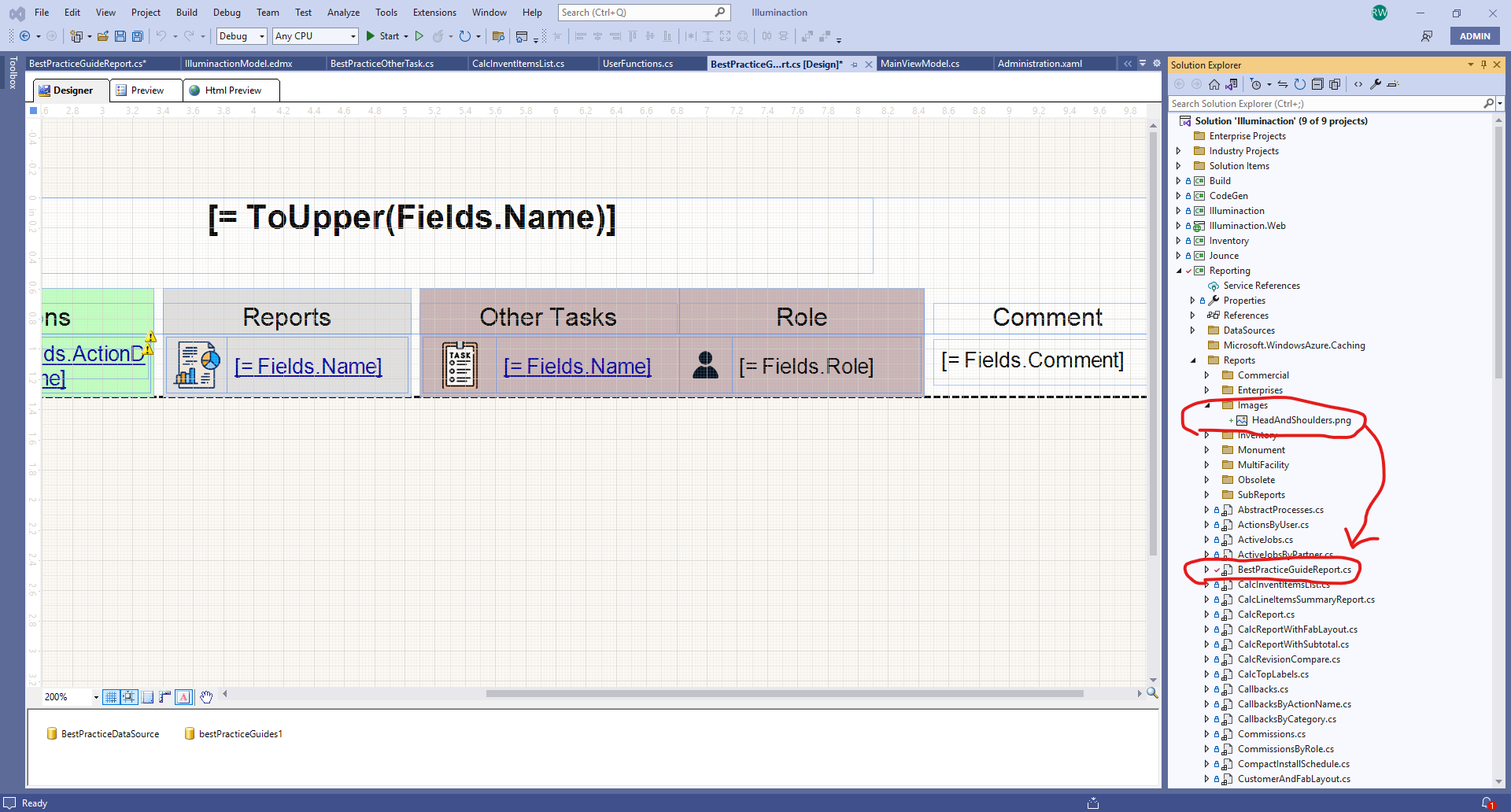
What is the syntax I should use in a UserFunction to link the value of the PictureBox to the image located in the directory indicated below.

Ivet
Telerik team
answered
on
05 May 2025
1 answer
149 views
hi,
I would like to ask, why does Telerik Report request the /info api multiple times? Can this info interface be requested in other ways to reduce the number of times?
thanks.
Petar
Telerik team
answered
on
02 May 2025
1 answer
122 views
Hi everyone,
I'm having an issue with Telerik Report Viewer (HTML5 version) and Telerik Report Designer. I'm trying to change the database connection dynamically, and although the new connection string is being passed correctly (I’ve confirmed this by printing the in-memory values), the report viewer keeps using the initial connection and doesn't apply the new one.
What's even stranger is that after clearing cookies, browser data, and restarting the site, it still sticks to the first connection it received. It feels like Telerik stores this connection internally (maybe through caching or some static variable) and won’t allow it to update.
Has anyone experienced something similar or knows how to force the viewer to use the new connection?
Any suggestions or guidance would be greatly appreciated.
Thanks in advance.
Ivet
Telerik team
answered
on
30 Apr 2025
1 answer
292 views
I'm using ReportProcessor in my .NET 8 project to render a trdp report. Rendering in PDF works fine but when I try to render as XLSX I'm getting the error in the subject line.
I've triple checked that I have installed all dependencies per this article OpenXML and XPS options not visible. Unavailable rendering format - Telerik Reporting
Any suggestions?
        [Authorize]
        public IActionResult Export(long id, string reportName="Statement.trdp", string format="PDF")
        {
            var baseUrl = $"{Request.Scheme}://{Request.Host}{Request.PathBase}";

            var reportProcessor = new ReportProcessor();

            var uriReportSource = new UriReportSource
            {
                Uri = Path.Combine(_environment.ContentRootPath, "Reports", reportName)
            };

            uriReportSource.Parameters.Add(new Telerik.Reporting.Parameter("stmtId", id));


            uriReportSource.Parameters.Add(new Telerik.Reporting.Parameter("url", baseUrl));

            var result = reportProcessor.RenderReport(format, uriReportSource, null);

            return File(result.DocumentBytes, result.MimeType);
        }



