or
3 answers
300 views
Hi,
In Gantt Chart Day mode, when I scroll timeline part in Day mode, I can't see the Date, hours are only visible (as you can see in attached screenshot). Can I fix this issue any way?? Fix date after scrolling or something else??
Thanks in advance.

Neli
Telerik team

answered
on
22 Nov 2021
0 answers
143 views
Hello,
In my solution, I use AngularJs and package @progress/kendo-ui@2018.2.704.
Today I updated the package to latest version and I encountered weird issue regards to kendo dropdownlist.
In place where we use brackets and property name like {{property}}, kendo instead of displaying property value shows {&zeroWidthSpace;{property}&zeroWidthSpace;}.
Does anyone know what was changed and produced that issue and how I can fix that?

Jacob
Top achievements
 Rank 1
Rank 1
updated question
on
22 Nov 2021
7 answers
525 views
Hi
I'm having an issue with persist states and custom command buttons
Please see this dojo code here
http://dojo.telerik.com/oraTI
To replicate the issue
- If you run the code and press any of the Edit buttons you get a 'clicked' alert message.
- Then press 'Save State' to save the grid state to local storage - you should see a 'saved' alert message
- Then run the code again, which will load the localStorage after the grid has loaded - you should see a 'loaded' alert message
- Now if you click the 'Edit' button nothing happens
The state is laoding fine and adjusting the grid display correctly as per the saved sate, but the custom buttons don't work.
Any suggestions on how to get this working?
Thanks
Dave
1 answer
156 views
Something like Open Edge Appbuilder for screen design etc ideally with good match for the Kendo "WIdgets" for designing Forms
Neli
Telerik team
answered
on
19 Nov 2021
1 answer
1.1K+ views
I have a kendo upload on one of my forms. This upload button has the following async, multiselect, autoUpload = false, batch = true. The problem I am running into is if the user selects 5 files, but meant to only select 4, they click the remove icon for that row.
I am having issues removing that file from the file portion of the upload control. If I select 5 and then remove them all, the upload is still acting as if all 5 are there. kendoUpload.getFiles() is always showing me every file they selected.
Just be clear, I am trying to remove a file from memory before the user fully uploads them. The process is that they select the files, the files populate a grid, and then once the user is ready they click an 'upload' button that will fire off the server call. Prior to them clicking upload everything is client side.
Neli
Telerik team
answered
on
19 Nov 2021
1 answer
156 views
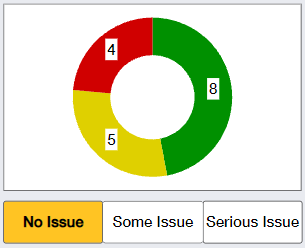
I have an application that displays a donut graph with 3 sections. My goal is to highlight the proper section of the graph when the correlated button is clicked. Attached is a relevant image. If the user clicks the 'No Issue' button below, I would like the green portion of the graph to be highlighted. I'd like similar functionality for the other buttons as well. Is this possible? I've perused the docs and have come across various highlighting information, but nothing related to "turning on the highlight" on button click.
Georgi Denchev
Telerik team
answered
on
19 Nov 2021
2 answers
560 views
Go here: https://demos.telerik.com/kendo-ui/multiselect/index
and select Anne King, Andrew Fuller and Nancy Leverling.
MultiSelect now uses two lines and the second line is blank, even after the widget loses focus.
How can I get rid of this extra blank line?
My page has lots of stuff on it, and the extra line causes most of the page to shift down.
Umutcan
Top achievements
Rank 1
 Iron
Iron
Rank 1
Iron
updated answer
on
19 Nov 2021
1 answer
1.4K+ views
I'm using the material-table module here [1] with remote data from a web service. I've included the search parameter, but it's not working and there are no error messages in the console.
Here is the code:
import React from 'react';
import ReactDOM from "react-dom";
import MaterialTable from 'material-table';


import { forwardRef } from 'react';

import AddBox from '@material-ui/icons/AddBox';
import ArrowUpward from '@material-ui/icons/ArrowUpward';
import Check from '@material-ui/icons/Check';
import ChevronLeft from '@material-ui/icons/ChevronLeft';
import ChevronRight from '@material-ui/icons/ChevronRight';
import Clear from '@material-ui/icons/Clear';
import DeleteOutline from '@material-ui/icons/DeleteOutline';
import Edit from '@material-ui/icons/Edit';
import FilterList from '@material-ui/icons/FilterList';
import FirstPage from '@material-ui/icons/FirstPage';
import LastPage from '@material-ui/icons/LastPage';
import Remove from '@material-ui/icons/Remove';
import SaveAlt from '@material-ui/icons/SaveAlt';
import Search from '@material-ui/icons/Search';
import ViewColumn from '@material-ui/icons/ViewColumn';

const tableIcons = {
    Add: forwardRef((props, ref) => <AddBox {...props} ref={ref} />),
    Check: forwardRef((props, ref) => <Check {...props} ref={ref} />),
    Clear: forwardRef((props, ref) => <Clear {...props} ref={ref} />),
    Delete: forwardRef((props, ref) => <DeleteOutline {...props} ref={ref} />),
    DetailPanel: forwardRef((props, ref) => <ChevronRight {...props} ref={ref} />),
    Edit: forwardRef((props, ref) => <Edit {...props} ref={ref} />),
    Export: forwardRef((props, ref) => <SaveAlt {...props} ref={ref} />),
    Filter: forwardRef((props, ref) => <FilterList {...props} ref={ref} />),
    FirstPage: forwardRef((props, ref) => <FirstPage {...props} ref={ref} />),
    LastPage: forwardRef((props, ref) => <LastPage {...props} ref={ref} />),
    NextPage: forwardRef((props, ref) => <ChevronRight {...props} ref={ref} />),
    PreviousPage: forwardRef((props, ref) => <ChevronLeft {...props} ref={ref} />),
    ResetSearch: forwardRef((props, ref) => <Clear {...props} ref={ref} />),
    Search: forwardRef((props, ref) => <Search {...props} ref={ref} />),
    SortArrow: forwardRef((props, ref) => <ArrowUpward {...props} ref={ref} />),
    ThirdStateCheck: forwardRef((props, ref) => <Remove {...props} ref={ref} />),
    ViewColumn: forwardRef((props, ref) => <ViewColumn {...props} ref={ref} />)
};

const GET_PUBLICATIONS_URL = 'http://193.62.54.159/backend/v1/publications?';


class App extends React.Component {

    render() {
        return (
            <MaterialTable
                icons={tableIcons}
                title="Remote Data Preview"
                columns={[
                    { title: 'Publication ID', field: 'publicationId' },
                    { title: 'PMID', field: 'pmid' },
                    { title: 'First author', field: 'firstAuthor' },
                    { title: 'Publication', field: 'title' },
                    { title: 'Journal', field: 'journal' },
                    { title: 'Status', field: 'status' },
                ]}
                data={query =>
                    new Promise((resolve, reject) => {
                        // let url = 'https://reqres.in/api/users?'
                        let url = GET_PUBLICATIONS_URL
                        url += 'size=' + query.pageSize
                        url += '&page=' + (query.page)
                        fetch(url)
                            .then(response => response.json())
                            .then(result => {
                                resolve({
                                    data: result._embedded.publications,
                                    page: result.page.number,
                                    totalCount: result.page.totalElements,
                                })
                            })
                    })
                }
                options={{
                    search: true
                }}
            />
        )
    }
}

// export default DemoMUITable_RemoteData;
ReactDOM.render(<App />, document.getElementById("root"));
Here is an example of the output from the web service call used above cinema hd:
{
    _embedded: {
        publications: [{
                publicationId: "5d2dbec2483e4bcddc82c61c",
                pmid: "jqfWof0a6N",
                title: "hDoClFK1xW",
                journal: "bsmw70kDBz",
                firstAuthor: "NUed57buOd",
                publicationDate: "2019-07-16T12:07:01.937Z",
                correspondingAuthor: {
                    authorName: "VRbSDd72mC",
                    email: "YgH4UoELBp"
                },
                status: "ELIGIBLE",
                _links: {
                    self: {
                        href: "http://193.62.54.159/backend/v1/publications/5d2dbec2483e4bcddc82c61c?pmid=false"
                    }
                }
            },
            {
                publicationId: "5d2dbeff483e4bcddc82c61d",
                pmid: "WlQsCFYg3b",
                title: "bsthfcP7zY",
                journal: "sUULVFkYJQ",
                firstAuthor: "NUed57buOd",
                publicationDate: "2019-07-16T12:07:01.937Z",
                correspondingAuthor: {
                    authorName: "UOTBdYbsRh",
                    email: "ZUmHQ7evjl"
                },
                status: "ELIGIBLE",
                _links: {
                    self: {
                        href: "http://193.62.54.159/backend/v1/publications/5d2dbeff483e4bcddc82c61d?pmid=false"
                    }
                }
            },
            {
                publicationId: "5d2dbf05483e4bcddc82c61e",
                pmid: "V1KphgdwaG",
                title: "KoXVQJjoGp",
                journal: "1bO9QNNDCM",
                firstAuthor: "NUed57buOd",
                publicationDate: "2019-07-16T12:07:01.937Z",
                correspondingAuthor: {
                    authorName: "KsfpbpEAGc",
                    email: "p69YIXvYEq"
                },
                status: "ELIGIBLE",
                _links: {
                    self: {
                        href: "http://193.62.54.159/backend/v1/publications/5d2dbf05483e4bcddc82c61e?pmid=false"
                    }
                }
            },
            {
                publicationId: "5d2dbf0a483e4bcddc82c61f",
                pmid: "JEmARsAgWM",
                title: "CiOTlRIeD4",
                journal: "l1ofJObwtJ",
                firstAuthor: "NUed57buOd",
                publicationDate: "2019-07-16T12:07:01.937Z",
                correspondingAuthor: {
                    authorName: "rGdQGN5oPh",
                    email: "6PI3NfrnmV"
                },
                status: "ELIGIBLE",
                _links: {
                    self: {
                        href: "http://193.62.54.159/backend/v1/publications/5d2dbf0a483e4bcddc82c61f?pmid=false"
                    }
                }
            },
            {
                publicationId: "5d346e129bb39d8c6e33faa4",
                pmid: "cNUmFPonBy",
                title: "0LwQYP0fUK",
                journal: "C3gQOWPZ2C",
                firstAuthor: "q1LwUyYpgO",
                publicationDate: "2019-07-16T12:07:01.937Z",
                correspondingAuthor: {
                    authorName: "oJdt6ae7sp",
                    email: "jhdOF23b9m"
                },
                status: "ELIGIBLE",
                _links: {
                    self: {
                        href: "http://193.62.54.159/backend/v1/publications/5d346e129bb39d8c6e33faa4?pmid=false"
                    }
                }
            }
        ]
    },
    _links: {
        first: {
            href: "http://193.62.54.159/backend/v1/publications?page=0&size=5"
        },
        self: {
            href: "http://193.62.54.159/backend/v1/publications"
        },
        next: {
            href: "http://193.62.54.159/backend/v1/publications?page=1&size=5"
        },
        last: {
            href: "http://193.62.54.159/backend/v1/publications?page=5&size=5"
        }
    },
    page: {
        size: 5,
        totalElements: 26,
        totalPages: 6,
        number: 0
    }
}
Here are my app's dependencies:
"dependencies": {
    "@material-ui/icons": "^4.2.1",
    "material-table": "^1.40.1",
    "react": "^16.8.6",
    "react-dom": "^16.8.6",
    "react-scripts": "3.0.1"
  },
Kiril
Telerik team
answered
on
19 Nov 2021
1 answer
147 views
Hi,
If I use the ViewHTML feature and add the following:
<div style="background-color:rgb(200, 100, 50);">
After closing the popup and clicking on the ViewHTML button again my code has changed to:
<div style="background-color:#c86432;">
and then the final output from the editor on saving becomes:
<div style="background-color:rgba(200, 100, 50,1);">
Is there any way to tell it not to return rgba type code as the output from the editor is being used for emails and rgba is not working properly in various email clients.
Many thanks,
Steve

Ianko
Telerik team
answered
on
19 Nov 2021
2 answers
2.3K+ views
is there any way ,to get the Change event of kendo switch with jquery?i dont want to use kendo helper
<input type="checkbox" id="tst" aria-label="Notifications Switch" />
the following does not work:
$("#tst").change(function(){ alert("works");});
i

John
Top achievements
 Rank 2
 Iron
Iron
 Iron
Iron
 Veteran
Rank 2
Iron
Iron
Veteran
answered
on
18 Nov 2021






