or
1 answer
264 views
I am wanting to re-open a previously opened kendo dialog. The dialog has scrolling content so when it re-opens I want to be at the top of the dialog again.
How can I do this? Or will I need to destroy and re-create?

Martin
Telerik team

answered
on
06 Feb 2024
1 answer
154 views
This is a follow-up to my original question:
I have a Kendo Date Picker for AngualrJS and I would like to color the individual day cells for a given day within the month.
https://www.telerik.com/forums/angualrjs-kendo-date-picker-how-to-color-day-cells
The follow-up question is:
I see that you can tie a colour background to a particular day value within a month, but how would you do that to a specific date (i.e. Make only the 10th of January red, but not the 10th of February, for example)?

Neli
Telerik team
answered
on
06 Feb 2024
0 answers
129 views
Hello , i have an issue with converting the milliseconds to human readable date,
I cannot find the solution for vue, but I have found multiple solutions for jquery.
What am i doing wrong ?
Chart.m-4.p-5( @seriesclick="onSeriesClick" :style="{ height: getChartHeight() }" )
ChartTooltip(:render="'tooltipRender'" background="#fff" color="#000")
template(v-slot:tooltipRender="{ props }")
.d-flex.align-items-center.flex-column.tooltip-content
h6.font-weight-bold.text-center.tooltip-category-title {{ props.point.category }}
.d-flex.align-items-center
span {{ $t('home.rangeBarChart.date.start') }} :
span.font-weight-bold.ml-1 {{ labelContentFrom(props.point)}}
.d-flex.align-items-center
span {{ $t('home.rangeBarChart.date.end') }} :
span.font-weight-bold.ml-1 {{ labelContentTo(props.point)}}
ChartTitle( v-if="chartTitle && chartTitle !== ''" :text="$t('home.rangeBarChart.'+ chartTitle + '.title' )" align='left' color='#475467' :font="'600 16px Inter'")
ChartSeries
ChartSeriesItem(:type="'rangeBar'", :data-items="myDataItemsComputed" :category-field="'phase'" :font="'600 14px Inter '" :color="barItemColor" :baseUnit="'months'" )
ChartSeriesLabels
ChartSeriesLabelsFrom(:content="labelContentFrom")
ChartSeriesLabelsTo(:content="labelContentTo")
ChartValueAxis
ChartValueAxisItem(
:major-grid-lines='{visible: false }'
:valueAxis="valueAxisComputed"
:fromField="'min'"
:toField="'max'"
:font="'600 14px Inter '"
)
I noticed in the jquery example, the have this : labels: {
template: "#= kendo.toString(new Date(value), 'HH:mm') #"
}
i have tried adding this code :
labels: {
template: `<div>{{ new Date(#= value #).toLocaleTimeString('en-US', { hour: 'numeric', minute: 'numeric' }) }}</div>`
}
it does not work, any suggestions would be greatly appreciated. Thank you
1 answer
327 views
My header widths do not match with my data content in the Kendo Grid. I have a fixed width for the container, and after hiding 4 out of 7 columns, the header displays with the intended width. However, the alignment of the data in those columns does not match. I have locked the first column, so I have two tables, one for the locked column and one for the unlocked. Whenever I group or filter records, the locked column width does not match with unlocked columns. Also, the same issue exists for the height.
Martin
Telerik team
answered
on
05 Feb 2024
1 answer
1.6K+ views
Morning,
I've been using the Kendo Grid for years and absolutely love it for what I can do with it, but every so often I get asked to stretch the functionality of what it can do, I haven't found much documentation on this, but i'll try my best to give an example of what I've done, and to see if there is a better way of doing it..
I have a field in my Grid that is a string, with multiple "Tags" explicitly given in the dataSource in filterable.
    {
        "columnMenu": {
            "componentType": "modern"
        },
        "stickable": true,
        "field": "conditions",
        "filterable": {
            "enabled": true,
            "multi": true,
            "search": true,
            "dataSource": [
                {
                    "conditions": "TEST123"
                },
                {
                    "conditions": "TEST"
                },
                {
                    "conditions": "ABC"
                },
                {
                    "conditions": "DEF"
                }
            ]
        },
        "groupable": true,
        "aggregates": "count",
        "groupHeaderTemplate": "Conditions: #= value # (Count: #= count#)",
        "sortable": true,
        "title": "Conditions",
The data in the field is a string of comma separated tags, i.e.
TEST, ABC, DEF
I've updated the filter method on the Grid so that I can select multiple options in the filter menu, and it does a "contains" look up to match multiple hits.
filter: function(e){
	this.columns.forEach(function(f){
		if(e.field === f.field){
			if(f.filterable.hasOwnProperty('dataSource')){
				e.filter.filters.forEach(function(f){
					f.operator = "contains";
					e.filter.logic = "and";
				})
			}
		}
	})
},
I have two issues here.
1. I'm using contains, so if the tags are similar (TEST, TEST123), selecting TEST will show both TEST and TEST123 - which isn't ideal.
2. If I select an option from the filter menu, it doesn't remain checked if you were to go back into the filter menu again.
I've asked this question before and had some great help to get it to this point using: https://docs.telerik.com/kendo-ui/knowledge-base/grid-how-to-change-multi-checkbox-filter-to-contains but I'm wondering if there is a better way of achieving the functionality I'm looking for here with the grid. I added square brackets to the tags to distinguish them ([TEST], [TEST123]) , but my users didn't like this change.
Is there a way to do this without using contains?
I'd also like to be able to see the selected option in the filter menu - I can find the checkbox through jQuery, but I cannot toggle it's state..
e.filter.filters.forEach(function(f){
	var checkbox = $(".k-filter-menu").find("input[value='"+f.value+"']");

	console.log(checkbox);
        checkbox.prop("checked", true).trigger("change");
	checkbox.attr("checked", true).trigger("change");

	f.operator = "contains";
	e.filter.logic = "and";
})
Thanks for your help,
Matt
Martin
Telerik team
answered
on
05 Feb 2024
3 answers
1.0K+ views
There is an issue with the Grid
- when all columns have a width defined, and
- when the total of all column widths is less than the total width of the grid
- will initially have the extra width distributed to them (good - not an issue)
- but when an attempt to resize a column is made, 1) every column other than the one being resized will resize to the width defined in the configuration AND 2) the column being resized will resize to take up the space left behind by the other columns becoming smaller.
Configuration for it to happen appears to be
- Resizing enabled
- Scrolling enabled
- Each column has a width defined, adding to a total width smaller than the width of the Grid's DOM element
The scenario is
- Open the grid
- Resize a column
Impact
Columns lose their distributed widths and the column being resized jumps away from the cursor.
An example is here:
Try resize the first column, you will observe the resized column growing in width and other columns losing their distributed widths. This leaves the cursor indicating an incorrect resize position.
Is there any chance this could be fixed / a work around be advised? Having the distributed column widths is this circumstance is good, but the behavior on resize is undesirable.
Jens Anders
Top achievements
 Rank 1
 Iron
Iron
Rank 1
Iron
updated answer
on
01 Feb 2024
0 answers
142 views
Having problems when using the showColumn() hideColumn() function for grids:
Why does hideColumn() function on grid scrunch up the width when enabling it?
Then when I check the checkbox to hide the first row:
It seems to scrunch the other rows to the LEFT? You demo in the DOJO doesn't do this... I was wondering if this is because I am using a hierarchical grid?
       function toggleEditing(e){

          var hideColumn = $(e.target).prop("checked");
          var grid = $("#grid").data("kendoGrid");
          if(hideColumn){
            grid.hideColumn(0);
          }
          else {
            grid.showColumn(0);
          }
        }
See my Kendo UI Dojo code for behavior:
https://dojo.telerik.com/UmAgoDEs/2
Thanks!
George





1 answer
161 views
Hi
I'm using a kendoListView and a kendoPager like this :
$("#pagerLstArticle").kendoPager({
dataSource: articles,
pageSizes: [12, 24, 36, 48],
messages: {
display: "Articles {0} à {1} sur {2}"
},
});
I would like to adap the kendoPager pageSizes depending on differents panels displayed or not on the screen
I can manage the kendoListView page size easily but for the kendoPager I don't know
How can I do this ?
Thank you
Isabelle
1 answer
144 views
Hi!! I'm having an issue with Kendo UI JQuery.
I'm using the grid, and I have my data source defined with schema inside. All the schema fields have the property editable in false.
At some point, I need to change some of them to editable true, but I'm not able to do it so far.
I tried getting the data from the grid and updating the Datasource object manually and after that read the Datasource and refresh the grid, but is not working.
Also, try setting a completely new Datasource, and after that read the Datasource and refresh the grid, but is not working.
Also, try destroying the grid a generating a new one, but the grid never refreshes and the editable continues in false.
Neli
Telerik team
answered
on
25 Jan 2024
1 answer
380 views
I've been trying to update from an older version 2019.3.1114 to a newer version, but from 2020.1.114, which is the next on the list that's not internal https://www.npmjs.com/package/@progress/kendo-ui?activeTab=versions, an onwards, I get the same error
kendoUpload is not a function.
RIght now I'm just trying to upgrade to the newest version but regardless I still get the same error. It sets some other kendo stuff on
$('files') as you can see from the screenshot, (kendoAddClass, kendoAnimate etc.) but not kendoUpload
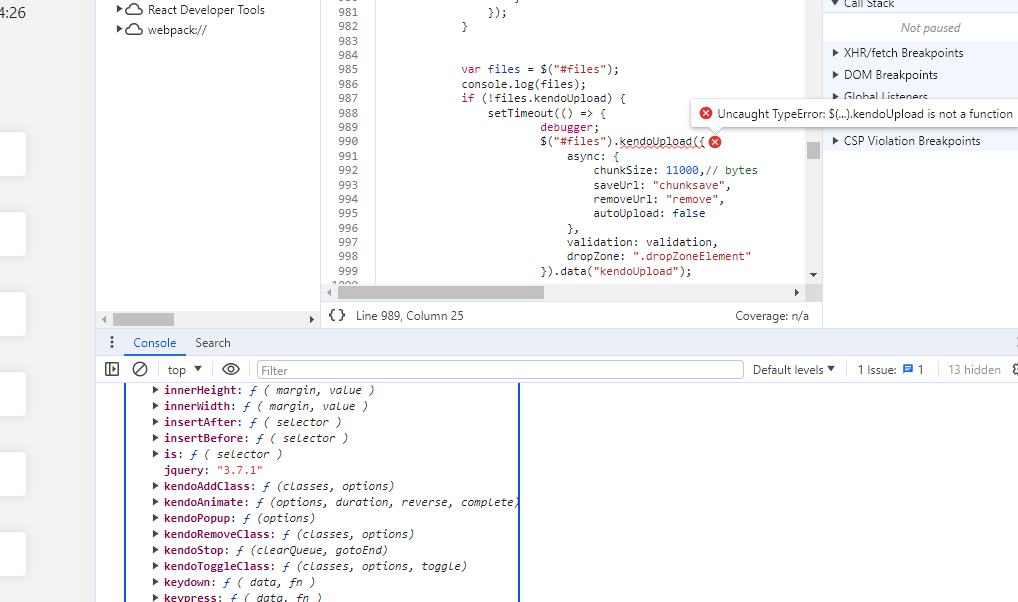
On
https://docs.telerik.com/kendo-ui/controls/upload/get-started
It says I should make the "files" input which I have
and it says I should call kendoUpload on files which I'm trying to but it doesn't exist
I thought it was a timing issue so I put it into a setTimeout, but it's still not there
Looking at
https://docs.telerik.com/kendo-ui/backwards-compatibility/2020-backward-compatibility
There's nothing that suggests that kendoUpload should break or act different from 2019 to 2020 versions as far as I can see.
Is there something else I'm missing? Do I need to activate it somehow? I'm loading both kendo.all.js and kendo.upload.js, I tried with just all.js first.
kendoUpload is not a function.
RIght now I'm just trying to upgrade to the newest version but regardless I still get the same error. It sets some other kendo stuff on
$('files') as you can see from the screenshot, (kendoAddClass, kendoAnimate etc.) but not kendoUpload
On
https://docs.telerik.com/kendo-ui/controls/upload/get-started
It says I should make the "files" input which I have
and it says I should call kendoUpload on files which I'm trying to but it doesn't exist
I thought it was a timing issue so I put it into a setTimeout, but it's still not there
Looking at
https://docs.telerik.com/kendo-ui/backwards-compatibility/2020-backward-compatibility
There's nothing that suggests that kendoUpload should break or act different from 2019 to 2020 versions as far as I can see.
Is there something else I'm missing? Do I need to activate it somehow? I'm loading both kendo.all.js and kendo.upload.js, I tried with just all.js first.










