or
2 answers
208 views
Hello,
why my kendo can not upload image and video.the source like this:
$(function () {
function openVideoUploader(requestId, callback) {
var origHtml = $("#uploadWin").html();
var updateResult = false;
$("#footage").kendoUpload({
multiple:false,
async:{
saveUrl:"/api/" + kupBucket + "/uploadvideofootage",
autoUpload:false
},
error:function (e) {
//popupAlert(e.XMLHttpRequest.response);
alert(e.XMLHttpRequest.responseText);
},
success:function (e) {
// $("#uploadForm").find(".k-progress").css("visibility", "hidden");
$("#uploadForm").find(".k-filename").css("height", "20px");
},
upload:function (e) {
e.data = { requestId: requestId };
},
});
var kendoWindow = $("#uploadWin").kendoWindow({
actions: ["Close"],
form: true,
modal:true,
visible: false,
resizable: false,
width:350,
}).data("kendoWindow").center().open();
$("#uploadWin").parent().find(".k-window-action").css("visibility", "hidden");
function onClosed() {
callback(updateResult);
$("#uploadWin").html(origHtml);
updateResult = false;
}
$("#cancelUpWin").click(function (e) {
updateResult = false;
$("#uploadWin").data("kendoWindow").close();
});
}
var uploadFootage = function (e) {
e.preventDefault();
var dataItem = this.dataItem($(e.currentTarget).closest("tr"));
openVideoUploader(dataItem.id, function (choice) {
});
}
var grid = $("#reqGrid").kendoGrid({
dataSource:{
transport:{
read:function (options) {
getUploadRequests("", "Open", onSuccessGetUploadRequests, null);
function onSuccessGetUploadRequests(responseData) {
if (responseData.result == "ok" && responseData["upload-requests"] != null)
options.success(responseData["upload-requests"]);
else {
throwServerError(responseData.reason);
options.success([]);
}
}
}
},
pageSize:15
},
pageable:{
input:true,
numeric:false,
pageSizes:false
},
sortable:true,
filterable:false,
selectable:true,
resizable:true,
columns:[
{ field:"submittedOn", title:"&{'submited-on'}" },
{ field:"device", title:"&{'device-name'}", template:'#= device.name #' },
{ field:"timeFrom", title:"&{'from'}", template:'#= kendo.toString(kendo.parseDate(timeFrom, "ddMMyyyyHHmmss"), "dd/MM/yyyy hh:mm:ss")#' },
{ field:"timeTo", title:"&{'to'}", template:'#= kendo.toString(kendo.parseDate(timeTo, "ddMMyyyyHHmmss"), "dd/MM/yyyy hh:mm:ss")#' },
{ field:"channelId", title:"&{'channel'}" },
{ field:"status", title:"&{'status'}" },
{ command:[
{ text:"&{'upload-video'}", click:uploadFootage}
], title:"", width:"200px" }
]
}).data("kendoGrid");
}
);
why my kendo can not upload image and video.the source like this:
$(function () {
function openVideoUploader(requestId, callback) {
var origHtml = $("#uploadWin").html();
var updateResult = false;
$("#footage").kendoUpload({
multiple:false,
async:{
saveUrl:"/api/" + kupBucket + "/uploadvideofootage",
autoUpload:false
},
error:function (e) {
//popupAlert(e.XMLHttpRequest.response);
alert(e.XMLHttpRequest.responseText);
},
success:function (e) {
// $("#uploadForm").find(".k-progress").css("visibility", "hidden");
$("#uploadForm").find(".k-filename").css("height", "20px");
},
upload:function (e) {
e.data = { requestId: requestId };
},
});
var kendoWindow = $("#uploadWin").kendoWindow({
actions: ["Close"],
form: true,
modal:true,
visible: false,
resizable: false,
width:350,
}).data("kendoWindow").center().open();
$("#uploadWin").parent().find(".k-window-action").css("visibility", "hidden");
function onClosed() {
callback(updateResult);
$("#uploadWin").html(origHtml);
updateResult = false;
}
$("#cancelUpWin").click(function (e) {
updateResult = false;
$("#uploadWin").data("kendoWindow").close();
});
}
var uploadFootage = function (e) {
e.preventDefault();
var dataItem = this.dataItem($(e.currentTarget).closest("tr"));
openVideoUploader(dataItem.id, function (choice) {
});
}
var grid = $("#reqGrid").kendoGrid({
dataSource:{
transport:{
read:function (options) {
getUploadRequests("", "Open", onSuccessGetUploadRequests, null);
function onSuccessGetUploadRequests(responseData) {
if (responseData.result == "ok" && responseData["upload-requests"] != null)
options.success(responseData["upload-requests"]);
else {
throwServerError(responseData.reason);
options.success([]);
}
}
}
},
pageSize:15
},
pageable:{
input:true,
numeric:false,
pageSizes:false
},
sortable:true,
filterable:false,
selectable:true,
resizable:true,
columns:[
{ field:"submittedOn", title:"&{'submited-on'}" },
{ field:"device", title:"&{'device-name'}", template:'#= device.name #' },
{ field:"timeFrom", title:"&{'from'}", template:'#= kendo.toString(kendo.parseDate(timeFrom, "ddMMyyyyHHmmss"), "dd/MM/yyyy hh:mm:ss")#' },
{ field:"timeTo", title:"&{'to'}", template:'#= kendo.toString(kendo.parseDate(timeTo, "ddMMyyyyHHmmss"), "dd/MM/yyyy hh:mm:ss")#' },
{ field:"channelId", title:"&{'channel'}" },
{ field:"status", title:"&{'status'}" },
{ command:[
{ text:"&{'upload-video'}", click:uploadFootage}
], title:"", width:"200px" }
]
}).data("kendoGrid");
}
);

Daniel
Telerik team

answered
on
17 Jan 2013
6 answers
1.3K+ views
I am trying to link a JQuery AJAX command to a MVC controller and having problems getting the files to the controller from the AJAX command. What am I doing wrong?
HTML
<form id="createTireGroupFromExcelForm" class="form-horizontal">
...boilerplate...
<input name="files[]" id="files" type="file" data-role="upload" multiple="multiple" autocomplete="off">
...boilerplate...
</form>
Javascript
$("#submitTireGroupExcel_btn").click(function () {
$.validator.unobtrusive.parse($('#createTireGroupFromExcelForm'));
if ($('#createTireGroupFromExcelForm').valid()) {
var form = $('#createTireGroupFromExcelForm');
$.ajax({
type: 'post',
enctype:"multipart/form-data",
url: "@Url.Action("CreateTireGroupFromExcel", "Events")",
data: form.serialize(),
success: function (result) {
if (!result.success) {
alert(result.error);
} else {
$('#createTireGroup').modal('hide');
$.pjax({
url: "@Url.Action("TireBuilder", "Events")" + "?tireSetGroupID=" + result.tireSetGroupID,
container: '#update_panel'
});
}
}
});
}
});
MVC Controller
public ActionResult CreateTireGroupFromExcel(Guid eventID, Guid teamID, string name, IEnumerable<HttpPostedFileBase> files)
{
throw new NotImplementedException();
}
HTML
<form id="createTireGroupFromExcelForm" class="form-horizontal">
...boilerplate...
<input name="files[]" id="files" type="file" data-role="upload" multiple="multiple" autocomplete="off">
...boilerplate...
</form>
Javascript
$("#submitTireGroupExcel_btn").click(function () {
$.validator.unobtrusive.parse($('#createTireGroupFromExcelForm'));
if ($('#createTireGroupFromExcelForm').valid()) {
var form = $('#createTireGroupFromExcelForm');
$.ajax({
type: 'post',
enctype:"multipart/form-data",
url: "@Url.Action("CreateTireGroupFromExcel", "Events")",
data: form.serialize(),
success: function (result) {
if (!result.success) {
alert(result.error);
} else {
$('#createTireGroup').modal('hide');
$.pjax({
url: "@Url.Action("TireBuilder", "Events")" + "?tireSetGroupID=" + result.tireSetGroupID,
container: '#update_panel'
});
}
}
});
}
});
MVC Controller
public ActionResult CreateTireGroupFromExcel(Guid eventID, Guid teamID, string name, IEnumerable<HttpPostedFileBase> files)
{
throw new NotImplementedException();
}


2 answers
315 views
The editor for the RoleIds property shows the correct selections when the row enters the "edit" mode. However, if I change the selected value in this control and press the update button, no call to my update url is made, as if nothing changed.
What am I missing?
Here's the code (see attached image for behavior):
<div id="myGrid"></div>
<script type="text/javascript">
$(function () {
var dataSource = new kendo.data.DataSource({
transport: {
read: { url: "/Test/TestRead"},
update: {
url: "/Test/TestUpdate",
type: "POST"
}
},
schema: {
model: {
id: "Id"
}
}
});
$('#myGrid').kendoGrid({
columns:
[
{command:
[{
name:"edit",
buttonType:"ImageAndText",
text:"Edit"
}]
},
{
field: "Name"
},
{
title:"Roles",
template:"#: RoleCSV #",
field: "RoleIds",
editor: "<select id='RoleIds' name='RoleIds' data-val='true' data-bind='value: RoleIds' multiple style='width:100%'><option value='1'>Admin</option><option value='2'>Guest</option></select>"
}
],
dataSource: dataSource,
model:{
},
editable: { mode: "inline", update: true}
});
});
</script>
Returned data from the read url looks like this:
[{"Id":1,"Name":"Mathieu","RoleCSV":"Admin","RoleIds":[1]},{"Id":2,"Name":"Martin","RoleCSV":"Admin, Guest","RoleIds":[1,2]},{"Id":3,"Name":"Patrick","RoleCSV":"Guest","RoleIds":[2]}]
What am I missing?
Here's the code (see attached image for behavior):
<div id="myGrid"></div>
<script type="text/javascript">
$(function () {
var dataSource = new kendo.data.DataSource({
transport: {
read: { url: "/Test/TestRead"},
update: {
url: "/Test/TestUpdate",
type: "POST"
}
},
schema: {
model: {
id: "Id"
}
}
});
$('#myGrid').kendoGrid({
columns:
[
{command:
[{
name:"edit",
buttonType:"ImageAndText",
text:"Edit"
}]
},
{
field: "Name"
},
{
title:"Roles",
template:"#: RoleCSV #",
field: "RoleIds",
editor: "<select id='RoleIds' name='RoleIds' data-val='true' data-bind='value: RoleIds' multiple style='width:100%'><option value='1'>Admin</option><option value='2'>Guest</option></select>"
}
],
dataSource: dataSource,
model:{
},
editable: { mode: "inline", update: true}
});
});
</script>
Returned data from the read url looks like this:
[{"Id":1,"Name":"Mathieu","RoleCSV":"Admin","RoleIds":[1]},{"Id":2,"Name":"Martin","RoleCSV":"Admin, Guest","RoleIds":[1,2]},{"Id":3,"Name":"Patrick","RoleCSV":"Guest","RoleIds":[2]}]

3 answers
315 views
I have a inline editable grid but when I want to edit a column with a combobox custom editor... just cant edit the cell by writing the value manually :( then i have to click over the combo arrow button to open the combo and then write the value i wish
Thanks
Thanks
Iliana Dyankova
Telerik team
answered
on
17 Jan 2013
1 answer
222 views
If I use <input type=datetime-local> it shows up as a blank box, because the css styles set the color of the text, but none of the other styles apply to input[type=datetime-local].

Kamen Bundev
Telerik team
answered
on
17 Jan 2013
3 answers
110 views
Edit:
I would delete this post and start a new one if the forum let me. The actual source of my problem is this piece of sample code for your site.
It seems to indicate that there is some magical way to know that the button was clicked and which button was. It does not seem to work in practice as running this example e.button is always null for me, so I cant figure out how to distinguish between a row click and a click on the button.
Mike
I would delete this post and start a new one if the forum let me. The actual source of my problem is this piece of sample code for your site.
<ul data-role="listview" id="foo" data-click="listViewClick">
    <li><a data-role="button" data-name="bar">Bar button</a> | <a data-role="button" data-name="baz">Baz button</a></li>
</ul>

<script>
 function listViewClick(e) {
     console.log(e.button); // Kendo mobile Button instance
 }
</script>
It seems to indicate that there is some magical way to know that the button was clicked and which button was. It does not seem to work in practice as running this example e.button is always null for me, so I cant figure out how to distinguish between a row click and a click on the button.
Mike

Dimo
Telerik team
answered
on
17 Jan 2013
7 answers
836 views
I need to know which classes apply to the panelbar. The Theme builder is not clear about what CSS effect what controls
I have a menu that looks fine when I select a menu item Appointment Scheduling Summary
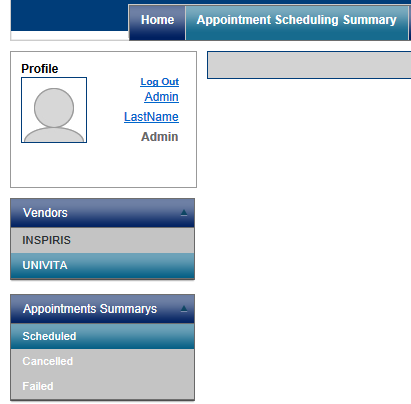
But when I select Cancelled the page refreshes and the menu does this:
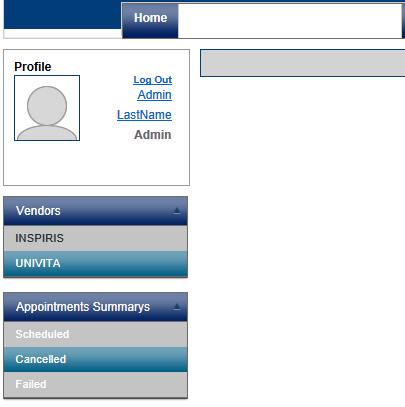
What CSS property sets the menu background to transparent or white? I cannot find it and the Theme Builder is confusing at best.
Where is the documentation for each control in the Kendo UI Suite for the web so I can quickly find what classes effect what controls?
I have a menu that looks fine when I select a menu item Appointment Scheduling Summary
But when I select Cancelled the page refreshes and the menu does this:
What CSS property sets the menu background to transparent or white? I cannot find it and the Theme Builder is confusing at best.
Where is the documentation for each control in the Kendo UI Suite for the web so I can quickly find what classes effect what controls?
Dimo
Telerik team
answered
on
17 Jan 2013
5 answers
365 views
I have a menu on my footer that is set to open above the footer when opened: $("#footer").kendoMenu({ direction: "top left" });
I can see the menu opening fine but the part of the menu that goes above the footer is not visible and all you can see is the main content of the page.
The footer is positioned absolutely. You would think this is just a simple z-index issue but I have tried adding the following styles to all parent elements of the menu (including the footer) to no avail:
I can see the menu opening fine but the part of the menu that goes above the footer is not visible and all you can see is the main content of the page.
The footer is positioned absolutely. You would think this is just a simple z-index issue but I have tried adding the following styles to all parent elements of the menu (including the footer) to no avail:
z-index: 2147483647;overflow: visible; zoom: 1; I should add that it works fine in IE 10 and Chrome.

1 answer
159 views
Hi,
Is there a roadmap for rename functionallity of folders and files in the image browser?
Regards,
Mattias
Is there a roadmap for rename functionallity of folders and files in the image browser?
Regards,
Mattias
Dimo
Telerik team
answered
on
17 Jan 2013
1 answer
163 views
Hi
After some hours of debugging I have now realised that it is not possible to reference controls from another view until the view has been been shown at least once. This presents a problem for me as I need to extract data from a view which may or may not have been initialised. What can I call to force the all the items in the view to be generated so that I can at least access the controls programmatically even if the user has never browsed to that view?
Many thanks
Michael
After some hours of debugging I have now realised that it is not possible to reference controls from another view until the view has been been shown at least once. This presents a problem for me as I need to extract data from a view which may or may not have been initialised. What can I call to force the all the items in the view to be generated so that I can at least access the controls programmatically even if the user has never browsed to that view?
Many thanks
Michael
Alexander Valchev
Telerik team
answered
on
17 Jan 2013











