


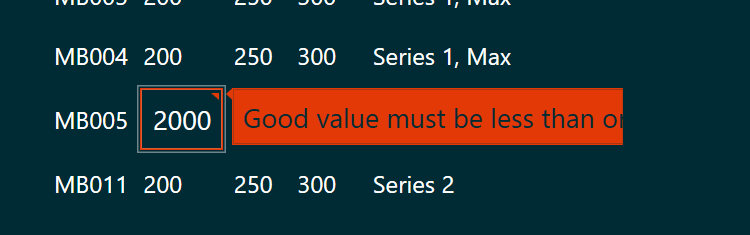
I have a RadGridView and I have implemented IDataErrorInfo on the view model. Unfortunately, when the user types in something invalid and an error appears, the message is cut off. I want to style it -- style... something -- so that the full error message will show. But I don't know what property to set or what to style
[Solved] How can I customize the error tips in RadGridView
0 Answers
82 Views
Hello Joe,
May I ask if it would be possible to share the theme that is used on your end, which is also displayed in the image that you provided? This way, I can review how the validation template is defined for the cell, as well as which one it is used for, and provide additional information on this question.
On a side note, may I ask if you could review the following article that showcases the validation error visuals in the Telerik UI for WPF and how to customize them?
WPF Validation Error Visual - Telerik UI for WPF
I will be awaiting your reply to assist you further on this case.
Thank you for the link to the article. I think this is probably all I need. I figured it would be some kind of attached properties like that. I will reply here again if I should run into any problems.
<telerik:RadMaskedNumericInput Validation.ErrorTemplate="{StaticResource CustomErrorTemplate}"What do I need to do here?
Hello Joe,
I further looked into this, and the validation error is displayed via a ToolTip element inside one of the visual states (that are represented by Border elements) inside the default ControlTemplate of the GridViewCell element. This ToolTip element has a custom ControlTemplate assigned to its Template property.
With this in mind, to customize it, extract the default ControlTemplate of the GridViewCell element with x:Key="GridViewCellTemplate", as well as the ControlTemplate for the ToolTip with x:Key="GridViewCell_ValidationToolTipTemplate". Then, modify the desired elements in the ToolTip's template to achieve the desired result. Finally, create a Style that targets the GridViewCell, and set the modified version of its ControlTemplate to the Template property.
The following code snippet showcases the default ControlTemplates for these two elements for the Office8Touch theme:
<ResourceDictionary>
	<ResourceDictionary.MergedDictionaries>
		<ResourceDictionary Source="/Telerik.Windows.Controls.GridView;component/Themes/GenericWindows8Touch.xaml" />
	</ResourceDictionary.MergedDictionaries>
	<ControlTemplate x:Key="GridViewCell_ValidationToolTipTemplate" TargetType="ToolTip">
		<Grid x:Name="Root" Opacity="0" Margin="2 0 0 0" Background="Transparent" RenderTransformOrigin="0 0">
			<VisualStateManager.VisualStateGroups>
				<VisualStateGroup x:Name="OpenStates">
					<VisualStateGroup.Transitions>
						<VisualTransition GeneratedDuration="0"/>
						<VisualTransition GeneratedDuration="0:0:0.2" To="Open">
							<Storyboard>
								<DoubleAnimationUsingKeyFrames Storyboard.TargetName="xform" Storyboard.TargetProperty="X">
									<SplineDoubleKeyFrame KeyTime="0:0:0.2" Value="0"/>
								</DoubleAnimationUsingKeyFrames>
								<DoubleAnimationUsingKeyFrames Storyboard.TargetName="Root" Storyboard.TargetProperty="Opacity">
									<SplineDoubleKeyFrame KeyTime="0:0:0.2" Value="1"/>
								</DoubleAnimationUsingKeyFrames>
							</Storyboard>
						</VisualTransition>
					</VisualStateGroup.Transitions>
					<VisualState x:Name="Closed">
						<Storyboard>
							<DoubleAnimationUsingKeyFrames Storyboard.TargetName="Root" Storyboard.TargetProperty="Opacity">
								<SplineDoubleKeyFrame KeyTime="0" Value="0"/>
							</DoubleAnimationUsingKeyFrames>
						</Storyboard>
					</VisualState>
					<VisualState x:Name="Open">
						<Storyboard>
							<DoubleAnimationUsingKeyFrames Storyboard.TargetName="xform" Storyboard.TargetProperty="X">
								<SplineDoubleKeyFrame KeyTime="0" Value="0"/>
							</DoubleAnimationUsingKeyFrames>
							<DoubleAnimationUsingKeyFrames Storyboard.TargetName="Root" Storyboard.TargetProperty="Opacity">
								<SplineDoubleKeyFrame KeyTime="0" Value="1"/>
							</DoubleAnimationUsingKeyFrames>
						</Storyboard>
					</VisualState>
				</VisualStateGroup>
			</VisualStateManager.VisualStateGroups>
			<Grid.RenderTransform>
				<TranslateTransform x:Name="xform" X="-25"/>
			</Grid.RenderTransform>
			<Grid.ColumnDefinitions>
				<ColumnDefinition Width="auto"/>
				<ColumnDefinition/>
			</Grid.ColumnDefinitions>
			<Border Padding="5 8 4 6" Grid.Column="1" MinHeight="40" Background="{telerik:Windows8TouchResource ResourceKey=ValidationBrush}">
				<ItemsControl ItemsSource="{TemplateBinding Content}">
					<ItemsControl.ItemTemplate>
						<DataTemplate>
							<TextBlock
                            MaxWidth="250"
                            FontSize="{telerik:Windows8TouchResource ResourceKey=FontSizeL}"
                            FontFamily="{telerik:Windows8TouchResource ResourceKey=FontFamily}"
                            VerticalAlignment="Center"
                            Foreground="{telerik:Windows8TouchResource ResourceKey=InvertedForegroundBrush}"
                            Text="{Binding}"
                            TextWrapping="Wrap"/>
						</DataTemplate>
					</ItemsControl.ItemTemplate>
					<ItemsControl.ItemsPanel>
						<ItemsPanelTemplate>
							<StackPanel/>
						</ItemsPanelTemplate>
					</ItemsControl.ItemsPanel>
				</ItemsControl>
			</Border>
			<Path Width="4"
				  Height="8"
				  Data="M4,0 L0,4 4,8Z"
				  Stretch="None"
				  Fill="{telerik:Windows8TouchResource ResourceKey=ValidationBrush}"
				  HorizontalAlignment="Left"
				  VerticalAlignment="Top"/>
		</Grid>
	</ControlTemplate>

	<ControlTemplate x:Key="GridViewCellTemplate" TargetType="telerik:GridViewCell">
		<Grid>
			<VisualStateManager.VisualStateGroups>
				<VisualStateGroup x:Name="SelectionStates">
					<VisualState x:Name="Unselected"/>
					<VisualState x:Name="Selected">
						<Storyboard>
							<ObjectAnimationUsingKeyFrames Storyboard.TargetName="Background_Selected" Storyboard.TargetProperty="Visibility">
								<DiscreteObjectKeyFrame KeyTime="0">
									<DiscreteObjectKeyFrame.Value>
										<Visibility>Visible</Visibility>
									</DiscreteObjectKeyFrame.Value>
								</DiscreteObjectKeyFrame>
							</ObjectAnimationUsingKeyFrames>
						</Storyboard>
					</VisualState>
				</VisualStateGroup>
				<VisualStateGroup x:Name="CommonStates">
					<VisualState x:Name="Normal"/>
					<VisualState x:Name="Current">
						<Storyboard>
							<ObjectAnimationUsingKeyFrames Storyboard.TargetName="Background_Current" Storyboard.TargetProperty="Visibility">
								<DiscreteObjectKeyFrame KeyTime="0">
									<DiscreteObjectKeyFrame.Value>
										<Visibility>Visible</Visibility>
									</DiscreteObjectKeyFrame.Value>
								</DiscreteObjectKeyFrame>
							</ObjectAnimationUsingKeyFrames>
						</Storyboard>
					</VisualState>
					<VisualState x:Name="MouseOver">
						<Storyboard>
							<ObjectAnimationUsingKeyFrames Storyboard.TargetName="Background_Over" Storyboard.TargetProperty="Visibility">
								<DiscreteObjectKeyFrame KeyTime="0">
									<DiscreteObjectKeyFrame.Value>
										<Visibility>Visible</Visibility>
									</DiscreteObjectKeyFrame.Value>
								</DiscreteObjectKeyFrame>
							</ObjectAnimationUsingKeyFrames>
						</Storyboard>
					</VisualState>
				</VisualStateGroup>
				<VisualStateGroup x:Name="EditingStates">
					<VisualState x:Name="Edited">
						<Storyboard>
							<ObjectAnimationUsingKeyFrames Storyboard.TargetName="PART_ContentPresenter" Storyboard.TargetProperty="Margin">
								<DiscreteObjectKeyFrame KeyTime="0">
									<DiscreteObjectKeyFrame.Value>
										<Thickness>0</Thickness>
									</DiscreteObjectKeyFrame.Value>
								</DiscreteObjectKeyFrame>
							</ObjectAnimationUsingKeyFrames>
							<ObjectAnimationUsingKeyFrames Storyboard.TargetName="PART_ContentPresenter" Storyboard.TargetProperty="VerticalAlignment">
								<DiscreteObjectKeyFrame KeyTime="0">
									<DiscreteObjectKeyFrame.Value>
										<VerticalAlignment>Stretch</VerticalAlignment>
									</DiscreteObjectKeyFrame.Value>
								</DiscreteObjectKeyFrame>
							</ObjectAnimationUsingKeyFrames>
							<ObjectAnimationUsingKeyFrames Storyboard.TargetName="PART_CellBorder" Storyboard.TargetProperty="Background">
								<DiscreteObjectKeyFrame KeyTime="0:0:0" Value="{telerik:Windows8TouchResource ResourceKey=MainBrush}"/>
							</ObjectAnimationUsingKeyFrames>
						</Storyboard>
					</VisualState>
					<VisualState x:Name="Display"/>
				</VisualStateGroup>
				<VisualStateGroup x:Name="DisabledStates">
					<VisualState x:Name="Enabled"/>
					<VisualState x:Name="Disabled">
						<Storyboard>
							<DoubleAnimationUsingKeyFrames Storyboard.TargetName="PART_ContentPresenter" Storyboard.TargetProperty="Opacity">
								<DiscreteDoubleKeyFrame KeyTime="0:0:0" Value="0.3"/>
							</DoubleAnimationUsingKeyFrames>
							<ObjectAnimationUsingKeyFrames Storyboard.TargetName="Background_Disabled" Storyboard.TargetProperty="Visibility">
								<DiscreteObjectKeyFrame KeyTime="0">
									<DiscreteObjectKeyFrame.Value>
										<Visibility>Visible</Visibility>
									</DiscreteObjectKeyFrame.Value>
								</DiscreteObjectKeyFrame>
							</ObjectAnimationUsingKeyFrames>
						</Storyboard>
					</VisualState>
				</VisualStateGroup>
				<VisualStateGroup x:Name="ValueStates">
					<VisualState x:Name="CellValid"/>
					<VisualState x:Name="CellInvalid">
						<Storyboard>
							<ObjectAnimationUsingKeyFrames Storyboard.TargetName="Background_Invalid" Storyboard.TargetProperty="Visibility">
								<DiscreteObjectKeyFrame KeyTime="0">
									<DiscreteObjectKeyFrame.Value>
										<Visibility>Visible</Visibility>
									</DiscreteObjectKeyFrame.Value>
								</DiscreteObjectKeyFrame>
							</ObjectAnimationUsingKeyFrames>
						</Storyboard>
					</VisualState>
					<VisualState x:Name="CellInvalidUnfocused">
						<Storyboard>
							<ObjectAnimationUsingKeyFrames Storyboard.TargetName="Background_Invalid_Unfocused" Storyboard.TargetProperty="Visibility">
								<DiscreteObjectKeyFrame KeyTime="0">
									<DiscreteObjectKeyFrame.Value>
										<Visibility>Visible</Visibility>
									</DiscreteObjectKeyFrame.Value>
								</DiscreteObjectKeyFrame>
							</ObjectAnimationUsingKeyFrames>
						</Storyboard>
					</VisualState>
				</VisualStateGroup>
				<VisualStateGroup x:Name="HighlightStates">
					<VisualState x:Name="NotHighlighted"/>
					<VisualState x:Name="Highlighted"/>
				</VisualStateGroup>
			</VisualStateManager.VisualStateGroups>
			<Border x:Name="PART_CellBorder"
					Background="{Binding Background, RelativeSource={RelativeSource TemplatedParent}}"
					BorderBrush="{TemplateBinding VerticalGridLinesBrush}"
					BorderThickness="{Binding VerticalGridLinesWidth, RelativeSource={RelativeSource TemplatedParent}, Converter={StaticResource GridLineWidthToThicknessConverter}, ConverterParameter=Right}"
					Margin="0 0 0 1"/>
			<Border x:Name="Background_Over"
					Opacity="0.05"
					BorderBrush="{TemplateBinding VerticalGridLinesBrush}"
					BorderThickness="{Binding VerticalGridLinesWidth, RelativeSource={RelativeSource TemplatedParent}, Converter={StaticResource GridLineWidthToThicknessConverter}, ConverterParameter=Right}"
					Grid.Column="2"
					Grid.ColumnSpan="2"
					Visibility="Collapsed"
					Background="{TemplateBinding MouseOverBackground}"/>
			<Border x:Name="Background_Selected"
					BorderBrush="{TemplateBinding VerticalGridLinesBrush}"
					BorderThickness="{Binding VerticalGridLinesWidth, RelativeSource={RelativeSource TemplatedParent}, Converter={StaticResource GridLineWidthToThicknessConverter}, ConverterParameter=Right}"
					Grid.Column="2"
					Grid.ColumnSpan="2"
					Visibility="Collapsed"
					Background="{TemplateBinding SelectedBackground}"/>
			<Border x:Name="Background_Current"
					BorderThickness="1"
					Opacity="0.5"
					Grid.Column="2"
					Grid.ColumnSpan="2"
					Visibility="Collapsed"
					Margin="1 0 0 0"
					BorderBrush="{TemplateBinding CurrentBorderBrush}"/>
			<Border x:Name="Background_Invalid_Unfocused"
					BorderThickness="1"
					Margin="3 2 2 2"
					Visibility="Collapsed"
					BorderBrush="{telerik:Windows8TouchResource ResourceKey=ValidationBrush}"
					Grid.Column="2"
					Grid.ColumnSpan="2"
					Opacity="1"/>
			<Border x:Name="Background_Invalid"
					BorderBrush="{telerik:Windows8TouchResource ResourceKey=ValidationBrush}"
					Background="{telerik:Windows8TouchResource ResourceKey=MainBrush}"
					BorderThickness="1"
					Margin="3 2 2 2"
					Grid.Column="2"
					Grid.ColumnSpan="2"
					Visibility="Collapsed">
				<ToolTipService.ToolTip>
					<ToolTip x:Name="validationTooltip"
							 Placement="Right"
							 Content="{TemplateBinding Errors}"
							 FontFamily="Segoe UI"
							 FontSize="15"
							 VerticalContentAlignment="Center"
							 Template="{StaticResource GridViewCell_ValidationToolTipTemplate}"/>
				</ToolTipService.ToolTip>
				<Grid Background="Transparent" HorizontalAlignment="Right" Height="30" VerticalAlignment="Top" Width="30">
					<Path Data="M0,2 L5,2 5,7 Z" Fill="{telerik:Windows8TouchResource ResourceKey=ValidationBrush}" Width="7" Height="7" HorizontalAlignment="Right" VerticalAlignment="Top"/>
				</Grid>
			</Border>
			<Border x:Name="Background_Disabled"
					Background="{telerik:Windows8TouchResource ResourceKey=MainBrush}"
					Opacity="0.5"
					Grid.Column="2"
					Grid.ColumnSpan="2"
					Visibility="Collapsed"/>
			<ContentPresenter x:Name="PART_ContentPresenter"
							  Margin="{TemplateBinding Padding}"
							  Content="{TemplateBinding Content}"
							  ContentTemplate="{TemplateBinding ContentTemplate}"
							  VerticalAlignment="{TemplateBinding VerticalContentAlignment}"
							  HorizontalAlignment="{TemplateBinding HorizontalContentAlignment}"/>
		</Grid>
		<ControlTemplate.Triggers>
			<DataTrigger Binding="{Binding RelativeSource={RelativeSource Self}, Path=ParentRow.HorizontalGridLinesWidth}" Value="0">
				<Setter TargetName="PART_CellBorder" Property="Margin" Value="0"/>
			</DataTrigger>
			<DataTrigger Binding="{Binding RelativeSource={RelativeSource Self}, Path=ParentRow.DetailsVisibility}" Value="Visible">
				<Setter TargetName="PART_CellBorder" Property="Margin" Value="0"/>
			</DataTrigger>
			<DataTrigger Binding="{Binding RelativeSource={RelativeSource Self}, Path=IsHighlighted}" Value="True">
				<Setter TargetName="PART_CellBorder" Property="Background" Value="{Binding HighlightedBackground, RelativeSource={RelativeSource TemplatedParent}}"/>
			</DataTrigger>
		</ControlTemplate.Triggers>
	</ControlTemplate>

	<Style TargetType="telerik:GridViewCell" BasedOn="{StaticResource GridViewCellStyle}">
		<Setter Property="Template" Value="{StaticResource GridViewCellTemplate}"/>
	</Style>
</ResourceDictionary>
With this being said, I attached a sample project to showcase this, with a modified version of the ControlTemplate for the ToolTip element.