or
1 answer
291 views
hi all,
i was wondering how to make the dropdownlist update its data like in Telerik MVC.
i was wondering how to make the dropdownlist update its data like in Telerik MVC.
// Gets the ComboBox var drop = $("#Parent").data("tComboBox");// Reload the ComboBox data drop.reload();Thanks in advance Mohammed Adel

Vesselin Obreshkov
Top achievements
 Rank 2
Rank 2
answered
on
06 Aug 2012
2 answers
251 views
Hi
I´m using MVC3 + Razor + Telerik and I have a Grid where the method Edit, update, Insert and Delete doesn´t work.
For example in Update after de Wiew layer the way is
1.- On the controllers
public ViewResult Index()
return View(db.SYS_UF.ToList());
2.- @{
Layout = "~/Views/Shared/_Layout.cshtml";
}
3.- Index.cshtml
@{
GridButtonType type = GridButtonType.Image;
GridEditMode mode = GridEditMode.InLine ;
}
@{
ViewBag.Title = "Lista de UFs";
}
...
... and On to build the screen
Have any bory some example ?
Thanks A lot.
using System;
using System.Collections.Generic;
using System.Data;
using System.Data.Entity;
using System.Linq;
using System.Web;
using System.Web.Mvc;
using STC_WEB.Models;
using Telerik.Web.Mvc;
using STC_WEB.Controllers.ClassesGrid;
namespace STC_WEB.Controllers
{
public class UFController : Controller
{
private AGRELENSEEntities db = new AGRELENSEEntities();
/****************************************************************/
//Used for the Ajax binding
[GridAction]
public ActionResult _SelectAjaxEditing()
{
List<SYS_UF> lstP = UFGrid.All();
return View(new GridModel { Data = lstP });
//return View(new GridModel(PagamentoGrid.All()));
}
[AcceptVerbs(HttpVerbs.Post)]
[GridAction]
public ActionResult _InsertAjaxEditing(int id)
{
//Create a new instance of the EditableProduct class.
SYS_UF uf = new SYS_UF();
//Perform model binding (fill the product properties and validate it).
if (TryUpdateModel(uf))
{
uf.SYS_UF_CD = Convert.ToString(id);
UFGrid.Insert(uf);
}
List<SYS_UF> lstP = UFGrid.All();
return View(new GridModel { Data = lstP});
}
[AcceptVerbs(HttpVerbs.Post)]
[GridAction]
public ActionResult _SaveAjaxEditing(int id)
{
SYS_UF uf = UFGrid.One(p => Convert.ToInt32(p.SYS_UF_CD) == id);
TryUpdateModel(uf);
UFGrid.Update(uf);
List<SYS_UF> lstP = UFGrid.All();
return View(new GridModel { Data = lstP });
}
[AcceptVerbs(HttpVerbs.Post)]
[GridAction]
public ActionResult _DeleteAjaxEditing(int id)
{
//Find a customer with ProductID equal to the id action parameter
SYS_UF uf = UFGrid.One(p => Convert.ToInt32(p.SYS_UF_CD) == id);
if (uf != null)
{
//Delete the record
UFGrid.Delete(uf);
}
List<SYS_UF> lstP = UFGrid.All();
return View(new GridModel { Data = lstP });
}
/****************************************************************/
/****************************************************************/
// GET: /UF/
public ViewResult Index()
{
return View(db.SYS_UF.ToList());
}
// GET: /UF/Details/5
public ViewResult Details(string id)
{
SYS_UF sys_uf = (from uf in db.SYS_UF where uf.SYS_UF_CD == id select uf).First();
return View(sys_uf);
}
//
// GET: /UF/Create
public ActionResult Create()
{
return View();
}
// POST: /UF/Create
[HttpPost]
public ActionResult Create(SYS_UF sys_uf) // Create([Bind(Exclude="id")]SYS_UF sys_uf) - qdo houver chave Autoincrementada
{
try
{
if (!ModelState.IsValid)
return View();
db.SYS_UF.Add(sys_uf);
db.SaveChanges();
return RedirectToAction("Index");
}
catch
{
return View(sys_uf);
}
}
//
// GET: /UF/Edit/5
public ActionResult Edit(string id)
{
var sys_uf = (from uf in db.SYS_UF where uf.SYS_UF_CD == id select uf).First();
return View(sys_uf);
}
//
// POST: /UF/Edit/5
[HttpPost]
public ActionResult Edit(SYS_UF sys_uf)
{
try
{
//TODO: add update logic here
if (ModelState.IsValid)
{
db.Entry(sys_uf).State = EntityState.Modified;
db.SaveChanges();
return RedirectToAction("Index");
}
return View(sys_uf);
}
catch
{
return View();
}
}
//
// GET: /UF/Delete/5
public ActionResult Delete(string id)
{
var sys_uf = (from uf in db.SYS_UF where uf.SYS_UF_CD == id select uf).First();
return View(sys_uf);
}
//
// POST: /UF/Delete/5
[HttpPost, ActionName("Delete")]
public ActionResult DeleteConfirmed(string id)
{
SYS_UF sys_uf = db.SYS_UF.Find(id);
db.SYS_UF.Remove(sys_uf);
db.SaveChanges();
return RedirectToAction("Index");
}
protected override void Dispose(bool disposing)
{
db.Dispose();
base.Dispose(disposing);
}
}
}
@model STC_WEB.Models.SYS_UF
@{
ViewBag.Title = "Inclusão de uma nova UF";
}
-* Create.cshtml *-
<h2>Inserir nova UF</h2>
<script src="@Url.Content("~/Scripts/jquery.validate.min.js")" type="text/javascript"></script>
<script src="@Url.Content("~/Scripts/jquery.validate.unobtrusive.min.js")" type="text/javascript"></script>
@using (Html.BeginForm()) {
@Html.ValidationSummary(true)
<fieldset>
<legend></legend>
<div class="editor-label">
@Html.LabelFor(model => model.SYS_UF_CD)
</div>
<div class="editor-field">
@Html.EditorFor(model => model.SYS_UF_CD)
@Html.ValidationMessageFor(model => model.SYS_UF_CD)
</div>
<div class="editor-label">
@Html.LabelFor(model => model.SYS_UF_DESC)
</div>
<div class="editor-field">
@Html.EditorFor(model => model.SYS_UF_DESC)
@Html.ValidationMessageFor(model => model.SYS_UF_DESC)
</div>
<p>
<input type="submit" value="Incluir" />
</p>
</fieldset>
}
<div>
@Html.ActionLink("Voltar para a Lista", "Index")
</div>
@model STC_WEB.Models.SYS_UF
@{
ViewBag.Title = "Exclusão de UF";
}
-* Dele.cshtml *-
<h2>Exclusão</h2>
<h3>Você deseja Excluir?</h3>
<fieldset>
<legend></legend>
<div class="display-label">UF</div>
<div class="display-field"><b>
@Html.DisplayFor(model => model.SYS_UF_CD)
</b></div>
<div class="display-label">DESCRIÇÃO</div>
<div class="display-field"><b>
@Html.DisplayFor(model => model.SYS_UF_DESC)
</b></div>
</fieldset>
@using (Html.BeginForm()) {
<p>
<input type="submit" value="Excluir" /> |
@Html.ActionLink("Voltar para a Lista", "Index")
</p>
}
@model STC_WEB.Models.
SYS_UF
@{
ViewBag.Title =
"Alterar";
}
-* Edit.cshtml *- (UPDATE)
<
h2>Edit</h2>
<
script src="@Url.Content("~/Scripts/jquery.validate.min.js")" type="text/javascript"></script>
<
script src="@Url.Content("~/Scripts/jquery.validate.unobtrusive.min.js")" type="text/javascript"></script>
@
using (Html.BeginForm()) {
@Html.ValidationSummary(
true)
<fieldset>
<legend>Cadastro de UFs</legend>
<div class="editor-label">
@Html.LabelFor(model => model.SYS_UF_CD)
</div>
<div class="editor-field">
@Html.EditorFor(model => model.SYS_UF_CD)
@Html.ValidationMessageFor(model => model.SYS_UF_CD)
</div>
<div class="editor-label">
@Html.LabelFor(model => model.SYS_UF_DESC)
</div>
<div class="editor-field">
@Html.EditorFor(model => model.SYS_UF_DESC)
@Html.ValidationMessageFor(model => model.SYS_UF_DESC)
</div>
<p>
<input type="submit" value="Gravar" />
</p>
</fieldset>
}
<
div>
@Html.ActionLink(
"Voltar para a Lista", "Index")
</
div>
And On.

1 answer
268 views
Hi,
My Popup Issue
@(Html.Kendo().Window()
.Name("roleRightsWindow")
.Width(600)
.Height(500)
.Title("Rights List")
.Actions(actions => actions.Close())
.Visible(false)
.Modal(true)
The above works just fine upon page load (for basic testing), but I want to call the same controller and action but with various values for the parameters gotten from one column in a grid and upon a button click of another column in the same grid.
I tried to find an example but could not.
Help would certainly be appreciated.
Thanks,
Murph
My Popup Issue
@(Html.Kendo().Window()
.Name("roleRightsWindow")
.Width(600)
.Height(500)
.Title("Rights List")
.Actions(actions => actions.Close())
.Visible(false)
.Modal(true)
.LoadContentFrom("_DARoleRightsAssignedAllForPopUp", "DataAccess", new { roleId = 4, roleTypeId = 1 })
)The above works just fine upon page load (for basic testing), but I want to call the same controller and action but with various values for the parameters gotten from one column in a grid and upon a button click of another column in the same grid.
I tried to find an example but could not.
Help would certainly be appreciated.
Thanks,
Murph
4 answers
1.3K+ views
Hi,
I am trying to add conditional to bound column on GRID. I saw an example that you showed on conditional column in the past and it didn't help me. In my code It only entered to one conditional only.
It is Boolean column. for example If I have two rows with one value that is: true and the other is false, I will get to true and It will not entered into the else condition.
Here is my code:
I am trying to add conditional to bound column on GRID. I saw an example that you showed on conditional column in the past and it didn't help me. In my code It only entered to one conditional only.
It is Boolean column. for example If I have two rows with one value that is: true and the other is false, I will get to true and It will not entered into the else condition.
Here is my code:
@(Html.Telerik().Grid<CRC.Models.CRC_DB_IsConnected>()
.Name("Grid")
{
columns.Bound(o => o.Name).Width(200);
columns.Bound(o => o.IsConnected).Width(200);
columns.Bound(o => o.IsConnected).ClientTemplate("<# if( item.IsConnected == true) { #> <img width='16' height='16' alt='Connected' src='" + Url.Content("~/Content/Images/buttonCircle_blank_green.png") + "' /> <# } else {#> <img width='16' height='16' alt='Not Connected' src='" + Url.Content("~/Content/Images/buttonCircle_blank_red.png") + "' /> <# } #>").Title("Is Connected");
})
.DataBinding(dataBinding => dataBinding.Ajax().Select("_AjaxBinding", "Home"))
.Pageable()
.Sortable()
.Scrollable()
.Groupable()
.Filterable()
)
3 answers
118 views
Hi Kendo team,
I noticed in my project that there seemed to be two sets of page number controls at the bottom of my grid after upgrading to the Q2 Beta. I thought maybe it was something I was doing wrong, so I tried running the Kendo examples locally and I get the same behavior. Attached is a screen capture of what I'm seeing in the grid demo, with the extra set of numbers highlighted. Is this something related to the new paging controls that needs to be updated in the MVC wrapper? Thanks for your help.
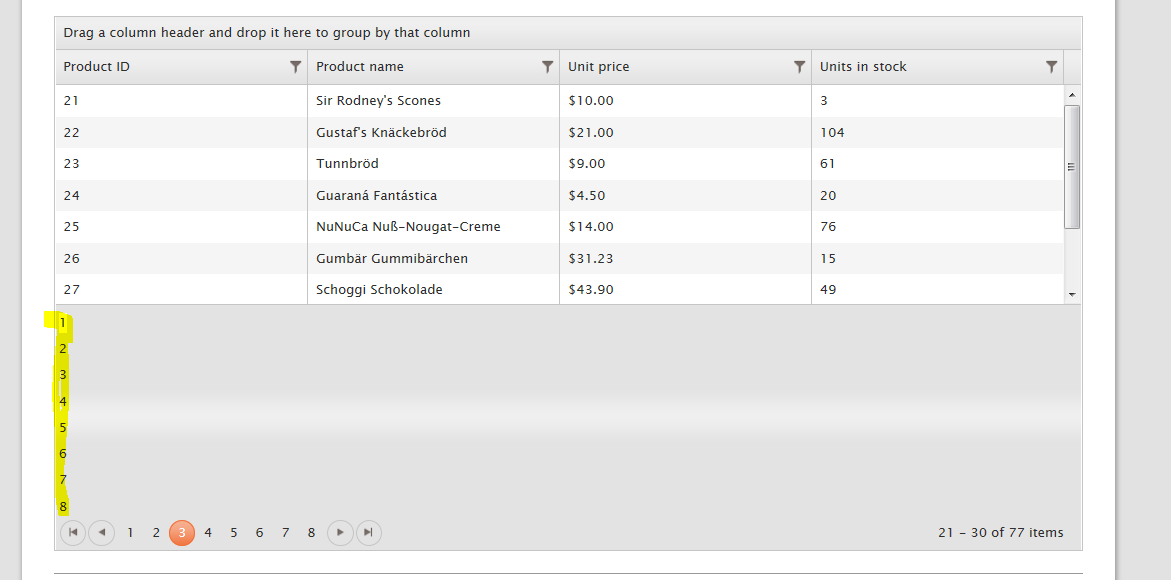
Regards,
Brian
I noticed in my project that there seemed to be two sets of page number controls at the bottom of my grid after upgrading to the Q2 Beta. I thought maybe it was something I was doing wrong, so I tried running the Kendo examples locally and I get the same behavior. Attached is a screen capture of what I'm seeing in the grid demo, with the extra set of numbers highlighted. Is this something related to the new paging controls that needs to be updated in the MVC wrapper? Thanks for your help.
Regards,
Brian

3 answers
305 views
When I run the Kendo examples, I see the input fields on popup dialogs for Edit and Create are using Kendo UI extensions. For example, kendoDatePicker is used for DateTime field, kendoNumericTextBox is used for numeric field, etc. However, on the popup dialogs of my application, this is not happening. The plain html input tags are used. Can anyone tell me what I am missing?
5 answers
321 views
Hi!
We have a few very narrow bool columns (representing for example "Is favorite"). We have been discussing how to do sorting/filtering in a good way here and would like to get some input as to what is possible.
For us the funnel icon (to filter) takes too much space, and is also the popup is too verbose. Rather we would like to click to filter, similair to how sorting works. Would this be possible? Or is there another preferred way?
What we think we would like is:
It works quite well but has two drawbacks:
We have a few very narrow bool columns (representing for example "Is favorite"). We have been discussing how to do sorting/filtering in a good way here and would like to get some input as to what is possible.
For us the funnel icon (to filter) takes too much space, and is also the popup is too verbose. Rather we would like to click to filter, similair to how sorting works. Would this be possible? Or is there another preferred way?
What we think we would like is:
- Sorting turned off for the bool column, filtering turned on, but without the funnel icon (or exchange it for a custom icon?) - all items shown
- User clicks header - only favorite items are shown
- User clicks header again - only non-favorite items are shown
- User clicks header once more - all items are shown
- During step 1-4 the selected grid sort order is maintained.
We got a demo working by doing something like (after setting .Filterable(false).Sortable(true) on the column):
public ActionResult _Items([DataSourceRequest]DataSourceRequest request){ var favSort = request.Sorts.FirstOrDefault(s => s.Member == "IsFavorite"); if (favSort != null) { request.Sorts.RemoveAt(request.Sorts.IndexOf(favSort)); request.Filters.Add(new FilterDescriptor("IsFavorite", FilterOperator.IsEqualTo, favSort.SortDirection == ListSortDirection.Ascending)); } //...}It works quite well but has two drawbacks:
- The previously selected sort order is lost
- The visual clue that only favorites / non-favorites are shown is the "up/down" arrow normally showing sort order, which is a little bit confusing. For specifically the favorite column something like "All results => dimmed star", "Only favorites => filled star", Only non-favorites => hollow star" would probably be best, but we dont know how to achieve this.
Any thoughts on how to implement any of this?
Thanks!
/Victor

Rosen
Telerik team

answered
on
02 Aug 2012
1 answer
174 views
I have a kendo grid using the MVC Extensions. I have set the grid to Sortable and the columns i don't want sorting on to false. However, once rendered to the page all columns headers are still clickable but only the ones marked sortable get the 'hand' icon. For instance, i have a 'select all column' and a 'group list' column that i don't want sorted.
Any help would be great. I am going to try the same on jsfiddle (using the js version) to see if i can reproduce.
@(Html.Kendo().Grid<MyViewModel>() .Name("my-list") .HtmlAttributes(new { @class = "grid" }) .DataSource(d => { var dsStep = d.Ajax(); dsStep.Read(read => read.Action("_Index", "Matter")) .PageSize(Model.InitialPageSize); }) .Columns(columns => { columns.Bound(p => p.Selected).Sortable(false).ClientTemplate( "<input type='hidden' name='list.Index' value='#=ID#'/>" + "<input type='checkbox' id='list_#=ID#__Selected' name='list[#=ID#].Selected' value='true'/>").Width(50); columns.Bound(p => p.Name).Template(t => { Html.ActionLink(t.Name, "Index", "Detail", new { id = t.ID }); }) .ClientTemplate("<a href='" + @Url.Content("~/Detail/Index") + "/#=ID#'>#=Name#</a>"); columns.Bound(p => p.Number).Width(50); columns.Bound(p => p.Clients).Sortable(false); columns.Bound(p => p.Area.Name).Width(100); columns.Bound(p => p.Staff).Sortable(false); columns.Bound(p => p.DateOpenedFormatted).Sortable(true);; }) .Resizable(r => r.Columns(true)) .Events(events => events.DataBound("wow")) .Pageable() .Sortable(sort => sort.SortMode(GridSortMode.SingleColumn)) .Selectable(a => a.Mode(GridSelectionMode.Multiple).Type(GridSelectionType.Row)))Any help would be great. I am going to try the same on jsfiddle (using the js version) to see if i can reproduce.
Rosen
Telerik team
answered
on
02 Aug 2012
2 answers
223 views
I have started a project using Kendo UI for MVC BETA and now I would like to upgrade the project to the new non Beta release. What steps do I follow to perform the upgrade? My understanding is that I copy the new js and css files in but do I do this from within VS? Do I delete the old files first? Thanks for any help on this.

AkAlan
Top achievements
Rank 2
Rank 2
answered
on
01 Aug 2012
2 answers
206 views
good morning everyone,
i am currently trying to setup a menu using the MVC wrapper for KendoUI menu and having some difficulty trying to setup the Animation part.
The animation method is overloaded. I know one of them i pass in a boolean but the other one, not sure how to use that one. Right now, I have:
@(Html.Kendo().Menu()
.Name("mainMenu")
.Animation(true) )
But i want to be able to customize the setup of the animation of the menu like how the regular KendoUI Menu can, using the 2nd overloaded Animation method:
var $mainMenu = $('#mainMenu');
$mainMenu.kendoMenu({
animation:
{
open:
{
effects: "fadeIn slideIn:down"
}
},
});
There isn't any documentation or example of how to use the 2nd overloaded Animation method of the KendoUI MVC wrapper. I am currently using the latest trial version of the Kendo UI Complete for ASP.NET MVC.
Thank you very much for you help.
i am currently trying to setup a menu using the MVC wrapper for KendoUI menu and having some difficulty trying to setup the Animation part.
The animation method is overloaded. I know one of them i pass in a boolean but the other one, not sure how to use that one. Right now, I have:
@(Html.Kendo().Menu()
.Name("mainMenu")
.Animation(true) )
But i want to be able to customize the setup of the animation of the menu like how the regular KendoUI Menu can, using the 2nd overloaded Animation method:
var $mainMenu = $('#mainMenu');
$mainMenu.kendoMenu({
animation:
{
open:
{
effects: "fadeIn slideIn:down"
}
},
});
There isn't any documentation or example of how to use the 2nd overloaded Animation method of the KendoUI MVC wrapper. I am currently using the latest trial version of the Kendo UI Complete for ASP.NET MVC.
Thank you very much for you help.







