or
2 answers
113 views
I have multiple autocomplete boxes and they all filter through the same AJAX datasource. I want to somehow pass the ID of the specific box to the AdditionalData javascript function so that I don't have to write like five different JavaScript functions with pretty much the same logic. I didn't see anything in the documentation and passing "e" in the AdditionalData function just passes the filter.
Razor:<strong>To:</strong> Html.Kendo().AutoComplete().Name("ToAddress")
.DataTextField("Email")
.Separator(";").MinLength(4).Filter(FilterType.Contains)
.DataSource(source =>
{
source.Read(r =>
{
r.Action("SearchAD", "Home").Data("AdditionalData");
})
.ServerFiltering(true);
}))
<strong>CC:</strong> Html.Kendo().AutoComplete().Name("ccAddress")
.DataTextField("Email")
.Separator(";").MinLength(4).Filter(FilterType.Contains)
.DataSource(source =>
{
source.Read(r =>
{
r.Action("SearchAD", "Home").Data("AdditionalData");
})
.ServerFiltering(true);
}))
<strong>BCC:</strong> Html.Kendo().AutoComplete().Name("bccAddress")
.DataTextField("Email")
.Separator(";").MinLength(4).Filter(FilterType.Contains)
.DataSource(source =>
{
source.Read(r =>
{
r.Action("SearchAD", "Home").Data("AdditionalData");
})
.ServerFiltering(true);
}))JavaScript
    function AdditionalData() {
        var text = $("[the autocomplete id]").val();  //get the ID or any other identifier
        var i = text.indexOf(";");
        var value = text.substring(i + 1);
        return {
            text: value
        }
    }
Anton Mironov
Telerik team

answered
on
08 Dec 2025
1 answer
143 views
I am trying to call an external web api with the autocomplete but can't seem to pass the autocomplete value as I need to. I need to pass the value at the end of the URL like: https://webapiurl/api/{value} . The farthest I got is passing the value but as a querystring parameter (https://webapiurl/api?name=value), this doesn't work, I get a 404 error. How can I concatenate the value at the end of the URL?
@(Html.Kendo().AutoComplete().Name("auto")
    .DataTextField("Name")
    .Filter("contains")
    .MinLength(4)
    .DataSource(source =>
        {
            source.Read(r =>
            {
                r.Url("https://webapiurl/api")
                    .Data("onAdditionalData");
            })
            .ServerFiltering(false);
        })
    )

<script>
    function onAdditionalData() {
        return {
            name: $("#auto").val()
        };
    }
</script>
Ivaylo
Telerik team
answered
on
16 Sep 2025
0 answers
154 views
Hello,
I'm encountering an issue with the autocomplete functionality in Kendo UI Grid. While the data selected through autocomplete is correctly added to hidden fields, it does not appear in the Grid.
Specifically, after using the autocomplete functionality, I checked whether the correct data was added to the respective hidden fields and found that the values I expected were indeed present in those fields. However, I noticed that these values were not visible in the Grid. This implies that the data selected by users is not being properly reflected within the Grid.
In summary, I am unable to display the data received through the autocomplete functionality within the Grid. I would appreciate any suggestions to resolve this issue.
The code structure related to the problem I mentioned above is as follows.
@(Html.Kendo().Grid(Model.Lines).Name("OrderLines")
.ToolBar(tools => tools.Create().Text("Add new product"))
.Editable(editable => editable.Mode(GridEditMode.InCell).CreateAt(GridInsertRowPosition.Bottom))
.Events(events => events
.Change("onChange"))
.Columns(columns =>
{
columns.Bound(p => p.Title)
.ClientTemplate("#= Title #" +
"<input type='hidden' name='Lines[#= index(data)#].Title' value='#= Title #' />")
.EditorTemplateName("ProductTitleAutoComplete");
columns.Bound(p => p.Title).Hidden().ClientTemplate("#= Title #" +
"<input type='hidden' name='Lines[#= index(data)#].Title' value='#= Title #' />"
);
columns.Bound(p => p.Description).ClientTemplate("#= Description #" +
"<input type='hidden' name='Lines[#= index(data)#].Description' value='#= Description #' />"
);
columns.Bound(p => p.Quantity).ClientTemplate("#= Quantity #" +
"<input type='hidden' name='Lines[#= index(data)#].Quantity' value='#= Quantity #' />"
);
columns.Bound(p => p.UnitPrice).ClientTemplate("#= UnitPrice #" +
"<input type='hidden' name='Lines[#= index(data)#].UnitPrice' value='#= UnitPrice #' />"
);
columns.Bound(p => p.TaxRate).ClientTemplate("#= TaxRate #" +
"<input type='hidden' name='Lines[#= index(data)#].TaxRate' value='#= TaxRate #' />"
);
columns.Bound(p => p.DiscountRate).ClientTemplate("#= DiscountRate #" +
"<input type='hidden' name='Lines[#= index(data)#].DiscountRate' value='#= DiscountRate #' />"
);
columns.Bound(p => p.PurchaseOrderId).Hidden().ClientTemplate("#= PurchaseOrderId #" +
"<input type='hidden' name='Lines[#= index(data)#].PurchaseOrderId' value='#= PurchaseOrderId #' />"
);
columns.Bound(p => p.ProductId).Hidden().ClientTemplate("#= ProductId #" +
"<input type='hidden' name='Lines[#= index(data)#].ProductId' value='#= ProductId #' />"
);
columns.Bound(p => p.Id).Hidden().ClientTemplate("#= Id #" +
"<input type='hidden' name='Lines[#= index(data)#].Id' value='#= Id #' />"
);
columns.Bound(p => p.MeasureWeightId).ClientTemplate("#= MeasureWeightId #" +
"<input type='hidden' name='Lines[#= index(data)#].MeasureWeightId' value='#= MeasureWeightId #' />"
);
columns.Command(command => command.Destroy()).Width(100);
})
.DataSource(dataSource => dataSource.Ajax()
.Model(model =>
{
model.Id(p => p.ProductId);
model.Field(p => p.ProductId).Editable(false);
})
.ServerOperation(false)
))
function onChange_ProductAutoComplete(e) {
var dataItem = e.sender.dataItem(0);
var grid = $("#OrderLines").data("kendoGrid");
if (dataItem) {
var el = $(e.sender.element[0]);
const parent = el.closest("td");
const inputs = parent.siblings().find('input');
$(inputs).each(function () {
var name = $(this).attr('name');
if (name.endsWith("Description")) {
$(this).val(dataItem.Notes);
} else if (name.endsWith("ProductId")) {
$(this).val(dataItem.Id);
}
else if (name.endsWith("Title")) {
$(this).attr({ value: dataItem.Title });
$(this).val(dataItem.Title);
}
else if (name.endsWith("MeasureWeightId")) {
$(this).val(dataItem.MeasureWeightId);
}
});
}
}
function onReadDataOnGrid_ProductAutoComplete(e) {
let data = {
title: $('#Title_ProductAutoComplete').val()
};
return data;
}
Thank you in advance for your support.

Selman
Top achievements
 Rank 1
Rank 1
asked
on
18 Mar 2024
2 answers
553 views
Hello folks
I got this one nearly done. I can see that it is hitting my controller in the background but the refresh just keeps spinning :)
@model myHinkleyWebApp.Models.ItemInventory
<div id="table_data"><hr /><div class="row"><div class="col-12 padding-0"><h5>Check Product Availability</h5><div class="k-d-flex k-justify-content-left" style="padding-top: 54px;"><div class="k-w-100 text-left">
@{Html.RenderPartial("../Shared/EditorTemplates/Item_Search_Editor");}
</div><div class="k-w-200 text-left"><input id="btnSubmit" type="submit" style="margin-left: 25px;" value="Submit" class="btn btn-outline-primary" name="submit" /></div></div>
@(Html.Kendo().Grid<myHinkleyWebApp.Models.ItemInventory>()
.Name("ItemInventory")
.Columns(columns => {
columns.Bound(p => p.Item_no);
columns.Bound(p => p.Family);
columns.Bound(p => p.Status);
columns.Bound(p => p.DNPrice);
columns.Bound(p => p.MapPrice);
columns.Bound(p => p.QuantityAvailable);
columns.Bound(p => p.QuantityConfirmed);
columns.Bound(p => p.ConfirmedPromiseDate);
//columns.Bound(p => p.inventory_id).Title("").ClientTemplate("<a href='" + Url.Action("Delete", new { id = "#=inventory_id#", m_id = "#=customer_id#" }) + "'>Delete</a>");
//columns.Command(command => command.Destroy()).Width(150);
})
.ToolBar(tools => tools.Excel())
//.Editable(editable => editable.Mode(GridEditMode.InCell))
.Pageable()
.Navigatable()
.Sortable()
//.Scrollable()
.DataSource(dataSource => dataSource
.Ajax()
.PageSize(10)
.Batch(true)
.ServerOperation(false)
.Events(events => events.Error("error_handler"))
//.Model(model => { model.Id(p => p.inventory_id); model.Field(p => p.inventory_id).DefaultValue(Guid.Empty); model.Field(p => p.customer_id).DefaultValue(Guid.Empty); })
//.Create("Item_Create_Update", "HLI_Customer_Specific_Inventory", new { CusNo = Model.CusNo })
//.Read("SearchItems_ByNameOrFamily", "ItemInventory", new {search_phrase = ViewBag.SearchPhrase})
//.Update("Item_Create_Update", "HLI_Customer_Specific_Inventory", new { CusNo = Model.CusNo })
//.Destroy("Item_Destroy", "HLI_Customer_Specific_Inventory", new { CusNo = Model.CusNo })
)
)
</div><br /><br /></div></div><script>
function error_handler(e) {
if (e.errors) {
var message = "Errors:\n";
$.each(e.errors, function (key, value) {
if ('errors' in value) {
$.each(value.errors, function () {
message += this + "\n";
});
}
});
alert(message);
}
}
$("#btnSubmit").click(function () {
var ItemInventory = $("#ItemInventory").data("kendoGrid");
$filter = new Array();
var ITEM = $("#item_no").val();
$.ajax({
type: "POST",
url: "/ItemInventory/SearchItems_ByNameOrFamily",
data: { search_phrase: ITEM },
dataType: "json",
success: function (result) {
var ds = new kendo.data.HierarchicalDataSource({
data: result
});
ItemInventory.setDataSource(ds);
ItemInventory.read();
ItemInventory.refresh();
}
});
//ItemInventory.dataSource.read();
});
</script>
After I click the button the grid is just spinning here is a view of that:
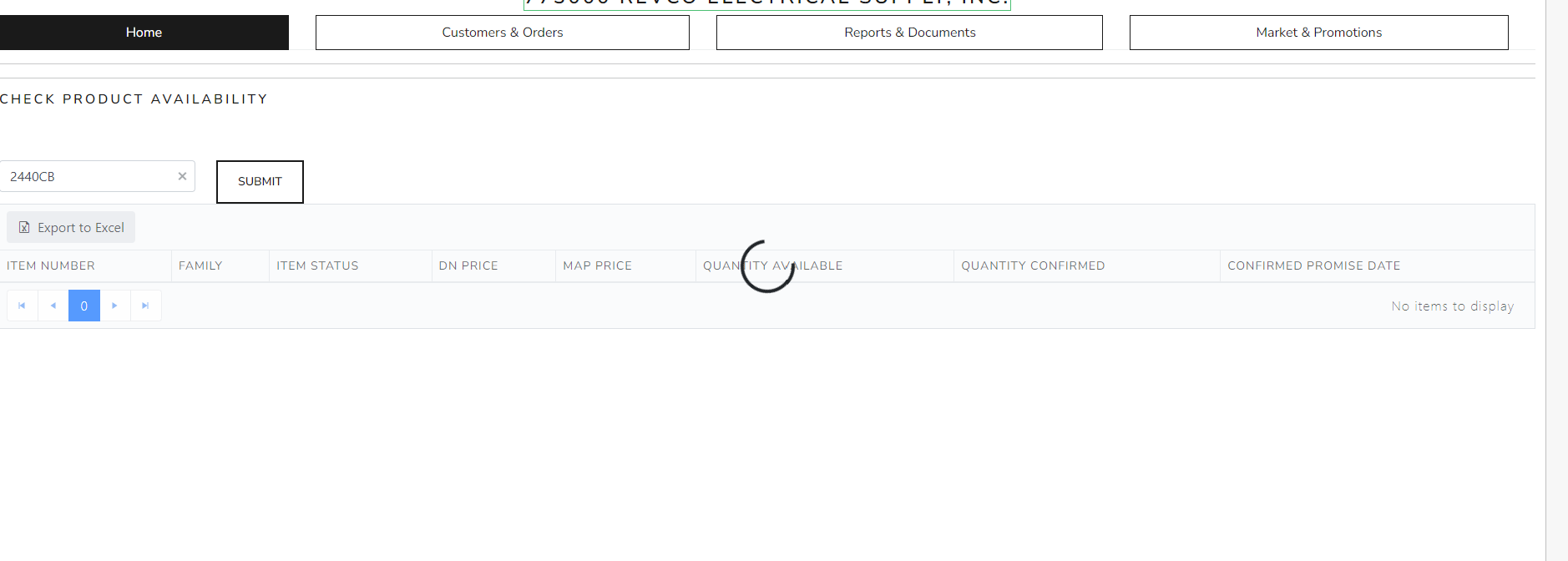 So really the help I need is with this javascript here:
$("#btnSubmit").click(function () {
var ItemInventory = $("#ItemInventory").data("kendoGrid");
$filter = new Array();
var ITEM = $("#item_no").val();
$.ajax({
type: "POST",
url: "/ItemInventory/SearchItems_ByNameOrFamily",
data: { search_phrase: ITEM },
dataType: "json",
success: function (result) {
var ds = new kendo.data.HierarchicalDataSource({
data: result
});
ItemInventory.setDataSource(ds);
ItemInventory.read();
ItemInventory.refresh();
}
});
//ItemInventory.dataSource.read();
});
To summarize I have a auto complete text box where I am entering an item. Then i want to push the button and refresh my grid which will pass the
item number and search for it and bring it back down in the grid!
Any help would be greatly appreciated!
Anyways here is my front end code here
GORAN
Top achievements
Rank 1
 Iron
Iron
Rank 1
Iron
answered
on
11 May 2023
1 answer
255 views
am using Azure Ad authentication in my ASP.Net 4.8 MVC application. When authentication is expired and when user clicks on the link or button user get redirected to login page. So that is good.
However, I have a problem with AutoComplete textbox which is also available on the same page among buttons and link. If user leave the app open and comes back after page authentication cookie is expired and enter a value in autocomplete textbox, then textbox doesn't do anything, it works as there is no data to filter and doesn't even throw an error. I would expect it to redirect user to login page or refresh the token.
I suppose that could be known to those who uses Jquery or ajax functions or telerik controls to how to check for token. I am just new to all that.
Just in case if the code is needed so here it is.
  <form action="@Url.Action("Transaction", "Job")" method="POST">
            <div>
                <div class="col-xs-4 k-content py text-left">

                    @{
                        try
                        {
                            @(Html.Kendo().AutoComplete()
                    .Name("searchValue")  //chaninging the name of the class to UserModel
                    .DataTextField("SearchString") //DataTextField("dataField")
                    .Filter("contains")
                    .MinLength(2)

                    .HtmlAttributes(new {style = "width:100%"})
                    .DataSource(source =>
                    {
                        source.Read(read =>
                        {

                            read.Action("GetAutoComplete", "Job")
                                .Data("onAdditionalData");
                        })
                            .ServerFiltering(true);
                    })
                    //.Events(e => e.DataBound("onDataBound"))
                    )

                        }
                        catch (Exception e)
                        {
                            //this.RedirectToAction("Reporting", "ReportManagement");
                        }

                    }
Anton Mironov
Telerik team
answered
on
01 Feb 2023
0 answers
444 views
i am getting the error when i use @html.kendo()
it showing are you missing any directives
>please suggest any solution
dhruv
Top achievements
Rank 1
Rank 1
asked
on
12 Sep 2022
0 answers
178 views
Hi I am using the Autocomplete textbox. It finding to the datasource fine. Just like Product is being used in the demo.
1. My question is if I have a product list. And it has the column product type , and I want to captrue the value of prodcut type then how I can do that. Product is binds with the userId.
2. I have a model class as
ModelViewMY {
date TodaysDate {get;set} // date is not part of the list.
List<Users> Users {get;set}
}
Question now: if I am using the AutoComplete in my mvc project then how I can set the DataTextFiled(Useres.UserId). I tried but I am getting errors.
@(Html.Kendo().AutoComplete()
.Name("searchParam")
.DataTextField("Id") //DataTextField("dataField")
.Filter("contains")
.MinLength(3)
Salma
Top achievements
Rank 1
 Iron
Iron
Rank 1
Iron
asked
on
24 Nov 2021
1 answer
727 views
Hey,
i've got kendo grid with filter row, i'm trying to hook-up all filter inputs to custom kendoAutoComplete(...) components.
Every column definition:
...
columns.Bound(x => x.ColumnName).Filterable(x => x.Cell(y => y.Template("onFilterAutocomplete")));
...
Template function definition:
function onFilterAutocomplete(e)
{
 var columnName = $(e.element).closest('span[data-field]').data('field');

 e.element.kendoAutoComplete({
	dataSource: {
            transport: {
                read: {
                    url: '@urlFilterAutocomplete',
                    type: 'POST',
                    data: {
                        field: columnName,
                        text: /* ... how to get currently entered text here dynamically? ... */
                    }
                }
            }
        }
    });
}
Controller:
[HttpPost]
public async Task<JsonResult> FilterAutocompleteAsync(string field, string text) => Json(/*... db ...*/);
Z
Top achievements
Rank 1
Iron
Rank 1
Iron
answered
on
17 Jun 2021
1 answer
513 views
Hello,
i'm using MVC5 Razor helper to create grid and i'm trying to show specific autocomplete values in filter row. As i undestood it from forums and docs i have to replace standard filter row input by manually creating kendoAutoComplete(...) with my own dataSource, as shown for example here with classic filter menu:
https://demos.telerik.com/aspnet-mvc/grid/filter-menu-customization
or here with filter row:
https://www.telerik.com/forums/server-side-filtering-with-row-filter-mode-filters-too-soon!
My custom JS autocomplete:
<script>
function onFilterAutocomplete(e)
{
	e.element.kendoAutoComplete({
		filter: 'contains',
		dataSource: {
			serverFiltering: true,
			serverSorting: true,
			transport: {
				read: '@Url.Action("FilterAutocompleteAsync")'
			}
		}
	});
}
</script>
My server method:
[HttpPost]
//[ValidateAntiForgeryToken]
public async Task<JsonResult> FilterAutocompleteAsync([DataSourceRequest]DataSourceRequest dataSourceRequest) => Json(/*... db stuff...*/);
When i try to replace input by defining:
columns.Bound(x => x.ColumnName).Filterable(x => x.Cell(y => y.Template("onFilterAutocomplete")));my JS function is executed on grid init and no errors are shown in browser console. But when i try to filter, the automatic autocomplete on filter input keeps showing values as normaly from grid dataSource (standard behaviour) and my controller method won't get called.
If i try to replace input by defining:
columns.Bound(x => x.ColumnName).Filterable(x => x.UI("onFilterAutocomplete")));my JS function won't get called at all.
What am i doing wrong here?
PS: I've tried with following versions:
telerik.ui.for.aspnetmvc.hotfix.2019.2.619.commercial.digitally-signed
and
telerik.ui.for.aspnetmvc.hotfix.2021.2.511.commercial.digitally-signed
Z
Top achievements
Rank 1
Iron
Rank 1
Iron
answered
on
15 Jun 2021
3 answers
861 views
Good day guys,
how possible is this, to send input textbox value to autocomplete textbox while typing. and the autocomplete should be set to readonly.
see attached image
kind regards
Tony
Top achievements
 Rank 2
 Iron
Iron
Iron
Iron
 Iron
Iron
Rank 2
Iron
Iron
Iron
answered
on
07 Jun 2021




