or
1 answer
76 views
Hello, I am running into issues with my kendo wizard and within one step of the kendo wizard I want to add in a dropdown right next to my kendo textbox so it looks like this where the dropdown is right next to the textbox I added above the combo box. I tried using the
s.Add<ReferralModelLite>()
    .Title("Clinic Selection")
    .Form(f => f
        .Validatable(v => v.ValidateOnBlur(true))
        .Layout("grid")
        .Grid(g => g.Cols(3).Gutter(12))
        .FormData(Model)
        .Items(items =>
        {
            // Add Kendo TextBox above the ComboBox
            items.Add().Field("ClinicSearchText")
                .Label(l => l.Text("Search for Nearby Facilities by Address:"))
                .ColSpan(2)
                .Editor(e => e.TextBox()
                    .Placeholder("Type to search clinics by address...")
                    .HtmlAttributes(new { @class = "input-wide", @style = "width: 100%;" })
                );

            items.Add().Field(m => m.ClinicReferralId)
                .Label(l => l.Text("Select Clinic:"))
                .ColSpan(2) // Not full width, adjust as needed
                .Editor(e => e.ComboBox()
                    .Placeholder("Select or type a clinic...")
                    .DataTextField("Text")
                    .DataValueField("Value")
                    .Filter("contains")
                    .Suggest(true)
                    .DataSource(ds => ds.Read("GetClinicsSelectItems", "Clinic"))
                    .HtmlAttributes(new { @style = "width: 100%;" })
                );
here are the implementations I tried that gave me errors or undesirable effects.
@(Html.Kendo().Wizard()
    .Name("intake-referral-wizard")
    .Steps(steps =>
    {
        steps.Add().Title("Clinic Selection").Content(@<text>
            <div style="display: flex; align-items: center; gap: 8px;">
                @(Html.Kendo().TextBox()
                    .Name("ClinicSearchText")
                    .Placeholder("Type to search clinics by address...")
                    .HtmlAttributes(new { @class = "input-wide", style = "width: 250px;" })
                )
                @(Html.Kendo().DropDownList()
                    .Name("ClinicSearchCount")
                    .DataTextField("Text")
                    .DataValueField("Value")
                    .BindTo(new[] {
                        new { Text = "5", Value = "5" },
                        new { Text = "10", Value = "10" },
                        new { Text = "20", Value = "20" },
                        new { Text = "50", Value = "50" },
                        new { Text = "100", Value = "100" }
                    })
                    .Value("10")
                    .HtmlAttributes(new { style = "width: 80px;" })
                )
            </div>
            <!-- Add any other controls or markup for this step below -->
        </text>);
        // Add more steps as needed...
    })
)items.Add().Field("ClinicSearchText")
.Label(l => l.Text("Search for Nearby Facilities by Address:"))
.ColSpan(2)
.EditorTemplate("ClinicSearchWithCount");this editor template implementation while not yielding errors just displayed the word ClinicSearchWithCount where the template should have gone.
Help with this would be greatly appreciated.

Eyup
Telerik team

answered
on
01 Oct 2025
0 answers
128 views
It was my understanding that the Kendo editor is only designed to work with the content between the <body></body> tags and strip off <html>, <head>, and the <body> tags themselves but while I do see that those tags are indeed left out in the dialog editor a <meta> tag that I have in my <head></head> section is still being rendered (ref attached screenshot) which is not desired to the extent that I wish to re-apply the standard "format" to the saved body content changes that re-applies the standard prefix/suffix tags we use to define HTML formatted email templates (Ref below) where the {0} placeholder would represent the true editor content changes for the email template being posted back from client to be saved. However while this works I'm getting the original <meta> tag as part of the "content" when my expectation is, that because it is embedded in the <head> tag that it would get stripped out when the <body></body> internal content is rendered on the client. I am currently using the 2025.1.227 build of Telerik UI for ASP.NET Core.
private const string EmailTemplateFormat = "<html><head><meta content=\"text/html; charset=windows-1252\" /></head><body style=\"padding: 0; margin: 0;\">{0}</body></html>";




1 answer
67 views
Why do i have 3 buttons special the last Cancel ?
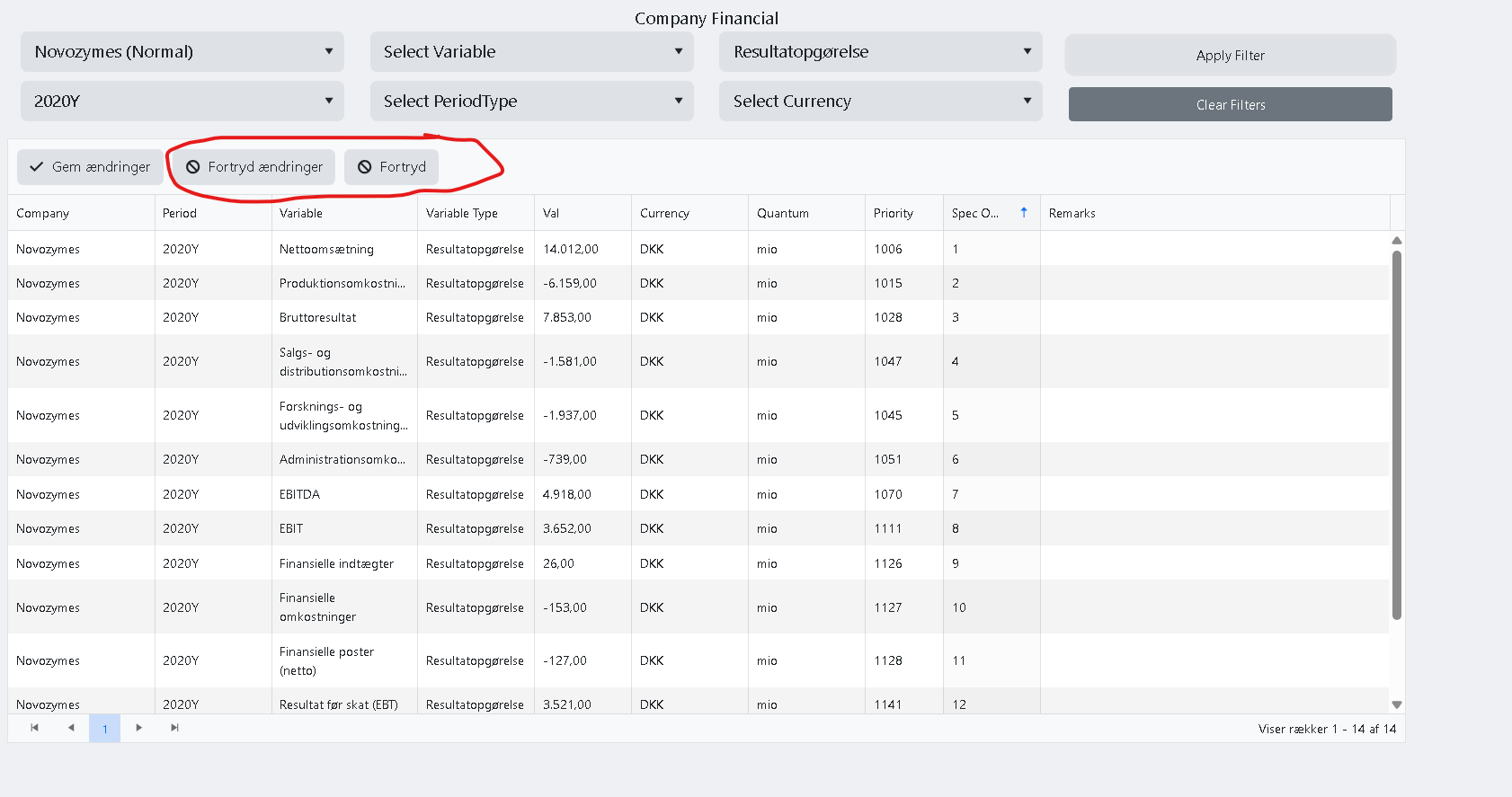
I have disabled all script on the page, except the simpel lookups for foreginkeys in dataset...
@(
Html.Kendo().Grid<IndexModel.CompanyFinancialVM>()
    .Name("gridCompanyFinancial")
    .Navigatable()
    .Height(590)
    .Sortable()
    .Editable(e => e.Mode(GridEditMode.InCell))
    .Scrollable()
    .ToolBar(t => { t.Save(); t.CancelEdit(); })
    .Columns(columns =>
    {
        columns.Bound(f => f.CompanyName).Title("Company").Width(150);
        columns.Bound(f => f.PeriodName).Title("Period").Width(120);
        columns.Bound(f => f.VariableName).Title("Variable").Width(150);
        columns.Bound(f => f.VariableTypeName).Title("Variable Type").Width(120);
        columns.Bound(f => f.Val).Title("Val")
            .Width(100)
            .Format("{0:n}") // Show 4 decimals and thousand separator
            .EditorTemplateName("Decimal");
        columns.Bound(f => f.ValCurr)
            .Title("Currency")
            .ClientTemplate("#= getCurrencyName(ValCurr) #")
            .EditorTemplateName("Currency")
            .Width(120);
        columns.Bound(f => f.QuantumFK)
            .Title("Quantum")
            .ClientTemplate("#= getQuantumName(QuantumFK) #")
            .EditorTemplateName("QuantumFK")
            .Width(120);
        columns.Bound(f => f.Priority).Title("Priority").Width(80);
        columns.Bound(f => f.SpecOrder).Title("Spec Order").Width(100);
        columns.Bound(f => f.Rem).Title("Remarks").EditorTemplateName("Rem");
    })
    .DataSource(ds => ds.Ajax()
        .Read(r => r.Url(Url.Content("~/CompanyFinancial/Index?handler=Read")).Data("getGridRequestData"))
        .Update(u => u.Url(Url.Content("~/CompanyFinancial/Index?handler=Update")).Data("forgeryToken"))
        .Batch(true)
        .Model(m =>
        {
            m.Id(f => f.Nr);
            m.Field(f => f.CompanyName);
            m.Field(f => f.PeriodName);
            m.Field(f => f.VariableName);
            m.Field(f => f.VariableTypeName);
            m.Field(f => f.Priority);
            m.Field(f => f.SpecOrder);
            m.Field(f => f.Val);
            m.Field(f => f.ValCurr);
            m.Field(f => f.QuantumFK);
            m.Field(f => f.Rem);
        })
        .Sort(s => s.Add(f => f.SpecOrder).Ascending())
        .PageSize(20)
    )
    .Pageable()
1 answer
163 views
I have a grid with custom editors and they are bound to the grid as such.
columns.Bound(x => x.Parent).EditorTemplateName("ParentEditor").ClientTemplate("#= Parent === undefined || Parent === null ? '' : parentTemplate(Parent)#");
columns.Bound(x => x.Child).EditorTemplateName("ChildEditor").ClientTemplate("#= Child === undefined || Child === null ? '' : childTemplate(Child)#");
The two editor templates look like this:
@model List<ParentViewModel>
@(Html.Kendo()
     .MultiSelectFor(m => m)
     .DataTextField("Name")
     .DataValueField("Id")
     .Placeholder("Select one or more parents")
     .AutoBind(true)
     .TagMode(MultiSelectTagMode.Multiple)
     .DataSource(source =>
     {
         source
         .Read(read =>
         {
             read.Action("GetParent", "Lookup");
         });
     })
     .Events(events => events.Change("onParentChange"))
)


@model List<ChildViewModel>
@(Html.Kendo()
      .MultiSelectFor(m => m)
      .DataTextField("Name")
      .DataValueField("Id")
      .Placeholder("Select one or more children")
      .AutoBind(true)
      .TagMode(MultiSelectTagMode.Multiple)
      .DataSource(source =>
      {
          source
          .Read(read =>
          {
              read.Action("GetChild", "Lookup").Data("getCurrentParents");
          })
          ;
      })
)
The UI is properly populating when the grid loads and looks like this:
Coumn Parent|Column Child
A |A1
B |B1, B2
When the user edits the row and removes item B from Column Parent, this code is invoked (which I got from Kendo UI Snippet | Kendo UI Dojo)
function onParentChange(e) {
    var selectedonParentChange = this.value();
    let dataItems = e.sender.dataItems();

	var multiSelect = $("#Child").data("kendoMultiSelect");
	var value = multiSelect.value();
	multiSelect.dataSource.filter(getFilterObj(dataItems));
	multiSelect.dataSource.filter({});  // Adding or removing has no effect
    multiSelect.refresh();
	multiSelect.value(value);
	console.log("Second value: " + multiSelect.value());
    var dataSource = multiSelect.dataSource;
    dataSource.read();
}

function getFilterObj(dataItems){
  let filtObj = {
    logic: "or",
    filters: [],
  };

  if(dataItems.length > 0){
    for (var i = 0; i < dataItems.length; i++) {
      filtObj.filters.push({
        field: "ParentId",
        operator: "eq",
        value: dataItems[i].Id
      });
    }
  } else {
    filtObj.filters.push({
        field: "ParentId",
        operator: "eq",
        value: ""
      });
  }

  return filtObj;
}
After the code runs, the UI looks like this:
Coumn Parent|Column Child
A |A1
So far so good. The problem is that when the user hits save this ends up on the Network in the form data:
Parent[0].Id: ParentIdA
Parent[0].Name: A
Child[0].Id: ChildId1
Child[0].Name: A1
Child[0].ParentId: ParentIdA
Child[1].Id: ChildId2
Child[1].Name: B1
Child[1].ParentId: ParentIdB
Child[2].Id: ChildId3
Child[2].Name: B2
Child[2].ParentId: ParentIdBKendo Version: 2024.4.1112
Eyup
Telerik team
answered
on
06 May 2025
1 answer
178 views
I have some (9) ASPX pages with RadEdit controls in my application.
Since installing the asp.net Ajax version R3 2025 and 2025.1.211 dev hotfix (from a much older version) I'm getting an error whenever IIS tries to send me any of those pages with RadEdit (I can remove the RadEdit control and get the page - without the edit area, but if I put it back, the error returns).
The full error is:
03/04/2025 15:34:02 19: System.Reflection.TargetInvocationException: Exception has been thrown by the target of an invocation. ---> System.Security.Cryptography.CryptographicException: The cryptographic operation has failed!
at Telerik.Web.UI.CryptoExceptionThrower.ThrowGenericCryptoException[T]()
at Telerik.Web.UI.CryptoExceptionThrower.ThrowIfFails[T](Func`1 function)
at Telerik.Web.UI.Common.HmacEnabledCryptoService.Encrypt(String input)
at Telerik.Web.Dialogs.DialogParametersSerializer.Serialize()
at Telerik.Web.UI.DialogDefinition.get_SerializedParameters()
--- End of inner exception stack trace ---
at System.RuntimeMethodHandle.InvokeMethod(Object target, Object[] arguments, Signature sig, Boolean constructor)
at System.Reflection.RuntimeMethodInfo.UnsafeInvokeInternal(Object obj, Object[] parameters, Object[] arguments)
at System.Reflection.RuntimeMethodInfo.Invoke(Object obj, BindingFlags invokeAttr, Binder binder, Object[] parameters, CultureInfo culture)
at System.Reflection.RuntimePropertyInfo.GetValue(Object obj, BindingFlags invokeAttr, Binder binder, Object[] index, CultureInfo culture)
at System.Reflection.RuntimePropertyInfo.GetValue(Object obj, Object[] index)
at Telerik.Web.UI.DialogDefinitionConverter.Serialize(Object obj, JavaScriptSerializer serializer)
at System.Web.Script.Serialization.JavaScriptSerializer.SerializeValue(Object o, StringBuilder sb, Int32 depth, Hashtable objectsInUse, SerializationFormat serializationFormat, MemberInfo currentMember)
at System.Web.Script.Serialization.JavaScriptSerializer.SerializeDictionary(IDictionary o, StringBuilder sb, Int32 depth, Hashtable objectsInUse, SerializationFormat serializationFormat)
at System.Web.Script.Serialization.JavaScriptSerializer.SerializeValueInternal(Object o, StringBuilder sb, Int32 depth, Hashtable objectsInUse, SerializationFormat serializationFormat, MemberInfo currentMember)
at System.Web.Script.Serialization.JavaScriptSerializer.SerializeValue(Object o, StringBuilder sb, Int32 depth, Hashtable objectsInUse, SerializationFormat serializationFormat, MemberInfo currentMember)
at System.Web.Script.Serialization.JavaScriptSerializer.Serialize(Object obj, StringBuilder output, SerializationFormat serializationFormat)
at System.Web.Script.Serialization.JavaScriptSerializer.Serialize(Object obj, SerializationFormat serializationFormat)
at Telerik.Web.UI.RadDialogOpener.DescribeComponent(IScriptDescriptor descriptor)
at Telerik.Web.UI.RadWebControl.Telerik.Web.IControl.DescribeComponent(IScriptDescriptor descriptor)
at Telerik.Web.UI.ScriptRegistrar.GetScriptDescriptors(Control control)
at Telerik.Web.UI.RadWebControl.GetScriptDescriptors()
at Telerik.Web.UI.RadWebControl.System.Web.UI.IScriptControl.GetScriptDescriptors()
at System.Web.UI.ScriptControlManager.RegisterScriptDescriptors(IScriptControl scriptControl)
at Telerik.Web.UI.RadWebControl.RegisterScriptDescriptors()
at Telerik.Web.UI.RadWebControl.Render(HtmlTextWriter writer)
at System.Web.UI.Control.RenderControlInternal(HtmlTextWriter writer, ControlAdapter adapter)
at System.Web.UI.Control.RenderControl(HtmlTextWriter writer, ControlAdapter adapter)
at System.Web.UI.Control.RenderControl(HtmlTextWriter writer)
at System.Web.UI.Control.RenderChildrenInternal(HtmlTextWriter writer, ICollection children)
at System.Web.UI.Control.RenderChildren(HtmlTextWriter writer)
at Telerik.Web.UI.RadEditor.RenderContents(HtmlTextWriter writer)
at System.Web.UI.WebControls.WebControl.Render(HtmlTextWriter writer)
at Telerik.Web.UI.RadWebControl.Render(HtmlTextWriter writer)
at System.Web.UI.Control.RenderControlInternal(HtmlTextWriter writer, ControlAdapter adapter)
at System.Web.UI.Control.RenderControl(HtmlTextWriter writer, ControlAdapter adapter)
at System.Web.UI.Control.RenderControl(HtmlTextWriter writer)
at System.Web.UI.Control.RenderChildrenInternal(HtmlTextWriter writer, ICollection children)
at System.Web.UI.Control.RenderChildren(HtmlTextWriter writer)
at Telerik.Web.UI.RadPageView.RenderContents(HtmlTextWriter writer)
at System.Web.UI.WebControls.WebControl.Render(HtmlTextWriter writer)
at System.Web.UI.Control.RenderControlInternal(HtmlTextWriter writer, ControlAdapter adapter)
at System.Web.UI.Control.RenderControl(HtmlTextWriter writer, ControlAdapter adapter)
at System.Web.UI.Control.RenderControl(HtmlTextWriter writer)
at System.Web.UI.Control.RenderChildrenInternal(HtmlTextWriter writer, ICollection children)
at System.Web.UI.Control.RenderChildren(HtmlTextWriter writer)
at Telerik.Web.UI.RadWebControl.RenderContents(HtmlTextWriter writer)
at System.Web.UI.WebControls.WebControl.Render(HtmlTextWriter writer)
at Telerik.Web.UI.RadWebControl.Render(HtmlTextWriter writer)
at System.Web.UI.Control.RenderControlInternal(HtmlTextWriter writer, ControlAdapter adapter)
at System.Web.UI.Control.RenderControl(HtmlTextWriter writer, ControlAdapter adapter)
at System.Web.UI.Control.RenderControl(HtmlTextWriter writer)
at System.Web.UI.Control.RenderChildrenInternal(HtmlTextWriter writer, ICollection children)
at System.Web.UI.HtmlControls.HtmlForm.RenderChildren(HtmlTextWriter writer)
at System.Web.UI.HtmlControls.HtmlContainerControl.Render(HtmlTextWriter writer)
at System.Web.UI.HtmlControls.HtmlForm.Render(HtmlTextWriter output)
at System.Web.UI.Control.RenderControlInternal(HtmlTextWriter writer, ControlAdapter adapter)
at System.Web.UI.Control.RenderControl(HtmlTextWriter writer, ControlAdapter adapter)
at System.Web.UI.HtmlControls.HtmlForm.RenderControl(HtmlTextWriter writer)
at System.Web.UI.Control.RenderChildrenInternal(HtmlTextWriter writer, ICollection children)
at System.Web.UI.Control.RenderChildren(HtmlTextWriter writer)
at System.Web.UI.Page.Render(HtmlTextWriter writer)
at System.Web.UI.Adapters.ControlAdapter.Render(HtmlTextWriter writer)
at System.Web.UI.Control.RenderControlInternal(HtmlTextWriter writer, ControlAdapter adapter)
at System.Web.UI.Control.RenderControl(HtmlTextWriter writer, ControlAdapter adapter)
at System.Web.UI.Control.RenderControl(HtmlTextWriter writer)
at Telerik.Web.UI.RadAjaxControl.RenderPageInAjaxMode(HtmlTextWriter writer, Control page)
at System.Web.UI.Control.RenderChildrenInternal(HtmlTextWriter writer, ICollection children)
at System.Web.UI.Control.RenderChildren(HtmlTextWriter writer)
at System.Web.UI.Page.Render(HtmlTextWriter writer)
at System.Web.UI.Adapters.ControlAdapter.Render(HtmlTextWriter writer)
at System.Web.UI.Control.RenderControlInternal(HtmlTextWriter writer, ControlAdapter adapter)
at System.Web.UI.Control.RenderControl(HtmlTextWriter writer, ControlAdapter adapter)
at System.Web.UI.Control.RenderControl(HtmlTextWriter writer)
at System.Web.UI.Page.ProcessRequestMain(Boolean includeStagesBeforeAsyncPoint, Boolean includeStagesAfterAsyncPoint)
Can anyone help or advise on what may be causing this?





2 answers
154 views
I'm trying to add a standard html Select element as a custom toolbar item in the Editor. I was able to make this work up through Kendo for Asp.Net Core version 2024.Q4. Now in version 2025.Q1 the Select does not respond to clicking. A click doesn't drop down the Select so the user can choose an Option item. I added an onclick event handler, and the click event is registering, but it does not open the Select. The documentation doesn't give any reason why this should not work. The Select element and its Options look fine in the page. Any suggestions?
        //Add a dropdown tool for inserting symbols.
        string selectTitle = "Select a symbol to insert";
        //Standard html select.
        //Cannot find a way to use an html Select in Kendo 2025Q1. This worked in Kendo 2024.Q4,
        // after removing the 'ref-toolbar-tool' attribute from the div preceding the Select.
        string toolNameSelect = $"insertSymbol-{EditorIdClean}";
        string dropdownNameSelect = $"symbolSelect_{EditorIdClean}";
        string symbolSelect = $"<label for='{dropdownNameSelect}' class='visually-hidden'>Symbol:</label>" +
            $"<select id='{dropdownNameSelect}' " +
            $"title='{selectTitle}' " +
            $"aria-label='{selectTitle}' " +
            "style='width:150px' " +
            "onclick='testSymbolSelect(this)' " + //The click event is registered * the alert appears.
            "onchange='InsertSymbolSelect(this)' " +
            ">" +
            $"{symbolHtmlSelectOptions()}" +
            $"</select>";
        toolFactories.Add(tools => tools
            .CustomTemplate(x => x
                .Name(toolNameSelect)
                .Tooltip(selectTitle)
                .Template(symbolSelect)
            ));

1 answer
159 views
Environment Info: ASP for .Net Core, taghelper kendo-grid
I have defined a template for a kendo grid popup editor.
<editable mode="popup" template-id="popup-editor">
    <editable-window title="Add/Edit Collateral"/>
</editable>
This is the template
@using Kendo.Mvc.UI

@addTagHelper *, Kendo.Mvc

@model MyApp.Web.ViewModels.MyViewModel

<div id="divEditImpliedSupport">
	<form method="post" id="frmImpliedSupport" asp-action="SaveImpliedSupport" asp-controller="ReviewApi">
		<input type="hidden" asp-for="CollateralID" />
		<div class="row">
			<div>
				<formgroup>
					<formlabel asp-for="CollateralDescription" ></formlabel>
					<div>
						<forminput asp-for="CollateralDescription" style="width:400px;"></forminput>
					</div>
				</formgroup>
			</div>
		</div>
	</form>
</div>
How do I set the size of the popup window?
1 answer
120 views
Hi Telerik,
To start, I will say this, yes I am using the danish language pack.
I am using the rich text editor and encountering issues with how it treats foreign language letters. I am based in Denmark, so when we have danish texts that include letters such as æ, ø, å, kendo seem to be translating them into a it's own letter combo.
This is a problem, because it is being saved like this in the database as well as, when I get the response, it does not translate it back to danish letters it stays as a weird letter dump.
Also consider that the data that is saved in the DB is later used in other places, therefore even if kendo would change it back for viewing, the fact that, this is how it is saved in the DB is a huge problem.
I attached some pictures for reference.
Thanks in advance,
Juste

Ivaylo
Telerik team
answered
on
12 Feb 2025
1 answer
108 views
In the attached image is a data entry screen from a grid. It is displayed on a mobile device. How can I change the <save> and <cancel> to a button so that it is more obvious to our users of where to click to <save> or <cancel> from this data entry point? Or do you have any other suggestions to help in this situation?
Thanks
-Maria
1 answer
116 views
Is it possible to make the editor component read only?
Eyup
Telerik team
answered
on
27 Jan 2025












