or
5 answers
169 views
Hi
I've been playing with the demo's and really like the AJAX kit so will be buying it once I get paid for my current job, but whilst using the trial version I have come across an error with the RadTooltipManager and would appreciate some help if anyone is able to please.
Basically it works fine everywhere on the site, apart from the home page, but to make it more confusing it doesn't work when loaded via http://www.domain.com/ but it does work when I add default.aspx so http://www.domain.com/default.aspx
The error I get is:
RadToolTipManager response error:
Exception=Sys.WebForms.PageRequestManagerServerErrorException: An unknown error occurred while processing the request on the server. The status code returned from the server was: 405
I've also attached a screenshot of the error.
My code is:
default.aspx
default.aspx.vb
I've just re-downloaded and re-installed the trial, to make sure it wasn't something to do with that.
Many thanks in advance.
Rich
I've been playing with the demo's and really like the AJAX kit so will be buying it once I get paid for my current job, but whilst using the trial version I have come across an error with the RadTooltipManager and would appreciate some help if anyone is able to please.
Basically it works fine everywhere on the site, apart from the home page, but to make it more confusing it doesn't work when loaded via http://www.domain.com/ but it does work when I add default.aspx so http://www.domain.com/default.aspx
The error I get is:
RadToolTipManager response error:
Exception=Sys.WebForms.PageRequestManagerServerErrorException: An unknown error occurred while processing the request on the server. The status code returned from the server was: 405
I've also attached a screenshot of the error.
My code is:
default.aspx
<%@ Page Title="" Language="VB" MasterPageFile="~/main.master" AutoEventWireup="true" CodeFile="default.aspx.vb" Inherits="_default3" EnableEventValidation="false" ViewStateEncryptionMode="Never" validaterequest="false" enableviewstatemac="false" %><%@ Register TagPrefix="telerik" Namespace="Telerik.Web.UI" Assembly="Telerik.Web.UI" %><%@ Register Src="~/ProductDetails.ascx" TagName="ProductDetails" TagPrefix="uc1" %><asp:content ID="Content1" ContentPlaceHolderID="HeadContent" Runat="Server"><meta name="keywords" content="keys" id="keywords" runat="server" /><meta name="description" content="description" id="description" runat="server" /> <link rel="stylesheet" type="text/css" href="/skins/MyCustomSkin/ToolTip.MyCustomSkin.css" /></asp:content><asp:content ID="Content2" ContentPlaceHolderID="MainContent" Runat="Server"> <script type="text/javascript"> var combo = null; function CloseActiveToolTip() { var tooltip = Telerik.Web.UI.RadToolTip.getCurrent(); if (tooltip) tooltip.hide(); } function OnClientHide(sender, args) { if (combo) { $find(combo.id).hideDropDown(); } }</script><telerik:radscriptmanager ID="RadScriptManager1" runat="server"></telerik:radscriptmanager><telerik:radtooltipmanager runat="server" ID="RadToolTipManager1" Position="Center" RelativeTo="Element" Width="545px" Height="320px" Animation="Fade" HideEvent="LeaveTargetAndToolTip" OnAjaxUpdate="OnAjaxUpdate" OnClientHide="OnClientHide" EnableShadow="true" EnableEmbeddedSkins="false" Skin="Transparent" RenderInPageRoot="true" AnimationDuration="300" enableajaxskinrendering="True" autoclosedelay="60000"></telerik:radtooltipmanager><asp:datalist id="dlProducts" runat="server" repeatcolumns="3" repeatdirection="Horizontal" repeatlayout="Table" cssclass="productlist" cellpadding="0" cellspacing="0" gridlines="None" borderstyle="None" datakeyfield="ProductID"> <itemtemplate><div id="smallImage" class="productlistitems" runat="server"><%# BoxDetails(Container.DataItem)%></div></itemtemplate></asp:datalist><asp:label id="lblText" runat="server" /></asp:content>default.aspx.vb
Imports SystemImports System.CollectionsImports System.ComponentModelImports System.DataImports System.Data.SqlClientImports System.DrawingImports System.IOImports System.WebImports System.Web.SessionStateImports System.Web.UIImports System.Web.UI.HtmlControlsImports System.Web.UI.WebControlsImports Telerik.Web.UIPartial Class _default3 Inherits System.Web.UI.Page Public Function BoxDetails(ByVal DataItem As Object) As String Dim MyConnection As SqlConnection MyConnection = New SqlConnection() MyConnection.ConnectionString = ConfigurationManager.ConnectionStrings("ConnectionString").ConnectionString Dim myTxt As String = "" If DataItem("TypeID").Equals(1) Then If Not DataItem("title").Trim().Equals("") Then myTxt = "<a class=""basic"" href=""" & DataItem("url").Trim() & """><img src=""/images/home/tn/" & DataItem("filename").Trim() & """ alt=""" & DataItem("title").Trim() & """ title=""" & DataItem("title").Trim() & """ /></a><div class=""productlisttitles""><a href=""" & DataItem("url").Trim() & """>" & DataItem("title").Trim() & "</a></div>" Else myTxt = "<a class=""basic"" href=""" & DataItem("url").Trim() & """><img src=""/images/home/tn/" & DataItem("filename").Trim() & """ alt=""" & DataItem("title").Trim() & """ title=""" & DataItem("title").Trim() & """ /></a>" End If End If If DataItem("TypeID").Equals(2) Then Dim strID As Integer = DataItem("ProductID") Dim sql As String = "SELECT ProductID, ProductName, price, url, " _ & "(SELECT ImageFileName FROM ProductImages WHERE ProductID = Products.ProductID AND tn = 1) As Img1 " _ & "FROM Products WHERE ProductID = @id" Dim objDR As SqlDataReader Dim CmdR As New SqlCommand(sql, MyConnection) With CmdR.Parameters .Add(New SqlParameter("@id", strID)) End With MyConnection.Open() objDR = CmdR.ExecuteReader(System.Data.CommandBehavior.CloseConnection) While objDR.Read() myTxt = "<a class=""basic"" href=""/product/" & objDR("url").Trim() & """><img src=""/images/products/mid/" & objDR("img1").Trim() & """ alt=""" & objDR("ProductName").Trim() & """ class=""noborder"" /></a><div class=""productlisttitles""><a class=""basic"" href=""/product/" & objDR("url").Trim() & """>" & objDR("ProductName").Trim() & "</a><br />£" & Decimal.Round(CDec(objDR("Price")), 2) & "</div>" End While MyConnection.Close() End If If DataItem("TypeID").Equals(3) Then myTxt = "<div class=""text255items"">" & DataItem("text").Trim() & "</div>" 'myTxt = DataItem("text").Trim() End If Return myTxt End Function Protected Sub Page_Load(ByVal sender As Object, ByVal e As System.EventArgs) Handles Me.Load RadToolTipManager1.TargetControls.Clear() 'RadToolTipManager1.UpdatePanel.ClientIDMode = System.Web.UI.ClientIDMode.AutoID If Not Page.IsPostBack Then BindData() End If End Sub Private Sub BindData() Dim body As HtmlGenericControl = DirectCast(Page.Master.FindControl("bodyTag"), HtmlGenericControl) body.Attributes.Add("class", "Home") Dim MyConnection As SqlConnection MyConnection = New SqlConnection() MyConnection.ConnectionString = ConfigurationManager.ConnectionStrings("ConnectionString").ConnectionString Dim sql As String = "SELECT * FROM CONTENT_PAGES WHERE PageID = 1" Dim objDR As SqlDataReader Dim CmdR As New SqlCommand(sql, MyConnection) MyConnection.Open() objDR = CmdR.ExecuteReader(System.Data.CommandBehavior.CloseConnection) While objDR.Read() Page.Title = Replace(objDR("PageTitleTag").Trim(), "&", "and") keywords.Attributes("content") = Replace(objDR("PageKeywords").Trim(), "&", "and") description.Attributes("content") = Replace(objDR("PageDesc").Trim(), "&", "and") 'lblTitle.Text = Replace(objDR("PageTitle").Trim(), "&", "and") Dim strText As String = objDR("PageText").Trim() If strText.StartsWith("<p>") Then lblText.Text = "</span>" & objDR("PageText").Trim() & "<span>" Else lblText.Text = "</span><p>" & objDR("PageText").Trim() & "</p><span>" End If End While MyConnection.Close() Dim sql3 As String = "SELECT * FROM HOME_SELECTIONS" Dim resultsDataSet3 As New DataSet() Dim myDataAdapter3 As SqlDataAdapter = New SqlDataAdapter(sql3, MyConnection) myDataAdapter3.Fill(resultsDataSet3, "title_meta") dlProducts.DataSource = resultsDataSet3 dlProducts.DataBind() End Sub Protected Sub OnAjaxUpdate(ByVal sender As Object, ByVal args As ToolTipUpdateEventArgs) Me.UpdateToolTip(args.Value, args.UpdatePanel) End Sub Private Sub UpdateToolTip(ByVal elementID As String, ByVal panel As UpdatePanel) Dim ctrl As Control = Page.LoadControl("~/ProductDetails.ascx") panel.ContentTemplateContainer.Controls.Add(ctrl) Dim details As ProductDetails = DirectCast(ctrl, ProductDetails) details.ProductID = elementID End Sub Protected Sub ListBox_SelectedIndexChanged(ByVal sender As Object, ByVal e As EventArgs) dlProducts.DataBind() End Sub Protected Sub dlProducts_ItemDataBound(ByVal sender As Object, ByVal e As System.Web.UI.WebControls.DataListItemEventArgs) Handles dlProducts.ItemDataBound Dim image As Control = e.Item.FindControl("smallImage") Dim currentRow As DataRowView = DirectCast(e.Item.DataItem, DataRowView) 'Add the image id to the tooltip manager If Not currentRow.Row("ProductID").ToString() = 0 Then Me.RadToolTipManager1.TargetControls.Add(image.ClientID, currentRow.Row("ProductID").ToString(), True) End If End SubEnd ClassI've just re-downloaded and re-installed the trial, to make sure it wasn't something to do with that.
Many thanks in advance.
Rich

2 answers
254 views
Hi Telerik,
As a disclaimer, this question is vague. My issue is that, under certain conditions, a RadWindow will re-open itself and become non-responsive to user interaction. For instance, if I have some client-side code which is executing (may or may not center the RadWindow), and the user closes the window before this code finishes executing. Then, when the code finishes executing, the window pops back open! If the user clicks on the 'X' it does not close the window.
I suspect this is entirely my fault... possibly should not allow closing of the window until fully loaded, or find a way to cancel client-side script execution. Regardless, I was looking for a blanket fix to make sure this problem doesn't accidentally rear its head to a customer.
At this point, I'm doing something like this:
In this scenario, I handle the browser window resizing. If there is an open window, I would like to move it back to the center of the page. It is my impression that calling oWindow.center on an element which is defined, but not visible, is dangerous in that it may show the window again?
Does what I'm doing make sense? Have you heard of other users experiencing similar issues / is there a standard way of handling this? Or is it just "code better and not defensively" and make sure that the state of my window is such that at any point in time, if its closed, it can respond intuitively.
Cheers,
Sean
As a disclaimer, this question is vague. My issue is that, under certain conditions, a RadWindow will re-open itself and become non-responsive to user interaction. For instance, if I have some client-side code which is executing (may or may not center the RadWindow), and the user closes the window before this code finishes executing. Then, when the code finishes executing, the window pops back open! If the user clicks on the 'X' it does not close the window.
I suspect this is entirely my fault... possibly should not allow closing of the window until fully loaded, or find a way to cancel client-side script execution. Regardless, I was looking for a blanket fix to make sure this problem doesn't accidentally rear its head to a customer.
At this point, I'm doing something like this:
//This will only trigger when the browser window resizes.//Fix the display of the dashboard, if theres an open window, re-center it.function OnMainSplitterResizing() { displayOverBaseID = baseSplitterID; if (oWindow && oWindow.isVisible) oWindow.center();}In this scenario, I handle the browser window resizing. If there is an open window, I would like to move it back to the center of the page. It is my impression that calling oWindow.center on an element which is defined, but not visible, is dangerous in that it may show the window again?
Does what I'm doing make sense? Have you heard of other users experiencing similar issues / is there a standard way of handling this? Or is it just "code better and not defensively" and make sure that the state of my window is such that at any point in time, if its closed, it can respond intuitively.
Cheers,
Sean

2 answers
246 views
I trying to figure out how to pass the name of a wave file that is displayed into the file explorer. So when the user double clicks on the file name, it plays in a media player that is next to the file explorer (see attached screen shot).
Currently if you double click the file name a window opens and the wave file starts playing. That doesn't work to well as if you close the window the calls keeps playing.
I need to pass the JavaScript var "name" to
Any suggestions????
Thanks,
Joe
Here's the code I have got so far...
Currently if you double click the file name a window opens and the wave file starts playing. That doesn't work to well as if you close the window the calls keeps playing.
I need to pass the JavaScript var "name" to
<param name="URL" value="" />in the Windows Media Player control and not have the file explorer default to
popping up a window and using the user's default media player.
Any suggestions????
Thanks,
Joe
Here's the code I have got so far...
<asp:Content ID="Content2" ContentPlaceHolderID="ContentPlaceHolder1" Runat="Server"> <telerik:RadScriptManager ID="RadScriptManager1" Runat="server"> </telerik:RadScriptManager> <br /> <table cellspacing="4"> <tr> <td rowspan="2" style="vertical-align: top;"> Browse to an image and click to preview. <telerik:RadFileExplorer ID="RadFileExplorer1" Runat="server" Configuration-MaxUploadFileSize="104857600" Width="500px"> <Configuration SearchPatterns="*.*"></Configuration> </telerik:RadFileExplorer> </td> <td style="vertical-align: top"> <br /> <fieldset style="width: 270px; height: 85px"> <legend> Play Call </legend> <script type="text/javascript"> function OnClientFileOpen(oExplorer, args) { var item = args.get_item(); //check if the opened item is a file //if the item does not have extension it is a directory //you can add additional check if the file has specific extension if (item.get_extension()) { args.set_cancel(true); //cancel the default execution var name = item.get_name(); //you can use get_path() method to get full path to the item alert(name); //execute the custom function changing the video in the MediaPlayer control } }</script> <object id="MediaPlayer1" height="65" classid="CLSID:6BF52A52-394A-11d3-B153-00C04F79FAA6" type="application/x-oleobject"> <param name="URL" value="" /> <param name="FileName" value="" /> <param name="enabled" value="true" /> <param name="ShowStatusBar" value="-1"/> <param name="AutoStart" value="-1"/> <param name="BufferingTime" value="5"/> <param name="ShowCaptioning" value="0"/> <param name="WindowlessVideo" value="0"/> <param name="Balance" value="-1"/> <param name="PreviewMode" value="1"/> <param name="Volume" value="100"/> <param name="AudioStream" value="-1"/> <param name="AutoSize" value="-1"/> <param name="AnimationAtStart" value="0"/> <param name="AllowScan" value="0"/> <param name="AllowChangeDisplaySize" value="0"/> <param name="AutoRewind" value="0"/> <param name="ClickToPlay" value="-1"/> <param name="CursorType" value="0"/> <param name="CurrentPosition" value="-1"/> <param name="CurrentMarker" value="0"/> <param name="DisplayBackColor" value="0"/> <param name="DisplayForeColor" value="16777215"/> <param name="DisplayMode" value="0"/> <param name="DisplaySize" value="0"/> <param name="EnableContextMenu" value="-1"/> <param name="EnablePositionControls" value="-1"/> <param name="EnableFullScreenControls" value="-1"/> <param name="EnableTracker" value="-1"/> <param name="InvokeURLs" value="-1"/> <param name="Language" value="-1"/> <param name="Mute" value="0"/> <param name="PlayCount" value="1"/> <param name="Rate" value="1"/> <param name="SelectionStart" value="0"/> <param name="SelectionEnd" value="-1"/> <param name="SendOpenStateChangeEvents" value="0"/> <param name="SendWarningEvents" value="0"/> <param name="SendErrorEvents" value="0"/> <param name="SendKeyboardEvents" value="0"/> <param name="SendMouseClickEvents" value="0"/> <param name="SendMouseMoveEvents" value="0"/> <param name="SendPlayStateChangeEvents" value="0"/> <param name="ShowControls" value="-1"/> <param name="ShowAudioControls" value="-1"/> <param name="ShowDisplay" value="0"/> <param name="ShowGotoBar" value="0"/> <param name="ShowPositionControls" value="-1"/> <param name="ShowTracker" value="-1"/> <param name="TransparentAtStart" value="-1"/> <param name="VideoBorderWidth" value="2"/> <param name="VideoBorderColor" value="0"/> <param name="VideoBorder3D" value="-1"/> </object> <br /> </div> </fieldset> </td> </tr> </table> </asp:Content>
Joe
Top achievements
 Rank 2
Rank 2
answered
on
06 Sep 2011
5 answers
1.5K+ views
Here is my grid:
It's in a radwindow, so I need to be able to loop through the grid and compile a list of items where the checkbox is checked.
I saw the example where you can set it to postback on the check changed event, but I'd prefer not to have to rebuild the string and postback everytime something is checked.
Is there anyway to do a loop through in javascript?
Thanks.
| <telerik:RadGrid runat="server" ID="radTableColumns" AutoGenerateColumns="false" AllowMultiRowSelection="true" > |
| <ClientSettings> |
| <Selecting AllowRowSelect="true" /> |
| </ClientSettings> |
| <MasterTableView> |
| <Columns> |
| <telerik:GridClientSelectColumn HeaderStyle-Width="40px" /> |
| <telerik:GridBoundColumn DataField="column_name" HeaderText="Column Name" /> |
| <telerik:GridBoundColumn DataField="column_type" HeaderText="Column Type" /> |
| </Columns> |
| </MasterTableView> |
| </telerik:RadGrid> |
It's in a radwindow, so I need to be able to loop through the grid and compile a list of items where the checkbox is checked.
I saw the example where you can set it to postback on the check changed event, but I'd prefer not to have to rebuild the string and postback everytime something is checked.
Is there anyway to do a loop through in javascript?
Thanks.

2 answers
230 views
the below code resizes radchart when you resize dock. but when page first loads, radchart is bigger than dock itself and some of chart is not visible. can someone help please ?
the below code resizes radchart when you resize dock. but when page first loads, radchart is bigger than dock itself and some of chart is not visible. can anybody help me with a code sample ? I searched forums and tried every single chart resize example but could no succeed..


the below code resizes radchart when you resize dock. but when page first loads, radchart is bigger than dock itself and some of chart is not visible. can anybody help me with a code sample ? I searched forums and tried every single chart resize example but could no succeed..

<head runat="server">
    <title>Untitled Page</title>
    <style type="text/css">
        .rdContent
        {
            overflow: hidden !important;
        }
    </style>
</head>
<body>
    <form id="form1" runat="server">
    <asp:ScriptManager ID="ScriptManager1" runat="server" />
    <telerik:RadScriptBlock ID="RadScriptBlock1" runat="server">
        <script type="text/javascript">
            function ResizeChart(sender, args) {
                var chart = $get("<%= RadChart1.ClientID %>");
                var chartimg = chart.getElementsByTagName("img")[0];
                chartimg.style.setAttribute("width", sender.get_width() - 50 + "px");
                chartimg.style.setAttribute("height", sender.get_height() - 50 + "px");
            }

        </script>
    </telerik:RadScriptBlock>

    <br />
    <div>
        <telerik:RadDockLayout runat="server" ID="RadDockLayout1" StoreLayoutInViewState="false">
            <telerik:RadDockZone runat="server" ID="RadDockZone4" Width="372px" Style="float: left;
                margin-right: 5px" BorderColor="#E1E1E1" BorderStyle="Solid">
                <telerik:RadDock ID="RadDock4" runat="server" Resizable="true" Width="350px" EnableRoundedCorners="true"
                    OnClientResizeEnd="ResizeChart">
                    <ContentTemplate>
                        <div>
                            <telerik:RadChart ID="RadChart1" runat="server">
                                <Series>
                                    <telerik:ChartSeries>
                                        <Items>
                                            <telerik:ChartSeriesItem YValue="3">
                                            </telerik:ChartSeriesItem>
                                            <telerik:ChartSeriesItem YValue="6">
                                            </telerik:ChartSeriesItem>
                                            <telerik:ChartSeriesItem YValue="2">
                                            </telerik:ChartSeriesItem>
                                            <telerik:ChartSeriesItem YValue="1">
                                            </telerik:ChartSeriesItem>
                                            <telerik:ChartSeriesItem YValue="5">
                                            </telerik:ChartSeriesItem>
                                            <telerik:ChartSeriesItem YValue="4">
                                            </telerik:ChartSeriesItem>
                                        </Items>
                                    </telerik:ChartSeries>
                                </Series>
                            </telerik:RadChart>
                        </div>
                    </ContentTemplate>
                </telerik:RadDock>
            </telerik:RadDockZone>
            <telerik:RadDockZone runat="server" ID="RadDockZone5" Width="372px" Style="float: left;
                margin-right: 5px;" BorderColor="#E1E1E1" BorderStyle="Solid">
                <telerik:RadDock ID="RadDock5" runat="server" Resizable="true" Width="327px" EnableRoundedCorners="true">
                    <ContentTemplate>
                        asdfads
                    </ContentTemplate>
                </telerik:RadDock>
            </telerik:RadDockZone>
            <telerik:RadDockZone runat="server" ID="RadDockZone6" Width="372px" Style="float: left;"
                BorderColor="#E1E1E1" BorderStyle="Solid">
                <telerik:RadDock ID="RadDock6" runat="server" Resizable="true" Width="327px" EnableRoundedCorners="true">
                    <ContentTemplate>
                        asdf
                    </ContentTemplate>
                </telerik:RadDock>
            </telerik:RadDockZone>
        </telerik:RadDockLayout>
    </div>
    </form>

</body>

</html>

aykut
Top achievements
 Rank 1
Rank 1
answered
on
06 Sep 2011
1 answer
253 views
Hi,
pleas I need your help...
This is the error
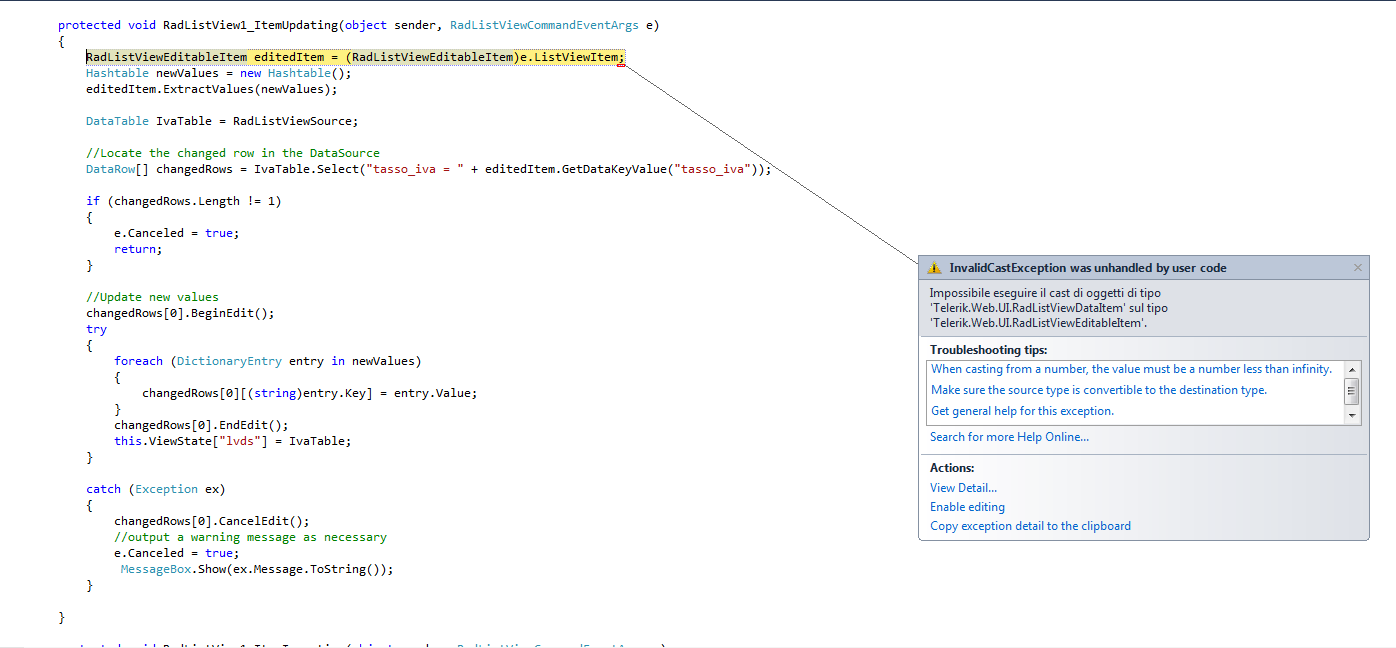
...and this is all the code
using System;
using System.Collections.Generic;
using System.Linq;
using System.Web;
using System.Web.UI;
using System.Web.UI.WebControls;
using System.Web.UI.Adapters;
using Oracle.DataAccess.Client;
using Telerik.OpenAccess.Config.Sql;
using System.Data;
using Telerik.Web.UI;
using System.Configuration;
using System.IO;
using System.Collections;
namespace WebApplication1
{
public partial class WebForm1 : System.Web.UI.Page
{
private OracleConnection conn = new OracleConnection();
string ConnString= "data source=OG_DB2;password=ghid101;user id=OG_GHIDONI";
string sql = " select tasso_iva, data_inizio, data_fine from tassi_iva group by tasso_iva, data_inizio, data_fine";
protected void Page_Load(object sender, EventArgs e)
{
string ConnString = "data source=OG_DB2;password=ghid101;user id=OG_GHIDONI";
conn.ConnectionString = ConnString; //ccc associo la connection string con un connection object
try
{
conn.Open(); //ccc apro la connessione
}
catch (Exception ex) // ccc catches any error
{
MessageBox.Show(ex.Message.ToString());
}
}
protected void Page_Init(object sender, EventArgs e)
{
RadListView1.NeedDataSource += (s, args) =>
{
RadListView1.DataSource = GetDataSet(sql);
// ccc il max per selezionare prima quello con la data d'inizio maggiore non gli piace! Trovare altra sol!!
};
}
protected void RadListView1_ItemUpdating(object sender, RadListViewCommandEventArgs e)
{
RadListViewEditableItem editedItem = (RadListViewEditableItem)e.ListViewItem;
Hashtable newValues = new Hashtable();
editedItem.ExtractValues(newValues);
DataTable IvaTable = RadListViewSource;
//Locate the changed row in the DataSource
DataRow[] changedRows = IvaTable.Select("tasso_iva = " + editedItem.GetDataKeyValue("tasso_iva"));
if (changedRows.Length != 1)
{
e.Canceled = true;
return;
}
//Update new values
changedRows[0].BeginEdit();
try
{
foreach (DictionaryEntry entry in newValues)
{
changedRows[0][(string)entry.Key] = entry.Value;
}
changedRows[0].EndEdit();
this.ViewState["lvds"] = IvaTable;
}
catch (Exception ex)
{
changedRows[0].CancelEdit();
//output a warning message as necessary
e.Canceled = true;
MessageBox.Show(ex.Message.ToString());
}
}
protected void RadListView1_ItemInserting(object sender, RadListViewCommandEventArgs e)
{
RadListViewEditableItem insertedItem = (RadListViewEditableItem)e.ListViewItem;
Hashtable newValues = new Hashtable();
insertedItem.ExtractValues(newValues);
DataTable IvaTable = RadListViewSource;
DataRow newRow = IvaTable.NewRow();
try
{
newRow["tasso_iva"] = IvaTable.Rows.Count + 1;
foreach (DictionaryEntry entry in newValues)
{
newRow[(string)entry.Key] = entry.Value;
}
IvaTable.Rows.Add(newRow);
this.ViewState["lvds"] = IvaTable;
}
catch (Exception ex)
{
//output a warning message as necessary
MessageBox.Show(ex.Message.ToString());
e.Canceled = true;
}
}
protected void RadListView1_ItemDeleting(object sender, RadListViewCommandEventArgs e)
{
try
{
DataTable IvaTable = this.RadListViewSource;
DataColumn pk = IvaTable.Columns["tasso_iva"];
DataColumn[] pkeys = new DataColumn[1];
pkeys[0] = pk;
IvaTable.PrimaryKey = pkeys;
int id = int.Parse(e.CommandArgument.ToString());
IvaTable.Rows.Find(id).Delete();
IvaTable.AcceptChanges();
this.ViewState["lvds"] = IvaTable;
}
catch (Exception ex)
{
//output a warning message as necessary
MessageBox.Show(ex.Message.ToString());
e.Canceled = true;
}
}
private DataTable RadListViewSource
{
get
{
Object obj = ViewState["lvds"];
if (obj != null)
{
return (DataTable)obj;
}
else
{
DataTable listViewDataSource;
listViewDataSource = new DataTable();
OracleDataAdapter adapter = new OracleDataAdapter(sql, ConnString);
adapter.Fill(listViewDataSource);
ViewState["lvds"] = listViewDataSource;
return listViewDataSource;
}
}
}
protected void RadListView1_NeedDataSource(object source, Telerik.Web.UI.RadListViewNeedDataSourceEventArgs e)
{
RadListView1.DataSource = GetDataSet(" select tasso_iva, max(data_inizio), data_fine from tassi_iva group by tasso_iva, data_inizio, data_fine");
//+ "where data_inizio = to_date('01.01.01', 'DD.MM.YY')";
}
public DataSet GetDataSet(string query)
{
string ConnString = "data source=OG_DB2;password=ghid101;user id=OG_GHIDONI";
//string qry = " select tasso_iva, max(data_inizio), data_fine from tassi_iva group by tasso_iva, data_inizio, data_fine";
OracleDataAdapter adapter = new OracleDataAdapter(query, ConnString);
DataSet ds = new DataSet();
try
{
adapter.Fill(ds, "tassi_iva");
}
finally
{
conn.Close();
}
return ds;
}
}
}
Somebody can help me?
Thanks a lot
pleas I need your help...
This is the error
...and this is all the code
using System;
using System.Collections.Generic;
using System.Linq;
using System.Web;
using System.Web.UI;
using System.Web.UI.WebControls;
using System.Web.UI.Adapters;
using Oracle.DataAccess.Client;
using Telerik.OpenAccess.Config.Sql;
using System.Data;
using Telerik.Web.UI;
using System.Configuration;
using System.IO;
using System.Collections;
namespace WebApplication1
{
public partial class WebForm1 : System.Web.UI.Page
{
private OracleConnection conn = new OracleConnection();
string ConnString= "data source=OG_DB2;password=ghid101;user id=OG_GHIDONI";
string sql = " select tasso_iva, data_inizio, data_fine from tassi_iva group by tasso_iva, data_inizio, data_fine";
protected void Page_Load(object sender, EventArgs e)
{
string ConnString = "data source=OG_DB2;password=ghid101;user id=OG_GHIDONI";
conn.ConnectionString = ConnString; //ccc associo la connection string con un connection object
try
{
conn.Open(); //ccc apro la connessione
}
catch (Exception ex) // ccc catches any error
{
MessageBox.Show(ex.Message.ToString());
}
}
protected void Page_Init(object sender, EventArgs e)
{
RadListView1.NeedDataSource += (s, args) =>
{
RadListView1.DataSource = GetDataSet(sql);
// ccc il max per selezionare prima quello con la data d'inizio maggiore non gli piace! Trovare altra sol!!
};
}
protected void RadListView1_ItemUpdating(object sender, RadListViewCommandEventArgs e)
{
RadListViewEditableItem editedItem = (RadListViewEditableItem)e.ListViewItem;
Hashtable newValues = new Hashtable();
editedItem.ExtractValues(newValues);
DataTable IvaTable = RadListViewSource;
//Locate the changed row in the DataSource
DataRow[] changedRows = IvaTable.Select("tasso_iva = " + editedItem.GetDataKeyValue("tasso_iva"));
if (changedRows.Length != 1)
{
e.Canceled = true;
return;
}
//Update new values
changedRows[0].BeginEdit();
try
{
foreach (DictionaryEntry entry in newValues)
{
changedRows[0][(string)entry.Key] = entry.Value;
}
changedRows[0].EndEdit();
this.ViewState["lvds"] = IvaTable;
}
catch (Exception ex)
{
changedRows[0].CancelEdit();
//output a warning message as necessary
e.Canceled = true;
MessageBox.Show(ex.Message.ToString());
}
}
protected void RadListView1_ItemInserting(object sender, RadListViewCommandEventArgs e)
{
RadListViewEditableItem insertedItem = (RadListViewEditableItem)e.ListViewItem;
Hashtable newValues = new Hashtable();
insertedItem.ExtractValues(newValues);
DataTable IvaTable = RadListViewSource;
DataRow newRow = IvaTable.NewRow();
try
{
newRow["tasso_iva"] = IvaTable.Rows.Count + 1;
foreach (DictionaryEntry entry in newValues)
{
newRow[(string)entry.Key] = entry.Value;
}
IvaTable.Rows.Add(newRow);
this.ViewState["lvds"] = IvaTable;
}
catch (Exception ex)
{
//output a warning message as necessary
MessageBox.Show(ex.Message.ToString());
e.Canceled = true;
}
}
protected void RadListView1_ItemDeleting(object sender, RadListViewCommandEventArgs e)
{
try
{
DataTable IvaTable = this.RadListViewSource;
DataColumn pk = IvaTable.Columns["tasso_iva"];
DataColumn[] pkeys = new DataColumn[1];
pkeys[0] = pk;
IvaTable.PrimaryKey = pkeys;
int id = int.Parse(e.CommandArgument.ToString());
IvaTable.Rows.Find(id).Delete();
IvaTable.AcceptChanges();
this.ViewState["lvds"] = IvaTable;
}
catch (Exception ex)
{
//output a warning message as necessary
MessageBox.Show(ex.Message.ToString());
e.Canceled = true;
}
}
private DataTable RadListViewSource
{
get
{
Object obj = ViewState["lvds"];
if (obj != null)
{
return (DataTable)obj;
}
else
{
DataTable listViewDataSource;
listViewDataSource = new DataTable();
OracleDataAdapter adapter = new OracleDataAdapter(sql, ConnString);
adapter.Fill(listViewDataSource);
ViewState["lvds"] = listViewDataSource;
return listViewDataSource;
}
}
}
protected void RadListView1_NeedDataSource(object source, Telerik.Web.UI.RadListViewNeedDataSourceEventArgs e)
{
RadListView1.DataSource = GetDataSet(" select tasso_iva, max(data_inizio), data_fine from tassi_iva group by tasso_iva, data_inizio, data_fine");
//+ "where data_inizio = to_date('01.01.01', 'DD.MM.YY')";
}
public DataSet GetDataSet(string query)
{
string ConnString = "data source=OG_DB2;password=ghid101;user id=OG_GHIDONI";
//string qry = " select tasso_iva, max(data_inizio), data_fine from tassi_iva group by tasso_iva, data_inizio, data_fine";
OracleDataAdapter adapter = new OracleDataAdapter(query, ConnString);
DataSet ds = new DataSet();
try
{
adapter.Fill(ds, "tassi_iva");
}
finally
{
conn.Close();
}
return ds;
}
}
}
Somebody can help me?
Thanks a lot
1 answer
285 views
I have a RadGrid with a GridClientDeleteColumn. The table also has a ItemTemplate with a RadNumericTextBox so values can be entered and udpate a total in the footer client side just like this example.
http://mono.telerik.com/Controls/Examples/Integration/GridAndInput/DefaultCS.aspx?product=grid
However, because of the DeleteColumn, whenever a user enters a new value in the TextBox on a row, and hits enter, the row gets deleted, it's firing off the delete event? Why? If I remove the DeleteColumn, of course, this no longer happens.
I tried adding OnClientEvent OnKeyPress event handler to capture the enter being pressed but can't find the documentation to tell me what the 'isEnterKey' property name is that shows in the debugger
Can I disable this somehow so the delete doesn't occur on pressing the enter key and the user has to click the delete button?
<telerik:GridClientDeleteColumn ButtonType="ImageButton" HeaderStyle-Width="25px" ItemStyle-Width="25px" />
...
http://mono.telerik.com/Controls/Examples/Integration/GridAndInput/DefaultCS.aspx?product=grid
However, because of the DeleteColumn, whenever a user enters a new value in the TextBox on a row, and hits enter, the row gets deleted, it's firing off the delete event? Why? If I remove the DeleteColumn, of course, this no longer happens.
I tried adding OnClientEvent OnKeyPress event handler to capture the enter being pressed but can't find the documentation to tell me what the 'isEnterKey' property name is that shows in the debugger
Can I disable this somehow so the delete doesn't occur on pressing the enter key and the user has to click the delete button?
<telerik:GridClientDeleteColumn ButtonType="ImageButton" HeaderStyle-Width="25px" ItemStyle-Width="25px" />
...
<telerik:GridTemplateColumn UniqueName="awardCol" DataField="Amount" HeaderText="Amount">
<ItemTemplate>
<telerik:RadNumericTextBox ID="amountEntryField" DataType="System.Double" MinValue="1.0" Value='<%# Eval("Amount") %>' runat="server">
<ClientEvents OnBlur="amtBlur" OnFocus="amtFocus" OnKeyPress="updateAmount" />
</telerik:RadNumericTextBox>
</ItemTemplate>
Tsvetina
Telerik team

answered
on
06 Sep 2011
1 answer
125 views
We are using Radeditor export to PDF feature to generate a Radeditor contents into PDF format and saving it to sharepoint document library.
We wanted to make reverse of this functionlity i.e wanted to replace a Radeditor body with PDF contents so that user can edit contents and genrate a new PDF again.
How can we implement this scenario.
We wanted to make reverse of this functionlity i.e wanted to replace a Radeditor body with PDF contents so that user can edit contents and genrate a new PDF again.
How can we implement this scenario.

Rumen
Telerik team
answered
on
06 Sep 2011
1 answer
76 views
I have a Radcombobox that is bind from the database.
i have put the following properties TRUE
ShowMoreResultsBox=true
EnableVirtualScrolling=true
EnableLoadOnDemand=true
ItemPerRequest=20
it works fine.
Suppose i add a Employee record. on the Employee add form there is a Radcombobox that have the Cities filled with it from the City table in database. when i click on the Radcombobox with each request next 20 cities are shown, its fine. Selected city suppose "California" is selected and inserted in database.
now when i come in edit mode i write down the code to select the california that was already added in database.
RadCombobox1.SelectedValue=20; //California State ID from the database.
but it is not shown by default unless we click on the radCombobox.
I want that Seleceted state should be displayed by default and as well as pagination should be worked with above mentioned properties.
i have put the following properties TRUE
ShowMoreResultsBox=true
EnableVirtualScrolling=true
EnableLoadOnDemand=true
ItemPerRequest=20
it works fine.
Suppose i add a Employee record. on the Employee add form there is a Radcombobox that have the Cities filled with it from the City table in database. when i click on the Radcombobox with each request next 20 cities are shown, its fine. Selected city suppose "California" is selected and inserted in database.
now when i come in edit mode i write down the code to select the california that was already added in database.
RadCombobox1.SelectedValue=20; //California State ID from the database.
but it is not shown by default unless we click on the radCombobox.
I want that Seleceted state should be displayed by default and as well as pagination should be worked with above mentioned properties.
Ivana
Telerik team
answered
on
06 Sep 2011
1 answer
91 views
Hi there,
At the moment I am working with recourses. I have 2 agenda's in my scheduler now. But I have a problem. I am working with schemes. And one person has another scheme than another person. When a person clicks on a timeslot I have to check if the person create an appointment and not outside of that scheme. How can I get the timeslot resource key when clicking on a timeslot? I need it in C#.
I hope someone can help me.
Thanks in advance.
Sander
At the moment I am working with recourses. I have 2 agenda's in my scheduler now. But I have a problem. I am working with schemes. And one person has another scheme than another person. When a person clicks on a timeslot I have to check if the person create an appointment and not outside of that scheme. How can I get the timeslot resource key when clicking on a timeslot? I need it in C#.
I hope someone can help me.
Thanks in advance.
Sander
Ivana
Telerik team
answered
on
06 Sep 2011





