or
0 answers
177 views
Hi,
I have some questions based on the below sample usercontrol code which contains a RadEditor control:
1) By trying to change the writing direction (RTL TO LTR or vise versa), Only by selecting the required paragraph and click on the required direction, the paragraph changes its direction. I need to enable the user to click the required direction and the cursor must be displayed in the required place, for example, In case there is no content on the RadEditor or the user clicked Enter to begin a new paragraph, if the user click RTL button, then the cursor must be displayed in the right (even if there is no content yet).
2) The same issue as 1, I face with the bullet list. I need to clcik the bullet list button and the first bullet must be displayed, even if there is no content (In the current case, I need to type at least one letter and put the cursor in the begining of the row and to click the bullet list button).
3) By caaling the user control within a FormView (Or any other control that needs DataSource), and trying to databind the EditorContent property as below, then, the content doesn't displayed, why? and how can I databind the radeditor control in my case?
My user control:
ascx:
<%@ Control Language="C#" AutoEventWireup="true" CodeFile="DefaultUserControl.ascx.cs" Inherits="Tmonavot.General_App_Controls_RadEditor_DefaultUserControl" %><link href="~/General/App/Controls/RadEditor/Style/Editor_RTL.css" rel="stylesheet" type="text/css" runat="server" id="EditorRtl" /><style type="text/css"> .reTool .Right-to-Left { background-image: url('<%= RTLIconUrl %>'); } .reTool .Left-to-Right { background-image: url('<%= LTRIconUrl %>'); }</style><asp:Panel ID="ContentPanel" runat="server" Direction="LeftToRight" HorizontalAlign="Left" Width="100%"> <telerik:RadEditor runat="server" ID="CntntRadEditor" Skin="Default" Height="400px" Width="680px" style="z-index:1001;"> </telerik:RadEditor></asp:Panel><telerik:RadScriptBlock ID="dd" runat="server"> <script type="text/javascript"> Telerik.Web.UI.Editor.CommandList["Right-to-Left"] = function (commandName, editor, args) { var oElem = editor.getSelectedElement(); if (oElem && oElem.tagName == "P") { oElem.setAttribute("dir", "rtl"); oElem.style.textAlign = "right"; } else if (editor.getSelectionHtml())//There is some selection { var toPaste = "<p dir='rtl' style='text-align: right'>" + editor.getSelectionHtml() + "</p>"; editor.pasteHtml(toPaste); } } Telerik.Web.UI.Editor.CommandList["Left-to-Right"] = function (commandName, editor, args) { var oElem = editor.getSelectedElement(); if (oElem && oElem.tagName == "P") { oElem.setAttribute("dir", "ltr"); oElem.style.textAlign = "left"; } else if (editor.getSelectionHtml())//There is some selection { var toPaste = "<p dir='ltr' style='text-align: left'>" + editor.getSelectionHtml() + "</p>"; editor.pasteHtml(toPaste); } } </script> </telerik:RadScriptBlock>usercontrol c#:
using System;using Telerik.Web.UI;using System.Web.UI.WebControls;namespace Tmonavot{ public partial class General_App_Controls_RadEditor_DefaultUserControl : System.Web.UI.UserControl { public string RTLIconUrl = System.Web.VirtualPathUtility.ToAbsolute("~/General/App/Controls/RadEditor/CustomTools/Direction/RTL.png"); public string LTRIconUrl = System.Web.VirtualPathUtility.ToAbsolute("~/General/App/Controls/RadEditor/CustomTools/Direction/LTR.png"); protected void Page_Load(object sender, EventArgs e) { //Set the style for the PContentRadEditor content if (!IsPostBack) { CntntRadEditor.DialogsCssFile = "~/General/App/Controls/RadEditor/Style/RadEditor_Dialogs_RTL.css"; CntntRadEditor.ContentAreaCssFile = "~/General/App/Controls/RadEditor/Style/EditorContentArea_RTL.css"; //Set the RadEditor content and tabindex CntntRadEditor.Content = this.EditorContent; } //(FileUrlFileSelectorUserControl1.FindControl("FolderNameLabel") as Label).Text = "ContactUs";// (FileUrlFileSelectorUserControl1.FindControl("FileUrlRadTextBox") as RadTextBox).Text.ToString().Replace("~/Pages/", ""); if (Resources.MngResource.ContentFloat.ToString().Equals("left")) { switchToLTR(); } else { switchToRTL(); } } private void switchToLTR() { ContentPanel.Direction = ContentDirection.LeftToRight; CntntRadEditor.DialogsCssFile = ""; CntntRadEditor.ContentAreaCssFile = ""; CntntRadEditor.CssFiles.Add(new EditorCssFile("~/General/App/Controls/RadEditor/Style/EditorContentArea_LTR.css")); EditorRtl.Attributes["Href"] = string.Empty; } private void switchToRTL() { ContentPanel.Direction = ContentDirection.RightToLeft; CntntRadEditor.DialogsCssFile = "~/General/App/Controls/RadEditor/Style/RadEditor_Dialogs_RTL.css"; CntntRadEditor.ContentAreaCssFile = "~/General/App/Controls/RadEditor/Style/EditorContentArea_RTL.css"; CntntRadEditor.CssFiles.Add(new EditorCssFile("~/General/App/Controls/RadEditor/Style/EditorContentArea_RTL.css")); EditorRtl.Attributes["Href"] = "General/App/Controls/RadEditor/Style/Editor_RTL.css"; } public string EditorContent { get { //string s = Convert.ToString(ViewState["EditorContent"]); return Convert.ToString(ViewState["EditorContent"]); } set { ViewState["EditorContent"] = value; } } }}
Sample formview control:
<asp:SqlDataSource ID="SqlDataSource1" runat="server" ConnectionString="<%$ ConnectionStrings:GeneralConnectionString %>" SelectCommand="SELECT * FROM [gPagesContent] WHERE ([PageID] = 41)"> </asp:SqlDataSource> <asp:FormView ID="FormView1" runat="server" DataKeyNames="PageID" DataSourceID="SqlDataSource1" Width="100%"> <ItemTemplate> <table width="100%" cellpadding="0" cellspacing="0" border="0"> <tr> <td valign="top" width="400"> <asp:Label ID="Label2" runat="server" Text="By displaying content using Label:" ></asp:Label> </td> <td valign="top" width="*"> <asp:Label ID="Label1" runat="server" Text='<%# Eval("PContent", "{0}") %>'></asp:Label> </td> </tr> <tr> <td valign="top" width="400"> <asp:Label ID="ContentLabel1" runat="server" Text="By displaying content using RadEditor:" ></asp:Label> </td> <td valign="top" width="*"> <uc1:DefaultUserControl ID="DefaultUserControl1" EditorContent='<%# Eval("PContent", "{0}") %>' runat="server" /> </td> </tr> </table> </ItemTemplate> </asp:FormView>
Please, I need your help,
Regards,
Bader
6 answers
383 views
Hello ,
I have a RadMenu in my web application. For one of the Rad Menu Item, I would like to open the form in new window. I have tried the Target="_blank". It is not working. I also tried through javascript
function clickHandler(sender, eventArgs)
{
if (eventArgs.item.Text == "LunchBreak")
{
//open a pre-defined window from the RadWindowManager's
//Windows collection
radopen(null,"Window1");
//Cancel the postback
return false;
}
}
<telerik:RadMenu ID="RadMenu1" runat="server" orientation="Horizontal" Skin="Windows7" OnClientItemClicking="clickHandler"
EnableRoundedCorners="True" EnableShadows="True" Height="39px" Width="100%"
CausesValidation="False">
<Items>
<telerik:RadMenuItem runat="server" Text="Home" ImageUrl="~/Images/Home.png"
NavigateUrl="~/frm_HomePage.aspx">
</telerik:RadMenuItem>
<telerik:RadMenuItem runat="server" Text="Login" ImageUrl="~/Images/Unlock.png" PostBack="False" Height="35px"
NavigateUrl="">
<Items>
<telerik:RadMenuItem runat="server" Text=" Driver Login" Value="Login"
NavigateUrl="~/frm_DriversLogin.aspx" ImageUrl="~/Images/Users-2.png" Height="35px">
</telerik:RadMenuItem>
</Items>
</telerik:RadMenuItem>
<telerik:RadMenuItem runat="server" Text="Trip Information" PostBack="False"
ImageUrl="~/Images/Users-Details.png" >
<Items>
<telerik:RadMenuItem runat="server" NavigateUrl="~/frm_RouteDetails.aspx"
Text="View/Edit Trips" Value="View Trips" ImageUrl="~/Images/Worker-Edit.png" Height="35px">
</telerik:RadMenuItem>
</Items>
</telerik:RadMenuItem>
<telerik:RadMenuItem runat="server" Text="Break" PostBack="False"
ImageUrl="~/Images/ClockNew.png" >
<Items>
<telerik:RadMenuItem runat="server" Text="LunchBreak" Target="_blank"
Value="Lunch Break" ImageUrl="~/Images/Worker-Time.png" Height="35px">
</telerik:RadMenuItem>
<telerik:RadMenuItem runat="server" Text="Break1" Target="_blank"
Value="Break 1" ImageUrl="~/Images/Worker-Time.png" Height="35px">
</telerik:RadMenuItem>
<telerik:RadMenuItem runat="server" Text="Break2" Target="_blank"
Value="Break 2" ImageUrl="~/Images/Worker-Time.png" Height="35px">
</telerik:RadMenuItem>
<telerik:RadMenuItem runat="server" Text="Break3" Target="_blank"
Value="Break 3" ImageUrl="~/Images/Worker-Time.png" Height="35px">
</telerik:RadMenuItem>
</Items>
</telerik:RadMenuItem>
</Items>
</telerik:RadMenu>
<telerik:RadWindowManager ID=RadWindowManager1 runat=server>
<Windows>
<telerik:RadWindow ID=Window1 runat=server NavigateUrl="frm_BreakTime.aspx" />
</Windows>
</telerik:RadWindowManager>
The Run time error I am getting.......
Microsoft JScript runtime error: 'item.Text' is null or not an object
Thanks
I have a RadMenu in my web application. For one of the Rad Menu Item, I would like to open the form in new window. I have tried the Target="_blank". It is not working. I also tried through javascript
function clickHandler(sender, eventArgs)
{
if (eventArgs.item.Text == "LunchBreak")
{
//open a pre-defined window from the RadWindowManager's
//Windows collection
radopen(null,"Window1");
//Cancel the postback
return false;
}
}
<telerik:RadMenu ID="RadMenu1" runat="server" orientation="Horizontal" Skin="Windows7" OnClientItemClicking="clickHandler"
EnableRoundedCorners="True" EnableShadows="True" Height="39px" Width="100%"
CausesValidation="False">
<Items>
<telerik:RadMenuItem runat="server" Text="Home" ImageUrl="~/Images/Home.png"
NavigateUrl="~/frm_HomePage.aspx">
</telerik:RadMenuItem>
<telerik:RadMenuItem runat="server" Text="Login" ImageUrl="~/Images/Unlock.png" PostBack="False" Height="35px"
NavigateUrl="">
<Items>
<telerik:RadMenuItem runat="server" Text=" Driver Login" Value="Login"
NavigateUrl="~/frm_DriversLogin.aspx" ImageUrl="~/Images/Users-2.png" Height="35px">
</telerik:RadMenuItem>
</Items>
</telerik:RadMenuItem>
<telerik:RadMenuItem runat="server" Text="Trip Information" PostBack="False"
ImageUrl="~/Images/Users-Details.png" >
<Items>
<telerik:RadMenuItem runat="server" NavigateUrl="~/frm_RouteDetails.aspx"
Text="View/Edit Trips" Value="View Trips" ImageUrl="~/Images/Worker-Edit.png" Height="35px">
</telerik:RadMenuItem>
</Items>
</telerik:RadMenuItem>
<telerik:RadMenuItem runat="server" Text="Break" PostBack="False"
ImageUrl="~/Images/ClockNew.png" >
<Items>
<telerik:RadMenuItem runat="server" Text="LunchBreak" Target="_blank"
Value="Lunch Break" ImageUrl="~/Images/Worker-Time.png" Height="35px">
</telerik:RadMenuItem>
<telerik:RadMenuItem runat="server" Text="Break1" Target="_blank"
Value="Break 1" ImageUrl="~/Images/Worker-Time.png" Height="35px">
</telerik:RadMenuItem>
<telerik:RadMenuItem runat="server" Text="Break2" Target="_blank"
Value="Break 2" ImageUrl="~/Images/Worker-Time.png" Height="35px">
</telerik:RadMenuItem>
<telerik:RadMenuItem runat="server" Text="Break3" Target="_blank"
Value="Break 3" ImageUrl="~/Images/Worker-Time.png" Height="35px">
</telerik:RadMenuItem>
</Items>
</telerik:RadMenuItem>
</Items>
</telerik:RadMenu>
<telerik:RadWindowManager ID=RadWindowManager1 runat=server>
<Windows>
<telerik:RadWindow ID=Window1 runat=server NavigateUrl="frm_BreakTime.aspx" />
</Windows>
</telerik:RadWindowManager>
The Run time error I am getting.......
Microsoft JScript runtime error: 'item.Text' is null or not an object
Thanks
8 answers
414 views
Hi,
I'm using an "AppointmentTemplate" to display my appointments. However in Timeline view (also in Month/Week view) only part of my templates is visible and the rest is cut off. This is due to the fact that the height of the "appointment" cells is fix.
Is there anyway I can modify the size of the "appointment" cells.
Also, I'm grouping by a resource. How can I specify the height of the groups in Timeline view so that all my cells are of the same height.
Any help will be greatly appreciated for the above.
Thanks ...
I'm using an "AppointmentTemplate" to display my appointments. However in Timeline view (also in Month/Week view) only part of my templates is visible and the rest is cut off. This is due to the fact that the height of the "appointment" cells is fix.
Is there anyway I can modify the size of the "appointment" cells.
Also, I'm grouping by a resource. How can I specify the height of the groups in Timeline view so that all my cells are of the same height.
Any help will be greatly appreciated for the above.
Thanks ...

Kate
Telerik team

answered
on
12 Jan 2012
8 answers
287 views
Good morning,
I'm trying to make a radGrid with an nested part that is multipage (much like this example, but with forms in the multipages that interact with the database(which aren't implemented yet)). Since Wednesday, I get the following error when I try to expand a row:
Microsoft JScript runtime error: Sys.WebForms.PageRequestManagerServerErrorException: Script control 'RadTabStrip1' is not a registered script control. Script controls must be registered using RegisterScriptControl() before calling RegisterScriptDescriptors().
Parameter name: scriptControl
The page used to work, without any problem, displaying the nested view correctly. I tried to check the differences in the code (including the code behind) to find what could have caused the change and honestly, I'm stumped. Any help would be GREATLY appreciated.
Here's the code for my grid:
Thanks!
I'm trying to make a radGrid with an nested part that is multipage (much like this example, but with forms in the multipages that interact with the database(which aren't implemented yet)). Since Wednesday, I get the following error when I try to expand a row:
Microsoft JScript runtime error: Sys.WebForms.PageRequestManagerServerErrorException: Script control 'RadTabStrip1' is not a registered script control. Script controls must be registered using RegisterScriptControl() before calling RegisterScriptDescriptors().
Parameter name: scriptControl
The page used to work, without any problem, displaying the nested view correctly. I tried to check the differences in the code (including the code behind) to find what could have caused the change and honestly, I'm stumped. Any help would be GREATLY appreciated.
Here's the code for my grid:
| <telerik:RadGrid ID="RadGrid1" runat="server" AllowPaging="True" DataSourceID="obsDetailsLogclByCat" |
| GridLines="None" Skin="Vista" AllowAutomaticUpdates="True" AllowMultiRowSelection="false" |
| ShowGroupPanel="true" AllowAutomaticInserts="True" AllowAutomaticDeletes="True"> |
| <MasterTableView DataSourceID="obsDetailsLogclByCat" GroupLoadMode="Server" CommandItemDisplay="Top" |
| CommandItemSettings-AddNewRecordText="Ajouter un nouveau logiciel" EditFormSettings-ColumnNumber="2" |
| AllowAutomaticUpdates="True" AllowAutomaticInserts="True" CommandItemStyle-ForeColor="White" |
| AllowAutomaticDeletes="True"> |
| <Columns> |
| <telerik:GridButtonColumn ConfirmText="Delete this product?" ConfirmDialogType="RadWindow" |
| ConfirmTitle="Delete" ButtonType="ImageButton" CommandName="Delete" Text="Delete" |
| UniqueName="DeleteColumn"> |
| <ItemStyle HorizontalAlign="Center" CssClass="MyImageButton" /> |
| </telerik:GridButtonColumn> |
| </Columns> |
| <NestedViewSettings DataSourceID="obsDetailsLogclByCat"> |
| <ParentTableRelation> |
| <telerik:GridRelationFields DetailKeyField="ID" MasterKeyField="ID" /> |
| </ParentTableRelation> |
| </NestedViewSettings> |
| <NestedViewTemplate> |
| <asp:panel runat="server" id="InnerContainer" cssclass="viewWrap" visible="false"> |
| <telerik:RadAjaxPanel ID="rapMultiPage" runat="server" Width="1100px"> |
| <telerik:RadTabStrip ID="RadTabStrip1" runat="server" MultiPageID="RadMultiPage1" |
| SelectedIndex="0" Skin="Vista" RegisterWithScriptManager="true" ClickSelectedTab="True" |
| CausesValidation="True"> |
| <Tabs> |
| <telerik:RadTab PageViewID="RadPageView1" Selected="True" Text="Détails du logiciel"> |
| </telerik:RadTab> |
| <telerik:RadTab PageViewID="RadPageView3" Text="Certification"> |
| </telerik:RadTab> |
| <telerik:RadTab PageViewID="RadPageView4" Text="Historique"> |
| </telerik:RadTab> |
| <telerik:RadTab PageViewID="RadPageView5" Text="Déplacement / copie"> |
| </telerik:RadTab> |
| </Tabs> |
| </telerik:RadTabStrip> |
| <telerik:RadMultiPage ID="RadMultiPage1" runat="server" SelectedIndex="0"> |
| <telerik:RadPageView ID="RadPageView1" runat="server"> |
| <div class="contactWrap"> |
| <h1> |
| Détails du logiciel</h1> |
| <br /> |
| <asp:Image ID="Image1" runat="server" ImageUrl="Images/duplicate.gif" /> |
| </div> |
| </telerik:RadPageView> |
| <telerik:RadPageView ID="RadPageView3" runat="server"> |
| <div class="contactWrap"> |
| <h1> |
| Certification</h1> |
| <br /> |
| <asp:HyperLink ID="HyperLink1" runat="server" NavigateUrl="~/page.aspx">Envoi vers un autre site</asp:HyperLink> |
| </div> |
| </telerik:RadPageView> |
| <telerik:RadPageView ID="RadPageView4" runat="server"> |
| <div class="contactWrap"> |
| <h1> |
| Historique</h1> |
| <br /> |
| Page Content |
| </div> |
| </telerik:RadPageView> |
| <telerik:RadPageView ID="RadPageView5" runat="server"> |
| <div class="contactWrap"> |
| <h1> |
| Déplacement / copie</h1> |
| <br /> |
| <asp:Button ID="Button1" runat="server" Text="Refresh" /> |
| <br /> |
| <telerik:RadTextBox ID="RadTextBox1" runat="server"> |
| </telerik:RadTextBox> |
| <br /> |
| <br /> |
| <telerik:RadListBox ID="RadListBox1" runat="server" AllowAutomaticUpdates="True" |
| AllowDelete="True" AllowReorder="True"> |
| </telerik:RadListBox> |
| </div> |
| </telerik:RadPageView> |
| </telerik:RadMultiPage> |
| </telerik:RadAjaxPanel> |
| </asp:panel> |
| </NestedViewTemplate> |
| <CommandItemSettings AddNewRecordText="Ajouter un nouveau logiciel" /> |
| <EditFormSettings ColumnNumber="2"> |
| </EditFormSettings> |
| </MasterTableView> |
| </telerik:RadGrid> |
Thanks!
2 answers
121 views
Hi
While i was exporting the radgrid to excel and work export tool bar is also including. i want to avoid the export toolbar in excel sheet.
While i was using ExportOnlyData="true" that is not including. But in my case i have used linkbutton in the grid so if i use ExportOnlyData="true" link button value is also not including. Any other way to avoid export tool bar in excel.
While i was exporting the radgrid to excel and work export tool bar is also including. i want to avoid the export toolbar in excel sheet.
While i was using ExportOnlyData="true" that is not including. But in my case i have used linkbutton in the grid so if i use ExportOnlyData="true" link button value is also not including. Any other way to avoid export tool bar in excel.
Nithya Rani
Top achievements
 Rank 1
Rank 1
answered
on
12 Jan 2012
1 answer
116 views
Hi all,
I want to place checkbox row in radgrid ..... with header also in checkbox to select and deselect rows... how can i do this plz help me to do this.....?????
I want to place checkbox row in radgrid ..... with header also in checkbox to select and deselect rows... how can i do this plz help me to do this.....?????

Shinu
Top achievements
 Rank 2
Rank 2
answered
on
12 Jan 2012
2 answers
154 views
Hi,
I want to disallow user from keying text in the combo box which contains checkbox. Because this will cause error to happen.
The error message is as below:
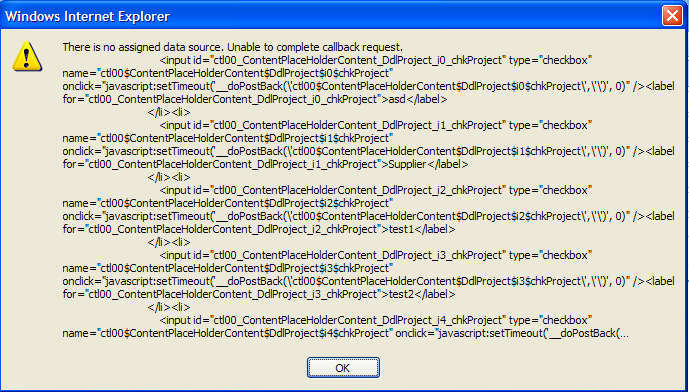
I have try to set AllowCustomText="false" but it seems that it do not take action when there is checkbox inside the combobox.
Below is is my sample code
Does anyone has any idea? Help Please!!
I want to disallow user from keying text in the combo box which contains checkbox. Because this will cause error to happen.
The error message is as below:
I have try to set AllowCustomText="false" but it seems that it do not take action when there is checkbox inside the combobox.
Below is is my sample code
<ajax:RadComboBox ID="DdlProject" runat="server" Width="240px" EnableLoadOnDemand="True" Text=" " AllowCustomText="false" EnableVirtualScrolling="true" EnableAutomaticLoadOnDemand="true"> <ItemTemplate> <asp:CheckBox runat="server" ID="chkProject" oncheckedchanged="chk_CheckedChangedProject" AutoPostBack="true" Text='<%#Eval("ProjectName")%>' /> </ItemTemplate> </ajax:RadComboBox>dsProject = getGetProject(mstrCompNo) DdlProject.DataSource = dsProject DdlProject.DataTextField = "ProjectId" DdlProject.DataValueField = "ProjectName" DdlProject.DataBind()Does anyone has any idea? Help Please!!
johnson lim
Top achievements
Rank 1
Rank 1
answered
on
12 Jan 2012
1 answer
105 views
Render Control does not create connecting lines in treeview.
Thanks
Tom Rozzi
Thanks
Tom Rozzi

3 answers
146 views
my radcombobox view is not right. Please check the following attachment.
i use telerik v.2011.1.315.35
i use telerik v.2011.1.315.35
1 answer
87 views
I just used a Hex Editor to check which version of jQuery was in the 2011-11-14 Telerik.Web.UI.dll that I'm using (v.2011.2.915.35). It appears to be Version 1.5 of jQuery.
The jQuery website states that the latest version available is 1.7.1.
When do you plan to incorporate this into your DLL?
Robert
The jQuery website states that the latest version available is 1.7.1.
When do you plan to incorporate this into your DLL?
Robert
Iana Tsolova
Telerik team
answered
on
12 Jan 2012





