or
5 answers
150 views
I have large amount of data and I’m trying out the example found here: http://demos.telerik.com/clientbinding3/
I managed to get it working with my data and filtering works, but I can’t seem to get it to change the pages. It also doesn’t update the “Time to get data” or “Time to update Grid”.
I’m wondering if it’s not getting the “ClientBindingExample.js”, because if I comment the javascript out of my ASPX file, it still loads the grid fine.
Is there something I could be missing? I’m sure it has to be easy, but I don't see it. :(
Thanks!

3 answers
211 views
Hello,
While working on a Grid we integrated in one of our pages, I noticed how the sorting was not working properly. When trying to sort, the column gets marked as sorted (either asc or desc), but the actual items in the grid do not get sorted at all, they stay in the exact same order as they were before.
Trying to figure out what the problem was, I seem to have gotten the problem down to its core: the EntityDataSource bound via the RadGrid_NeedDataSource event handler.
Code:
Code Behind:
Is this a known issue? Is there anything I can do to resolve this problem?
Any help would be more than welcome!
Thanks,
Glenn
While working on a Grid we integrated in one of our pages, I noticed how the sorting was not working properly. When trying to sort, the column gets marked as sorted (either asc or desc), but the actual items in the grid do not get sorted at all, they stay in the exact same order as they were before.
Trying to figure out what the problem was, I seem to have gotten the problem down to its core: the EntityDataSource bound via the RadGrid_NeedDataSource event handler.
Code:
<%@ Page Language="C#" AutoEventWireup="true" CodeFile="test.aspx.cs" Inherits="test" MasterPageFile="~/Site.master" Theme="EventDrive" %><%@ Register Assembly="Telerik.Web.UI" Namespace="Telerik.Web.UI" TagPrefix="telerik" %><asp:Content ID="BodyContent" runat="server" ContentPlaceHolderID="MainContent"><telerik:RadScriptManager ID="RadScriptManager" runat="server" /><telerik:RadGrid ID="RadGrid1" OnNeedDataSource="RadGrid_NeedDataSource" runat="server" AllowPaging="True" AllowSorting="True"></telerik:RadGrid><asp:EntityDataSource ID="edsED" runat="server" ConnectionString="name=EventdriveEntities"DefaultContainerName="EventdriveEntities" EntitySetName="Person" AutoSort="true"/> </asp:Content>Code Behind:
using System;using System.Collections.Generic;using System.Linq;using System.Web;using System.Web.UI;using System.Web.UI.WebControls;using Telerik.Web.UI;public partial class test : System.Web.UI.Page{ protected void RadGrid_NeedDataSource(object sender, GridNeedDataSourceEventArgs e) { edsED.Where = "it.EventID = 2324"; //fetch EventID here. RadGrid1.DataSource = edsED; }}Is this a known issue? Is there anything I can do to resolve this problem?
Any help would be more than welcome!
Thanks,
Glenn
11 answers
192 views
Hi,
we are facing problem with file upload in IE8 & IE7 and there is no problem with IE9 & other browsers.
We are using Telerik.web.UI.dll file version - 2011.1.413.40 RadUpload. The problem is that when we select button to upload the file browser not open and in selection box cursor is blinking only i.e. not possible to browse file.
Our requirement is to work fine for IE7 to IE9. So please suggest me if any settings are require if code issue then let me know.
Thanks
Jaichand
we are facing problem with file upload in IE8 & IE7 and there is no problem with IE9 & other browsers.
We are using Telerik.web.UI.dll file version - 2011.1.413.40 RadUpload. The problem is that when we select button to upload the file browser not open and in selection box cursor is blinking only i.e. not possible to browse file.
Our requirement is to work fine for IE7 to IE9. So please suggest me if any settings are require if code issue then let me know.
Thanks
Jaichand

Peter Filipov
Telerik team

answered
on
16 Mar 2012
2 answers
200 views
Hi,
I am trying to resize my chart when the page load. Here is the code I have right now:
JavaScript:
VB:
ResizeChart() is called on the onresize event on the Body and it works! But when it's called with the jQuery "$(document).ready" my variable ajaxManager is null, so I understand that the RadAjaxManager is not loaded at this time. How can I call ResizeChart() on the load of the RadChart? I can't find any ClientEvent for the RadChart.
Thanks.
I am trying to resize my chart when the page load. Here is the code I have right now:
JavaScript:
$(document).ready(ResizeChart());function ResizeChart(){ var ajaxManager = $find("<%= RadAjaxManager1.ClientID %>"); var arg1 = $(document).width(); var arg2 = 305; ajaxManager.ajaxRequest(arg1 + "," + arg2);}VB:
Protected Sub RadAjaxManager1_AjaxRequest(ByVal sender As Object, ByVal e As Telerik.Web.UI.AjaxRequestEventArgs) Handles RadAjaxManager1.AjaxRequest Dim argument As String = e.Argument Dim sArray As String() = argument.Split(",".ToCharArray()) chartLabos.Width = CInt(sArray(0)) chartLabos.Height = CInt(sArray(1))End SubResizeChart() is called on the onresize event on the Body and it works! But when it's called with the jQuery "$(document).ready" my variable ajaxManager is null, so I understand that the RadAjaxManager is not loaded at this time. How can I call ResizeChart() on the load of the RadChart? I can't find any ClientEvent for the RadChart.
Thanks.
Jocelyn
Top achievements
 Rank 1
Rank 1
answered
on
16 Mar 2012
3 answers
110 views
Hi,
I have a radgrid inside a radwindow. And in my case, i need to set the width of the radwindow after the page loads.
Problem with this is, when the radwindow resizes, the grid also resizes. This is all fine except for the grid header.
It appears shrinked to the left and a white gap appears on the right. How do i solve this?
Regards,
Dexter
PS:This only happens in IE
I have a radgrid inside a radwindow. And in my case, i need to set the width of the radwindow after the page loads.
Problem with this is, when the radwindow resizes, the grid also resizes. This is all fine except for the grid header.
It appears shrinked to the left and a white gap appears on the right. How do i solve this?
Regards,
Dexter
PS:This only happens in IE
Pavlina
Telerik team
answered
on
16 Mar 2012
1 answer
140 views
Dear sir,
Can I get Asp.net sample code for Scheduler control with data binding in cs file?
and Add new appointment, edit appointment and move appointment events in cs file.
I try to sortout the sample code, but not succeed.
If I need only Scheduler control still I have to purchase all telerik controls?
If I can purchase only Scheduler control then what will be charges?
Thanks
Rupesh
Can I get Asp.net sample code for Scheduler control with data binding in cs file?
and Add new appointment, edit appointment and move appointment events in cs file.
I try to sortout the sample code, but not succeed.
If I need only Scheduler control still I have to purchase all telerik controls?
If I can purchase only Scheduler control then what will be charges?
Thanks
Rupesh

Plamen
Telerik team
answered
on
16 Mar 2012
1 answer
148 views
Hi, I'm having a problem with RadListView.
In my EditTemplate i have some validation Controls. When i submit data with invalid fields the validation occurs so everything is ok. The problem is when the fields are all validated and the data is submited. I get an error: Invalid JSON Primitive. Any clue?
Some extra info:
- the ListView is in an UserControl loaded dynamically.
- It works ok without the validation controls.
thanks in advance.
In my EditTemplate i have some validation Controls. When i submit data with invalid fields the validation occurs so everything is ok. The problem is when the fields are all validated and the data is submited. I get an error: Invalid JSON Primitive. Any clue?
Some extra info:
- the ListView is in an UserControl loaded dynamically.
- It works ok without the validation controls.
thanks in advance.
2 answers
184 views
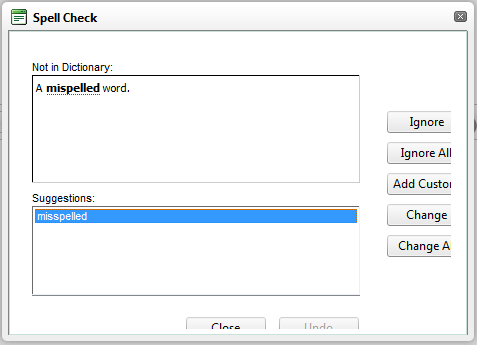
I am using the RadSpell with an MVC web application. The buttons at the side and bottom are cut off in both IE and Firefox. How can I change the width and height of the rad spell window?
3 answers
285 views
Hi,
I am getting the follwing error while exporting PDF file. I used the following formatted text in grid "Workers Compensation Information[binary]" in one of the column.I assume the error mainly comes due to using non unicode character. So i would like to know how to avoid the following error and also how to replace the appropriate character symbols with matching text. Since i am using lot of symbol related characters it would be more helpful to me to track error.
My error message is:
Invalid XHTML. RadGrid has to render correct XHTML in order to export to PDF.
Description: An unhandled exception occurred during the execution of the current web request. Please review the stack trace for more information about the error and where it originated in the code.
Exception Details: Telerik.Web.UI.Grid.Export.GridPdfExportException: Invalid XHTML. RadGrid has to render correct XHTML in order to export to PDF.
Parse error:
Reference to undeclared entity 'W'. Line 2004, position 75.
at line:
Louisiana Workers' Compensation Notice (B&W; English)<i>[binary]</i>
-Thanks
I am getting the follwing error while exporting PDF file. I used the following formatted text in grid "Workers Compensation Information[binary]" in one of the column.I assume the error mainly comes due to using non unicode character. So i would like to know how to avoid the following error and also how to replace the appropriate character symbols with matching text. Since i am using lot of symbol related characters it would be more helpful to me to track error.
My error message is:
Invalid XHTML. RadGrid has to render correct XHTML in order to export to PDF.
Parse error:
Reference to undeclared entity 'W'. Line 2004, position 75.
at line:
Louisiana Workers' Compensation Notice (B&W; English)<i>[binary]</i>
Description: An unhandled exception occurred during the execution of the current web request. Please review the stack trace for more information about the error and where it originated in the code. Exception Details: Telerik.Web.UI.Grid.Export.GridPdfExportException: Invalid XHTML. RadGrid has to render correct XHTML in order to export to PDF.
Parse error:
Reference to undeclared entity 'W'. Line 2004, position 75.
at line:
Louisiana Workers' Compensation Notice (B&W; English)<i>[binary]</i>
-Thanks
Daniel
Telerik team
answered
on
16 Mar 2012
1 answer
218 views
Team
I am using radcombobox in my application.
I am using it to implement search functionality. whenever we type something in combobox the resulting items is getting displayed in the combo list properly
& when result is not there it should display “no result found” & should give a link to a page which is used to add the items in that combobox.This I have added in the list of items .It is working.(attached is the screenshot for this requirement img.)
For this I am using OnItemsRequested event.
I have a requirement to show text of items in bold which I am typing in combobox. (attached is the screenshot for this requirement1 img.)
This feature is working when I set Filter ="Contains" but for displaying “no result found” & should give a link to a page which is used to add the items in that combobox requirement I can’t set this property. If I set this property it won’t show “no result found” & link .
I have tried to set it by <b> tab but it shows <b> tag as it is in item text.
Is there another way to show the combobox typed text part of items in bold?
Ivana
Telerik team
answered
on
16 Mar 2012





