or
1 answer
350 views
I have the following scenario.
1) Master - Cotante Page
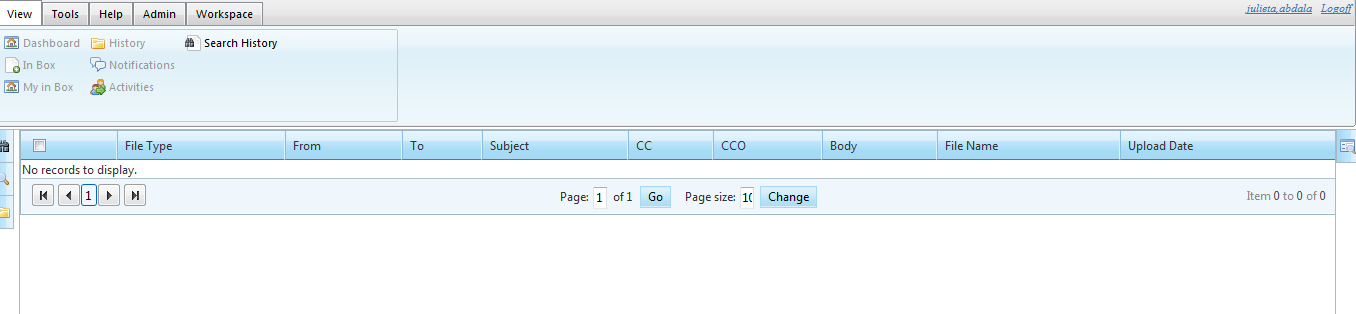
2) RadWindows.
When user click on "Assume User" in menu
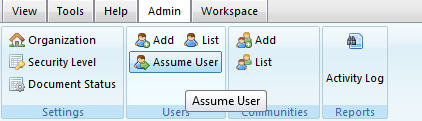
RadWindows is open.
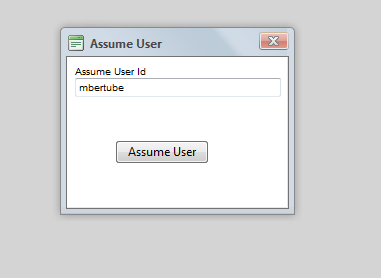
After user click on Assume User (I closed windows and execute ajaxManager command)
This command load Assume User in Mater/Content Page
I need show loading panel while that code is executing.
protected void RadAjaxManager_Request(object sender, AjaxRequestEventArgs e)
{
switch(e.Argument.ToLower())
{
case "assume":
LoadSettings();
Response.Redirect("~/UI/DocumentsList.aspx");
break;
}
}
private void LoadSettings()
{
Resources = App.GetRegistrationResources("Login");
lblogOff.Text = Resources.GetString(lblogOff.ID, new CultureInfo(Culture));
lblAssume.Text = Resources.GetString(lblAssume.ID, new CultureInfo(Culture));
lnkCloseAssume.Text = Resources.GetString(lnkCloseAssume.ID, new CultureInfo(Culture));
if (Session["AssumeUserId"] != null)
{
//Here: START RADLOADING PANEL
lblAssume.Visible = true;
lnkCloseAssume.Visible = true;
lblogOff.Visible = false;
LoadAssumeUser(); //here load user name
//Here: END RADLOADING PANEL
}else
{
lblAssume.Visible = false;
lnkCloseAssume.Visible = false;
lblogOff.Visible = true;
}
}
Regards
1) Master - Cotante Page
2) RadWindows.
When user click on "Assume User" in menu
RadWindows is open.
After user click on Assume User (I closed windows and execute ajaxManager command)
This command load Assume User in Mater/Content Page
I need show loading panel while that code is executing.
protected void RadAjaxManager_Request(object sender, AjaxRequestEventArgs e)
{
switch(e.Argument.ToLower())
{
case "assume":
LoadSettings();
Response.Redirect("~/UI/DocumentsList.aspx");
break;
}
}
private void LoadSettings()
{
Resources = App.GetRegistrationResources("Login");
lblogOff.Text = Resources.GetString(lblogOff.ID, new CultureInfo(Culture));
lblAssume.Text = Resources.GetString(lblAssume.ID, new CultureInfo(Culture));
lnkCloseAssume.Text = Resources.GetString(lnkCloseAssume.ID, new CultureInfo(Culture));
if (Session["AssumeUserId"] != null)
{
//Here: START RADLOADING PANEL
lblAssume.Visible = true;
lnkCloseAssume.Visible = true;
lblogOff.Visible = false;
LoadAssumeUser(); //here load user name
//Here: END RADLOADING PANEL
}else
{
lblAssume.Visible = false;
lnkCloseAssume.Visible = false;
lblogOff.Visible = true;
}
}
Regards

Andrey
Telerik team

answered
on
29 Mar 2012
6 answers
442 views
Hi,
I have a nested (2-level) RadGrid sorted alphabetically by the name . After inserting a new record, I want to set the page index of the parent table to the newly created item without affecting the alphabetical sorting. I also want to automatically expand the new parent row to show its child table. Thanks.
I have a nested (2-level) RadGrid sorted alphabetically by the name . After inserting a new record, I want to set the page index of the parent table to the newly created item without affecting the alphabetical sorting. I also want to automatically expand the new parent row to show its child table. Thanks.


1 answer
457 views
Hello,
- Understanding:
- In the code for the Image Gallery Demo using RadListView control, a RadBinaryImage control has been used.
- In the aspx page, a "onclick="<%#CreateWindowScript((TiledImages) Container.DataItem) %>"/>" event has been used.
- Also, if we run the program in debug mode and place a break point on the "CreateWindowScript" method defined in the code behind, we will see that this method is getting called at "Page_Load" itself.
- What i understand is its trying to register a Java Script for the click event when ever it occurs.
- Requirement:
- The images to be shown are stored in the data base.
- My requirement is that once the page is loaded and the user clicks on any of the image, I want to call a server side (code behind) method.
- Based on the selected Image and its ID, I want to load few other controls with data from the data base.
- As far as I understand, the onclick event used in the demo will not serve the purpose.
- What other option can I look out for for the above mentioned requirement?
- Note: In our project, we plan to use this image gallery in a form of a Live Tile in a ASP.NET application. And hence the usage of ListView and RadBinaryImage control.
A quick input towards the solution will be very helpful.
Regards,
Abhijit
Tsvetina
Telerik team
answered
on
29 Mar 2012
1 answer
133 views
Hi,
I had customized my radcalendar for displaying Hijri dates along with Gregorian.It works fine on my local machine but when hosting the Hijri dates from 13th to last date of every month is invisible.I am attaching a screenshot along with this for your reference.
Here my code is;
Thnx in advance.
I had customized my radcalendar for displaying Hijri dates along with Gregorian.It works fine on my local machine but when hosting the Hijri dates from 13th to last date of every month is invisible.I am attaching a screenshot along with this for your reference.
Here my code is;
Protected Sub RadCalendar1_DayRender(ByVal sender As Object, ByVal e As Telerik.Web.UI.Calendar.DayRenderEventArgs) Handles radCal1.DayRender Dim label As New Label() Dim div As HtmlGenericControl = New HtmlGenericControl("div") div.Attributes.Add("class", "CalG") label.Text = e.Day.[Date].Day.ToString() 'Gregorian Day div.Controls.Add(label) Dim div1 As HtmlGenericControl = New HtmlGenericControl("div") div1.Attributes.Add("class", "CalH") Dim label1 As Label = New Label() label1.ForeColor = Drawing.Color.Brown Dim d As DateTime = e.Day.Date Dim objDateConv As New DatesConversion label1.Font.Size = FontSize.Small label1.Height = "5" label1.Text = objDateConv.GregToHijri(d, "Day") & "/" & objDateConv.GregToHijri(d, "Month") 'hijri Day and month div1.Controls.Add(label1) If e.Day.Date.DayOfWeek = 4 Then 'Disable week day Dim calendarSkin = radCal1.Skin If (calendarSkin = "") Then calendarSkin = "Default" End If Dim otherMonthCssClass As String = String.Format("otherMonth_{0}", calendarSkin) e.Cell.Text = "" e.Cell.CssClass = otherMonthCssClass ' set new CssClass for the disabled calendar day cells (e.g. look like other month days here) Dim calendarDay As RadCalendarDay = New RadCalendarDay calendarDay.Date = e.Day.Date calendarDay.IsSelectable = False calendarDay.ItemStyle.CssClass = otherMonthCssClass radCal1.SpecialDays.Add(calendarDay) e.Cell.BackColor = Drawing.Color.LightYellow End If div.Attributes.Add("class", "CalG") div1.Attributes.Add("class", "CalH") e.Cell.Controls.Add(div) e.Cell.Controls.Add(div1) End SubThnx in advance.
Milena
Telerik team
answered
on
29 Mar 2012
2 answers
127 views
Hi,
I have a treeList (Q3 2011) with multi column sorting enabled.
The first column is initially sorted:
I have additional columns which I want to sort ("Name" and "Group") manually.
For example I have the following tree with 3 columns:
Caption | Name | Group
Caption1 (this is just a grouping node)
+ C1 | a | Group1
+ C2 | b | Group1
+ C3 | c | Group1
+ C4 | | -
I remove the sort of the "Caption" column by clicking twice and add a sort (desc) to "Group" and a sort (asc) to "Name". I expect something like above, but I get:
Caption | Name | Group
Caption1
+ C2 | b | Group1
+ C1 | a | Group1
+ C3 | c | Group1
+ C4 | | -
Even if I set "Name" to "desc" it stays the same. If I set the filter just to "Name" it works (a, b, c / c, b, a).
Unfortunately I can't reproduce this with the Demo (http://demos.telerik.com/aspnet-ajax/treelist/examples/sorting/basicsorting/defaultcs.aspx ) because it doesn't have comparable data (no column has double entries).
Also, the documentation is very light regarding this topic.
Is there something else I have to do to get this to work?
Thanks!
I have a treeList (Q3 2011) with multi column sorting enabled.
m_treeList.AllowSorting = true;m_treeList.AllowMultiColumnSorting = true;The first column is initially sorted:
if (!Page.IsPostBack){ TreeListSortExpression sort = new TreeListSortExpression(); sort.FieldName = "Caption"; sort.SortOrder = TreeListSortOrder.Ascending; m_treeList.SortExpressions.Add(sort);}I have additional columns which I want to sort ("Name" and "Group") manually.
For example I have the following tree with 3 columns:
Caption | Name | Group
Caption1 (this is just a grouping node)
+ C1 | a | Group1
+ C2 | b | Group1
+ C3 | c | Group1
+ C4 | | -
I remove the sort of the "Caption" column by clicking twice and add a sort (desc) to "Group" and a sort (asc) to "Name". I expect something like above, but I get:
Caption | Name | Group
Caption1
+ C2 | b | Group1
+ C1 | a | Group1
+ C3 | c | Group1
+ C4 | | -
Even if I set "Name" to "desc" it stays the same. If I set the filter just to "Name" it works (a, b, c / c, b, a).
Unfortunately I can't reproduce this with the Demo (http://demos.telerik.com/aspnet-ajax/treelist/examples/sorting/basicsorting/defaultcs.aspx ) because it doesn't have comparable data (no column has double entries).
Also, the documentation is very light regarding this topic.
Is there something else I have to do to get this to work?
Thanks!
Martin
Telerik team
answered
on
29 Mar 2012
2 answers
264 views
I have a RadListView that has an ItemTemplate that contains a RadComboBox. As such, the IDs of the combo boxes are dynamically generated, so this will not work for me:
. What I'm trying to do is apply some business logic to what can and cannot be selected. I'm having trouble targetting the items in the listbox. When a check box is selected, I need to use jQuery to select all items in the combobox, then check the value of an attribute that is part of the object loaded into the datasource on page load called "type". If this type is equal to, say, "person", then I need to disable all items in the combobox other whos type is "group". I've started with something like this:
I'm stuck on where to go from here. I seem to be unable to access any sort of item client id in order to create an asp object that allows me to manipulate the telerik object. For instance, if I were to just grab the item like:
it would return null for that field. And if i try to get the id of the parent above that, I also get null.
Any ideas?
Or at the very least, how do I obtain the RadComboBox item starting at the checkbox OnClick event. For instance
The from there, how do i iterate through the item collection. is there a method like rcb.get_items().each(...); ??
var rcbAssigneeObject = $find("<%=rcbAssignee.ClientID %>");. What I'm trying to do is apply some business logic to what can and cannot be selected. I'm having trouble targetting the items in the listbox. When a check box is selected, I need to use jQuery to select all items in the combobox, then check the value of an attribute that is part of the object loaded into the datasource on page load called "type". If this type is equal to, say, "person", then I need to disable all items in the combobox other whos type is "group". I've started with something like this:
$(".AssigneeTag").find(":checkbox").click( function () { var allItems = $(this).closest(".rcbList").find(".rcbItem"); //check item types here });I'm stuck on where to go from here. I seem to be unable to access any sort of item client id in order to create an asp object that allows me to manipulate the telerik object. For instance, if I were to just grab the item like:
var myItem = $(this).closest(".rcbItem").attr("id");it would return null for that field. And if i try to get the id of the parent above that, I also get null.
Any ideas?
Or at the very least, how do I obtain the RadComboBox item starting at the checkbox OnClick event. For instance
var rcb = $(this).pathToRadComboBoxControl().Get();The from there, how do i iterate through the item collection. is there a method like rcb.get_items().each(...); ??
Kalina
Telerik team
answered
on
29 Mar 2012
2 answers
197 views
Hello,
I have just read this demo:http://demos.telerik.com/aspnet-ajax/grid/examples/dataediting/alleditablecolumns/defaultcs.aspx .
In this demo,the "Category" column is not a field in table [Products] ,but in table [Categories ].And the demo use the following code to show the category's name accurately:
But now I have 3 tables in my datebase,for example,table A,table B and table C.Table A has a foreign key pointing to table B.And table B has a foreign key pointing to table C.Now I want to show A.X,B.Y,C.Z in a grid and realize the insert/update/delete functions.How to?
In addition,if I use dropdownlist to show B.Y and C.Z,I have to deal with the SelectedIndexChanged event to refresh the other dropdownlist.
It seems that my question is a little stupid.Let me give an example.Now I have to manage the students' information.Each student comes from different college,and has their major.Each major is in different college.Now I have 3 tables:[Students],[Majors],[Colleges].[Students].MajorID is a foreign key pointing to [Majors]. [Majors].[CollegeID] is a foreign key pointing to [Colleges]. [Majors].Name is the name of a major and [College].Name is the name of a college.Now I want to use a grid to show/insert/update/delete students.
My current solution is to use other pages for insert/update,is there a faster way?
Thanks very much.
I have just read this demo:http://demos.telerik.com/aspnet-ajax/grid/examples/dataediting/alleditablecolumns/defaultcs.aspx .
In this demo,the "Category" column is not a field in table [Products] ,but in table [Categories ].And the demo use the following code to show the category's name accurately:
<telerik:GridDropDownColumn DataField="CategoryID" DataSourceID="SqlDataSource2" HeaderText="Category" ListTextField="CategoryName" ListValueField="CategoryID" UniqueName="CategoryID" ColumnEditorID="GridDropDownColumnEditor1"> </telerik:GridDropDownColumn>But now I have 3 tables in my datebase,for example,table A,table B and table C.Table A has a foreign key pointing to table B.And table B has a foreign key pointing to table C.Now I want to show A.X,B.Y,C.Z in a grid and realize the insert/update/delete functions.How to?
In addition,if I use dropdownlist to show B.Y and C.Z,I have to deal with the SelectedIndexChanged event to refresh the other dropdownlist.
It seems that my question is a little stupid.Let me give an example.Now I have to manage the students' information.Each student comes from different college,and has their major.Each major is in different college.Now I have 3 tables:[Students],[Majors],[Colleges].[Students].MajorID is a foreign key pointing to [Majors]. [Majors].[CollegeID] is a foreign key pointing to [Colleges]. [Majors].Name is the name of a major and [College].Name is the name of a college.Now I want to use a grid to show/insert/update/delete students.
My current solution is to use other pages for insert/update,is there a faster way?
Thanks very much.
Andrey
Telerik team
answered
on
29 Mar 2012
1 answer
176 views
Hi,
Hosted ASP.net v4 web application in IIS 7.5. Application is working fine with http (182 port). When added HPPTS binding with default port (443)...getting javascript error "SCRIPT5009: 'Sys' is undefined"; the same is working with Firefox. After some analysis found that "Telerik.Web.UI.WebResource.axd" is not rendered to IE (v9).
\When I change the HTTPS port number from 443 to other port (say 555)...application is working as expected.
Can any clarify why port 443 is blocking Telerik.Web.UI.WebResource.axd ?
Thanks in Advance...!
Pradeep
Hosted ASP.net v4 web application in IIS 7.5. Application is working fine with http (182 port). When added HPPTS binding with default port (443)...getting javascript error "SCRIPT5009: 'Sys' is undefined"; the same is working with Firefox. After some analysis found that "Telerik.Web.UI.WebResource.axd" is not rendered to IE (v9).
\When I change the HTTPS port number from 443 to other port (say 555)...application is working as expected.
Can any clarify why port 443 is blocking Telerik.Web.UI.WebResource.axd ?
Thanks in Advance...!
Pradeep
Genady Sergeev
Telerik team
answered
on
29 Mar 2012
1 answer
103 views
Hi,
we're having an issue with RadMaskedTextBox (and RadDatePicker too) with EnableSingleInputRendering true on IE6 browser.
We searched the forums, but we found no suggestions.
We have this simple markup:
And on codebehind:
When we open IE6 browser, value inside radMaskedSingle is partially hidden (see attachment).
Any suggestion/workaround for this issue? (Telerik version Q1 2012 - 2012.1.215).
Regards.
we're having an issue with RadMaskedTextBox (and RadDatePicker too) with EnableSingleInputRendering true on IE6 browser.
We searched the forums, but we found no suggestions.
We have this simple markup:
<telerik:RadMaskedTextBox ID="radMaskedSingle" runat="server" DisplayPromptChar="X" HideOnBlur="true" HoveredStyle-BorderColor="#18d330" Mask="####" PromptChar="" SelectionOnFocus="None" Width="100px"></telerik:RadMaskedTextBox>
<telerik:RadMaskedTextBox ID="radMaskedStandard" runat="server" DisplayPromptChar="X"
HideOnBlur="true" HoveredStyle-BorderColor="#18d330" Mask="####" PromptChar=""
SelectionOnFocus="None" Width="100px" EnableSingleInputRendering="true"></telerik:RadMaskedTextBox>
And on codebehind:
protected void Page_Load(object sender, EventArgs e){ radMaskedSingle.Text = "0123"; radMaskedStandard.Text = "0123";}When we open IE6 browser, value inside radMaskedSingle is partially hidden (see attachment).
Any suggestion/workaround for this issue? (Telerik version Q1 2012 - 2012.1.215).
Regards.
Vasil
Telerik team
answered
on
29 Mar 2012
9 answers
235 views
Hi,
I'm experiencing this issue where you drag and drop files, but before you drop, if you press the Esc key while the files are dragged over... so before you release your mouse to drop, if you press escape, the ruDropzone div is on top and remains on top. The upload control is not shown anymore.
This is reproducible in the online demo as well... any work around for this issue?
http://demos.telerik.com/aspnet-ajax/asyncupload/examples/draganddrop/defaultcs.aspx?product=asyncupload
Thanks.
sathish
I'm experiencing this issue where you drag and drop files, but before you drop, if you press the Esc key while the files are dragged over... so before you release your mouse to drop, if you press escape, the ruDropzone div is on top and remains on top. The upload control is not shown anymore.
This is reproducible in the online demo as well... any work around for this issue?
http://demos.telerik.com/aspnet-ajax/asyncupload/examples/draganddrop/defaultcs.aspx?product=asyncupload
Thanks.
sathish
Bozhidar
Telerik team
answered
on
29 Mar 2012





