or
1 answer
54 views
Good afternoon,
I updated this last fix(2012_2_724) you, to solve a bug that was giving RadnumericTextbox, it seems that something messed up RadDatePicker.
Now RadDatePicker is not respecting the value set in the width property, visually in the way of "Design" in the browser it is normal but the project he is bugged ... This disrupts the very model of the form.
I updated this last fix(2012_2_724) you, to solve a bug that was giving RadnumericTextbox, it seems that something messed up RadDatePicker.
Now RadDatePicker is not respecting the value set in the width property, visually in the way of "Design" in the browser it is normal but the project he is bugged ... This disrupts the very model of the form.

Galin
Telerik team

answered
on
13 Aug 2012
2 answers
403 views
I have a Radgrid with Advacned Data Binding. In the Update Command, If a column is changed, I have to change values of other rows too. I am handling the updates in a sql statement. However, after Update button is clicked, it only refreshes the current row and not the whole grid. I want to Refresh or REbind the whole grid on Update Command.
Tried adding inside UpdateCommand, but its not working,
UpdateRecords();
e.Canceled = true;
RadGrid1.Rebind();
Also, I need to do the same on Insert Command too.
Thanks,
Sri!!!
Tried adding inside UpdateCommand, but its not working,
UpdateRecords();
e.Canceled = true;
RadGrid1.Rebind();
Also, I need to do the same on Insert Command too.
Thanks,
Sri!!!
4 answers
196 views
Hi
I have a Radeditor in a table below, with a defined fixed width of 400px
<telerik:RadEditor ID="radMyEditor" runat="server" Width="400px" Skin="Windows7" ContentAreaMode="Div" AutoResizeHeight="false" EnableResize="false" ToolsFile="~\Controls\Telerik\RadEditorButtons.xml" StripFormattingOnPaste="MSWordRemoveAll" ContentFilters="RemoveScripts, FixUlBoldItalic, FixEnclosingP, IECleanAnchors, MozEmStrong, ConvertFontToSpan, ConvertToXhtml, IndentHTMLContent, OptimizeSpans, ConvertCharactersToEntities">
Viewing source, the HTML renders initially at 400px, on IE
<div id="ctl00_MainContent_radObituary" class="RadEditor Windows7 reWrapper" style="height:400px;width:400px;">
However, it seems telerik runs a 'fix up script' after the page loading changes the width of the editor to 1000px. When viewing the page with IE 9 Dev Tools, the div has now become:
<div class="RadEditor Windows7 reWrapper" id="ctl00_MainContent_radObituary" style="width: 1000px; height: 394px; min-height: 394px; min-width: 400px;">
(The 1000px comes from inline, and is not inherited from a CSS)
So where does the 1000px come from? How can I stop this "post load" fix up step?
This problem only seems to happen in IE.
Thanks
Stuart

Rumen
Telerik team
answered
on
13 Aug 2012
6 answers
294 views
Sir,
I used a radwindow which is opened by clicking a button on the page1.aspx.
After I close tht radwindow,I perform an event in the page1.aspx for eg,a button click
The error Invalid JSON Primitive is coming
I didnt write any script in radwindow page and page1.aspx
help me...
Thanks....
I used a radwindow which is opened by clicking a button on the page1.aspx.
After I close tht radwindow,I perform an event in the page1.aspx for eg,a button click
The error Invalid JSON Primitive is coming
I didnt write any script in radwindow page and page1.aspx
help me...
Thanks....
3 answers
104 views
I have an issue where one of my panes inside splitter has an activex control. While resizing, the splitter anchor line hides behind the active control which prevents the user from releasing the anchor where they want to.
To overcome that, I am trying to make the activex control hide in the OnClientResizing event and then make it visible again after the resize has completed (OnClientResized). The problem is that the OnClientResizing event is not fired until the resize is complete (mouse button has been released.) This is true even on the telerik demo page based on what gets logged in the log console.
Can someone please help me here?
Thanks!!
To overcome that, I am trying to make the activex control hide in the OnClientResizing event and then make it visible again after the resize has completed (OnClientResized). The problem is that the OnClientResizing event is not fired until the resize is complete (mouse button has been released.) This is true even on the telerik demo page based on what gets logged in the log console.
Can someone please help me here?
Thanks!!

Vessy
Telerik team
answered
on
13 Aug 2012
2 answers
416 views
Hi!
This is my scenario
- I have a Grid with a top menu as user control with options such as "Delete Selected"
- When user click on "Delete Selected" . a radwindows is open. The radwindow user COntentTemplate, because I need set height:150px and width.
My Grid:

the aspx of Grid:
<%@ Page Title="" Language="C#" MasterPageFile="~/UI/Doculex.Master" AutoEventWireup="true"
CodeBehind="Fields.aspx.cs" Inherits="WebSearch.UI.Admin.Fields" %>
<%@ Register TagPrefix="UC" TagName="header" Src="~/UI/UserControls/Header.ascx" %>
<%@ Register TagPrefix="UC" TagName="AddButtons" Src="~/UI/Admin/UserControls/Grid/AddTopButtons.ascx" %>
<%@ Register TagPrefix="UC" TagName="DeleteDialog" Src="/UI/Admin/UserControls/Grid/Popups/DeleteSelected.ascx" %>
<%@ Register TagPrefix="UC" TagName="EnableDialog" Src="/UI/Admin/UserControls/Grid/Popups/EnableSelected.ascx" %>
<%@ Register TagPrefix="UC" TagName="DisableDialog" Src="/UI/Admin/UserControls/Grid/Popups/DisableSelected.ascx" %>
<%@ MasterType VirtualPath="~/UI/Doculex.Master" %>
<asp:Content ID="Content1" ContentPlaceHolderID="head" runat="server">
<link href="/UI/Style/Admin/Admin.css" rel="stylesheet" type="text/css" />
<script type="text/javascript" src="/UI/Admin/Scripts/Form.js"></script>
<telerik:RadCodeBlock ID="RadCodeBlock1" runat="server">
<script type="text/javascript">
function showDeleteSelectedDialog() { //OPEN DELETE SELECTED RADWINDOW
var rgGrid = $find("<%= Grid.ClientID %>");
var oWindow = $find('<%=DeleteSelected.ClientID%>' + "_DeleteDialog");
if (oWindow == null)
oWindow = $find("ctl00_" + '<%=DeleteSelected.ClientID%>' + "_DeleteDialog");
if (rgGrid == null || oWindow == null) return false;
ShowDeleteSelectedDialog(rgGrid, oWindow);
return false;
}
function ShowEditForm(id, rowIndex) {
var grid = $find("<%= Grid.ClientID %>");
var rowControl = grid.get_masterTableView().get_dataItems()[rowIndex].get_element();
var oWindow = window.radopen("FieldForm.aspx?ID=" + id, "FieldDialog");
return false;
}
function showInsertForm() { var oWindow = window.radopen("FieldForm.aspx", "FieldDialog"); }
function refreshGrid(arg) {
if (arg != null) { $find("<%= RadAjaxManager.GetCurrent(Page).ClientID %>").ajaxRequest(arg); }
else {
if (arg) {
$find("<%= RadAjaxManager.GetCurrent(Page).ClientID %>").ajaxRequest(arg);
}
else {
$find("<%= RadAjaxManager.GetCurrent(Page).ClientID %>").ajaxRequest("RebindAndNavigate");
}
}
}
function rowDblClick(sender, eventArgs) {
editedRow = eventArgs.get_itemIndexHierarchical();
$find("<%= Grid.ClientID %>").get_masterTableView().editItem(editedRow);
}
function ValueChanged(sender, args) {
//var SenderId = sender.get_element().id;
var SenderId = sender.get_id();
var txtNameId = $("#" + SenderId).get(0);
var txtName = $telerik.findTextBox(SenderId.replace("txtName", "txtName"));
var text = txtName.get_value();
var txtId = $telerik.findTextBox(SenderId.replace("txtName", "txtId"));
var txtHeader = $telerik.findTextBox(SenderId.replace("txtName", "txtHeader"));
txtHeader.set_value(text);
}
</script>
</telerik:RadCodeBlock>
</asp:Content>
<asp:Content ID="Content2" ContentPlaceHolderID="ContentPlaceHolder1" runat="server">
<telerik:RadAjaxLoadingPanel runat="server" Skin="Vista" ID="LoadginPanel1" IsSticky="true"
CssClass="LoadingPanel" />
<telerik:RadAjaxManagerProxy ID="AjaxManagerProxy1" runat="server">
<AjaxSettings>
<telerik:AjaxSetting AjaxControlID="RadAjaxManager1">
<UpdatedControls>
<telerik:AjaxUpdatedControl ControlID="Grid" LoadingPanelID="LoadginPanel1" />
</UpdatedControls>
</telerik:AjaxSetting>
<telerik:AjaxSetting AjaxControlID="Grid">
<UpdatedControls>
<telerik:AjaxUpdatedControl ControlID="Grid" LoadingPanelID="LoadginPanel1" />
</UpdatedControls>
</telerik:AjaxSetting>
<telerik:AjaxSetting AjaxControlID="btnDelete">
<UpdatedControls>
<telerik:AjaxUpdatedControl ControlID="Grid" LoadingPanelID="LoadginPanel1" />
</UpdatedControls>
</telerik:AjaxSetting>
</AjaxSettings>
</telerik:RadAjaxManagerProxy>
<UC:header runat="server" ID="headerPage" />
<div id="containerSubWHelp">
<telerik:RadGrid ID="Grid" runat="server" AutoGenerateColumns="False" OnNeedDataSource="FieldsGrid_NeedDataSource"
OnUpdateCommand="FieldsGrid_UpdateCommand" OnInsertCommand="FieldsGrid_InsertCommand"
OnItemCommand="FieldsGrid_ItemCommand" OnPreRender="FieldsGrid_PreRender" OnItemCreated="FieldsGrid_ItemCreated"
OnDeleteCommand="FieldsGrid_DeleteCommand" OnItemDataBound="FieldsGrid_ItemDataBound">
<MasterTableView DataKeyNames="Id" ClientDataKeyNames="Id,Name,Header">
<Columns>
<telerik:GridClientSelectColumn CommandName="Select" UniqueName="Select" HeaderStyle-Width="28px"
Resizable="false" Reorderable="false">
</telerik:GridClientSelectColumn>
<telerik:GridTemplateColumn UniqueName="IsActive" DataField="IsActive" Reorderable="false"
HeaderStyle-Width="55px" AllowFiltering="true" Resizable="false">
<ItemTemplate>
<asp:ImageButton ID="ActiveIcon" runat="server" CommandName="Active"></asp:ImageButton>
<asp:CheckBox ID="lblIsActive" runat="server" Checked='<%# (DataBinder.Eval(Container.DataItem,"IsActive") is DBNull ?false:Eval("IsActive")) %>'
Visible="false" />
</ItemTemplate>
</telerik:GridTemplateColumn>
<telerik:GridTemplateColumn UniqueName="TemplateEditColumn" HeaderStyle-Width="28px"
Reorderable="false" AllowFiltering="false" Resizable="false">
<ItemTemplate>
<asp:ImageButton ID="EditLink" runat="server" ImageUrl="/UI/Images/pencil.png"></asp:ImageButton>
</ItemTemplate>
</telerik:GridTemplateColumn>
<telerik:GridEditCommandColumn HeaderStyle-Width="28px" UniqueName="EditCommandColumn"
Reorderable="false" ButtonType="ImageButton" EditImageUrl="/UI/Images/grid_edit.png"
Resizable="false">
</telerik:GridEditCommandColumn>
<telerik:GridButtonColumn UniqueName="btnDelete" ConfirmDialogType="RadWindow" ButtonType="ImageButton"
Reorderable="false" CommandName="Delete" ConfirmDialogHeight="100px" ConfirmDialogWidth="300px"
HeaderStyle-Width="28px" Resizable="false" ImageUrl="/UI/Images/cross.png" />
<telerik:GridTemplateColumn DataField="Id" UniqueName="Id" Visible="false">
<InsertItemTemplate>
<telerik:RadTextBox ID="txtIdInsert" runat="server" Text='<%# Bind("Id") %>' ReadOnly="true"
Enabled="false" />
</InsertItemTemplate>
<EditItemTemplate>
<telerik:RadTextBox ID="txtId" runat="server" Text='<%# Eval("Id") %>' ReadOnly="true" />
</EditItemTemplate>
</telerik:GridTemplateColumn>
<telerik:GridTemplateColumn UniqueName="Name" DataField="Name">
<EditItemTemplate>
<asp:TextBox ID="txtName" Width="120px" runat="server" Text='<%# DataBinder.Eval(Container.DataItem, "Name") %>'>
</asp:TextBox>
<br />
<asp:RequiredFieldValidator ID="rfName" runat="server" ErrorMessage="*" Display="Dynamic"
ControlToValidate="txtName" CssClass="validator" />
<asp:CustomValidator ID="cvName" runat="server" Display="Dynamic" CssClass="validator"
ControlToValidate="txtName" OnServerValidate="cvName_ServerValidate" />
<asp:RegularExpressionValidator ID="reName" ControlToValidate="txtName" runat="server"
ValidationExpression="^[0-9a-zA-Z\s]{1,125}$" CssClass="validator" Display="Dynamic" />
</EditItemTemplate>
<ItemTemplate>
<asp:Label ID="lblName" runat="server" Text='<%# DataBinder.Eval(Container.DataItem, "Name") %>'></asp:Label>
</ItemTemplate>
</telerik:GridTemplateColumn>
<telerik:GridTemplateColumn UniqueName="Header" DataField="Header">
<EditItemTemplate>
<asp:TextBox ID="txtHeader" Width="120px" runat="server" Text='<%# DataBinder.Eval(Container.DataItem, "Header") %>' />
<br />
<asp:RequiredFieldValidator ID="RFHeader" runat="server" ErrorMessage="*" CssClass="validator"
ControlToValidate="txtHeader" Display="Dynamic" />
<asp:CustomValidator ID="cvHeader" CssClass="validator" Display="Dynamic" runat="server"
ControlToValidate="txtHeader" />
<asp:RegularExpressionValidator ID="reHeader" ControlToValidate="txtHeader" runat="server"
ValidationExpression="^[0-9a-zA-Z\s]{1,125}$" CssClass="validator" Display="Dynamic" />
</EditItemTemplate>
<ItemTemplate>
<asp:Label ID="lblHeader" runat="server" Text='<%# DataBinder.Eval(Container.DataItem, "Header") %>'></asp:Label>
</ItemTemplate>
</telerik:GridTemplateColumn>
<telerik:GridTemplateColumn UniqueName="DataType" DataField="DataType">
<EditItemTemplate>
<telerik:RadComboBox runat="server" ID="cbDataType" EnableLoadOnDemand="True" DataTextField="DataType"
DataValueField="Id" HighlightTemplatedItems="true" Width="150px" AutoPostBack="true" />
<br />
<asp:RequiredFieldValidator ID="frSecurity" runat="server" ErrorMessage="*" CssClass="validator"
Display="Dynamic" ControlToValidate="cbDataType"></asp:RequiredFieldValidator>
</EditItemTemplate>
<ItemTemplate>
<asp:Label ID="lblDatatype" runat="server" Text='<%# DataBinder.Eval(Container.DataItem, "DataType") %>'></asp:Label>
</ItemTemplate>
</telerik:GridTemplateColumn>
<telerik:GridTemplateColumn UniqueName="IsInput" DataField="IsInput">
<EditItemTemplate>
<asp:CheckBox ID="chkIsInput" Width="120px" runat="server" Checked='<%# (DataBinder.Eval(Container.DataItem,"IsInput") is DBNull ?false:Eval("IsInput")) %>' />
</EditItemTemplate>
<ItemTemplate>
<asp:Label ID="lblIsInput" runat="server" Text='<%# DataBinder.Eval(Container.DataItem, "IsInput") %>'></asp:Label>
</ItemTemplate>
</telerik:GridTemplateColumn>
<telerik:GridTemplateColumn UniqueName="IsRequired" DataField="IsRequired">
<EditItemTemplate>
<asp:CheckBox ID="chkIsRequired" Width="120px" runat="server" Checked='<%# (DataBinder.Eval(Container.DataItem,"IsRequired") is DBNull ?false:Eval("IsRequired")) %>' />
</EditItemTemplate>
<ItemTemplate>
<asp:Label ID="lblIsRequired" runat="server" Text='<%# DataBinder.Eval(Container.DataItem, "IsRequired") %>'></asp:Label>
</ItemTemplate>
</telerik:GridTemplateColumn>
</Columns>
<CommandItemTemplate>
<UC:AddButtons ID="AddButtons" runat="server" />
</CommandItemTemplate>
</MasterTableView>
<ClientSettings>
<Resizing ResizeGridOnColumnResize="true" />
<ClientEvents OnRowDblClick="rowDblClick" />
</ClientSettings>
</telerik:RadGrid>
<telerik:RadWindowManager ID="RadWindowManager1" runat="server" EnableShadow="true">
<Windows>
<telerik:RadWindow ID="FieldDialog" runat="server" Height="600px" Width="800px" Skin="Vista"
BackColor="Aquamarine" ReloadOnShow="true" ShowContentDuringLoad="false" Modal="true"
VisibleStatusbar="false" Behaviors="Move, Close" Animation="FlyIn" />
</Windows>
</telerik:RadWindowManager>
<UC:DeleteDialog ID="DeleteSelected" runat="server"></UC:DeleteDialog>
</div>
</asp:Content>
Top Menu Ascx:
<div class="addSection">
<div class="quickAdd">
<asp:LinkButton ID="lnkqQuitInsert" runat="server" CommandName="InitInsert">
<asp:ImageButton ID="imgQuickAdd" runat="server" ImageUrl="/UI/Images/add.png" />
<asp:Label ID="lblQuickAdd" runat="server" class="TopMenuLabel" /></asp:LinkButton>
</div>
<div class="fullAdd" id="FullAdd" runat="server">
<asp:LinkButton ID="lnkAdd" runat="server" CommandName="FullInsert">
<asp:ImageButton ID="imgAddFull" runat="server" ImageUrl="/UI/Images/add.png" />
<asp:Label ID="lblFullAdd" runat="server" class="TopMenuLabel"/>
</asp:LinkButton></div>
<div class="quickAdd">
<asp:LinkButton ID="lnkDeleteSelected" runat="server" OnClientClick="javascript:showDeleteSelectedDialog();"
>
<asp:ImageButton ID="imgDeleteSelected" runat="server" ImageUrl="/UI/Images/cross.png" />
<asp:Label ID="lblDeleteSelected" runat="server" class="TopMenuLabel"/></asp:LinkButton>
</div>
<div class="quickAdd">
<asp:LinkButton ID="lnkEnabled" runat="server" OnClientClick="javascript:showEnableSelectedDialog();" >
<asp:ImageButton ID="imgEnabled" runat="server" ImageUrl="/UI/Images/active.png" />
<asp:Label ID="lblEnableSelected" runat="server" class="TopMenuLabel"/></asp:LinkButton>
</div>
<div class="quickAdd">
<asp:LinkButton ID="lnkDiabled" runat="server" OnClientClick="javascript:showDisableSelectedDialog();">
<asp:ImageButton ID="imgDisable" runat="server" ImageUrl="/UI/Images/notActive.png" />
<asp:Label ID="lblDisableSelected" runat="server" class="TopMenuLabel"/></asp:LinkButton>
</div>
</div>
The RadWindow as userControl ( I use this controls in every page)
<script type="text/javascript" src="/UI/Admin/Scripts/Form.js"></script>
<telerik:RadCodeBlock ID="RadCodeBlock1" runat="server">
<script type="text/javascript">
function closeAndRebindDelete(args) {
CloseAndRebindTopMenu(args); }
function cancel() { CancelTopMenu(); }
</script>
</telerik:RadCodeBlock>
<telerik:RadWindow ID="DeleteDialog" runat="server" Skin="Vista" BackColor="Aquamarine"
ReloadOnShow="true" ShowContentDuringLoad="false" Modal="true" VisibleStatusbar="false"
Behaviors="Move, Close" Animation="FlyIn" Width="550px" Height="100px">
<ContentTemplate>
<div class="information">
<center>
<asp:Label ID="lblDeleteSelectInformation" CssClass="fontLabel" runat="server">
</asp:Label>
</center>
</div>
<br />
<div style="width: 100%; text-align: center;">
<telerik:RadButton ID="btnMarkForDelete" runat="server" Skin="Vista" Width="140px"
OnClick="btnMarkForDelete_Click">
<Icon PrimaryIconUrl="/UI/Images/markForDelete.png" PrimaryIconWidth="21px" PrimaryIconHeight="25px"
PrimaryIconTop="3px" PrimaryIconLeft="9px" />
</telerik:RadButton>
<telerik:RadButton ID="btnDeleteNow" runat="server" Skin="Vista" Width="140px" OnClick="btnDeleteNow_Click">
<Icon PrimaryIconUrl="/UI/Images/cross.png" PrimaryIconWidth="21px" PrimaryIconHeight="25px"
PrimaryIconTop="3px" PrimaryIconLeft="9px" />
</telerik:RadButton>
<telerik:RadButton ID="btnCancel" runat="server" Skin="Vista" Width="100px" CausesValidation="False"
ToolTip="Cancel" OnClientClicked="cancel">
<Icon PrimaryIconUrl="/UI/Images/cancel.png" PrimaryIconWidth="21px" PrimaryIconHeight="25px"
PrimaryIconTop="3px" PrimaryIconLeft="9px" />
</telerik:RadButton>
</div>
</ContentTemplate>
</telerik:RadWindow>
Form.js:
function GetRadWindow() { //if I call this function to close an rebind I get an error window.radwindow == null
var oWindow = null;
if (window.radWindow) oWindow = window.radWindow; //Will work in Moz in all cases, including clasic dialog
else if (window.frameElement.radWindow) oWindow = window.frameElement.radWindow; //IE (and Moz as well)
return oWindow;
}
function Cancel() {
GetRadWindow().close();
return;
}
function CloseAndRebind(args) {
GetRadWindow().BrowserWindow.refreshGrid(args); //ERROR
GetRadWindow().close();
return;
}
function CancelTopMenu() {
return false;
}
function CloseAndRebindTopMenu(args) {
window.refreshGrid(args); //I use this option as solution but I get other erros.
return false;
}
function ShowDeleteSelectedDialog(grid, oWindow) {
var MasterTable = grid.get_masterTableView();
var selectedRows = MasterTable.get_selectedItems();
if (selectedRows.length > 0) {
oWindow.set_iconUrl("/UI/Images/delete.png");
oWindow.show();
}
}
3- Run the app, selecte a row, click on Delete Selected, the radWindow is open, click on the first Button
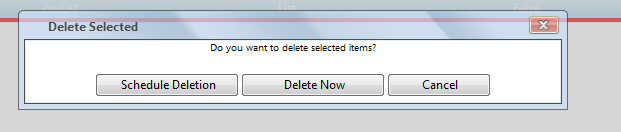
All is working fun, the raadwindow close (very slow), the radgrid rebind, But when I try to use some of row action such as
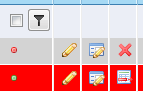
The actions ( radajaxamanager) doesnt work, an in Javascript console show the following errors:

I need finish this urgent!
Where is the error????
regards
This is my scenario
- I have a Grid with a top menu as user control with options such as "Delete Selected"
- When user click on "Delete Selected" . a radwindows is open. The radwindow user COntentTemplate, because I need set height:150px and width.
My Grid:
the aspx of Grid:
<%@ Page Title="" Language="C#" MasterPageFile="~/UI/Doculex.Master" AutoEventWireup="true"
CodeBehind="Fields.aspx.cs" Inherits="WebSearch.UI.Admin.Fields" %>
<%@ Register TagPrefix="UC" TagName="header" Src="~/UI/UserControls/Header.ascx" %>
<%@ Register TagPrefix="UC" TagName="AddButtons" Src="~/UI/Admin/UserControls/Grid/AddTopButtons.ascx" %>
<%@ Register TagPrefix="UC" TagName="DeleteDialog" Src="/UI/Admin/UserControls/Grid/Popups/DeleteSelected.ascx" %>
<%@ Register TagPrefix="UC" TagName="EnableDialog" Src="/UI/Admin/UserControls/Grid/Popups/EnableSelected.ascx" %>
<%@ Register TagPrefix="UC" TagName="DisableDialog" Src="/UI/Admin/UserControls/Grid/Popups/DisableSelected.ascx" %>
<%@ MasterType VirtualPath="~/UI/Doculex.Master" %>
<asp:Content ID="Content1" ContentPlaceHolderID="head" runat="server">
<link href="/UI/Style/Admin/Admin.css" rel="stylesheet" type="text/css" />
<script type="text/javascript" src="/UI/Admin/Scripts/Form.js"></script>
<telerik:RadCodeBlock ID="RadCodeBlock1" runat="server">
<script type="text/javascript">
function showDeleteSelectedDialog() { //OPEN DELETE SELECTED RADWINDOW
var rgGrid = $find("<%= Grid.ClientID %>");
var oWindow = $find('<%=DeleteSelected.ClientID%>' + "_DeleteDialog");
if (oWindow == null)
oWindow = $find("ctl00_" + '<%=DeleteSelected.ClientID%>' + "_DeleteDialog");
if (rgGrid == null || oWindow == null) return false;
ShowDeleteSelectedDialog(rgGrid, oWindow);
return false;
}
function ShowEditForm(id, rowIndex) {
var grid = $find("<%= Grid.ClientID %>");
var rowControl = grid.get_masterTableView().get_dataItems()[rowIndex].get_element();
var oWindow = window.radopen("FieldForm.aspx?ID=" + id, "FieldDialog");
return false;
}
function showInsertForm() { var oWindow = window.radopen("FieldForm.aspx", "FieldDialog"); }
function refreshGrid(arg) {
if (arg != null) { $find("<%= RadAjaxManager.GetCurrent(Page).ClientID %>").ajaxRequest(arg); }
else {
if (arg) {
$find("<%= RadAjaxManager.GetCurrent(Page).ClientID %>").ajaxRequest(arg);
}
else {
$find("<%= RadAjaxManager.GetCurrent(Page).ClientID %>").ajaxRequest("RebindAndNavigate");
}
}
}
function rowDblClick(sender, eventArgs) {
editedRow = eventArgs.get_itemIndexHierarchical();
$find("<%= Grid.ClientID %>").get_masterTableView().editItem(editedRow);
}
function ValueChanged(sender, args) {
//var SenderId = sender.get_element().id;
var SenderId = sender.get_id();
var txtNameId = $("#" + SenderId).get(0);
var txtName = $telerik.findTextBox(SenderId.replace("txtName", "txtName"));
var text = txtName.get_value();
var txtId = $telerik.findTextBox(SenderId.replace("txtName", "txtId"));
var txtHeader = $telerik.findTextBox(SenderId.replace("txtName", "txtHeader"));
txtHeader.set_value(text);
}
</script>
</telerik:RadCodeBlock>
</asp:Content>
<asp:Content ID="Content2" ContentPlaceHolderID="ContentPlaceHolder1" runat="server">
<telerik:RadAjaxLoadingPanel runat="server" Skin="Vista" ID="LoadginPanel1" IsSticky="true"
CssClass="LoadingPanel" />
<telerik:RadAjaxManagerProxy ID="AjaxManagerProxy1" runat="server">
<AjaxSettings>
<telerik:AjaxSetting AjaxControlID="RadAjaxManager1">
<UpdatedControls>
<telerik:AjaxUpdatedControl ControlID="Grid" LoadingPanelID="LoadginPanel1" />
</UpdatedControls>
</telerik:AjaxSetting>
<telerik:AjaxSetting AjaxControlID="Grid">
<UpdatedControls>
<telerik:AjaxUpdatedControl ControlID="Grid" LoadingPanelID="LoadginPanel1" />
</UpdatedControls>
</telerik:AjaxSetting>
<telerik:AjaxSetting AjaxControlID="btnDelete">
<UpdatedControls>
<telerik:AjaxUpdatedControl ControlID="Grid" LoadingPanelID="LoadginPanel1" />
</UpdatedControls>
</telerik:AjaxSetting>
</AjaxSettings>
</telerik:RadAjaxManagerProxy>
<UC:header runat="server" ID="headerPage" />
<div id="containerSubWHelp">
<telerik:RadGrid ID="Grid" runat="server" AutoGenerateColumns="False" OnNeedDataSource="FieldsGrid_NeedDataSource"
OnUpdateCommand="FieldsGrid_UpdateCommand" OnInsertCommand="FieldsGrid_InsertCommand"
OnItemCommand="FieldsGrid_ItemCommand" OnPreRender="FieldsGrid_PreRender" OnItemCreated="FieldsGrid_ItemCreated"
OnDeleteCommand="FieldsGrid_DeleteCommand" OnItemDataBound="FieldsGrid_ItemDataBound">
<MasterTableView DataKeyNames="Id" ClientDataKeyNames="Id,Name,Header">
<Columns>
<telerik:GridClientSelectColumn CommandName="Select" UniqueName="Select" HeaderStyle-Width="28px"
Resizable="false" Reorderable="false">
</telerik:GridClientSelectColumn>
<telerik:GridTemplateColumn UniqueName="IsActive" DataField="IsActive" Reorderable="false"
HeaderStyle-Width="55px" AllowFiltering="true" Resizable="false">
<ItemTemplate>
<asp:ImageButton ID="ActiveIcon" runat="server" CommandName="Active"></asp:ImageButton>
<asp:CheckBox ID="lblIsActive" runat="server" Checked='<%# (DataBinder.Eval(Container.DataItem,"IsActive") is DBNull ?false:Eval("IsActive")) %>'
Visible="false" />
</ItemTemplate>
</telerik:GridTemplateColumn>
<telerik:GridTemplateColumn UniqueName="TemplateEditColumn" HeaderStyle-Width="28px"
Reorderable="false" AllowFiltering="false" Resizable="false">
<ItemTemplate>
<asp:ImageButton ID="EditLink" runat="server" ImageUrl="/UI/Images/pencil.png"></asp:ImageButton>
</ItemTemplate>
</telerik:GridTemplateColumn>
<telerik:GridEditCommandColumn HeaderStyle-Width="28px" UniqueName="EditCommandColumn"
Reorderable="false" ButtonType="ImageButton" EditImageUrl="/UI/Images/grid_edit.png"
Resizable="false">
</telerik:GridEditCommandColumn>
<telerik:GridButtonColumn UniqueName="btnDelete" ConfirmDialogType="RadWindow" ButtonType="ImageButton"
Reorderable="false" CommandName="Delete" ConfirmDialogHeight="100px" ConfirmDialogWidth="300px"
HeaderStyle-Width="28px" Resizable="false" ImageUrl="/UI/Images/cross.png" />
<telerik:GridTemplateColumn DataField="Id" UniqueName="Id" Visible="false">
<InsertItemTemplate>
<telerik:RadTextBox ID="txtIdInsert" runat="server" Text='<%# Bind("Id") %>' ReadOnly="true"
Enabled="false" />
</InsertItemTemplate>
<EditItemTemplate>
<telerik:RadTextBox ID="txtId" runat="server" Text='<%# Eval("Id") %>' ReadOnly="true" />
</EditItemTemplate>
</telerik:GridTemplateColumn>
<telerik:GridTemplateColumn UniqueName="Name" DataField="Name">
<EditItemTemplate>
<asp:TextBox ID="txtName" Width="120px" runat="server" Text='<%# DataBinder.Eval(Container.DataItem, "Name") %>'>
</asp:TextBox>
<br />
<asp:RequiredFieldValidator ID="rfName" runat="server" ErrorMessage="*" Display="Dynamic"
ControlToValidate="txtName" CssClass="validator" />
<asp:CustomValidator ID="cvName" runat="server" Display="Dynamic" CssClass="validator"
ControlToValidate="txtName" OnServerValidate="cvName_ServerValidate" />
<asp:RegularExpressionValidator ID="reName" ControlToValidate="txtName" runat="server"
ValidationExpression="^[0-9a-zA-Z\s]{1,125}$" CssClass="validator" Display="Dynamic" />
</EditItemTemplate>
<ItemTemplate>
<asp:Label ID="lblName" runat="server" Text='<%# DataBinder.Eval(Container.DataItem, "Name") %>'></asp:Label>
</ItemTemplate>
</telerik:GridTemplateColumn>
<telerik:GridTemplateColumn UniqueName="Header" DataField="Header">
<EditItemTemplate>
<asp:TextBox ID="txtHeader" Width="120px" runat="server" Text='<%# DataBinder.Eval(Container.DataItem, "Header") %>' />
<br />
<asp:RequiredFieldValidator ID="RFHeader" runat="server" ErrorMessage="*" CssClass="validator"
ControlToValidate="txtHeader" Display="Dynamic" />
<asp:CustomValidator ID="cvHeader" CssClass="validator" Display="Dynamic" runat="server"
ControlToValidate="txtHeader" />
<asp:RegularExpressionValidator ID="reHeader" ControlToValidate="txtHeader" runat="server"
ValidationExpression="^[0-9a-zA-Z\s]{1,125}$" CssClass="validator" Display="Dynamic" />
</EditItemTemplate>
<ItemTemplate>
<asp:Label ID="lblHeader" runat="server" Text='<%# DataBinder.Eval(Container.DataItem, "Header") %>'></asp:Label>
</ItemTemplate>
</telerik:GridTemplateColumn>
<telerik:GridTemplateColumn UniqueName="DataType" DataField="DataType">
<EditItemTemplate>
<telerik:RadComboBox runat="server" ID="cbDataType" EnableLoadOnDemand="True" DataTextField="DataType"
DataValueField="Id" HighlightTemplatedItems="true" Width="150px" AutoPostBack="true" />
<br />
<asp:RequiredFieldValidator ID="frSecurity" runat="server" ErrorMessage="*" CssClass="validator"
Display="Dynamic" ControlToValidate="cbDataType"></asp:RequiredFieldValidator>
</EditItemTemplate>
<ItemTemplate>
<asp:Label ID="lblDatatype" runat="server" Text='<%# DataBinder.Eval(Container.DataItem, "DataType") %>'></asp:Label>
</ItemTemplate>
</telerik:GridTemplateColumn>
<telerik:GridTemplateColumn UniqueName="IsInput" DataField="IsInput">
<EditItemTemplate>
<asp:CheckBox ID="chkIsInput" Width="120px" runat="server" Checked='<%# (DataBinder.Eval(Container.DataItem,"IsInput") is DBNull ?false:Eval("IsInput")) %>' />
</EditItemTemplate>
<ItemTemplate>
<asp:Label ID="lblIsInput" runat="server" Text='<%# DataBinder.Eval(Container.DataItem, "IsInput") %>'></asp:Label>
</ItemTemplate>
</telerik:GridTemplateColumn>
<telerik:GridTemplateColumn UniqueName="IsRequired" DataField="IsRequired">
<EditItemTemplate>
<asp:CheckBox ID="chkIsRequired" Width="120px" runat="server" Checked='<%# (DataBinder.Eval(Container.DataItem,"IsRequired") is DBNull ?false:Eval("IsRequired")) %>' />
</EditItemTemplate>
<ItemTemplate>
<asp:Label ID="lblIsRequired" runat="server" Text='<%# DataBinder.Eval(Container.DataItem, "IsRequired") %>'></asp:Label>
</ItemTemplate>
</telerik:GridTemplateColumn>
</Columns>
<CommandItemTemplate>
<UC:AddButtons ID="AddButtons" runat="server" />
</CommandItemTemplate>
</MasterTableView>
<ClientSettings>
<Resizing ResizeGridOnColumnResize="true" />
<ClientEvents OnRowDblClick="rowDblClick" />
</ClientSettings>
</telerik:RadGrid>
<telerik:RadWindowManager ID="RadWindowManager1" runat="server" EnableShadow="true">
<Windows>
<telerik:RadWindow ID="FieldDialog" runat="server" Height="600px" Width="800px" Skin="Vista"
BackColor="Aquamarine" ReloadOnShow="true" ShowContentDuringLoad="false" Modal="true"
VisibleStatusbar="false" Behaviors="Move, Close" Animation="FlyIn" />
</Windows>
</telerik:RadWindowManager>
<UC:DeleteDialog ID="DeleteSelected" runat="server"></UC:DeleteDialog>
</div>
</asp:Content>
Top Menu Ascx:
<div class="addSection">
<div class="quickAdd">
<asp:LinkButton ID="lnkqQuitInsert" runat="server" CommandName="InitInsert">
<asp:ImageButton ID="imgQuickAdd" runat="server" ImageUrl="/UI/Images/add.png" />
<asp:Label ID="lblQuickAdd" runat="server" class="TopMenuLabel" /></asp:LinkButton>
</div>
<div class="fullAdd" id="FullAdd" runat="server">
<asp:LinkButton ID="lnkAdd" runat="server" CommandName="FullInsert">
<asp:ImageButton ID="imgAddFull" runat="server" ImageUrl="/UI/Images/add.png" />
<asp:Label ID="lblFullAdd" runat="server" class="TopMenuLabel"/>
</asp:LinkButton></div>
<div class="quickAdd">
<asp:LinkButton ID="lnkDeleteSelected" runat="server" OnClientClick="javascript:showDeleteSelectedDialog();"
>
<asp:ImageButton ID="imgDeleteSelected" runat="server" ImageUrl="/UI/Images/cross.png" />
<asp:Label ID="lblDeleteSelected" runat="server" class="TopMenuLabel"/></asp:LinkButton>
</div>
<div class="quickAdd">
<asp:LinkButton ID="lnkEnabled" runat="server" OnClientClick="javascript:showEnableSelectedDialog();" >
<asp:ImageButton ID="imgEnabled" runat="server" ImageUrl="/UI/Images/active.png" />
<asp:Label ID="lblEnableSelected" runat="server" class="TopMenuLabel"/></asp:LinkButton>
</div>
<div class="quickAdd">
<asp:LinkButton ID="lnkDiabled" runat="server" OnClientClick="javascript:showDisableSelectedDialog();">
<asp:ImageButton ID="imgDisable" runat="server" ImageUrl="/UI/Images/notActive.png" />
<asp:Label ID="lblDisableSelected" runat="server" class="TopMenuLabel"/></asp:LinkButton>
</div>
</div>
The RadWindow as userControl ( I use this controls in every page)
<script type="text/javascript" src="/UI/Admin/Scripts/Form.js"></script>
<telerik:RadCodeBlock ID="RadCodeBlock1" runat="server">
<script type="text/javascript">
function closeAndRebindDelete(args) {
CloseAndRebindTopMenu(args); }
function cancel() { CancelTopMenu(); }
</script>
</telerik:RadCodeBlock>
<telerik:RadWindow ID="DeleteDialog" runat="server" Skin="Vista" BackColor="Aquamarine"
ReloadOnShow="true" ShowContentDuringLoad="false" Modal="true" VisibleStatusbar="false"
Behaviors="Move, Close" Animation="FlyIn" Width="550px" Height="100px">
<ContentTemplate>
<div class="information">
<center>
<asp:Label ID="lblDeleteSelectInformation" CssClass="fontLabel" runat="server">
</asp:Label>
</center>
</div>
<br />
<div style="width: 100%; text-align: center;">
<telerik:RadButton ID="btnMarkForDelete" runat="server" Skin="Vista" Width="140px"
OnClick="btnMarkForDelete_Click">
<Icon PrimaryIconUrl="/UI/Images/markForDelete.png" PrimaryIconWidth="21px" PrimaryIconHeight="25px"
PrimaryIconTop="3px" PrimaryIconLeft="9px" />
</telerik:RadButton>
<telerik:RadButton ID="btnDeleteNow" runat="server" Skin="Vista" Width="140px" OnClick="btnDeleteNow_Click">
<Icon PrimaryIconUrl="/UI/Images/cross.png" PrimaryIconWidth="21px" PrimaryIconHeight="25px"
PrimaryIconTop="3px" PrimaryIconLeft="9px" />
</telerik:RadButton>
<telerik:RadButton ID="btnCancel" runat="server" Skin="Vista" Width="100px" CausesValidation="False"
ToolTip="Cancel" OnClientClicked="cancel">
<Icon PrimaryIconUrl="/UI/Images/cancel.png" PrimaryIconWidth="21px" PrimaryIconHeight="25px"
PrimaryIconTop="3px" PrimaryIconLeft="9px" />
</telerik:RadButton>
</div>
</ContentTemplate>
</telerik:RadWindow>
Form.js:
function GetRadWindow() { //if I call this function to close an rebind I get an error window.radwindow == null
var oWindow = null;
if (window.radWindow) oWindow = window.radWindow; //Will work in Moz in all cases, including clasic dialog
else if (window.frameElement.radWindow) oWindow = window.frameElement.radWindow; //IE (and Moz as well)
return oWindow;
}
function Cancel() {
GetRadWindow().close();
return;
}
function CloseAndRebind(args) {
GetRadWindow().BrowserWindow.refreshGrid(args); //ERROR
GetRadWindow().close();
return;
}
function CancelTopMenu() {
return false;
}
function CloseAndRebindTopMenu(args) {
window.refreshGrid(args); //I use this option as solution but I get other erros.
return false;
}
function ShowDeleteSelectedDialog(grid, oWindow) {
var MasterTable = grid.get_masterTableView();
var selectedRows = MasterTable.get_selectedItems();
if (selectedRows.length > 0) {
oWindow.set_iconUrl("/UI/Images/delete.png");
oWindow.show();
}
}
3- Run the app, selecte a row, click on Delete Selected, the radWindow is open, click on the first Button
All is working fun, the raadwindow close (very slow), the radgrid rebind, But when I try to use some of row action such as
The actions ( radajaxamanager) doesnt work, an in Javascript console show the following errors:
I need finish this urgent!
Where is the error????
regards


1 answer
106 views
I need to validate the advanced form serverside and there are a few things that I need to do that cannot be done with asp validators. I am already using asp validators for some required fields and I'd like to use them here, if possible to simply things.
Specifically I need to:
1) I need to verify that a RadNumericTextbox is a multiple of 6
2) Check a repeater and make sure that its Items.Count are > 0.
How can I do these 2 validations?
Steven
Specifically I need to:
1) I need to verify that a RadNumericTextbox is a multiple of 6
2) Check a repeater and make sure that its Items.Count are > 0.
How can I do these 2 validations?
Steven

Plamen
Telerik team
answered
on
13 Aug 2012
3 answers
330 views
Hi,
I am using template coulmn and adding required field validator and span tag to show * in red color.
I am struggling eith the allignment of the same. Please find attached the images depecting few cases.
I have tried adding br tag after span tag, after required field etc but it is not alligned properly.
All I am trying to implement is to have a Red * in the initial load of the page and required field error message on next line. I also need to take care of the scenario of people working on different resolution screen. I have 5 required fields.
I am using template coulmn and adding required field validator and span tag to show * in red color.
I am struggling eith the allignment of the same. Please find attached the images depecting few cases.
I have tried adding br tag after span tag, after required field etc but it is not alligned properly.
All I am trying to implement is to have a Red * in the initial load of the page and required field error message on next line. I also need to take care of the scenario of people working on different resolution screen. I have 5 required fields.
<telerik:GridTemplateColumn HeaderText="Site ID" DataField="SiteID" UniqueName="SiteID" EditFormColumnIndex="0" SortExpression="SiteID" AllowFiltering="true"> <EditItemTemplate> <telerik:RadTextBox runat="server" ID="txtSiteId" Text='<%# Bind("SiteID") %>' MaxLength="50"> </telerik:RadTextBox> <span style="color: red">*</span> <asp:RequiredFieldValidator ID="RequiredFieldValidatorSiteId" runat="server" ErrorMessage="Site Id is Required" ControlToValidate="txtSiteId" ValidationGroup="requiredFieldGroup"> </asp:RequiredFieldValidator> </EditItemTemplate> <ItemTemplate> <%#Eval("SiteID")%> </ItemTemplate> </telerik:GridTemplateColumn>
Kostadin
Telerik team
answered
on
13 Aug 2012
4 answers
232 views
here is my aspx code
Page Language="VB" MasterPageFile="~/internal1.master" AutoEventWireup="false" CodeFile="objectType.aspx.vb" Inherits="internal_parameter_catalog_objectType" title="Untitled Page" %>
<%@ Register Assembly="Telerik.Web.UI" Namespace="Telerik.Web.UI" TagPrefix="telerik" %>
<%@ Register Assembly="EO.Web" Namespace="EO.Web" TagPrefix="eo" %>
<%@ Register Assembly="AjaxControlToolkit" Namespace="AjaxControlToolkit" TagPrefix="cc1" %>
<asp:Content ID="Content1" ContentPlaceHolderID="ContentPlaceHolder1" Runat="Server">
<telerik:radscriptblock id="RadScriptBlock1" runat="server">
<script type="text/javascript">
//On insert and update buttons click temporarily disables ajax to perform upload actions
function conditionalPostback(e, sender)
{
var theRegexp = new RegExp("\.UpdateButton$|\.PerformInsertButton$", "ig");
if (sender.EventTarget.match(theRegexp))
{
var upload = $find(window['UploadId']);
//AJAX is disabled only if file is selected for upload
if(upload.getFileInputs()[0].value != "")
{
sender.EnableAjax = false;
}
}
}
</script>
</telerik:radscriptblock>
<span style="font-size: 16pt; font-family: 新細明體"><strong><em>館藏類型編輯作業</em></strong></span>
<br /><br />
<telerik:RadAjaxManager ID="RadAjaxManager1" runat="server" Style="position: static">
<AjaxSettings>
<telerik:AjaxSetting AjaxControlID="RadGrid1">
<UpdatedControls>
<telerik:AjaxUpdatedControl ControlID="RadGrid1" LoadingPanelID="RadAjaxLoadingPanel1" />
</UpdatedControls>
</telerik:AjaxSetting>
</AjaxSettings>
</telerik:RadAjaxManager>
<telerik:RadAjaxLoadingPanel ID="RadAjaxLoadingPanel1" runat="server" Height="75px"
Style="position: static" Transparency="50" Width="75px">
<img alt="Loading..." src='<%= RadAjaxLoadingPanel.GetWebResourceUrl(Page, "Telerik.Web.UI.Skins.Default.Ajax.loading.gif") %>'
style="border: 0px;" />
</telerik:RadAjaxLoadingPanel>
<telerik:RadAjaxPanel ID="RadAjaxPanel1" runat="server"
clientevents-onrequeststart="conditionalPostback">
<telerik:RadGrid ID="RadGrid1" runat="server" AllowAutomaticDeletes="True" AllowAutomaticInserts="True"
AllowAutomaticUpdates="True" AllowMultiRowEdit="True" AllowMultiRowSelection="True"
AllowPaging="True" AutoGenerateColumns="False" DataSourceID="SqlDataSource1"
GridLines="None" PageSize="25" ShowStatusBar="True" Skin="Office2007" Style="position: static">
<PagerStyle Mode="NextPrevNumericAndAdvanced" Position="TopAndBottom" />
<MasterTableView CommandItemDisplay="TopAndBottom" DataKeyNames="itemtype" DataSourceID="SqlDataSource1" GridLines="None" NoDetailRecordsText="系統裡沒有子資料" NoMasterRecordsText="系統裡沒有資料">
<RowIndicatorColumn>
<HeaderStyle Width="20px" />
</RowIndicatorColumn>
<ExpandCollapseColumn>
<HeaderStyle Width="20px" />
</ExpandCollapseColumn>
<Columns>
<telerik:GridTemplateColumn UniqueName="CheckBoxTemplateColumn">
<HeaderTemplate>
<asp:CheckBox ID="headerChkbox" runat="server" AutoPostBack="True" OnCheckedChanged="ToggleSelectedState"
Style="position: static" />
</HeaderTemplate>
<ItemTemplate>
<asp:CheckBox ID="CheckBox1" runat="server" AutoPostBack="True" OnCheckedChanged="ToggleRowSelection"
Style="position: static" />
</ItemTemplate>
</telerik:GridTemplateColumn>
<telerik:GridBoundColumn DataField="itemtype" HeaderText="類型代碼" ReadOnly="True" SortExpression="itemtype"
UniqueName="itemtype">
</telerik:GridBoundColumn>
<telerik:GridBoundColumn DataField="description" HeaderText="館藏類型" SortExpression="description"
UniqueName="description">
</telerik:GridBoundColumn>
<telerik:GridBoundColumn DataField="createdate" DataType="System.DateTime" HeaderText="建檔日期"
SortExpression="createdate" UniqueName="createdate">
</telerik:GridBoundColumn>
<telerik:GridBoundColumn DataField="createname" HeaderText="建檔人" SortExpression="createname"
UniqueName="createname">
</telerik:GridBoundColumn>
<telerik:GridBoundColumn DataField="storeno" HeaderText="所屬館藏" SortExpression="storeno"
UniqueName="storeno">
</telerik:GridBoundColumn>
<telerik:GridEditCommandColumn ButtonType="ImageButton" CancelText="放棄" EditText="修改" InsertText="儲存新增" UpdateText="儲存修改">
</telerik:GridEditCommandColumn>
<telerik:GridButtonColumn ButtonType="ImageButton" CommandName="Delete" Text="删除"
UniqueName="column" ConfirmText="資料將被删除,請確認!" ConfirmTitle="資料删除確認">
</telerik:GridButtonColumn>
</Columns>
<CommandItemTemplate>
<asp:LinkButton ID="btnEditSelected" runat="server" CausesValidation="false" CommandName="EditSelected"
Style="vertical-align: bottom; position: static" Visible="<%# RadGrid1.EditIndexes.Count = 0 %>"><img style="border:0px;vertical-align:middle;" alt="" src="../../../pics/action/Edit.gif" /> 修改選取資料</asp:LinkButton><asp:LinkButton
ID="btnUpdateEdited" runat="server" CommandName="UpdateEdited" Style="position: static"
Visible="<%# RadGrid1.EditIndexes.Count > 0 %>"><img style="border:0px;vertical-align:middle;" alt="" src="../../../pics/action/Update.gif" /> 儲存修改資料</asp:LinkButton><asp:LinkButton
ID="btnCancel" runat="server" CausesValidation="false" CommandName="CancelAll"
Style="position: static" Visible="<%# RadGrid1.EditIndexes.Count > 0 Or RadGrid1.MasterTableView.IsItemInserted %>"><img style="border:0px;vertical-align:middle;" alt="" src="../../../pics/action/Cancel.gif" /> 放棄編輯</asp:LinkButton><asp:LinkButton
ID="LinkButton2" runat="server" CommandName="InitInsert" Style="position: static"
Visible="<%# Not RadGrid1.MasterTableView.IsItemInserted %>"><img style="border:0px;vertical-align:middle;" alt="" src="../../../pics/action/AddRecord.gif" /> 新增資料</asp:LinkButton><asp:LinkButton
ID="LinkButton3" runat="server" CommandName="PerformInsert" Style="position: static"
Visible="<%# RadGrid1.MasterTableView.IsItemInserted %>"><img style="border:0px;vertical-align:middle;" alt="" src="../../../pics/action/Insert.gif" /> 儲存新增資料</asp:LinkButton><asp:LinkButton
ID="LinkButton1" runat="server" CausesValidation="false" CommandName="DeleteSelected"
OnClientClick="javascript:return confirm('Delete all selected Products?')" Style="position: static"><img style="border:0px;vertical-align:middle;" alt="" src="../../../pics/action/Delete.gif" /> 刪除選取資料</asp:LinkButton>
<asp:LinkButton ID="LinkButton4" runat="server" CommandName="RebindGrid" Style="position: static"><img style="border:0px;vertical-align:middle;" alt="" src="../../../pics/action/Refresh.gif" /> 重新整理</asp:LinkButton>
</CommandItemTemplate>
<EditFormSettings EditFormType="Template">
<EditColumn UniqueName="EditCommandColumn1">
</EditColumn>
<FormTemplate>
<table style="position: static" width="100%">
<tr>
<td>
<table style="position: static">
<tr>
<td>
<span style="color: #ff0000">*</span>類型代碼:</td>
<td>
<telerik:RadTextBox ID="RadTextBox1" runat="server" Style="position: static" Text='<%# Bind("itemtype") %>'
Width="125px">
</telerik:RadTextBox></td>
<td>
<span style="color: #ff0000">*</span>館藏類型:</td>
<td>
<telerik:RadTextBox ID="RadTextBox2" runat="server" Style="position: static" Text='<%# Bind("description") %>'
Width="250px">
</telerik:RadTextBox></td>
</tr>
</table>
<table style="position: static">
<tr>
<td style="width: 100px">
<span style="color: #ff0000">*</span>館藏類型圖示:</td>
</tr>
</table>
<table style="position: static">
<tr>
<td>
<asp:RadioButtonList ID="RadioButtonList1" runat="server" Style="position: static">
<asp:ListItem Selected="True"> </asp:ListItem>
<asp:ListItem> </asp:ListItem>
<asp:ListItem> </asp:ListItem>
</asp:RadioButtonList></td>
<td>
<telerik:RadComboBox ID="RadComboBox1" runat="server"
Skin="Office2007" Style="position: static" DataSourceID="SqlDataSourceimage1" DataTextField="name" DataValueField="url2" Width="250px">
<CollapseAnimation Duration="200" Type="OutQuint" />
<ItemTemplate>
<asp:Image ID="Image1" runat="server" ImageUrl='<%# Eval("url2") %>' Style="position: static" />
<asp:Label ID="Label1" runat="server" Style="position: static" Text='<%# Eval("name") %>'></asp:Label>
</ItemTemplate>
</telerik:RadComboBox>
<br />
<br />
<asp:Label ID="Label2" runat="server" Style="position: static" Text="沒有代表圖示"></asp:Label><br />
<br />
<asp:Label ID="Label3" runat="server" Style="position: static" Text="自定代表圖示"></asp:Label></td>
</tr>
<tr>
<td>
</td>
<td>
<telerik:RadUpload ID="RadUpload1" runat="server" AllowedFileExtensions=".jpg,.bmp,.gif,.dib,.jpeg,.jpe,.jfif,.png,.tif,.tiff"
ControlObjectsVisibility="None" MaxFileInputsCount="1"
MaxFileSize="1000000" Skin="Vista" Style="position: static" TargetFolder="~/store/UserItemImage">
</telerik:RadUpload>
</td>
</tr>
</table>
<table style="position: static">
<tr>
<td>
備註:</td>
<td>
<telerik:RadTextBox ID="RadTextBox3" runat="server" Height="50px" Style="position: static"
Text='<%# Bind("summary") %>' TextMode="MultiLine" Width="250px">
</telerik:RadTextBox></td>
</tr>
</table>
</td>
</tr>
<tr>
<td align="right">
<asp:Button ID="btnUpdate" runat="server" CommandName='<%# IIf((TypeOf(Container) is GridEditFormInsertItem), "PerformInsert", "Update") %>'
Style="position: static" Text='<%# IIf((TypeOf(Container) is GridEditFormInsertItem), "儲存新增", "儲存修改") %>' /><asp:Button
ID="btnCancel" runat="server" CausesValidation="False" CommandName="Cancel" Style="position: static"
Text="放棄編輯" /></td>
</tr>
</table>
<asp:HiddenField ID="createdateHiddenField" runat="server" Value='<%# Bind("createdate") %>' />
<asp:HiddenField ID="createnameHiddenField" runat="server" Value='<%# Bind("createname") %>' />
<asp:HiddenField ID="storenoHiddenField" runat="server" Value='<%# Bind("storeno") %>' /><asp:HiddenField ID="imageurlHiddenField" runat="server" Value='<%# Bind("imageurl") %>' />
<asp:HiddenField ID="imagenameHiddenField" runat="server" Value='<%# Bind("imagename") %>' />
</FormTemplate>
</EditFormSettings>
<PagerStyle Mode="NextPrevNumericAndAdvanced" PagerTextFormat="轉換頁面: {4} &nbsp;現顯示頁面 {0} of {1}, 資料數量 {2} to {3} of {5}."
Position="TopAndBottom" />
</MasterTableView>
<ClientSettings AllowKeyboardNavigation="True" EnableRowHoverStyle="True">
</ClientSettings>
<FilterMenu EnableTheming="True" Skin="Sunset">
<CollapseAnimation Duration="200" Type="OutQuint" />
</FilterMenu>
</telerik:RadGrid></telerik:RadAjaxPanel>
<asp:SqlDataSource ID="SqlDataSource1" runat="server" ConnectionString="<%$ ConnectionStrings:LIB1.0ConnectionString %>"
DeleteCommand="DELETE FROM [parameter_catalog_objectType] WHERE [itemtype] = @itemtype"
InsertCommand="INSERT INTO [parameter_catalog_objectType] ([itemtype], [description], [imageurl], [imagename], [summary], [createdate], [createname], [storeno]) VALUES (@itemtype, @description, @imageurl, @imagename, @summary, @createdate, @createname, @storeno)"
SelectCommand="SELECT * FROM [parameter_catalog_objectType]" UpdateCommand="UPDATE [parameter_catalog_objectType] SET [description] = @description, [imageurl] = @imageurl, [imagename] = @imagename, [summary] = @summary, [createdate] = @createdate, [createname] = @createname, [storeno] = @storeno WHERE [itemtype] = @itemtype">
<DeleteParameters>
<asp:Parameter Name="itemtype" Type="String" />
</DeleteParameters>
<UpdateParameters>
<asp:Parameter Name="description" Type="String" />
<asp:Parameter Name="imageurl" Type="String" />
<asp:Parameter Name="imagename" Type="String" />
<asp:Parameter Name="summary" Type="String" />
<asp:Parameter Name="createdate" Type="DateTime" />
<asp:Parameter Name="createname" Type="String" />
<asp:Parameter Name="storeno" Type="String" />
<asp:Parameter Name="itemtype" Type="String" />
</UpdateParameters>
<InsertParameters>
<asp:Parameter Name="itemtype" Type="String" />
<asp:Parameter Name="description" Type="String" />
<asp:Parameter Name="imageurl" Type="String" />
<asp:Parameter Name="imagename" Type="String" />
<asp:Parameter Name="summary" Type="String" />
<asp:Parameter Name="createdate" Type="DateTime" />
<asp:Parameter Name="createname" Type="String" />
<asp:Parameter Name="storeno" Type="String" />
</InsertParameters>
</asp:SqlDataSource>
<asp:SqlDataSource ID="SqlDataSourceimage1" runat="server" ConnectionString="<%$ ConnectionStrings:LIB1.0ConnectionString %>"
SelectCommand="SELECT * FROM [catalog_objectTypeImgUrl]"></asp:SqlDataSource>
</asp:Content>
here is my code behind
Protected Sub RadGrid1_InsertCommand(ByVal source As Object, ByVal e As Telerik.Web.UI.GridCommandEventArgs) Handles RadGrid1.InsertCommand
If e.Item.OwnerTableView.DataSourceID = "SqlDataSource1" Then
If TypeOf e.Item Is GridEditableItem And e.Item.IsInEditMode Then
Dim uploader As RadUpload = TryCast(e.Item.FindControl("RadUpload1"), RadUpload)
Dim imageurl As HiddenField = TryCast(e.Item.FindControl("imageurlHiddenField"), HiddenField)
Dim imagename As HiddenField = TryCast(e.Item.FindControl("imagenameHiddenField"), HiddenField)
Dim imageFile As UploadedFile = Nothing
If uploader.UploadedFiles.Count > 0 Then
imageFile = uploader.UploadedFiles(0)
imageurl.Value = "~/store/UserItemImage/" & imageFile.FileName
imagename.Value = imageFile.FileName
End If
End If
End If
End Sub
Is anyone can tell me why the Radupload is not uploadable in the Radgrid, I have been following the online demo to put the script below:
<telerik:radscriptblock id="RadScriptBlock1" runat="server">
<script type="text/javascript">
//On insert and update buttons click temporarily disables ajax to perform upload actions
function conditionalPostback(e, sender)
{
var theRegexp = new RegExp("\.UpdateButton$|\.PerformInsertButton$", "ig");
if (sender.EventTarget.match(theRegexp))
{
var upload = $find(window['UploadId']);
//AJAX is disabled only if file is selected for upload
if(upload.getFileInputs()[0].value != "")
{
sender.EnableAjax = false;
}
}
}
</script>
</telerik:radscriptblock>
to disable ajx. Can anyone give me a help please! I found it the uploader is no upload any thing to my target file at all. Thank you
Dorababu
Top achievements
 Rank 1
Rank 1
answered
on
13 Aug 2012
0 answers
169 views
var executingAssembly = Assembly.GetExecutingAssembly();//executingAssembly = {App_Web_serversummaryedit.ascx.e5f4f472.hriathhs, Version=0.0.0.0, Culture=neutral, PublicKeyToken=null} var webResourceDataArray = NavigationHelper.WebResourceData(webResourceCssPath).Split('|'); var webResourceName = webResourceDataArray[webResourceDataArray.Length - 1];//webResourceName = Telerik.Web.UI.Skins.Grid.css var resourceStream = executingAssembly.GetManifestResourceStream(webResourceName); if (resourceStream != null) { var cssTextStreamReader = new StreamReader(resourceStream); cssText.Append(cssTextStreamReader.ReadToEnd()); }Why this does not work? How to read css from resource file by resource name?? :(
I suspect instead of Assembly.GetExecutingAssembly() must be something like loading Telerik.Web.UI.dll again? Btw, it resides in GAC.
So, how to manage all this?
UPDATE: Done!
var telerikAssembly = Assembly.GetAssembly(typeof(Telerik.Web.SkinRegistrar));

Alexander
Top achievements
Rank 1
Rank 1
asked
on
13 Aug 2012





