or
10 answers
400 views
hello,
I downloaded the source code of the example "carrental" and I can not build the project.
The error message presented to me is: "Could not load file or assembly'Telerik.OpenAccess, 2010.2.714.1 Version =, Culture = neutral, PublicKeyToken =7ce17eeaf1d59342' or one of ITS dependencies."
I already tried to do the "Upgrade References" in menu "Telerik" in VS2010, but instead of this error is to appear the following error" Could not load file or assembly'Telerik.Web.UI' or one of ITS dependencies. " repeated five times.
Is there any place where you can download the version of ORM Q2 2010? Or your demoversion will be available in Q3 2010?
Greetings
bruno.
I downloaded the source code of the example "carrental" and I can not build the project.
The error message presented to me is: "Could not load file or assembly'Telerik.OpenAccess, 2010.2.714.1 Version =, Culture = neutral, PublicKeyToken =7ce17eeaf1d59342' or one of ITS dependencies."
I already tried to do the "Upgrade References" in menu "Telerik" in VS2010, but instead of this error is to appear the following error" Could not load file or assembly'Telerik.Web.UI' or one of ITS dependencies. " repeated five times.
Is there any place where you can download the version of ORM Q2 2010? Or your demoversion will be available in Q3 2010?
Greetings
bruno.

Erik
Top achievements
 Rank 2
Rank 2
answered
on
30 Jan 2013
0 answers
414 views
hi there,
I am currently get this unhandled exception in first time of a page load (onetime for application start) and after reloading the same page, I dont get this exception and everythings is OK . I'm not use datetime conversion in my login.aspx page. this problem while cause when i use telerik control. it's attractive this exception in every page that use Telerik Rad Script Manager and stop rendering page.
i will gratefull everyone that help me for solve this problem.
Server Error in '/' Application.
The string was not recognized as a valid DateTime. There is an unknown word starting at index 20.
Description: An unhandled exception occurred during the execution of the current web request. Please review the stack trace for more information about the error and where it originated in the code.Exception Details: System.FormatException: The string was not recognized as a valid DateTime. There is an unknown word starting at index 20.
Source Error:
|
Source File: d:\HSE_NIGC_TFS\HSE_NIGC\DAP.Web.HSE\DAP.Web.HSE.WebUI\Login.aspx Line: 233
Stack Trace:
|
Version Information: Microsoft .NET Framework Version:4.0.30319; ASP.NET Version:4.0.30319.1

Reza
Top achievements
 Rank 1
Rank 1
asked
on
30 Jan 2013
2 answers
122 views
I Have two combobox inside update panel... second is populating based on selection of first on onselectedindex event ,... but 1st time I Change index of first combo box it is ok.. but second time is not populating according to first combo box value..........
plz help?
plz help?
Mahesh
Top achievements
Rank 1
Rank 1
answered
on
30 Jan 2013
3 answers
579 views
Hi,
I am using RadListView which updates the page content outside the RadListView (on ItemCommand of RadListView)
<asp:Panel id="PanelToUpdate" runat="server">
" CONTENT SHOULD COME HERE WHEN LINK BUTTON INSIDE RADLISTVIEW IS CLICKED ('ITEM-COMMAND' EVENT with 'SELECT' COMMAND ) "
" THIS PANEL SHOULD NOT BE UPDATED WHEN PAGER'S NEXT OR PREVIOUS BUTTON IS CLICKED.
</asp:Panel>
<telerik:RadListView ID="rptArticles" AllowPaging="True" runat="server" OnPreRender="rptArticles_PreRender"
ItemPlaceholderID="ArticlesList" DataKeyNames="ArticleID"
OnItemDataBound="rptArticles_ItemDataBound" EnableViewState="true">
<LayoutTemplate>
<ul>
<asp:Panel ID="ArticlesList" runat="server" />
</ul>
<telerik:RadDataPager ID="pgrAudio" runat="server" PagedControlID="rptArticles" PageSize="5">
<Fields>
<telerik:RadDataPagerButtonField FieldType="Prev" />
<telerik:RadDataPagerButtonField FieldType="Next" />
</Fields>
</telerik:RadDataPager>
</LayoutTemplate>
<ItemTemplate>
<li>
<asp:LinkButton runat="server" ID="lbArticle" runat="server" CommandName="Select" CommandArgument='<% #Eval("ID") %>' CssClass="thumb">
<img id="Img1" alt="" runat="server"
src='<% #ResolveUrl(Eval("ImageFile").ToString()) + "?width=148&scale=both&height=91&crop=auto" %>' />
</asp:LinkButton>
<div class="title">
<asp:Literal ID="Literal1" runat="server" Text='<% #Eval("Title") %>' ></asp:Literal>
</div>
</li>
</ItemTemplate>
</telerik:RadListView>
On the top of my htmlbody i am defining the radajaxmanager as follows :
<telerik:RadAjaxManager runat="server" ID="RadAjaxManager1">
<AjaxSettings>
<telerik:AjaxSetting AjaxControlID="rptArticles">
<UpdatedControls>
<telerik:AjaxUpdatedControl ControlID="PanelToUpdate"/>
</UpdatedControls>
</telerik:AjaxSetting>
</AjaxSettings>
</telerik:RadAjaxManager>
The problem I am facing is :
- When a pager Next or Previous is clicked, it updates my "PanelToUpdate" as well. I want to prevent it to update in that case. It should be updated only when LinkButton is clicked.
I tried EventName in AjaxSettings of RadAjaxManager as :
<telerik:AjaxSetting AjaxControlID="rptArticles" EventName="OnItemCommand">
<telerik:AjaxSetting AjaxControlID="rptArticles" EventName="OnSelectedIndexChanged">
But it seems that EventName do not worked for me anytime. my Panel is updating on each click, be it on LinkButton inside radListView, or nearby PagerButtons.
Please help.
Ravi
I am using RadListView which updates the page content outside the RadListView (on ItemCommand of RadListView)
<asp:Panel id="PanelToUpdate" runat="server">
" CONTENT SHOULD COME HERE WHEN LINK BUTTON INSIDE RADLISTVIEW IS CLICKED ('ITEM-COMMAND' EVENT with 'SELECT' COMMAND ) "
" THIS PANEL SHOULD NOT BE UPDATED WHEN PAGER'S NEXT OR PREVIOUS BUTTON IS CLICKED.
</asp:Panel>
<telerik:RadListView ID="rptArticles" AllowPaging="True" runat="server" OnPreRender="rptArticles_PreRender"
ItemPlaceholderID="ArticlesList" DataKeyNames="ArticleID"
OnItemDataBound="rptArticles_ItemDataBound" EnableViewState="true">
<LayoutTemplate>
<ul>
<asp:Panel ID="ArticlesList" runat="server" />
</ul>
<telerik:RadDataPager ID="pgrAudio" runat="server" PagedControlID="rptArticles" PageSize="5">
<Fields>
<telerik:RadDataPagerButtonField FieldType="Prev" />
<telerik:RadDataPagerButtonField FieldType="Next" />
</Fields>
</telerik:RadDataPager>
</LayoutTemplate>
<ItemTemplate>
<li>
<asp:LinkButton runat="server" ID="lbArticle" runat="server" CommandName="Select" CommandArgument='<% #Eval("ID") %>' CssClass="thumb">
<img id="Img1" alt="" runat="server"
src='<% #ResolveUrl(Eval("ImageFile").ToString()) + "?width=148&scale=both&height=91&crop=auto" %>' />
</asp:LinkButton>
<div class="title">
<asp:Literal ID="Literal1" runat="server" Text='<% #Eval("Title") %>' ></asp:Literal>
</div>
</li>
</ItemTemplate>
</telerik:RadListView>
On the top of my htmlbody i am defining the radajaxmanager as follows :
<telerik:RadAjaxManager runat="server" ID="RadAjaxManager1">
<AjaxSettings>
<telerik:AjaxSetting AjaxControlID="rptArticles">
<UpdatedControls>
<telerik:AjaxUpdatedControl ControlID="PanelToUpdate"/>
</UpdatedControls>
</telerik:AjaxSetting>
</AjaxSettings>
</telerik:RadAjaxManager>
The problem I am facing is :
- When a pager Next or Previous is clicked, it updates my "PanelToUpdate" as well. I want to prevent it to update in that case. It should be updated only when LinkButton is clicked.
I tried EventName in AjaxSettings of RadAjaxManager as :
<telerik:AjaxSetting AjaxControlID="rptArticles" EventName="OnItemCommand">
<telerik:AjaxSetting AjaxControlID="rptArticles" EventName="OnSelectedIndexChanged">
But it seems that EventName do not worked for me anytime. my Panel is updating on each click, be it on LinkButton inside radListView, or nearby PagerButtons.
Please help.
Ravi
Maria Ilieva
Telerik team

answered
on
30 Jan 2013
1 answer
203 views
Hi,
I am having a requirement where I need to AutoSave RadEditor content. Now these RadEditor are present inside Repeater control and they may be more than one RadEditor present inside the control.
I have Implemented AutoSave using OnClientLoad event & RadAjaxManager. But the issue here is that I cannot explicitly pass the RadEditor Primary Key id through which I can Identify that the passed RadEditor text on server Side, Since OnClientLoad event doesnot takes any parameters.
Below is my ASPX Code
and my JavaScript Code
Now as OnClientLoad doesn't takes any parameter on server side I cannot identify which Radeditor content is being edited.
Can you please suggest me any way by which I can pass Label lblID to OnCLientLoad Event of Radeditor.
I am having a requirement where I need to AutoSave RadEditor content. Now these RadEditor are present inside Repeater control and they may be more than one RadEditor present inside the control.
I have Implemented AutoSave using OnClientLoad event & RadAjaxManager. But the issue here is that I cannot explicitly pass the RadEditor Primary Key id through which I can Identify that the passed RadEditor text on server Side, Since OnClientLoad event doesnot takes any parameters.
Below is my ASPX Code
<asp:Repeater ID="Repeater1" runat="server"> <ItemTemplate> <table> <tr> <td> <b><asp:Label ID="lblID" Text='<%# DataBinder.Eval(Container.DataItem, "ID")%>' runat="server" Visible="false"></asp:Label></b> <telerik:RadEditor ID="RadEditor1" Content='<%# Bind("Description") %>' runat="server" OnClientLoad="OnClientLoad"> <Languages> <telerik:SpellCheckerLanguage Code="en-US" Title="English" /> </Languages> </telerik:RadEditor> </td> </tr> </table> </ItemTemplate>and my JavaScript Code
var timer = null;var radE = null;function OnClientLoad(editor, args) { radE = editor; editor.add_spellCheckLoaded(function () { var spell = editor.get_ajaxSpellCheck(); spell.add_spellCheckStart(function (editor, args) { stopTimer(); }); spell.add_spellCheckEnd(function (editor, args) { startTimer(); }); } ); editor.attachEventHandler("onkeyup", function (e) { stopTimer(); startTimer(); }); }function stopTimer() { if (timer != undefined || timer != null) clearTimeout(timer); } function startTimer() { timer = setTimeout("autoSave()", 6000); }function autoSave() { var content = radE.get_html(true); var ajaxManager = $find("<%= RadAjaxManager.ClientID %>"); ajaxManager.ajaxRequest(content); }Now as OnClientLoad doesn't takes any parameter on server side I cannot identify which Radeditor content is being edited.
Can you please suggest me any way by which I can pass Label lblID to OnCLientLoad Event of Radeditor.
1 answer
93 views
How can i change the style (image ) of this button what kind of Pager Style is this ?
see image
Thx for help and fast answer
see image
Thx for help and fast answer

Jayesh Goyani
Top achievements
Rank 2
Rank 2
answered
on
30 Jan 2013
3 answers
183 views
I was trying to implement some nicer client side error handling informing the user why the upload failed as the exisiting client feedback is just a red dot instead of a green dot, so I followed this example
http://demos.telerik.com/aspnet-ajax/asyncupload/examples/validation/defaultcs.aspx
But I am now trying to work out how to hide the error message when the user clicks remove on an invalid file.
I looked at OnClientFileUploadRemoving, but that only gets triggered if a valid file is removed.
Also, is there something similar to the upload.isExtensionValid method that checks if the file size is valid?
Thanks
http://demos.telerik.com/aspnet-ajax/asyncupload/examples/validation/defaultcs.aspx
But I am now trying to work out how to hide the error message when the user clicks remove on an invalid file.
I looked at OnClientFileUploadRemoving, but that only gets triggered if a valid file is removed.
Also, is there something similar to the upload.isExtensionValid method that checks if the file size is valid?
Thanks
Peter Filipov
Telerik team
answered
on
30 Jan 2013
3 answers
81 views
Hi Everyone!
I'm trying to make a chart and I'm afraid that it's not possible or I'm doing something bad. Basicly I want to do a chart something like that:
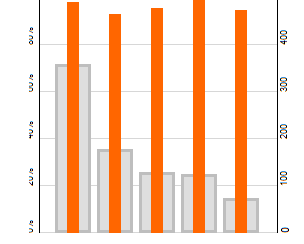
And I got something like that:
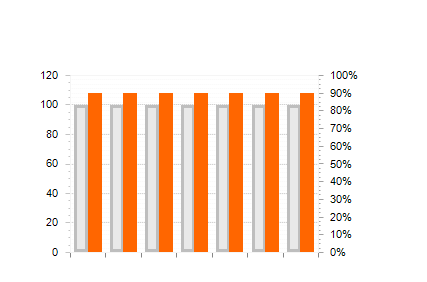
As you can see I can not begin the orange bar in the middle of the grey bar. Anyone knows if it's possible?
Thanks in advance
I'm trying to make a chart and I'm afraid that it's not possible or I'm doing something bad. Basicly I want to do a chart something like that:
And I got something like that:
As you can see I can not begin the orange bar in the middle of the grey bar. Anyone knows if it's possible?
Thanks in advance
mike Lundgren
Top achievements
Rank 1
Rank 1
answered
on
30 Jan 2013
3 answers
159 views
I may have a sort problem on one of my fields in a RadGrid.
I have a description field that is set in a RadEditor. It's rich text and unlimited length. (varchar(max)).
In the grid itself, when the field is displayed, I have a call in the ItemDataBound event handler to strip the field of HTML and only display the first 40 characters. The code for the stripping is as follows:
string clearText = Regex.Replace(incoming_string, "<(.|\n)*?>", "");
clearText = System.Web.HttpUtility.HtmlDecode(clearText);
Even with that the sort on that field does not appear to work perfectly. There are still a few records with stray characters. This may or may not be a problem in real life as these records are casually entered test data. Still I'd like to know if I'm doing anything basically wrong.
Suggestions?
I have a description field that is set in a RadEditor. It's rich text and unlimited length. (varchar(max)).
In the grid itself, when the field is displayed, I have a call in the ItemDataBound event handler to strip the field of HTML and only display the first 40 characters. The code for the stripping is as follows:
string clearText = Regex.Replace(incoming_string, "<(.|\n)*?>", "");
clearText = System.Web.HttpUtility.HtmlDecode(clearText);
Even with that the sort on that field does not appear to work perfectly. There are still a few records with stray characters. This may or may not be a problem in real life as these records are casually entered test data. Still I'd like to know if I'm doing anything basically wrong.
Suggestions?
Angel Petrov
Telerik team
answered
on
30 Jan 2013
1 answer
60 views
Hi
How do I clear the filtering on inserting a new row. Please suggest some help
thanks in advance
RT
How do I clear the filtering on inserting a new row. Please suggest some help
thanks in advance
RT






