or
1 answer
470 views
Hi,
I want to open Power Point file (.ppsx or .pps) in Browser.
I have tried many methods.
But all methods lead me to download the file not to show in the browser.
It should not be downloaded.have to be shown in browser itself.
help me to get this done.
Thanking you,
Regards,
AGM Raja
I want to open Power Point file (.ppsx or .pps) in Browser.
I have tried many methods.
But all methods lead me to download the file not to show in the browser.
It should not be downloaded.have to be shown in browser itself.
help me to get this done.
Thanking you,
Regards,
AGM Raja

Shinu
Top achievements
 Rank 2
Rank 2
answered
on
07 Nov 2013
1 answer
168 views
Here is the scenario:
- I am calling a new ASPX page inside a RadWindow which is vertically larger than the parent browser window.
- The RadWindow is set to AutoSize
- The Vertical scroll bar is turned on within the RadWindow's adjusted width - which then triggers a Horizontal scroll bar to cover the new width of the Vertical scroll bar.
I want the Vertical Scrollbar to appear when needed, but not the Horizontal one - unless in some rare instance the actual width of the Radwindow was truly more than the Parent Browser Window.
Am I missing something?
- I am calling a new ASPX page inside a RadWindow which is vertically larger than the parent browser window.
- The RadWindow is set to AutoSize
- The Vertical scroll bar is turned on within the RadWindow's adjusted width - which then triggers a Horizontal scroll bar to cover the new width of the Vertical scroll bar.
I want the Vertical Scrollbar to appear when needed, but not the Horizontal one - unless in some rare instance the actual width of the Radwindow was truly more than the Parent Browser Window.
Am I missing something?

Ianko
Telerik team

answered
on
07 Nov 2013
5 answers
107 views
I am trying to make an Excel document from a Grid. The Excel export needs to work in multiple international locations. It currently works fine when viewed from a en-US computer, but when viewed from a it-IT computer the format of the latitude and longitude are incorrect. See the example below. I am not explicitly setting the culture either at page load or during the export. I have tried setting an invariant culture, but that doesn't appear to work either.
In grid on the website
en-US Latitude = -33.85563
it-IT Latitude = -33.85563
In exported Excel
en-US Latitude = -33.85563
it-IT Latitude = -3385563,00 (this should be -33,85563)
In grid on the website
en-US Latitude = -33.85563
it-IT Latitude = -33.85563
In exported Excel
en-US Latitude = -33.85563
it-IT Latitude = -3385563,00 (this should be -33,85563)

Kostadin
Telerik team
answered
on
07 Nov 2013
2 answers
126 views
We are using the latest release and we have lost all of our appointment background colors. I am assigning the colors in the AppointmentDatabound code as follows based on the type of appointment
"e.Appointment.BackColor = Color.Orange"
It looks like it is assigning the color correctly and I can see the color around the edges of the appointment, but it looks like an image is sitting on top of the back ground color. This was not an issue before. All the colors showed correctly. The screenshot below shows the appointment as yellow when I coded it to be orange.
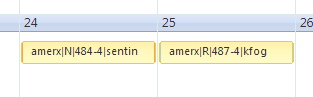
I also narrowed it down to only certain themes. "WebBlue" shows only the one color and "Simple" showing the color we programmed the appointment to show.
Did something change in the Css to apply an image on the appointment in the last update? Please help.
"e.Appointment.BackColor = Color.Orange"
It looks like it is assigning the color correctly and I can see the color around the edges of the appointment, but it looks like an image is sitting on top of the back ground color. This was not an issue before. All the colors showed correctly. The screenshot below shows the appointment as yellow when I coded it to be orange.
I also narrowed it down to only certain themes. "WebBlue" shows only the one color and "Simple" showing the color we programmed the appointment to show.
Did something change in the Css to apply an image on the appointment in the last update? Please help.
Kate
Telerik team
answered
on
07 Nov 2013
3 answers
74 views
Hi
In my web application, I am using Q1 2013 radcontrols. I am just adding reference to the telerik.web.UI, Skin and Design dll and now I want to use audio support for my radcaptcha. From where can I get the audio code files that corresponds to Q1 2013 version?
Thanks in advance
Saravanan
In my web application, I am using Q1 2013 radcontrols. I am just adding reference to the telerik.web.UI, Skin and Design dll and now I want to use audio support for my radcaptcha. From where can I get the audio code files that corresponds to Q1 2013 version?
Thanks in advance
Saravanan
1 answer
104 views
Hello,
I'm trying to use the autocompletebox in a DNN module (07.01.02 (356)) and I can see the AJAX call going out, but when the response comes back I see the following error in the console, and the drop down doesn't show any options: [Error] TypeError: 'undefined' is not an object (evaluating 'e.length')
_populateDropDown (Telerik.Web.UI.WebResource.axd, line 5905)
_onWebServiceResponse (Telerik.Web.UI.WebResource.axd, line 6116)
(anonymous function) (Telerik.Web.UI.WebResource.axd, line 6)
(anonymous function) (Telerik.Web.UI.WebResource.axd, line 6)
_raiseEvent (Telerik.Web.UI.WebResource.axd, line 978)
_onWebServiceSuccess (Telerik.Web.UI.WebResource.axd, line 973)
(anonymous function) (Telerik.Web.UI.WebResource.axd, line 6)
x (Telerik.Web.UI.WebResource.axd, line 6)
(anonymous function) (Telerik.Web.UI.WebResource.axd, line 6)
completed (Telerik.Web.UI.WebResource.axd, line 6)
_onReadyStateChange (Telerik.Web.UI.WebResource.axd, line 6)
Thanks,
Scott
I'm trying to use the autocompletebox in a DNN module (07.01.02 (356)) and I can see the AJAX call going out, but when the response comes back I see the following error in the console, and the drop down doesn't show any options: [Error] TypeError: 'undefined' is not an object (evaluating 'e.length')
_populateDropDown (Telerik.Web.UI.WebResource.axd, line 5905)
_onWebServiceResponse (Telerik.Web.UI.WebResource.axd, line 6116)
(anonymous function) (Telerik.Web.UI.WebResource.axd, line 6)
(anonymous function) (Telerik.Web.UI.WebResource.axd, line 6)
_raiseEvent (Telerik.Web.UI.WebResource.axd, line 978)
_onWebServiceSuccess (Telerik.Web.UI.WebResource.axd, line 973)
(anonymous function) (Telerik.Web.UI.WebResource.axd, line 6)
x (Telerik.Web.UI.WebResource.axd, line 6)
(anonymous function) (Telerik.Web.UI.WebResource.axd, line 6)
completed (Telerik.Web.UI.WebResource.axd, line 6)
_onReadyStateChange (Telerik.Web.UI.WebResource.axd, line 6)
Thanks,
Scott
Kate
Telerik team
answered
on
07 Nov 2013
1 answer
70 views
Hi ,
I want the look and feel of both Row Field header and Column field header should be same.
For our project we are using Pivot grid and Rad Grid ,we need same look of pivot grid header as rad grid.
help me how to override the css of Pivot grid Row fild header as same like Colum header.
please see the attached file.
rowheader1.jpg is the original out put
rowheaderneedsamelikeuniform2.png needed output.
Thanks and Regards
Shanu
I want the look and feel of both Row Field header and Column field header should be same.
For our project we are using Pivot grid and Rad Grid ,we need same look of pivot grid header as rad grid.
help me how to override the css of Pivot grid Row fild header as same like Colum header.
please see the attached file.
rowheader1.jpg is the original out put
rowheaderneedsamelikeuniform2.png needed output.
Thanks and Regards
Shanu
Pavlina
Telerik team
answered
on
07 Nov 2013
2 answers
154 views
Hi,
I am wondering if there is any event that can be handled to know when a node has been checked?
Thanks
I am wondering if there is any event that can be handled to know when a node has been checked?
Thanks
César
Top achievements
 Rank 1
Rank 1
answered
on
07 Nov 2013
1 answer
218 views
I just inherited a legacy system Web app that uses Telerik.
I'm not absolutely sure whether this is a Telerik problem or something more basic but I thought I'd start here.
The code up til now has been maintained and compiled in Visual Studio 2010, Net Framework 4.0
I'm trying to upgrade to VS2012. (For the moment I'm keeping it in 4.0)
The problem is as follows: Every main page has a reference to Telerik and an instance of the RadScriptManager.
The way the system works, every page also gets to a point where it instantiates a RadWindow within the main window, which in turn loads an ASPX with a standard ReportViewer control and very little else. Up till now this has run fine.
The RadWindow code is as follows:
RadWindow rwReportWindow = new RadWindow();
rwReportWindow.ID = "RadWindow1";
rwReportWindow.NavigateUrl = "ReportViewer.aspx";
rwReportWindow.Title = "Report Viewer";
rwReportWindow.Visible = true;
rwReportWindow.VisibleOnPageLoad = true;
rwReportWindow.InitialBehaviors |= WindowBehaviors.Pin;
rwReportWindow.InitialBehaviors |= WindowBehaviors.Maximize;
rwmReportWindows.Windows.Add(rwReportWindow);
where rwmReportWindows is a RadWindowManager.
If I compile and run this in VS2012, when I get to the point where it tries to run the window, it crashes with the message 'The Report Viewer Web Control requires a System.Web.UI.ScriptManager on the web form.'
If I add that basic ScriptManager to ReportViewer.aspx, the reports work, sometimes. Sometimes the viewer just seems to hang/stay blank/whatever.
In conclusion, I'm not sure what I'm dealing with here.
Suggestions?
(I was under the impression that the RadScriptManager and the regular ScriptManager were incompatible, that you couldn't have both on the same page.)
I'm not absolutely sure whether this is a Telerik problem or something more basic but I thought I'd start here.
The code up til now has been maintained and compiled in Visual Studio 2010, Net Framework 4.0
I'm trying to upgrade to VS2012. (For the moment I'm keeping it in 4.0)
The problem is as follows: Every main page has a reference to Telerik and an instance of the RadScriptManager.
The way the system works, every page also gets to a point where it instantiates a RadWindow within the main window, which in turn loads an ASPX with a standard ReportViewer control and very little else. Up till now this has run fine.
The RadWindow code is as follows:
RadWindow rwReportWindow = new RadWindow();
rwReportWindow.ID = "RadWindow1";
rwReportWindow.NavigateUrl = "ReportViewer.aspx";
rwReportWindow.Title = "Report Viewer";
rwReportWindow.Visible = true;
rwReportWindow.VisibleOnPageLoad = true;
rwReportWindow.InitialBehaviors |= WindowBehaviors.Pin;
rwReportWindow.InitialBehaviors |= WindowBehaviors.Maximize;
rwmReportWindows.Windows.Add(rwReportWindow);
where rwmReportWindows is a RadWindowManager.
If I compile and run this in VS2012, when I get to the point where it tries to run the window, it crashes with the message 'The Report Viewer Web Control requires a System.Web.UI.ScriptManager on the web form.'
If I add that basic ScriptManager to ReportViewer.aspx, the reports work, sometimes. Sometimes the viewer just seems to hang/stay blank/whatever.
In conclusion, I'm not sure what I'm dealing with here.
Suggestions?
(I was under the impression that the RadScriptManager and the regular ScriptManager were incompatible, that you couldn't have both on the same page.)
Dimitar Terziev
Telerik team
answered
on
07 Nov 2013
1 answer
126 views
Hey Guys,
i´ve a little Problem with the RadGrid Paging Feature. We´re filling the RadGrid with different Datasources wichever Get-Parameter is in the Url. The Default page is e.g. default.aspx and the Page for all Entrys of this Month is default.aspx?filter=month.
The Problem is now, when i try to Paging, the Page Reloadet always on default.aspx and not an default.aspx?filter=month. Thereby the Grid is after Paging always filled with the Data from the Default Page and not from the second Page of the last DataSource.
Can anywhone help me, what i can do to solve this Problem?
Thanks for helping
Sincerely
Dee
i´ve a little Problem with the RadGrid Paging Feature. We´re filling the RadGrid with different Datasources wichever Get-Parameter is in the Url. The Default page is e.g. default.aspx and the Page for all Entrys of this Month is default.aspx?filter=month.
The Problem is now, when i try to Paging, the Page Reloadet always on default.aspx and not an default.aspx?filter=month. Thereby the Grid is after Paging always filled with the Data from the Default Page and not from the second Page of the last DataSource.
Can anywhone help me, what i can do to solve this Problem?
Thanks for helping
Sincerely
Dee
Konstantin Dikov
Telerik team
answered
on
07 Nov 2013





