or
5 answers
663 views
I have a user control with 2 rad buttons and a rad ajax manager. one ajaxs the other. Because of the user control it is the ajaxmanagerproxy
the main page has a multipage and I load several of the user controls in codeadding them to the pageview in the multipage programatically. I have a regular ajaxmanager on the page set to ajax the panel. However. When the page loads I see all the controls I am adding and when I click the page reloads and they are gone.
What is the point of using ajax if a postback still happens. Any assistance would be appreciated.
the main page has a multipage and I load several of the user controls in codeadding them to the pageview in the multipage programatically. I have a regular ajaxmanager on the page set to ajax the panel. However. When the page loads I see all the controls I am adding and when I click the page reloads and they are gone.
What is the point of using ajax if a postback still happens. Any assistance would be appreciated.

Viktor Tachev
Telerik team

answered
on
27 Nov 2013
1 answer
101 views
Hi
I have a requirement to add a watermark/ put a date format hint beside the calander icon in the GridDateTimeColumn.. is there a property that is available on the Telerik grid or can you suggest a way of achieving this...
This is what i have
<telerik:GridDateTimeColumn HeaderStyle-Font-Bold="true" HeaderText="xxxxx" ColumnEditorID="xxxxDatePicker"
DataField="xxxx" DataFormatString={0:dd-MMM-yyyy} UniqueName="xxxxxx" Aggregate="None" HeaderStyle-Width="20%" />
Thanks in advance.
I have a requirement to add a watermark/ put a date format hint beside the calander icon in the GridDateTimeColumn.. is there a property that is available on the Telerik grid or can you suggest a way of achieving this...
This is what i have
<telerik:GridDateTimeColumn HeaderStyle-Font-Bold="true" HeaderText="xxxxx" ColumnEditorID="xxxxDatePicker"
DataField="xxxx" DataFormatString={0:dd-MMM-yyyy} UniqueName="xxxxxx" Aggregate="None" HeaderStyle-Width="20%" />
Thanks in advance.

Jayesh Goyani
Top achievements
 Rank 2
Rank 2
answered
on
27 Nov 2013
1 answer
121 views
Hi,
we have our own custom control to insert flash and video into the website. Within the control we are using the media manager to let the user choose the files.
The problem we have is that we want to hide the media manager icon from the default toolbar but still be able to open the media manager from within our custom control.
If we remove the mediamanager entry in the ToolFile.xml the media manager also won't open in our custom control.
If we leave it there it works, but the default media manager icon is still present.
Is there any possibility to just hide the default media manager icon?
Thanks
Mark
we have our own custom control to insert flash and video into the website. Within the control we are using the media manager to let the user choose the files.
The problem we have is that we want to hide the media manager icon from the default toolbar but still be able to open the media manager from within our custom control.
If we remove the mediamanager entry in the ToolFile.xml the media manager also won't open in our custom control.
If we leave it there it works, but the default media manager icon is still present.
Is there any possibility to just hide the default media manager icon?
Thanks
Mark

Ianko
Telerik team
answered
on
27 Nov 2013
1 answer
124 views
how to wrap text only for level 1 menu item? as I don't want to wrap text for the menu sub item, is this possible?
Many thanks
Many thanks

3 answers
166 views
I've subclassed the RadGrid to be able to provide a consistent, customized behavior for it in my web application.
Right now I'm trying to customize the pagesize combobox in the RadGrid, so it will display more options than the default.
The page size combobox correctly displays the new list of options, but selecting one of them does nothing. No event is fired and the grid contents is not updated.
What do I need to do to make it work?
My code:
Right now I'm trying to customize the pagesize combobox in the RadGrid, so it will display more options than the default.
The page size combobox correctly displays the new list of options, but selecting one of them does nothing. No event is fired and the grid contents is not updated.
What do I need to do to make it work?
My code:
Protected Overrides Sub OnItemCreated(e As Telerik.Web.UI.GridItemEventArgs) If TypeOf e.Item Is GridPagerItem Then Dim l_oPageSize As RadComboBox = DirectCast(e.Item.FindControl("PageSizeComboBox"), RadComboBox) l_oPageSize.Items.Clear() Dim l_oItem As RadComboBoxItem For l_iIndex As Integer = 10 To 150 Step 10 l_oItem = New RadComboBoxItem(l_iIndex) l_oPageSize.Items.Add(l_oItem) Next l_oItem = New RadComboBoxItem(200) l_oPageSize.Items.Add(l_oItem) l_oItem = New RadComboBoxItem(300) l_oPageSize.Items.Add(l_oItem) l_oItem = New RadComboBoxItem(300) l_oPageSize.Items.Add(l_oItem) l_oItem = New RadComboBoxItem(350) l_oPageSize.Items.Add(l_oItem) l_oItem = New RadComboBoxItem(400) l_oPageSize.Items.Add(l_oItem) l_oItem = New RadComboBoxItem(450) l_oPageSize.Items.Add(l_oItem) l_oItem = New RadComboBoxItem(500) l_oPageSize.Items.Add(l_oItem) l_oItem = New RadComboBoxItem(600) l_oPageSize.Items.Add(l_oItem) l_oItem = New RadComboBoxItem(700) l_oPageSize.Items.Add(l_oItem) l_oItem = New RadComboBoxItem(800) l_oPageSize.Items.Add(l_oItem) l_oItem = New RadComboBoxItem(900) l_oPageSize.Items.Add(l_oItem) l_oItem = New RadComboBoxItem(1000) l_oPageSize.Items.Add(l_oItem) Dim l_iW As Integer = l_oPageSize.Width.ToString.Substring(0, l_oPageSize.Width.ToString.IndexOf("px")) l_oPageSize.Width = Unit.Pixel(l_iW + 10) End If MyBase.OnItemCreated(e)End Sub
1 answer
139 views
I get the following errors when I try to insert/edit a record in the Batch Editing demo at
http://demos.telerik.com/aspnet-ajax/grid/examples/data-editing/batch-editing/defaultcs.aspx
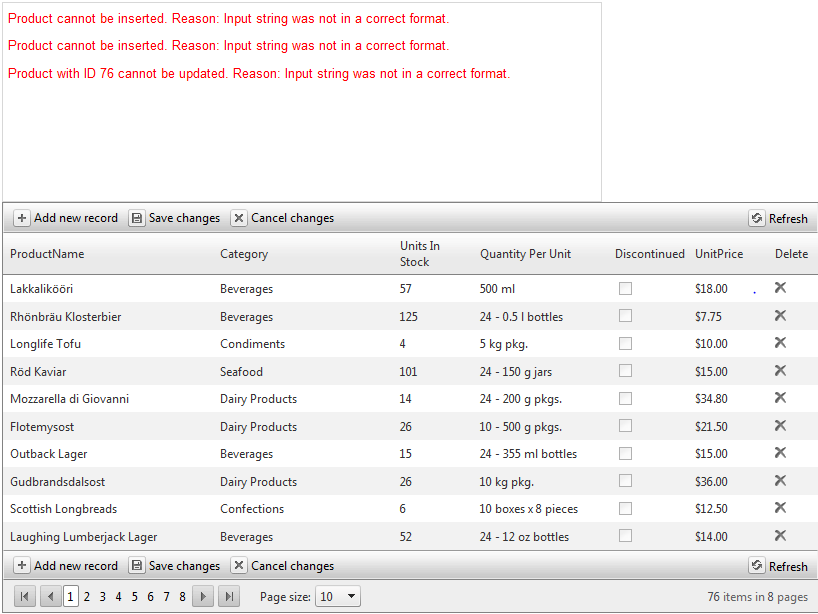
http://demos.telerik.com/aspnet-ajax/grid/examples/data-editing/batch-editing/defaultcs.aspx

Angel Petrov
Telerik team
answered
on
27 Nov 2013
6 answers
136 views
I have a scheduler with two resources in the insert and edit forms. The first resource is the Employee, and the second is the customer. I am passing the customer id into the page and want to open the insert form and select the customer from the resource, based upon the customer id. How do I do this?

Plamen
Telerik team
answered
on
27 Nov 2013
1 answer
283 views
So I have Grids throughout my site that have static headers and footer. Currently, the heights are all hard-coded depending on the other content on the particular page. The problem is that in certain instances a grid may only be populated with a handful of records but the footer is staying static at the bottom of the page, leaving a huge space between the last record and the totals.
I can allow the grid do auto size the height but then I will lose the scrolling that I want at a certain height. How can I make the footer sticky to the last row unless it exceeds a specified height?
I can allow the grid do auto size the height but then I will lose the scrolling that I want at a certain height. How can I make the footer sticky to the last row unless it exceeds a specified height?
Venelin
Telerik team
answered
on
27 Nov 2013
5 answers
331 views
Hi all,
the option ImageStorageLocation="Session" for RadCaptcha I used earlier was working OK, until now.
The problem with the Captcha came right after the latest update of my RadControls was applied (Q3 2013). Simply put, instead of the image with captcha numbers, we now get no image at all.
Looking deeply at the problem, I discovered that if we change the Captcha's ImageStorageLocation to "Cache" the captcha image is rendered as expected. However, I have to use the Session option, because other options was not appropriate (not working) in my hosting environement.
Can anyone help please, or is it a bug in the latest Q3 2013 update.
Slav
Telerik team
answered
on
27 Nov 2013
1 answer
84 views
It took telerik 5 years to fix the case sensitive seeach in the combobox..
New control Radsearch, same old defect, all over again..
Argh...
Plamen
Telerik team
answered
on
27 Nov 2013






