or
1 answer
265 views
Can you use RadEditor to upload a pdf, like an image, and then have the pdf display on the screen and not a link?

Ianko
Telerik team

answered
on
10 Feb 2015
3 answers
231 views
Hi,
When adding content using pasteHtml method, it's adding <br> tag before the text in chrome browser due to which an extra line is appearing. This issue can also be reproduced using existing tool e.g. "Insert Time". The issue will be gone when you switch between HTML view and Design view. Check this screen cast: http://screencast.com/t/liOx9ryeIp1
Any work-around to fix this issue?
I'm using "ASP.NET AJAX Q2 2014" (2014.2.724.40) version.
Also I'm disabling ConvertToXhtml, ConvertCharactersToEntities, ConvertFontToSpan, and RemoveScripts filters. And NewLineMode = EditorNewLineModes.Div.
Thanks,
Anil
When adding content using pasteHtml method, it's adding <br> tag before the text in chrome browser due to which an extra line is appearing. This issue can also be reproduced using existing tool e.g. "Insert Time". The issue will be gone when you switch between HTML view and Design view. Check this screen cast: http://screencast.com/t/liOx9ryeIp1
Any work-around to fix this issue?
I'm using "ASP.NET AJAX Q2 2014" (2014.2.724.40) version.
Also I'm disabling ConvertToXhtml, ConvertCharactersToEntities, ConvertFontToSpan, and RemoveScripts filters. And NewLineMode = EditorNewLineModes.Div.
Thanks,
Anil

Marin Bratanov
Telerik team
answered
on
10 Feb 2015
2 answers
147 views
Hi,
I've got my drop down lists working with border coloured validation using JQuery. Now that I am trying to do the same thing with RadComboBoxes I can't seem to get the relevant css classes. Below is how I am doing this to the drop down lists. How do I do the same with ComboBoxes?
Regards
Jon
I've got my drop down lists working with border coloured validation using JQuery. Now that I am trying to do the same thing with RadComboBoxes I can't seem to get the relevant css classes. Below is how I am doing this to the drop down lists. How do I do the same with ComboBoxes?
Regards
Jon
var $ = $telerik.$;var dropDown = dropDownTree.get_element();if (eventArgs.IsValid === false) { $(dropDown).find(".rddtInner").addClass("RadDropDownTreeFieldErrorHighlight");} else { $(dropDown).find(".rddtInner").removeClass("RadDropDownTreeFieldErrorHighlight");}
3 answers
405 views
I have a rad grid that populates and pages fine however when I try to filter based on controls in the filtertemplate the page postsback, but no filter is applied.
When debuging, the filterexpression is added to the mastertableview but the column has no filter applied. Using telerik version 2014.3.1209.45
<%@ Page Title="" Language="vb" AutoEventWireup="false" MasterPageFile="~/Layout/WebPortal.master" CodeBehind="CustomerNotes.aspx.vb" Inherits="Office.CustomerNotes" %>
<asp:Content ID="Content1" ContentPlaceHolderID="PageContentPlaceHolder" runat="server">
<telerik:RadGrid runat="server" ID="grdNotes" Width="1024" AllowSorting="true" DataSourceID="sdsNotes" AutoGenerateEditColumn="true" AutoGenerateColumns="false" AllowFilteringByColumn="true"
ShowStatusBar="true" RegisterWithScriptManager="true" EnableLinqExpressions="false">
<MasterTableView DataKeyNames="ID" AllowSorting="true" AllowPaging="true" PageSize="30" TableLayout="Fixed" EditMode="InPlace" AllowAutomaticInserts="true" AllowFilteringByColumn="true">
<Columns>
<telerik:GridBoundColumn DataField="CustomerName" HeaderText="Customer Name" ReadOnly="true" AllowFiltering="true" AllowSorting="true" UniqueName="colCustomer">
<FilterTemplate>
<telerik:RadComboBox ID="rcbCustomerName" runat="server" AppendDataBoundItems="true" DataSourceID="sdsCustomer" AutoPostBack="true"
DataTextField="Name" DataValueField="Name" OnClientSelectedIndexChanged="CustomerIndexChanged"
SelectedValue='<%# TryCast(Container, GridItem).OwnerTableView.GetColumn("colCustomer").CurrentFilterValue%>'>
<Items>
<telerik:RadComboBoxItem Text="All" />
</Items>
</telerik:RadComboBox>
<telerik:RadScriptBlock ID="rsbCustomer" runat="server">
<script type="text/javascript">
function CustomerIndexChanged(sender, args) {
var tableView = $find("<%# TryCast(Container, GridItem).OwnerTableView.ClientID %>");
tableView.filter("colCustomer", args.get_item().get_value(), Telerik.Web.UI.GridFilterFunction.EqualTo);
}
</script>
</telerik:RadScriptBlock>
</FilterTemplate>
</telerik:GridBoundColumn>
<telerik:GridBoundColumn DataField="Note" HeaderText="Note" AllowSorting="true" AllowFiltering="false">
</telerik:GridBoundColumn>
<telerik:GridBoundColumn DataField="NoteType" HeaderText="Note Type" AllowSorting="true" AllowFiltering="true" UniqueName="colNoteType" >
<FilterTemplate>
<telerik:RadComboBox ID="rcbNoteType" runat="server" AppendDataBoundItems="true" DataSourceID="sdsNoteType" DataTextField="Type"
DataValueField="Id" OnClientSelectedIndexChanged="NoteTypeIndexChanged" AutoPostBack="true"
SelectedValue='<%# TryCast(Container, GridItem).OwnerTableView.GetColumn("colNoteType").CurrentFilterValue%>'>
<Items>
<telerik:RadComboBoxItem Text="All" />
</Items>
</telerik:RadComboBox>
<telerik:RadScriptBlock ID="rsbNoteType" runat="server">
<script type="text/javascript">
function NoteTypeIndexChanged(sender, args) {
var tableView = $find("<%# TryCast(Container, GridItem).OwnerTableView.ClientID %>");
tableView.filter("colNoteType", args.get_item().get_value(), Telerik.Web.UI.GridFilterFunction.EqualTo);
}
</script>
</telerik:RadScriptBlock>
</FilterTemplate>
</telerik:GridBoundColumn>
<telerik:GridBoundColumn DataField="Name" HeaderText="Creator" ReadOnly="true" AllowSorting="true" AllowFiltering="true" UniqueName="colCreator">
<FilterTemplate>
<telerik:RadComboBox ID="rcbCreator" runat="server" AppendDataBoundItems="true" DataSourceID="sdsCreator" DataTextField="Creator"
DataValueField="Creator" AutoPostBack="true" OnClientSelectedIndexChanged="CreatorIndexChanged"
SelectedValue='<%# TryCast(Container, GridItem).OwnerTableView.GetColumn("colCreator").CurrentFilterValue%>'>
<Items>
<telerik:RadComboBoxItem Text="All" />
</Items>
</telerik:RadComboBox>
<telerik:RadScriptBlock ID="rsbCreator" runat="server">
<script type="text/javascript">
function CreatorIndexChanged(sender, args) {
var tableView = $find("<%# TryCast(Container, GridItem).OwnerTableView.ClientID %>");
tableView.filter("colCreator", args.get_item().get_value(), Telerik.Web.UI.GridFilterFunction.EqualTo);
}
</script>
</telerik:RadScriptBlock>
</FilterTemplate>
</telerik:GridBoundColumn>
<telerik:GridBoundColumn DataField="CreationDate" HeaderText="Creation Date" ReadOnly="true" DataType="System.DateTime" DataFormatString="{0:d}" AllowSorting="true" AllowFiltering="false"></telerik:GridBoundColumn>
</Columns>
</MasterTableView>
</telerik:RadGrid>
<asp:SqlDataSource runat="server" ID="sdsCreator" SelectCommand="SELECT DISTINCT c.id as ID,c.Name AS Creator FROM cis.CustomerToDoList ctl INNER JOIN cis.Creators c ON c.ID = ctl.CreatorID INNER JOIN cis.Creators c2 ON c2.ID = ctl.AssigneeID INNER JOIN cis.CustomerList cl ON cl.CustomerNo = ctl.CustomerNo WHERE Complete=0 AND ctl.DateDeleted IS NULL ORDER BY c.Name" />
<asp:SqlDataSource runat="server" ID="sdsNoteType" SelectCommand="Select id,type from cis.customernotetype order by type"/>
<asp:SqlDataSource runat="server" id="sdsCustomer" SelectCommand="SELECT DISTINCT cl.CustomerNo,cl.Name FROM cis.CustomerToDoList ctl INNER JOIN cis.Creators c ON c.ID = ctl.CreatorID INNER JOIN cis.Creators c2 ON c2.ID = ctl.AssigneeID INNER JOIN cis.CustomerList cl ON cl.CustomerNo = ctl.CustomerNo WHERE Complete=0 AND ctl.DateDeleted IS NULL ORDER BY name" />
<asp:SqlDataSource runat="server" ID="sdsNotes" SelectCommand="SELECT cn.id AS ID,cn.Note,cnt.Type AS NoteType,c.Name,cn.CreationDate,cl.Name AS CustomerName FROM cis.CustomerNotes cn INNER JOIN cis.customernotetype cnt ON cn.notetype = cnt.id INNER JOIN cis.CustomerList cl ON cl.CustomerNo = cn.CustomerNo INNER JOIN cis.Creators c ON c.ID = cn.CreatorID WHERE cl.Inactive=0"/>
</asp:Content>
When debuging, the filterexpression is added to the mastertableview but the column has no filter applied. Using telerik version 2014.3.1209.45
<%@ Page Title="" Language="vb" AutoEventWireup="false" MasterPageFile="~/Layout/WebPortal.master" CodeBehind="CustomerNotes.aspx.vb" Inherits="Office.CustomerNotes" %>
<asp:Content ID="Content1" ContentPlaceHolderID="PageContentPlaceHolder" runat="server">
<telerik:RadGrid runat="server" ID="grdNotes" Width="1024" AllowSorting="true" DataSourceID="sdsNotes" AutoGenerateEditColumn="true" AutoGenerateColumns="false" AllowFilteringByColumn="true"
ShowStatusBar="true" RegisterWithScriptManager="true" EnableLinqExpressions="false">
<MasterTableView DataKeyNames="ID" AllowSorting="true" AllowPaging="true" PageSize="30" TableLayout="Fixed" EditMode="InPlace" AllowAutomaticInserts="true" AllowFilteringByColumn="true">
<Columns>
<telerik:GridBoundColumn DataField="CustomerName" HeaderText="Customer Name" ReadOnly="true" AllowFiltering="true" AllowSorting="true" UniqueName="colCustomer">
<FilterTemplate>
<telerik:RadComboBox ID="rcbCustomerName" runat="server" AppendDataBoundItems="true" DataSourceID="sdsCustomer" AutoPostBack="true"
DataTextField="Name" DataValueField="Name" OnClientSelectedIndexChanged="CustomerIndexChanged"
SelectedValue='<%# TryCast(Container, GridItem).OwnerTableView.GetColumn("colCustomer").CurrentFilterValue%>'>
<Items>
<telerik:RadComboBoxItem Text="All" />
</Items>
</telerik:RadComboBox>
<telerik:RadScriptBlock ID="rsbCustomer" runat="server">
<script type="text/javascript">
function CustomerIndexChanged(sender, args) {
var tableView = $find("<%# TryCast(Container, GridItem).OwnerTableView.ClientID %>");
tableView.filter("colCustomer", args.get_item().get_value(), Telerik.Web.UI.GridFilterFunction.EqualTo);
}
</script>
</telerik:RadScriptBlock>
</FilterTemplate>
</telerik:GridBoundColumn>
<telerik:GridBoundColumn DataField="Note" HeaderText="Note" AllowSorting="true" AllowFiltering="false">
</telerik:GridBoundColumn>
<telerik:GridBoundColumn DataField="NoteType" HeaderText="Note Type" AllowSorting="true" AllowFiltering="true" UniqueName="colNoteType" >
<FilterTemplate>
<telerik:RadComboBox ID="rcbNoteType" runat="server" AppendDataBoundItems="true" DataSourceID="sdsNoteType" DataTextField="Type"
DataValueField="Id" OnClientSelectedIndexChanged="NoteTypeIndexChanged" AutoPostBack="true"
SelectedValue='<%# TryCast(Container, GridItem).OwnerTableView.GetColumn("colNoteType").CurrentFilterValue%>'>
<Items>
<telerik:RadComboBoxItem Text="All" />
</Items>
</telerik:RadComboBox>
<telerik:RadScriptBlock ID="rsbNoteType" runat="server">
<script type="text/javascript">
function NoteTypeIndexChanged(sender, args) {
var tableView = $find("<%# TryCast(Container, GridItem).OwnerTableView.ClientID %>");
tableView.filter("colNoteType", args.get_item().get_value(), Telerik.Web.UI.GridFilterFunction.EqualTo);
}
</script>
</telerik:RadScriptBlock>
</FilterTemplate>
</telerik:GridBoundColumn>
<telerik:GridBoundColumn DataField="Name" HeaderText="Creator" ReadOnly="true" AllowSorting="true" AllowFiltering="true" UniqueName="colCreator">
<FilterTemplate>
<telerik:RadComboBox ID="rcbCreator" runat="server" AppendDataBoundItems="true" DataSourceID="sdsCreator" DataTextField="Creator"
DataValueField="Creator" AutoPostBack="true" OnClientSelectedIndexChanged="CreatorIndexChanged"
SelectedValue='<%# TryCast(Container, GridItem).OwnerTableView.GetColumn("colCreator").CurrentFilterValue%>'>
<Items>
<telerik:RadComboBoxItem Text="All" />
</Items>
</telerik:RadComboBox>
<telerik:RadScriptBlock ID="rsbCreator" runat="server">
<script type="text/javascript">
function CreatorIndexChanged(sender, args) {
var tableView = $find("<%# TryCast(Container, GridItem).OwnerTableView.ClientID %>");
tableView.filter("colCreator", args.get_item().get_value(), Telerik.Web.UI.GridFilterFunction.EqualTo);
}
</script>
</telerik:RadScriptBlock>
</FilterTemplate>
</telerik:GridBoundColumn>
<telerik:GridBoundColumn DataField="CreationDate" HeaderText="Creation Date" ReadOnly="true" DataType="System.DateTime" DataFormatString="{0:d}" AllowSorting="true" AllowFiltering="false"></telerik:GridBoundColumn>
</Columns>
</MasterTableView>
</telerik:RadGrid>
<asp:SqlDataSource runat="server" ID="sdsCreator" SelectCommand="SELECT DISTINCT c.id as ID,c.Name AS Creator FROM cis.CustomerToDoList ctl INNER JOIN cis.Creators c ON c.ID = ctl.CreatorID INNER JOIN cis.Creators c2 ON c2.ID = ctl.AssigneeID INNER JOIN cis.CustomerList cl ON cl.CustomerNo = ctl.CustomerNo WHERE Complete=0 AND ctl.DateDeleted IS NULL ORDER BY c.Name" />
<asp:SqlDataSource runat="server" ID="sdsNoteType" SelectCommand="Select id,type from cis.customernotetype order by type"/>
<asp:SqlDataSource runat="server" id="sdsCustomer" SelectCommand="SELECT DISTINCT cl.CustomerNo,cl.Name FROM cis.CustomerToDoList ctl INNER JOIN cis.Creators c ON c.ID = ctl.CreatorID INNER JOIN cis.Creators c2 ON c2.ID = ctl.AssigneeID INNER JOIN cis.CustomerList cl ON cl.CustomerNo = ctl.CustomerNo WHERE Complete=0 AND ctl.DateDeleted IS NULL ORDER BY name" />
<asp:SqlDataSource runat="server" ID="sdsNotes" SelectCommand="SELECT cn.id AS ID,cn.Note,cnt.Type AS NoteType,c.Name,cn.CreationDate,cl.Name AS CustomerName FROM cis.CustomerNotes cn INNER JOIN cis.customernotetype cnt ON cn.notetype = cnt.id INNER JOIN cis.CustomerList cl ON cl.CustomerNo = cn.CustomerNo INNER JOIN cis.Creators c ON c.ID = cn.CreatorID WHERE cl.Inactive=0"/>
</asp:Content>
Angel Petrov
Telerik team
answered
on
10 Feb 2015
1 answer
103 views
How I can optimize the styles and scripts in axd files?...
I attached an image of chorme result.
tahnks
I attached an image of chorme result.
tahnks
Slav
Telerik team
answered
on
10 Feb 2015
5 answers
1.4K+ views
We bought the complete license of Telerik controls, I've been using the Radgrid mainly to do the Export to Excel.
I have two problems that needs to be solved:
1. How do I manually add text or header to Row 1 of the excel file and then start all bound items from the Dataset on Row 2 downwards?
(see attachment1.png)
2. How do I remove the filering/sorting that is automatically added to the columns when the excel file is exported. I need to retain the colors I defined but I don't want the dropdown button for each column.
(see attachment2.png)
Thanks,
Here are my codes:
codebehind
aspx
I have two problems that needs to be solved:
1. How do I manually add text or header to Row 1 of the excel file and then start all bound items from the Dataset on Row 2 downwards?
(see attachment1.png)
2. How do I remove the filering/sorting that is automatically added to the columns when the excel file is exported. I need to retain the colors I defined but I don't want the dropdown button for each column.
(see attachment2.png)
Thanks,
Here are my codes:
codebehind
bool isConfigured = false; protected void RadGrid1_ExcelMLExportRowCreated(object source, GridExportExcelMLRowCreatedArgs e) { if (e.RowType == GridExportExcelMLRowType.HeaderRow) { //Add custom styles to the desired cells CellElement cell = e.Row.Cells.GetCellByName("Number"); cell.StyleValue = "normalHeaderStyle"; cell = e.Row.Cells.GetCellByName("Name"); cell.StyleValue = "normalHeaderStyle"; cell = e.Row.Cells.GetCellByName("Weight in Grams"); cell.StyleValue = "normalHeaderStyle"; cell = e.Row.Cells.GetCellByName("Energie"); cell.StyleValue = "perTotalHeaderStyle"; cell = e.Row.Cells.GetCellByName("Eiweiss"); cell.StyleValue = "perTotalHeaderStyle"; cell = e.Row.Cells.GetCellByName("Fett"); cell.StyleValue = "perTotalHeaderStyle"; cell = e.Row.Cells.GetCellByName("KH"); cell.StyleValue = "perTotalHeaderStyle"; cell = e.Row.Cells.GetCellByName("Nahrungsfasern, total"); cell.StyleValue = "perTotalHeaderStyle"; cell = e.Row.Cells.GetCellByName("Energie1"); cell.StyleValue = "per100HeaderStyle"; cell = e.Row.Cells.GetCellByName("Eiweiss1"); cell.StyleValue = "per100HeaderStyle"; cell = e.Row.Cells.GetCellByName("Fett1"); cell.StyleValue = "per100HeaderStyle"; cell = e.Row.Cells.GetCellByName("KH1"); cell.StyleValue = "per100HeaderStyle"; cell = e.Row.Cells.GetCellByName("Nahrungsfasern, total1"); cell.StyleValue = "per100HeaderStyle"; cell = e.Row.Cells.GetCellByName("Energie CAL."); cell.StyleValue = "perTotalHeaderStyle"; } if (e.RowType == GridExportExcelMLRowType.DataRow) { //Add custom styles to the desired cells CellElement cell = e.Row.Cells.GetCellByName("Number"); cell.StyleValue = cell.StyleValue == "itemStyle" ? "itemNormalStyle" : "itemNormalStyle"; cell = e.Row.Cells.GetCellByName("Name"); cell.StyleValue = cell.StyleValue == "itemStyle" ? "itemNormalStyle" : "itemNormalStyle"; cell = e.Row.Cells.GetCellByName("Weight in Grams"); cell.StyleValue = cell.StyleValue == "itemStyle" ? "itemNormalStyle" : "itemNormalStyle"; cell = e.Row.Cells.GetCellByName("Energie"); cell.StyleValue = cell.StyleValue == "itemStyle" ? "itemNutrientStyle" : "itemNutrientStyle"; cell = e.Row.Cells.GetCellByName("Eiweiss"); cell.StyleValue = cell.StyleValue == "itemStyle" ? "itemNutrientStyle" : "itemNutrientStyle"; cell = e.Row.Cells.GetCellByName("Fett"); cell.StyleValue = cell.StyleValue == "itemStyle" ? "itemNutrientStyle" : "itemNutrientStyle"; cell = e.Row.Cells.GetCellByName("KH"); cell.StyleValue = cell.StyleValue == "itemStyle" ? "itemNutrientStyle" : "itemNutrientStyle"; cell = e.Row.Cells.GetCellByName("Nahrungsfasern, total"); cell.StyleValue = cell.StyleValue == "itemStyle" ? "itemNutrientStyle" : "itemNutrientStyle"; cell = e.Row.Cells.GetCellByName("Energie1"); cell.StyleValue = cell.StyleValue == "itemStyle" ? "itemNutrientStyle" : "itemNutrientStyle"; cell = e.Row.Cells.GetCellByName("Eiweiss1"); cell.StyleValue = cell.StyleValue == "itemStyle" ? "itemNutrientStyle" : "itemNutrientStyle"; cell = e.Row.Cells.GetCellByName("Fett1"); cell.StyleValue = cell.StyleValue == "itemStyle" ? "itemNutrientStyle" : "itemNutrientStyle"; cell = e.Row.Cells.GetCellByName("KH1"); cell.StyleValue = cell.StyleValue == "itemStyle" ? "itemNutrientStyle" : "itemNutrientStyle"; cell = e.Row.Cells.GetCellByName("Nahrungsfasern, total1"); cell.StyleValue = cell.StyleValue == "itemStyle" ? "itemNutrientStyle" : "itemNutrientStyle"; cell = e.Row.Cells.GetCellByName("Energie CAL."); cell.StyleValue = cell.StyleValue == "itemStyle" ? "itemNutrientStyle" : "itemNutrientStyle"; if (!isConfigured) { //Set Worksheet name e.Worksheet.Name = "Nährwerte"; //Set Column widths foreach (ColumnElement column in e.Worksheet.Table.Columns) { if (e.Worksheet.Table.Columns.IndexOf(column) == 1) column.Width = Unit.Point(180); //set width 180 to ProductName column else column.Width = Unit.Point(80); //set width 80 to the rest of the columns } //Set Page options PageSetupElement pageSetup = e.Worksheet.WorksheetOptions.PageSetup; pageSetup.PageLayoutElement.IsCenteredVertical = true; pageSetup.PageLayoutElement.IsCenteredHorizontal = true; pageSetup.PageMarginsElement.Left = 0.5; pageSetup.PageMarginsElement.Top = 0.5; pageSetup.PageMarginsElement.Right = 0.5; pageSetup.PageMarginsElement.Bottom = 0.5; pageSetup.PageLayoutElement.PageOrientation = PageOrientationType.Landscape; //Freeze panes //e.Worksheet.WorksheetOptions.AllowFreezePanes = true; //e.Worksheet.WorksheetOptions.LeftColumnRightPaneNumber = 3; //e.Worksheet.WorksheetOptions.TopRowBottomPaneNumber = 1; //e.Worksheet.WorksheetOptions.SplitHorizontalOffset = 1; //e.Worksheet.WorksheetOptions.SplitVerticalOffest = 1; //e.Worksheet.WorksheetOptions.ActivePane = 4; isConfigured = true; } } } protected void RadGrid1_ExcelMLExportStylesCreated(object source, GridExportExcelMLStyleCreatedArgs e) { //Add currency and percent styles StyleElement pertotalHeaderStyle = new StyleElement("perTotalHeaderStyle"); pertotalHeaderStyle.FontStyle.Color = System.Drawing.Color.Black; pertotalHeaderStyle.FontStyle.Bold = true; pertotalHeaderStyle.FontStyle.FontName = "Calibri"; pertotalHeaderStyle.FontStyle.Size = 10.0; e.Styles.Add(pertotalHeaderStyle); StyleElement per100HeaderStyle = new StyleElement("per100HeaderStyle"); per100HeaderStyle.FontStyle.Color = System.Drawing.Color.Black; per100HeaderStyle.FontStyle.Bold = true; per100HeaderStyle.FontStyle.FontName = "Calibri"; per100HeaderStyle.FontStyle.Size = 10.0; e.Styles.Add(per100HeaderStyle); StyleElement normalHeaderStyle = new StyleElement("normalHeaderStyle"); normalHeaderStyle.FontStyle.Color = System.Drawing.Color.Black; normalHeaderStyle.FontStyle.Bold = true; normalHeaderStyle.FontStyle.FontName = "Calibri"; normalHeaderStyle.FontStyle.Size = 10.0; e.Styles.Add(normalHeaderStyle); StyleElement itemStyle = new StyleElement("itemNormalStyle"); itemStyle.FontStyle.Color = System.Drawing.Color.Black; itemStyle.FontStyle.Bold = false; itemStyle.FontStyle.FontName = "Calibri"; itemStyle.FontStyle.Size = 10.0; e.Styles.Add(itemStyle); StyleElement itemNutrientStyle = new StyleElement("itemNutrientStyle"); itemNutrientStyle.FontStyle.Color = System.Drawing.Color.Black; itemNutrientStyle.NumberFormat.FormatType = NumberFormatType.Standard; itemNutrientStyle.FontStyle.Bold = false; itemNutrientStyle.FontStyle.FontName = "Calibri"; itemNutrientStyle.FontStyle.Size = 10.0; e.Styles.Add(itemNutrientStyle); //Apply background colors foreach (StyleElement style in e.Styles) { if (style.Id == "perTotalHeaderStyle") { style.InteriorStyle.Pattern = InteriorPatternType.Solid; style.InteriorStyle.Color = System.Drawing.Color.Yellow; } if (style.Id == "per100HeaderStyle") { style.InteriorStyle.Pattern = InteriorPatternType.Solid; style.InteriorStyle.Color = System.Drawing.Color.YellowGreen; } if (style.Id == "normalHeaderStyle") { style.InteriorStyle.Pattern = InteriorPatternType.Solid; style.InteriorStyle.Color = System.Drawing.Color.Gray; } if (style.Id == "itemNormalStyle") { style.InteriorStyle.Pattern = InteriorPatternType.None; } if (style.Id == "itemNutrientStyle") { style.InteriorStyle.Pattern = InteriorPatternType.None; } } }aspx
<telerik:RadAjaxPanel ID="RadAjaxPanel1" runat="server" LoadingPanelID="RadAjaxLoadingPanel1" ClientEvents-OnRequestStart="requestStart"> <telerik:RadGrid ID="RadGrid1" Width="97%" AllowSorting="False" AllowPaging="True" PageSize="30" AllowMultiRowSelection="True" AllowFilteringByColumn="False" runat="server" Gridlines="Horizontal" AutoGenerateColumns="false" DataSourceID="SqlDataSource1" Skin="Vista" > <MasterTableView DataKeyNames="Number,Name" CommandItemDisplay="Top" AllowFilteringByColumn="false" > <Columns> <telerik:GridBoundColumn UniqueName="Number" SortExpression="Number" HeaderText="Number" DataField="Number"> </telerik:GridBoundColumn> <telerik:GridBoundColumn UniqueName="Name" SortExpression="Name" HeaderText="Name" DataField="Name"> </telerik:GridBoundColumn> <telerik:GridBoundColumn FooterText="Weight in Grams footer" UniqueName="Weight in Grams" SortExpression="Weight in Grams" HeaderText="Weight in Grams" DataField="Weight in Grams"> </telerik:GridBoundColumn> <%--Per Serving--%> <telerik:GridBoundColumn UniqueName="Energie" SortExpression="Energie" HeaderText="Energie" DataField="Energie" DataFormatString="{0:N2}"> </telerik:GridBoundColumn> <telerik:GridBoundColumn UniqueName="Eiweiss" SortExpression="Eiweiss" HeaderText="Eiweiss" DataField="Eiweiss" DataFormatString="{0:N2}"> </telerik:GridBoundColumn> <telerik:GridBoundColumn UniqueName="Fett" SortExpression="Fett" HeaderText="Fett" DataField="Fett" DataFormatString="{0:N2}"> </telerik:GridBoundColumn> <telerik:GridBoundColumn UniqueName="KH" SortExpression="KH" HeaderText="KH" DataField="KH" DataFormatString="{0:N2}"> </telerik:GridBoundColumn> <telerik:GridBoundColumn UniqueName="Nahrungsfasern, total" SortExpression="Nahrungsfasern, total" HeaderText="Nahrungsfasern, total" DataField="Nahrungsfasern, total" DataFormatString="{0:N2}"> </telerik:GridBoundColumn> <%--Per 100--%> <telerik:GridBoundColumn UniqueName="Energie1" SortExpression="Energie1" HeaderText="Energie" DataField="Energie1" DataFormatString="{0:N2}"> </telerik:GridBoundColumn> <telerik:GridBoundColumn UniqueName="Eiweiss1" SortExpression="Eiweiss1" HeaderText="Eiweiss" DataField="Eiweiss1" DataFormatString="{0:N2}"> </telerik:GridBoundColumn> <telerik:GridBoundColumn UniqueName="Fett1" SortExpression="Fet1" HeaderText="Fett" DataField="Fett1" DataFormatString="{0:N2}"> </telerik:GridBoundColumn> <telerik:GridBoundColumn UniqueName="KH1" SortExpression="KH1" HeaderText="KH" DataField="KH1" DataFormatString="{0:N2}"> </telerik:GridBoundColumn> <telerik:GridBoundColumn UniqueName="Nahrungsfasern, total1" SortExpression="Nahrungsfasern, total1" HeaderText="Nahrungsfasern, total" DataField="Nahrungsfasern, total1" DataFormatString="{0:N2}"> </telerik:GridBoundColumn> <telerik:GridBoundColumn UniqueName="Energie CAL." SortExpression="Energie CAL." HeaderText="Energie CAL." DataField="Energie CAL." DataFormatString="{0:N2}"> </telerik:GridBoundColumn> </Columns> <CommandItemSettings ShowExportToExcelButton="true" ShowAddNewRecordButton="false" /> </MasterTableView> <ExportSettings Excel-Format="ExcelML" HideStructureColumns="true" ExportOnlyData="true" IgnorePaging="true" OpenInNewWindow="true"> </ExportSettings> <PagerStyle Mode="NextPrevAndNumeric" Position="TopAndBottom" /> </telerik:RadGrid> </telerik:RadAjaxPanel>
Kostadin
Telerik team
answered
on
10 Feb 2015
1 answer
698 views
Hi
I Have Bind Records From the database to Ex Id,Name,Empno to <telerik:RadGrid Here all filed using <telerik:GridBoundColumn here i need how to change
my Id column using Hyperlink from <telerik:GridBoundColumn then when i click my Id column hyperlink corresponding record fetch the new radwindow show the
records in the same page i shown radwindow no need refer other aspx how will do this
I search Telerik Url some code this
window.radopen("page.aspx?OrderID=" + id, "RadWindowDetails");
This code i do not need i need radwindow open exists page only.
I Have Bind Records From the database to Ex Id,Name,Empno to <telerik:RadGrid Here all filed using <telerik:GridBoundColumn here i need how to change
my Id column using Hyperlink from <telerik:GridBoundColumn then when i click my Id column hyperlink corresponding record fetch the new radwindow show the
records in the same page i shown radwindow no need refer other aspx how will do this
I search Telerik Url some code this
window.radopen("page.aspx?OrderID=" + id, "RadWindowDetails");
This code i do not need i need radwindow open exists page only.

Eyup
Telerik team
answered
on
10 Feb 2015
2 answers
535 views
Hi,
I applied filter part to my radgrid. but it's not showing filter icon fully.
Code :
Current Output display :
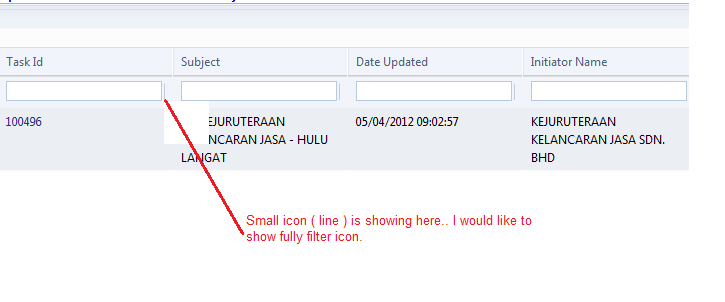
Thanks in advance..
I applied filter part to my radgrid. but it's not showing filter icon fully.
Code :
<telerik:RadGrid ID="RadGrid1" AllowFilteringByColumn="true" runat="server" AutoGenerateColumns="False" AllowSorting="True" AllowPaging="True" GridLines="None" ShowGroupPanel="True" CellSpacing="0"> <MasterTableView ShowFooter="true"> <CommandItemSettings ExportToPdfText="Export to PDF"></CommandItemSettings> <RowIndicatorColumn Visible="True" FilterControlAltText="Filter RowIndicator column"> </RowIndicatorColumn> <ExpandCollapseColumn Visible="True" FilterControlAltText="Filter ExpandColumn column"> </ExpandCollapseColumn> <Columns> <telerik:GridTemplateColumn Aggregate="Count" FooterAggregateFormatString="Total : {0:N0}" SortExpression="TaskNo" FooterText="Total :" UniqueName="TaskNo" HeaderText="Task Id" DataField="TaskNo" DataType="System.string" HeaderTooltip="TaskNo"> <ItemStyle Width="70px" Wrap="false" /> <HeaderStyle Width="70px" Wrap="false" /> <ItemTemplate> <asp:HyperLink ID="HyperLink2" runat="server" Text='<%#DataBinder.Eval(Container.DataItem, "TaskNo")%>' NavigateUrl='<%#"~/MyTasksHierarchyMain.aspx?TaskNo=" + DataBinder.Eval(Container.DataItem, "TaskNo").ToString()%>' Target="_blank"></asp:HyperLink> </ItemTemplate> </telerik:GridTemplateColumn> <telerik:GridBoundColumn DataField="FileName" FilterControlAltText="Filter FileName column" HeaderText="File Name" UniqueName="FileName" SortExpression="FileName" ReadOnly="True"> </telerik:GridBoundColumn>Current Output display :
Thanks in advance..
5 answers
489 views
we are having an application with large number of data.
while exporting the data from rad grid to excel format we are getting the error :
Exception type: OutOfMemoryException
the Rad Grid contains the 25 columns and nearly 35,000 rows
there is one aspx page on that page load the data will fetch into the RadGrid and then the data will export to Excel or CSV
i pasted the HTML and cs code
can you please assist us on this
<telerik:RadGrid ID="radGrid" runat="server" Visible="false" AutoGenerateColumns="false" OnGridExporting="radGrid_GridExporting"
OnExcelExportCellFormatting="RadGrid1_ExcelExportCellFormatting">
<ExportSettings HideStructureColumns="true" />
</telerik:RadGrid>
the .CS Code :
protected void Page_Load(object sender, EventArgs e)
{
if (Request.QueryString["downloadoption"] != null)
{
LoadData();
}
}
private void LoadData()
{
Logger.LogInformation("Start", "btnSaveAs_Click", "DownloadFormat");
if (Request.QueryString["ReportPagerName"] != null)
{
ReportPager = Request.QueryString["ReportPagerName"];
}
if (Session[ReportPager] != null)
{
int reportIntId = 0;
Int32.TryParse(Request.QueryString[ReportID], out reportIntId);
//string reportID = Request.QueryString[ReportID];
this.CheckDataAccess(DataAccessType.Report, null, null, null, null, null, null, null, reportIntId);
if (!IsTransactionDetailsPage(reportIntId))
{
reportPager = (ReportPager)Session[ReportPager];
AddColumnsToGrid();
SetExportSettings();
BindDataTable();
}
else
{
if (Session["TransactionDetails"] != null)
{
DataTable dt = (DataTable)Session["TransactionDetails"];
this.radGrid.MasterTableView.Columns.Clear();
foreach (DataColumn dc in dt.Columns)
{
GridBoundColumn gbc1 = new GridBoundColumn();
gbc1.DataField = dc.ColumnName;
gbc1.HeaderText = string.Empty;
this.radGrid.MasterTableView.Columns.Add(gbc1);
}
this.radGrid.DataSource = dt;
this.radGrid.DataBind();
}
}
DownloadDataGrid();
}
Logger.LogInformation("End", "btnSaveAs_Click", "DownloadFormat");
}
private void AddColumnsToGrid()
{
Logger.LogInformation("Start", "AddColumnsToGrid", "DownloadFormat");
this.radGrid.MasterTableView.Columns.Clear();
foreach (GridField entry in reportPager.ColumnDictionary.Values)
{
if (entry.IsDisplayField)
{
GridBoundColumn gbc1 = new GridBoundColumn();
gbc1.DataField = entry.DataField;
gbc1.HeaderText = entry.HeaderText;
this.radGrid.MasterTableView.Columns.Add(gbc1);
}
}
Logger.LogInformation("End", "AddColumnsToGrid", "DownloadFormat");
}
private void SetExportSettings()
{
Logger.LogInformation("Start", "SetExportSettings", "DownloadFormat");
this.radGrid.ExportSettings.ExportOnlyData = true;
this.radGrid.ExportSettings.IgnorePaging = true;
this.radGrid.ExportSettings.OpenInNewWindow = true;
this.radGrid.ExportSettings.FileName = ConfigurationManager.AppSettings["DownloadDataFileName"];
Logger.LogInformation("End", "SetExportSettings", "DownloadFormat");
}
private void BindDataTable()
{
Logger.LogInformation("Start", "BindDataTable", "DownloadFormat");
this.reportPager.StartRow = 1;
this.reportPager.EndRow = this.reportPager.GetRowCount();
DataTable dt;
//Excel
if (Request.QueryString["downloadoption"].ToString() == "EXCEL")
dt = this.reportPager.GetDataTable(false, false);
else
dt = this.reportPager.GetDataTable(false);
this.radGrid.DataSource = dt;
this.radGrid.DataBind();
Logger.LogInformation("End", "BindDataTable", "DownloadFormat");
}
private void DownloadDataGrid()
{
Logger.LogInformation("Start", "DownloadData", "DownloadFormat");
this.radGrid.Visible = true;
//CSV
if (Request.QueryString["downloadoption"].ToString() == "CSV")
{
//if (SelRadioButtonList1.SelectedItem.Text == SelRadioButtonList1.Items[2].Text){
this.SetCSVDelimiter();
this.radGrid.MasterTableView.ExportToCSV();
}
//Excel
else if (Request.QueryString["downloadoption"].ToString() == "EXCEL")
{
//else if (SelRadioButtonList1.SelectedItem.Text == SelRadioButtonList1.Items[0].Text)
//{
this.radGrid.MasterTableView.ExportToExcel();
}
}
protected void radGrid_GridExporting(object source, GridExportingArgs e)
{
Logger.LogInformation("Start", "radGrid_GridExporting", "DownloadFormat");
Response.ClearContent();
Response.ClearHeaders();
Response.Clear();
Response.BufferOutput = true;
if (e.ExportType == ExportType.Excel || e.ExportType == ExportType.Csv)
{
string filename = radGrid.ExportSettings.FileName;
string fileExtension = radGrid.ExportSettings.Excel.FileExtension;
if (e.ExportType == ExportType.Csv)
fileExtension = radGrid.ExportSettings.Csv.FileExtension;
this.Response.AddHeader("Content-Disposition", "attachment;filename=\"" + filename + "." + fileExtension + "\"");
if (e.ExportType == ExportType.Excel)
{
//specify the number decimal separator and group separator being used.
string css = "<style type='text/css'><!--table {mso-displayed-decimal-separator:'\\" + Thread.CurrentThread.CurrentUICulture.NumberFormat.NumberDecimalSeparator;
css += "'; mso-displayed-thousand-separator:'\\" + Thread.CurrentThread.CurrentUICulture.NumberFormat.NumberGroupSeparator + "';} ";
css += this.AddDateFormatCSSClass();
css += "--> </style>";
//css += @"<script type=""text/javascript"" language=""javascript"">window.opener.Invoked();</script>";
e.ExportOutput = e.ExportOutput.Replace("</head>", css + "</head>");
}
}
if (Request.QueryString["downloadoption"].ToString() == "CSV")
{
Response.ContentType = "application/octet-stream";
Response.AddHeader("Content-Type", "text/csv");
Response.BinaryWrite(new UnicodeEncoding().GetBytes(e.ExportOutput));
Response.Flush();
Response.End();
}
Logger.LogInformation("End", "radGrid_GridExporting", "DownloadFormat");
}
while exporting the data from rad grid to excel format we are getting the error :
Exception type: OutOfMemoryException
the Rad Grid contains the 25 columns and nearly 35,000 rows
there is one aspx page on that page load the data will fetch into the RadGrid and then the data will export to Excel or CSV
i pasted the HTML and cs code
can you please assist us on this
OnExcelExportCellFormatting="RadGrid1_ExcelExportCellFormatting">
<ExportSettings HideStructureColumns="true" />
</telerik:RadGrid>
the .CS Code :
protected void Page_Load(object sender, EventArgs e)
{
if (Request.QueryString["downloadoption"] != null)
{
LoadData();
}
}
private void LoadData()
{
Logger.LogInformation("Start", "btnSaveAs_Click", "DownloadFormat");
if (Request.QueryString["ReportPagerName"] != null)
{
ReportPager = Request.QueryString["ReportPagerName"];
}
if (Session[ReportPager] != null)
{
int reportIntId = 0;
Int32.TryParse(Request.QueryString[ReportID], out reportIntId);
//string reportID = Request.QueryString[ReportID];
this.CheckDataAccess(DataAccessType.Report, null, null, null, null, null, null, null, reportIntId);
if (!IsTransactionDetailsPage(reportIntId))
{
reportPager = (ReportPager)Session[ReportPager];
AddColumnsToGrid();
SetExportSettings();
BindDataTable();
}
else
{
if (Session["TransactionDetails"] != null)
{
DataTable dt = (DataTable)Session["TransactionDetails"];
this.radGrid.MasterTableView.Columns.Clear();
foreach (DataColumn dc in dt.Columns)
{
GridBoundColumn gbc1 = new GridBoundColumn();
gbc1.DataField = dc.ColumnName;
gbc1.HeaderText = string.Empty;
this.radGrid.MasterTableView.Columns.Add(gbc1);
}
this.radGrid.DataSource = dt;
this.radGrid.DataBind();
}
}
DownloadDataGrid();
}
Logger.LogInformation("End", "btnSaveAs_Click", "DownloadFormat");
}
private void AddColumnsToGrid()
{
Logger.LogInformation("Start", "AddColumnsToGrid", "DownloadFormat");
this.radGrid.MasterTableView.Columns.Clear();
foreach (GridField entry in reportPager.ColumnDictionary.Values)
{
if (entry.IsDisplayField)
{
GridBoundColumn gbc1 = new GridBoundColumn();
gbc1.DataField = entry.DataField;
gbc1.HeaderText = entry.HeaderText;
this.radGrid.MasterTableView.Columns.Add(gbc1);
}
}
Logger.LogInformation("End", "AddColumnsToGrid", "DownloadFormat");
}
private void SetExportSettings()
{
Logger.LogInformation("Start", "SetExportSettings", "DownloadFormat");
this.radGrid.ExportSettings.ExportOnlyData = true;
this.radGrid.ExportSettings.IgnorePaging = true;
this.radGrid.ExportSettings.OpenInNewWindow = true;
this.radGrid.ExportSettings.FileName = ConfigurationManager.AppSettings["DownloadDataFileName"];
Logger.LogInformation("End", "SetExportSettings", "DownloadFormat");
}
private void BindDataTable()
{
Logger.LogInformation("Start", "BindDataTable", "DownloadFormat");
this.reportPager.StartRow = 1;
this.reportPager.EndRow = this.reportPager.GetRowCount();
DataTable dt;
//Excel
if (Request.QueryString["downloadoption"].ToString() == "EXCEL")
dt = this.reportPager.GetDataTable(false, false);
else
dt = this.reportPager.GetDataTable(false);
this.radGrid.DataSource = dt;
this.radGrid.DataBind();
Logger.LogInformation("End", "BindDataTable", "DownloadFormat");
}
private void DownloadDataGrid()
{
Logger.LogInformation("Start", "DownloadData", "DownloadFormat");
this.radGrid.Visible = true;
//CSV
if (Request.QueryString["downloadoption"].ToString() == "CSV")
{
//if (SelRadioButtonList1.SelectedItem.Text == SelRadioButtonList1.Items[2].Text){
this.SetCSVDelimiter();
this.radGrid.MasterTableView.ExportToCSV();
}
//Excel
else if (Request.QueryString["downloadoption"].ToString() == "EXCEL")
{
//else if (SelRadioButtonList1.SelectedItem.Text == SelRadioButtonList1.Items[0].Text)
//{
this.radGrid.MasterTableView.ExportToExcel();
}
}
protected void radGrid_GridExporting(object source, GridExportingArgs e)
{
Logger.LogInformation("Start", "radGrid_GridExporting", "DownloadFormat");
Response.ClearContent();
Response.ClearHeaders();
Response.Clear();
Response.BufferOutput = true;
if (e.ExportType == ExportType.Excel || e.ExportType == ExportType.Csv)
{
string filename = radGrid.ExportSettings.FileName;
string fileExtension = radGrid.ExportSettings.Excel.FileExtension;
if (e.ExportType == ExportType.Csv)
fileExtension = radGrid.ExportSettings.Csv.FileExtension;
this.Response.AddHeader("Content-Disposition", "attachment;filename=\"" + filename + "." + fileExtension + "\"");
if (e.ExportType == ExportType.Excel)
{
//specify the number decimal separator and group separator being used.
string css = "<style type='text/css'><!--table {mso-displayed-decimal-separator:'\\" + Thread.CurrentThread.CurrentUICulture.NumberFormat.NumberDecimalSeparator;
css += "'; mso-displayed-thousand-separator:'\\" + Thread.CurrentThread.CurrentUICulture.NumberFormat.NumberGroupSeparator + "';} ";
css += this.AddDateFormatCSSClass();
css += "--> </style>";
//css += @"<script type=""text/javascript"" language=""javascript"">window.opener.Invoked();</script>";
e.ExportOutput = e.ExportOutput.Replace("</head>", css + "</head>");
}
}
if (Request.QueryString["downloadoption"].ToString() == "CSV")
{
Response.ContentType = "application/octet-stream";
Response.AddHeader("Content-Type", "text/csv");
Response.BinaryWrite(new UnicodeEncoding().GetBytes(e.ExportOutput));
Response.Flush();
Response.End();
}
Logger.LogInformation("End", "radGrid_GridExporting", "DownloadFormat");
}


1 answer
400 views
Hello Team,
I am using Rad grid, that is having more then 100000 records with 70 columns,
I tried with even 10000 records only to check export issues but, Export to excel is not working, it slows down the page, and after waiting for 20 mins, its still not exporting the data.
Can anyone help me out with this?
Thanks and Regards,
Ruchi Patel
I am using Rad grid, that is having more then 100000 records with 70 columns,
I tried with even 10000 records only to check export issues but, Export to excel is not working, it slows down the page, and after waiting for 20 mins, its still not exporting the data.
Can anyone help me out with this?
Thanks and Regards,
Ruchi Patel
Pavlina
Telerik team
answered
on
09 Feb 2015





