or
1 answer
367 views
When I tried to add 4 group footers in the radgrid, I see that colspan="4" is added automatically, I want the footers to align with the columns.
<FooterStyle Font-Bold="true" />
<GroupFooterTemplate>
This is a Footer - Total Cases
<asp:Label ID="Label8" runat="server" />
</td>
<td colspan="2">
This is a Footer - Adjustment
<asp:Label ID="Label1" runat="server" />
</td>
<td>
This is a Footer - OrderTotal
<asp:Label ID="Label2" runat="server" />
</GroupFooterTemplate>
<Columns>

Eyup
Telerik team

answered
on
09 Feb 2016
1 answer
60 views
Hi,
Is it possible to RadEditor cleaned everything but the links when pasting from Word? I have StripFormattingOnPaste="AllExceptNewLines"

Ianko
Telerik team
answered
on
09 Feb 2016
1 answer
94 views
I have a RadcomboBox with "CheckBox" options with CheckBoxes="true" EnableCheckAllItemsCheckBox="true" set. Now I populate the data with two separators. When "Check All" is selected it displays "All Items Checked" on top of the RadComboBox. It includes the two separators too. Now when I uncheck one of the items, it displays the count which includes the two separators. Now the user gets confused when 10 items are selected and one item is unchecked why it displays 12 items checked. It includes the two separators into count. How to avoid the two separators not to be counted.
Thanks
Madhu
Eyup
Telerik team
answered
on
09 Feb 2016
3 answers
260 views
Hello,
I'm having multiple charts on page. After changing the value of a dropdown list i want to refresh some (but not all!) charts on the page. I'm using ajaxRequestWithTarget to do this and the request is working properly. The "LoadingPanels" also appear correctly over the charts, I specified. But then all charts of the page are redrawn. This suggests that changing the dropdown does change the values of all charts, even though it does not. Thats why I would like to prevent the redraw.
Is there any way to do this?

Marin Bratanov
Telerik team
answered
on
09 Feb 2016
1 answer
180 views
Had troubles with the Excel-like filters in the RadGrid when trying for the first time. The context menu wouldn't drop down after configuring RadGrid based on this text from the demo:
The demo shows the new Grid FilterType called HeaderContext implemented in Q3 2015. This filtering mode provides look and feel that resembles the filter in Excel. To enable this mode you should set the FilterTypeproperty of RadGrid to HeaderContext and turn on the header context menu (EnableHeaderContextFilterMenu="true").
After troubleshooting and comparing code, found it didn't drop down because EnableHeaderContextMenu="true" was missing from my markup but was is in the demo .aspx code.
It would be helpful to update the demo page and add EnableHeaderContextMenu="true" to the list of required properties.
I think adding more info about the need for this event... OnFilterCheckListItemsRequested="RadGrid1_FilterCheckListItemsRequested" in the same text would also help. The text of As you can see ListBox populated through DataSource displays the values. doesn't highlight the importance of that event to the Excel-like filtering feature.
Thanks,
John
Pavlina
Telerik team
answered
on
08 Feb 2016
2 answers
272 views
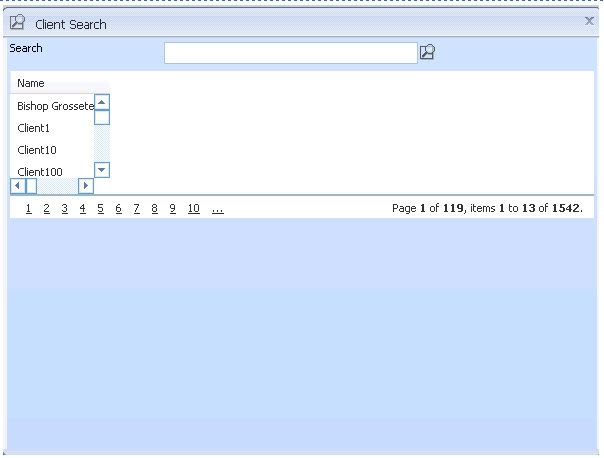
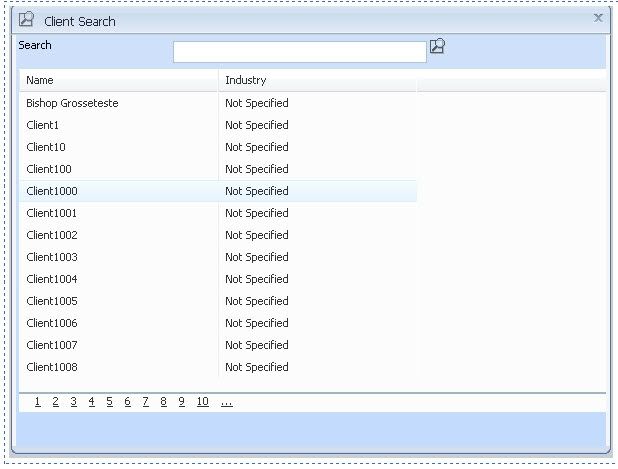
I have a problem in that when I have a RadGrid inside a RadWindow with Firefox. With FireFox I can't seem to resize the radgrid properly. The resizing works fine in IE.
For example, have a RadWindow that I open ("ClientSearch") Width=600 Height=450. In my example I am (for testing purposes) setting the RadGrid to Width=100 Height=100.
This screencap shows how it renders in IE.
This screencap shows how it renders in FireFox.
(I also attached files)
Could anyone tell me what I'm doing wrong? Is there another way to resize the radGrid?
Cutting to it, here is the Javascript I use to resize, the main page that defines the Window, and the code snipplet in the window that defines the grid. On the page that I define the grid I do <ClientEvents OnMasterTableViewCreated="SetGridSizeLocator"> .. this is what calls the Javascript.
| function setGridSizeLocator() |
| { |
| document.getElementById('ctl00_PrimaryContent_EntityGrid_GridData').style.width = 100; |
| document.getElementById('ctl00_PrimaryContent_EntityGrid_GridData').style.height = 100; |
| }; |
| <telerik:RadWindowManager ID="RadWindowManager1" runat="server" ShowContentDuringLoad="false" VisibleStatusbar="false" ReloadOnShow="true" EnableEmbeddedSkins="false" Skin="Locator2009" Modal="true"> |
| <Windows> |
| <telerik:RadWindow runat="server" IconUrl="images/lookup.gif" Title="Client Search" ID="Window1" Width="600" Height="450" Behaviors="Close"></telerik:RadWindow> |
| <telerik:RadWindow runat="server" IconUrl="images/toolbar/Tasksmall.gif" Title="Tasks" ID="WindowClientInbox" Width="635" Height="375" BackColor="White" Behaviors="Close,Move,Resize"></telerik:RadWindow> |
| </Windows> |
| <asp:UpdatePanel ID="UpdatePanel1" runat="server"> |
| <ContentTemplate> |
| <table width="100%"> |
| <tr> |
| <td align="left"> |
| <telerik:RadGrid ID="EntityGrid" EnableEmbeddedBaseStylesheet="false" EnableEmbeddedSkins="false" runat="server" EnableLinqExpressions="true" GridLines="None" AllowSorting="True" AllowPaging="True" PageSize="13" Skin="Vista2009" ClientSettings-EnableRowHoverStyle="true" > |
| <ClientSettings > |
| <ClientEvents OnMasterTableViewCreated="setGridSizeLocator" /> |
| <Selecting AllowRowSelect="True" /> |
| <Scrolling AllowScroll="True" /> |
| <ClientEvents OnRowDblClick="LocatorGridEntitySelect" OnRowSelected="LocatorGridEntityContext" /> |
| </ClientSettings> |
| <PagerStyle Mode="NumericPages" /> |
| <MasterTableView ClientDataKeyNames="RecordID,DisplayText,UIDisplay,UIKey"> |
| <EditFormSettings> |
| <EditColumn InsertImageUrl="Update.gif" UpdateImageUrl="Update.gif" EditImageUrl="Edit.gif" CancelImageUrl="Cancel.gif"></EditColumn> |
| </EditFormSettings> |
| </MasterTableView> |
| </telerik:RadGrid> |
| </td> |
| </tr> |
| </table> |
| </ContentTemplate> |
| </asp:UpdatePanel> |

2 answers
87 views
Hi All.
How do i download the demo of this, as i only have updated my Telerik, but i want to download the full demo that you have, as i have not downloaded any demos.

Ivan Danchev
Telerik team
answered
on
08 Feb 2016
11 answers
823 views
Can you tell me the best way to show totals in a header on a Radgrid that is grouped? I have a radgrid with 13 columns and grouped by only 1 column. I need the Group header(not the footer) to show the totals for each of the columns within the group and be aligned with each column. Is this possible? I have looked through all of the support sites and have had no luck.
Any help would be appreciated!
Thanks.
Any help would be appreciated!
Thanks.
Eyup
Telerik team
answered
on
08 Feb 2016
1 answer
88 views
I use item.Display = false; in the RadGrid1_ItemCreated. This hides the item fine. Page count is 15 and only shows 10 because 5 are hidden.
Is there a way to show the 15 requested...
Thanks
Eyup
Telerik team
answered
on
08 Feb 2016
1 answer
208 views
hello all
i have tow question ?
i work on invoice web app
i add a gridview with sqldatasource
firstly
in this grid view i have a textbox to inter Qty and other column with in stock value i have to prevent user add qty value larger than in stock value so i want to add compare validation inside gridview (Qty most be less or equal instock value)
Secondly
i add a combox inside gridview with other sqldatasource , this combo box have three column i want textbox in other column to get one of this column vale when combobox selected chanched
im looking forward to here from you
regard
Maria Ilieva
Telerik team
answered
on
08 Feb 2016