Get Instant Answers to Your Technical Questions with the Telerik AI Assistant

Summarize with AI:
Progress Telerik and Kendo UI support just got even better! Here’s how to use the AI Assistant option to query for help, with an opportunity to send unresolved issues (and their context!) on for further support.
You’re building apps with Progress Telerik or Kendo UI and have a question for technical support. You can now get an instant technical support answer from the Telerik AI Assistant instead of waiting for support to review the case.
What Is the Telerik AI Assistant?
The Progress Telerik AI Assistant is an intelligent support tool that delivers instant technical answers to your Telerik and Kendo UI questions. It’s not a replacement for our support team, just a faster way to get help with many questions and implementation challenges.
It answers your technical questions in seconds using Retrieval-Augmented Generation (RAG) technology. When you ask a question, the Telerik AI Assistant searches through Telerik documentation, knowledge base and community forums to find the most relevant information. Then it generates a precise and structured answer grounded in verified sources.
How Is the Telerik AI Assistant Helping You?
The Telerik AI Assistant saves you time by providing an instant detailed response with references to official documentation and knowledge base articles. It is available 24 hours a day and 7 days a week. Yes, you get support during weekends and national holidays, too! Instead of waiting for a support response, you get:
- Instant clarity on configuration questions, code patterns and implementation approaches
- Accurate, contextual answers drawn from official documentation and verified knowledge
- Source references so you can verify recommendations and explore topics deeper if needed
- Faster problem resolution whether you’re troubleshooting an issue, exploring new features or learning best practices
- Less downtime, fewer development delays and more confidence that you’re implementing things correctly the first time
Who Has Access to the Telerik AI Assistant?
The Telerik AI Assistant is available for most Telerik and Kendo UI products to everyone who has an active license or trial with access to customer support. Simply ask your question and get an instant answer if you’re using any of these products:
- Telerik UI for Blazor
- Telerik Reporting
- Kendo React
- Kendo UI for jQuery
- Kendo UI for Angular
- Kendo UI for Vue
- Telerik UI for ASP.NET Core
- Telerik UI for ASP.NET MVC
- Telerik UI for ASP.NET AJAX
- Telerik UI for WPF
- Telerik UI for WinForms
- Telerik UI for .NET MAUI
Why Use the AI Assistant in Addition to Contacting Support?
Using the Telerik AI Assistant is optional and completely up to you. It’s a choice that sits alongside our exceptional technical support, not a replacement for it.
Use the Telerik AI Assistant when you want instant answers for configuration questions, debugging issues, exploring features or learning patterns. If it fully resolves your issue, you’re done. Quick and easy!
If it doesn’t fully address the problem, you can send the entire conversation (including your original description and what the AI Assistant provided) directly to a support engineer just like a regular support ticket. They’ll have the complete context and can pick up where the assistant left off, often reaching a resolution faster than starting from scratch.
How to Get Support in Your Native Language?
Language should never stand in the way of successfully delivering your project. You can ask the Telerik AI Assistant questions in your native language, whether that is Deutsch, français, 日本語, български or another language. The AI Assistant will understand your question, translate it to English to search through the knowledge base, and provide the answer back in your original language.
This makes instant technical support truly accessible to developers around the world. While official support communication remains in English, the Telerik AI Assistant removes that language barrier, so you can get AI-assisted answers in the language you’re most comfortable with.
How to Use the Telerik AI Assistant?
To get started, visit the Telerik Support Center and go through the steps to get technical support. Describe your technical issue, configuration question or implementation challenge in natural language. You are more than welcome to share code snippets or error codes that illustrate the problem. Once you are done, click “Get AI Reply” and give it a minute.

The Telerik AI Assistant provides a comprehensive answer with relevant code examples, configuration guidance, and references to the source documentation. The response is well formatted and easy to follow.
How to Follow Up with a Support Engineer?
You are always one click away from a technical support engineer. If the Telerik AI Assistant did not fully resolve your issue, you will find that often it will ask you questions that aim to get more details. Answer those questions and add more context before sending the entire conversation to a support engineer, by clicking the Send to Support button. This is how the Telerik AI Assistant and the support engineers work together most effectively to help you.
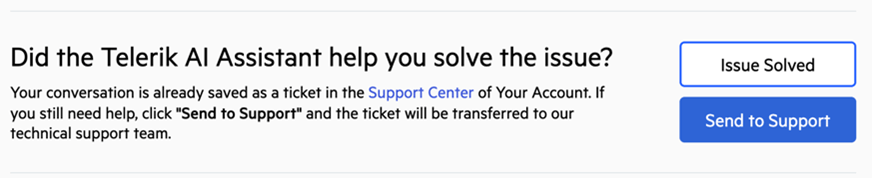
Our support engineers will respond within their standard timeframe depending on your support plan, and they’ll have a complete picture of your issue and the guidance you’ve already received from the AI Assistant.
Ready to move faster? With the Telerik AI Assistant, instant support is available 24/7! You can solve technical problems right away and continue with your momentum or send it to our expert support team. Either way, you’ll spend less time stuck and more time coding.
The Telerik AI Assistant is yet one more extension of award-winning support for Progress Telerik and Kendo UI. Not yet a user? This support is also available in the 30-day trial license!

Plamen Mitrev
Plamen is a Support Lead in the Customer Care team at Progress. He joined the company in 2019 as a Technical Support Engineer. A dedicated and empathetic professional, Plamen thrives on helping people and is motivated by the joy of making a positive difference both at work and beyond.
Related Posts
Comments
All articles
Topics
Web MobileMobile
Desktop
Design
Productivity
People