WinUI MaskedInput Overview
The RadMaskedInput controls formats and constrains text to a predefined pattern or a pattern you define. They provide input validation and masks, such as date, IP Address, SSN, phone number, digits, currency and decimals.
 Start Free Trial
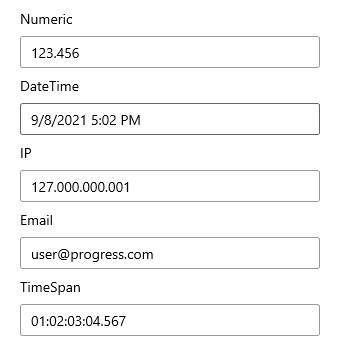
Key Features
This is a list with short descriptions of the top-of-the-line features of Telerik's RadMaskedInput controls.
-
Rich set of mask types: The masked input control allows you to define a mask rule that restricts the entered value. You can find more about this and the available tokens in the Mask Types section.
-
Prompt Character: The PromptChar character will be displayed in the RadMaskedInput controls for any mask position that the user has not filled in yet.
-
Value Format: The ValueFormat allows you to control whether the value can also hold literals and prompt characters. Only available in the RadMaskedTextInput and RadMaskedIPInput controls.
-
Keyboard Support: In addition to the standard keyboard input, the RadMaskedInput controls deliver the convenience of desktop applications with support for arrow-key navigation.
-
Globalization Support: Full globalization support is provided out-of-the-box through the Culture property of the RadMaskedInput controls.
Get started with the controls with the Getting Started help article that shows how to use them in a basic scenario.
Telerik UI for WinUI Support and Learning Resources
- Telerik UI for WinUI MaskedInput Homepage
- Get Started with the Telerik UI for WinUI MaskedInput
- Telerik UI for WinUI API Reference
- Getting Started with Telerik UI for WinUI Components
- Telerik UI for WinUI MaskedInput Forums