New to Telerik UI for WinUI? Start a free 30-day trial
Marker Indicator
Updated on Mar 26, 2026
A marker in the most general sense is a visual cue that signifies an important point inside a value range. This cue can be static, indicating some kind of threshold or it can be dynamic, indicating a dynamic threshold or some specific data that is dynamic. MarkerGaugeIndicator is the only indicator that is applicable to both the linear and the radial range.
Properties
MarkerGaugeIndicator class inherits from the GaugeIndicator class - [See the inherited properties](%slug radgauge-indicators-gaugeindicatorclass%).
- Content (object): Gets or sets the content for the marker.
- ContentTemplate (DataTemplate): Gets or sets the template for the marker.
- IsRotated (bool): Gets or sets a value that determines if the marker will rotate in place as well as around the center of a radial range or whether it will rotate automatically in a linear range when its orientation is Vertical.
Example
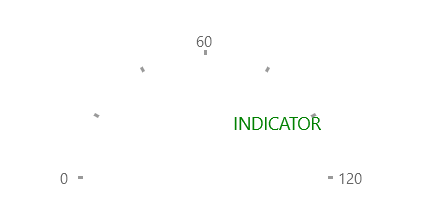
Example 1 shows how to add a MarkerGaugeIndicator to a RadRadialGauge.
Example 1: Creating RadLinearGauge
XAML
<Grid xmlns:dataVisualization="using:Telerik.UI.Xaml.Controls.DataVisualization">
	<dataVisualization:RadRadialGauge LabelStep="60" TickStep="20" MaxValue="120" LabelRadiusScale="1.10" Width="200">
		<dataVisualization:MarkerGaugeIndicator Value="99" Content="INDICATOR" Foreground="Green" Margin="0,0,30,0" IsRotated="True" />
	</dataVisualization:RadRadialGauge>
</Grid>
Figure 1: MarkerGaugeIndicator