New to Telerik UI for WinUI? Start a free 30-day trial
Arrow Indicator
Updated on Mar 26, 2026
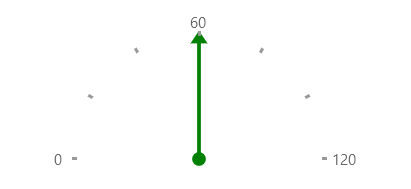
The ArrowGaugeIndicator represents a specific value on the gauge scale as an arrow that points to this value. Its visual representation consists of an arrow head, an arrow shaft and a circular arrow tail.
Properties
The Arrow Indicator has one unique property plus several inherited properties.
ArrowGaugeIndicator class inherits from the BarGaugeIndicator class -
- ArrowTailRadius (double): Gets or sets the radius of the arrow tail.
Example
Example 1 shows how to add a ArrowGaugeIndicator to RadRadialGauge.
Example 1: Creating ArrowGaugeIndicator
XAML
<Grid xmlns:dataVisualization="using:Telerik.UI.Xaml.Controls.DataVisualization">
	<dataVisualization:RadRadialGauge LabelStep="60" TickStep="20" MaxValue="120" LabelRadiusScale="1.10" Width="200">
		<dataVisualization:ArrowGaugeIndicator Brush="Green" Thickness="3" ArrowTailRadius="2" Value="60"/>
	</dataVisualization:RadRadialGauge>
</Grid>
Figure 1: ArrowGaugeIndicator