Restore Focus When RadBusyIndicator Is Hidden
Environment
| Product | Progress® Telerik® UI for WPF |
Description
Restore keyboard focus to a control in RadBusyIndicator content after the busy indicator disappears.
Solution
Use the read-only IsBusyIndicationVisible property to detect when the busy content is displayed. The property is updated after IsBusy, so use it when the focus change must follow the display state of the indicator.
Return Focus to a Specific Control
The following attached property behavior returns focus to a TextBox when RadBusyIndicator is no longer visible:
public class FocusHelper
{
    private static void OnEnsureFocusChanged(DependencyObject d, DependencyPropertyChangedEventArgs e)
    {
        if (!(bool)e.NewValue)
        {
            var control = d as Control;
            control.Dispatcher.BeginInvoke(new Action(() =>
                {
                    control.Focus();
                }));
        }
    }

    public static bool GetEnsureFocus(DependencyObject obj)
    {
        return (bool)obj.GetValue(EnsureFocusProperty);
    }

    public static void SetEnsureFocus(DependencyObject obj, bool value)
    {
        obj.SetValue(EnsureFocusProperty, value);
    }

    public static readonly DependencyProperty EnsureFocusProperty =
        DependencyProperty.RegisterAttached(
        "EnsureFocus",
        typeof(bool),
        typeof(FocusHelper),
        new PropertyMetadata(OnEnsureFocusChanged));
}
Bind the attached property to IsBusyIndicationVisible on a control inside the busy indicator's content:
<Border BorderBrush="Black"
				BorderThickness="2"
				Height="200" Width="220"
				Margin="10">
    <telerik:RadBusyIndicator x:Name="BusyIndicator">
        <StackPanel VerticalAlignment="Center" HorizontalAlignment="Center"
							x:Name="StackPanel">
            <TextBox Width="170"
								Margin="10"
								x:Name="TextBox"
								Text="Click here to set the focus."/>
            <TextBox Width="170"
								Margin="10"
								Text="or here."/>
        </StackPanel>
    </telerik:RadBusyIndicator>
</Border>
Return Focus to the Last Focused Control
To restore focus to whichever control was focused before the busy indicator appeared, save that control and focus it again after RadBusyIndicator is hidden. The following example uses a DispatcherTimer to show and hide the indicator:
Define the sample layout and RadBusyIndicator:
<Border BorderBrush="Black"
				BorderThickness="2"
				Height="200" Width="220"
				Margin="10">
    <telerik:RadBusyIndicator x:Name="BusyIndicator">
        <StackPanel VerticalAlignment="Center" HorizontalAlignment="Center"
							x:Name="StackPanel">
            <TextBox Width="170"
								Margin="10"
								x:Name="TextBox"
								Text="Click here to set the focus."/>
            <TextBox Width="170"
								Margin="10"
								Text="or here."/>
        </StackPanel>
    </telerik:RadBusyIndicator>
</Border>
Add a property to store the control that had focus:
private DispatcherTimer dispatcherTimer { get; set; }

public void Example()
{
    this.dispatcherTimer = new DispatcherTimer();
    dispatcherTimer.Interval = new TimeSpan(0, 0, 5);
    dispatcherTimer.Tick += new EventHandler(timerTick);
    dispatcherTimer.Start();
}
private void timerTick(object sender, EventArgs e)
{
    var isBusy = this.BusyIndicator.IsBusy;
    if (!isBusy)
    {
        this.focusedElement = FocusManagerHelper.GetFocusedElement(this.StackPanel) as Control;
        this.BusyIndicator.IsBusy = true;
    }
    else
    {
        this.BusyIndicator.IsBusy = false;
        if (this.focusedElement != null)
        {
            this.focusedElement.IsEnabledChanged += focusedElement_IsEnabledChanged;
        }
    }
}

private void focusedElement_IsEnabledChanged(object sender, DependencyPropertyChangedEventArgs e)
{
    this.focusedElement.Focus();
    this.focusedElement.IsEnabledChanged -= focusedElement_IsEnabledChanged;
}
Use a DispatcherTimer to enable and disable the busy indicator, then return focus to the saved control:
private DispatcherTimer dispatcherTimer { get; set; }

public void Example()
{
    this.dispatcherTimer = new DispatcherTimer();
    dispatcherTimer.Interval = new TimeSpan(0, 0, 5);
    dispatcherTimer.Tick += new EventHandler(timerTick);
    dispatcherTimer.Start();
}
private void timerTick(object sender, EventArgs e)
{
    var isBusy = this.BusyIndicator.IsBusy;
    if (!isBusy)
    {
        this.focusedElement = FocusManagerHelper.GetFocusedElement(this.StackPanel) as Control;
        this.BusyIndicator.IsBusy = true;
    }
    else
    {
        this.BusyIndicator.IsBusy = false;
        if (this.focusedElement != null)
        {
            this.focusedElement.IsEnabledChanged += focusedElement_IsEnabledChanged;
        }
    }
}

private void focusedElement_IsEnabledChanged(object sender, DependencyPropertyChangedEventArgs e)
{
    this.focusedElement.Focus();
    this.focusedElement.IsEnabledChanged -= focusedElement_IsEnabledChanged;
}
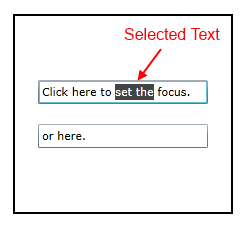
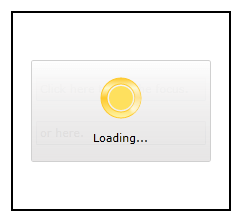
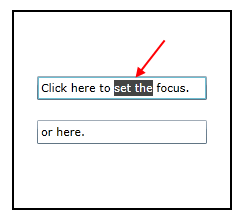
The screenshots show the focus before, during, and after the busy state:
TextBox before RadBusyIndicator appears
RadBusyIndicator displayed over its content
TextBox focused after RadBusyIndicator is hidden
Find a runnable project for the example in the WPF Samples GitHub repository.