Lines Support
The RadTreeView allows you to enable connected lines between the nodes of a treeview. By default the connecting lines between the nodes are not enabled (they are not visible). You should use a single property to do so - IsLineEnabled and set it to True.
<telerik:RadTreeView x:Name="radTreeView" IsLineEnabled="True">
</telerik:RadTreeView>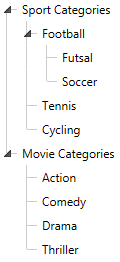
You can also control the visibility of the lines between the root items (the items on the first level) of the treeview. This can be done with the IsRootLinesEnabled property of the treeview. The default value of this property is True
<telerik:RadTreeView x:Name="radTreeView2" IsLineEnabled="True" IsRootLinesEnabled="False">
</telerik:RadTreeView>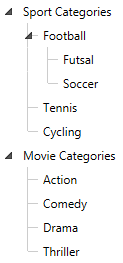
For more information about the visual structure of the RadTreeView, check out the Visual Structure topic.
Change the LineColor
To change the line color, extract the RadTreeViewItem control template and modify its TreeView_LineColor resource. See Editing Control Templates for extraction instructions.