RecurrencePattern
Use RecurrencePattern to configure daily, weekly, monthly, and yearly appointments in the RadScheduleView control. The IAppointment interface exposes a RecurrenceRule property that associates an appointment with a recurrence pattern. Recurrence rules also support exceptions.
The RecurrenceRule class creates and evaluates recurrence rules. Its required Pattern property has type RecurrencePattern.
This article covers the following properties, methods, and examples:
-
Main properties of the
RecurrencePatternclass: -
Main methods of the
RecurrencePatternclass:
RecurrencePattern Class
The RecurrencePattern class defines the recurrence settings that a RecurrenceRule uses to generate occurrences.
The RecurrencePattern class is in the Telerik.Windows.Controls.ScheduleView namespace of the Telerik.Windows.Controls.ScheduleView.dll assembly.
Frequency
Set the Frequency property to a value from the RecurrenceFrequency enumeration:
-
Minutely—UseRecurrenceFrequency.Minutelyfor appointments that occur every minute (available starting with Q3 2012 SP1). -
Hourly—UseRecurrenceFrequency.Hourlyfor appointments that occur every hour (available starting with Q3 2012 SP1). -
Daily—UseRecurrenceFrequency.Dailyfor appointments that occur every day. -
Monthly—UseRecurrenceFrequency.Monthlyfor appointments that occur every month. -
Weekly—UseRecurrenceFrequency.Weeklyfor appointments that occur every week. -
Yearly—UseRecurrenceFrequency.Yearlyfor appointments that occur every year.
Do not use
RecurrenceFrequency.SecondlyorRecurrenceFrequency.Noneas a recurrence frequency. Although the enumeration includes these values, they are invalid for recurring appointments.
The default value of Frequency is RecurrenceFrequency.None. Always set Frequency to a valid value when you configure a recurring appointment.
Set
MinutelyandHourlyfrequencies in code. To display these options in the EditRecurrenceDialog, customize theEditRecurrenceDialogStyleand add them to the template manually.
MinutesOfHour
Set MinutesOfHour to an array of integers to specify the minutes of the hour when the appointment occurs. This property is mainly used with the Minutely frequency.
HoursOfDay
Set HoursOfDay to an array of integers to specify the hours of the day when the appointment occurs. This property is mainly used with the Hourly frequency.
DaysOfWeekMask
Set DaysOfWeekMask to specify the days of the week when the appointment occurs. The RecurrenceDays enumeration includes these values:
-
EveryDay -
Friday -
Monday -
Saturday -
Sunday -
Thursday -
Tuesday -
Wednesday -
WeekDays -
WeekendDays -
None
The default value of DaysOfWeekMask is RecurrenceDays.None. This property is optional.
RecurrenceDays.WeekDays is equivalent to RecurrenceDays.Monday | RecurrenceDays.Tuesday | RecurrenceDays.Wednesday | RecurrenceDays.Thursday | RecurrenceDays.Friday.
RecurrenceDays.WeekendDays is equivalent to RecurrenceDays.Saturday | RecurrenceDays.Sunday.
RecurrenceDays.EveryDay is equivalent to RecurrenceDays.Monday | RecurrenceDays.Tuesday | RecurrenceDays.Wednesday | RecurrenceDays.Thursday | RecurrenceDays.Friday | RecurrenceDays.Saturday | RecurrenceDays.Sunday.
Combine
RecurrenceDaysmembers with the bitwise OR operator (|) to select multiple days forDaysOfWeekMask. See the recurring appointment examples.
Interval
Set Interval to specify the number of frequency units between occurrences. With Frequency set to RecurrenceFrequency.Daily, the interval is in days. With RecurrenceFrequency.Monthly, it is in months.
The default value of Interval is 1.
Combine
Interval,DaysOfWeekMask, andFrequencyto configure the recurring appointment examples.
DaysOfMonth
Set DaysOfMonth to specify the day of the month when the appointment occurs.
DayOrdinal
Set DayOrdinal to specify the ordinal position of a day, such as first, second, third, or fourth. For example, configure an appointment for the second Monday of every third month.
MonthOfYear
Set MonthOfYear to specify the month when the appointment occurs. This property is mainly used for yearly appointments. See the yearly appointment example.
MaxOccurrences
Set MaxOccurrences to limit the number of appointment occurrences. See the example of limiting occurrences.
FirstDayOfWeek
FirstDayOfWeek gets or sets the day on which the week starts. This property is only meaningful when Frequency is RecurrenceFrequency.Weekly and Interval is greater than 1.
RecursUntil
Set RecursUntil to specify the end date of appointment occurrences. See the example of setting an end date.
Copy()
Use Copy() to create a new RecurrencePattern instance with the same values as an existing pattern.
var pattern = new RecurrencePattern()
{
    Frequency = RecurrenceFrequency.Monthly,
    MaxOccurrences = 10
};
var copyPattern = pattern.Copy();In the above example, a new monthly recurrence pattern is created. It also has a limit of 10 occurrences. When you invoke the pattern.Copy() method this creates a new instance of the RecurrencePattern class with exactly the same characteristics as the source object (the Frequency property will be set to RecurrenceFrequency.Monthly and the MaxOccurrences property will be set to 10).
CopyFrom()
Use CopyFrom() to copy properties from a specified RecurrencePattern to the instance that calls the method.
var pattern = new RecurrencePattern()
{
    Frequency = RecurrenceFrequency.Monthly,
    MaxOccurrences = 10
};
var newPattern = new RecurrencePattern();
newPattern.CopyFrom(pattern);All properties in the current instance (newPattern object) will be replaced by the corresponding properties in the specified RecurrencePattern object.
Examples
Before using these examples, set up a RadScheduleView project. The examples use the following appointment declaration.
var startDate = new DateTime(2011, 05, 11, 10, 0, 0);
var appointment = new Appointment()
{
    Start = startDate,
    End = startDate.AddHours(2),
    Subject = "Example"
};The sample appointment starts on May 11, 2011 at 10:00 AM and lasts two hours.
How to Create Every Day Recurring Appointment?
To create a daily appointment, set Frequency to RecurrenceFrequency.Daily.
var pattern = new RecurrencePattern()
{
    Frequency = RecurrenceFrequency.Daily
};
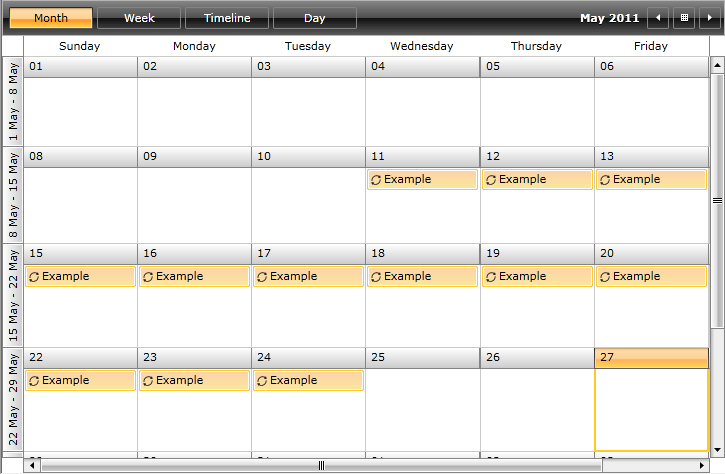
appointment.RecurrenceRule = new RecurrenceRule(pattern);The following image shows the daily recurrence.

How to Create Every Week Day Recurring Appointment?
To create a weekday appointment, set both Frequency and DaysOfWeekMask.
var pattern = new RecurrencePattern()
{
    Frequency = RecurrenceFrequency.Weekly,
    DaysOfWeekMask = RecurrenceDays.WeekDays
};
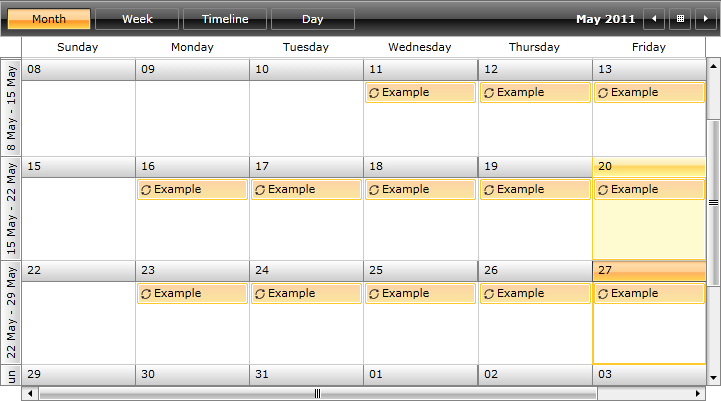
appointment.RecurrenceRule = new RecurrenceRule(pattern);The following image shows the weekday recurrence.
For weekend appointments, set
DaysOfWeekMasktoRecurrenceDays.WeekendDays.
For a specific day of the week, set the corresponding DaysOfWeekMask value. For example, use RecurrenceDays.Friday for appointments that occur every Friday.
How to Create an Appointment that Occurs on Every n Days?
To create an appointment every third day, set these RecurrencePattern properties:
-
Set
FrequencytoRecurrenceFrequency.Daily. -
Set
DaysOfWeekMasktoRecurrenceDays.EveryDay. -
Set
Intervalto3.
var pattern = new RecurrencePattern()
{
    Frequency = RecurrenceFrequency.Daily,
    DaysOfWeekMask = RecurrenceDays.EveryDay,
    Interval = 3
};
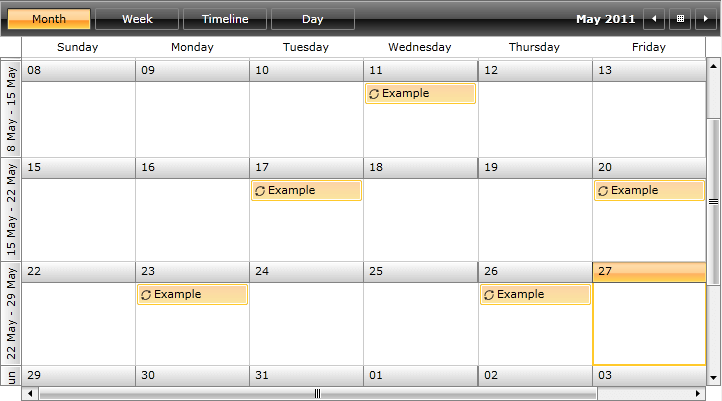
appointment.RecurrenceRule = new RecurrenceRule(pattern);The following image shows an appointment that occurs every third day.
For a daily frequency, set
Intervalto the required number of days between occurrences, such as4,5, or6.
How to Create an Appointment that Occurs on Every "n-th" Day of the Month and the Interval Between Each Recurrence is "m" Months?
To create an appointment on the fifth day of every second month, set these properties:
-
Set
DaysOfMonthto5. -
Set
FrequencytoRecurrenceFrequency.Monthly. -
Set
Intervalto2.
var pattern = new RecurrencePattern()
{
    DaysOfMonth = new int[] { 5 },
    Frequency = RecurrenceFrequency.Monthly,
    Interval = 2
};
appointment.RecurrenceRule = new RecurrenceRule(pattern);How to Create an Appointment that Occurs on Every "n-th" Week Day and the Interval Between Each Recurrence is "m" Months?
To create an appointment on the second Monday of every second month, set these properties:
-
Set
DayOrdinalto2. -
Set
FrequencytoRecurrenceFrequency.Monthly. -
Set
DaysOfWeekMasktoRecurrenceDays.Monday. -
Set
Intervalto2.
var pattern = new RecurrencePattern()
{
    DayOrdinal = 2,
    DaysOfWeekMask = RecurrenceDays.Monday,
    Frequency = RecurrenceFrequency.Monthly,
    Interval = 2
};
appointment.RecurrenceRule = new RecurrenceRule(pattern);How to Create an Yearly Appointment?
To create an appointment on November 13 each year, set these properties:
-
Set
FrequencytoRecurrenceFrequency.Yearly. -
Set
MonthOfYearto11. -
Set
DaysOfMonthto13.
var pattern = new RecurrencePattern()
{
    Frequency = RecurrenceFrequency.Yearly,
    MonthOfYear = 11,
    DaysOfMonth = new int[] { 13 }
};
appointment.RecurrenceRule = new RecurrenceRule(pattern);Set the Maximum Occurrences of the Appointment
For a daily appointment with a limit of three occurrences, set MaxOccurrences to 3.
var pattern = new RecurrencePattern()
{
    Frequency = RecurrenceFrequency.Daily,
    MaxOccurrences = 3
};
appointment.RecurrenceRule = new RecurrenceRule(pattern);Set the End Date of the Appointment Occurrences
Set RecursUntil to the end date of the appointment occurrences.
var pattern = new RecurrencePattern()
{
    Frequency = RecurrenceFrequency.Daily,
    RecursUntil = new DateTime(2011, 05, 24, 10, 0, 0)
};
appointment.RecurrenceRule = new RecurrenceRule(pattern);The following image shows daily occurrences from May 11, 2011 until May 24, 2011.