New to Telerik UI for WPF? Start a free 30-day trial
Using In-Memory Data
Updated on Sep 23, 2026
The purpose of this tutorial is to show you how to populate a RadGridView with in-memory data.
The control will be bound to an ObservableCollection of Car objects. Each Car has a Name and Description.
- Create a new class named Car and add two properties - Name and Description. Both of the properties are of type string. Here is the source code:
C#
public class Car
{
    public Car()
    {
    }

    public Car(string name, string description)
    {
        this.Name = name;
        this.Description = description;
    }

    public string Name
    {
        get;
        set;
    }

    public string Description
    {
        get;
        set;
    }
}
VB.NET
Public Class Car

    Public Sub New()
    End Sub

    Public Sub New(ByVal name As String, ByVal description As String)
        Me.Name = name
        Me.Description = description
    End Sub

    Private _Name As String
    Public Property Name() As String
        Get
            Return _Name
        End Get
        Set(ByVal value As String)
            _Name = value
        End Set
    End Property

    Private _Description As String
    Public Property Description() As String
        Get
            Return _Description
        End Get
        Set(ByVal value As String)
            _Description = value
        End Set
    End Property
End Class- Create a new class named RadGridViewSampleData.
C#
public class RadGridViewSampleData
{
    public RadGridViewSampleData()
    {
        Cars = new ObservableCollection<Car>();
        Cars.Add(new Car("BMW", "A german luxury car."));
        Cars.Add(new Car("Porsche", "A german sports car."));
        Cars.Add(new Car("Citroen", "A french luxury car."));
        Cars.Add(new Car("Renault", "A french family car."));
    }

    public ObservableCollection<Car> Cars
    {
        get;
        set;
    }
}
VB.NET
Public Class RadGridViewSampleData
    Public Sub New()
        Cars = New ObservableCollection(Of Car)()
        Cars.Add(New Car("BMW", "A german luxury car."))
        Cars.Add(New Car("Porsche", "A german sports car."))
        Cars.Add(New Car("Citroen", "A french luxury car."))
        Cars.Add(New Car("Renault", "A french family car."))
    End Sub

    Private _Cars As ObservableCollection(Of Car)
    Public Property Cars() As ObservableCollection(Of Car)
        Get
            Return _Cars
        End Get
        Set(ByVal value As ObservableCollection(Of Car))
            _Cars = value
        End Set
    End Property
End Class- Declare the RadGridViewSampleData object as a resource in your application.
XAML
<Grid.Resources>
    <my:RadGridViewSampleData x:Key="DataSource"/>
</Grid.Resources>- Update your RadGridView declaration - set the ItemsSource property.
XAML
<telerik:RadGridView x:Name="radGridView" ItemsSource="{Binding Source={StaticResource DataSource}, Path=Cars}"/>Run your demo, the result can be seen on the next picture:
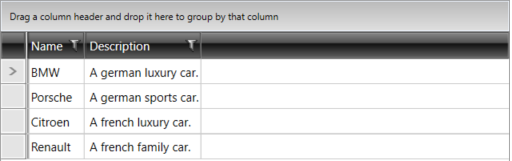
If you need to define the columns manually read the topic Defining Columns.