In Code-Behind
This article shows how to define a RadDiagram, shapes, and connections in code-behind with Progress® Telerik® UI for WPF.
The examples use the Telerik Windows8 theme. See setting an application-wide theme for the Xaml and NoXaml theme setup options.
Adding Items In Code Behind
Before using the examples, configure a WPF project with the package or assembly references described in RadDiagram Getting Started. Complete the license activation required for your Telerik release and configure the theme for your Xaml or NoXaml assemblies.
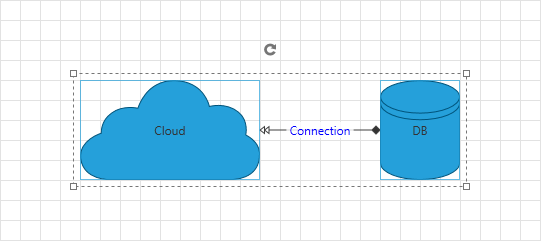
The following C# and VB.NET examples create a RadDiagram and add two shapes and a connection:
private void GenerateRadDiagram()
{
    RadDiagram diagram = new RadDiagram();

    RadDiagramShape shapeCloud = new RadDiagramShape()
    {
        Width = 180,
        Height = 100,
        Position = new Point() { X = 100, Y = 100 },
        Content = "Cloud"
    };
    shapeCloud.Geometry = ShapeFactory.GetShapeGeometry(CommonShapeType.CloudShape);

    RadDiagramShape dbShape = new RadDiagramShape()
    {
        Width = 80,
        Height = 100,
        Position = new Point() { X = 400, Y = 100 },
        Content = "DB"
    };
    dbShape.Geometry = ShapeFactory.GetShapeGeometry(FlowChartShapeType.Database2Shape);

    RadDiagramConnection connection = new RadDiagramConnection()
    {
        Source = shapeCloud,
        SourceConnectorPosition = ConnectorPosition.Right,
        Target = dbShape,
        TargetConnectorPosition = ConnectorPosition.Left,
        SourceCapType = CapType.Arrow4,
        TargetCapType = CapType.Arrow5Filled,
        Content = new TextBlock() { Text = " Connection ", Foreground = new SolidColorBrush() { Color = Colors.Blue } }
    };
    diagram.Items.Add(shapeCloud);
    diagram.Items.Add(dbShape);
    diagram.Items.Add(connection);
    diagram.SelectAll();

    this.LayoutRoot.Children.Add(diagram);
}Private Sub GenerateRadDiagram()
Dim diagram As New RadDiagram()
Dim shapeCloud As New RadDiagramShape() With
{
.Width = 180,
.Height = 100, .Position = New Point() With {.X = 100, .Y = 100},
.Content = "Cloud"
}
shapeCloud.Geometry = ShapeFactory.GetShapeGeometry(CommonShapeType.CloudShape)
Dim dbShape As New RadDiagramShape() With
{
.Width = 80,
.Height = 100,
.Position = New Point() With {.X = 400, .Y = 100},
.Content = "DB"
}
dbShape.Geometry = ShapeFactory.GetShapeGeometry(FlowChartShapeType.Database2Shape)
Dim connection As New RadDiagramConnection() With
{
.Source = shapeCloud,
.SourceConnectorPosition = ConnectorPosition.Right,
.Target = dbShape,
.TargetConnectorPosition = ConnectorPosition.Left,
.SourceCapType = CapType.Arrow4,
.TargetCapType = CapType.Arrow5Filled,
.Content = New TextBlock() With
{
.Text = " Connection ",
.Foreground = New SolidColorBrush() With
{
.Color = Colors.Blue
}
}
}
diagram.Items.Add(shapeCloud)
diagram.Items.Add(dbShape)
diagram.Items.Add(connection)
diagram.SelectAll()
Me.LayoutRoot.Children.Add(diagram)
End SubThe examples use the static ShapeFactory class from the Telerik.Windows.Controls.Diagrams assembly. The following C# and VB.NET examples list its static methods for creating an EllipseShape, RectangleShape, or Geometry:
public static RadDiagramShape CreateCircle(double radiusX, double radiusY, Point center)
{
    return new RadDiagramShape();
}
public static RadDiagramShape CreateRectangle(Rect rect)
{
    return new RadDiagramShape();
}
public static Geometry GetShapeGeometry(ArrowShapeType shapeType)
{
    return ShapeFactory.GetShapeGeometry(shapeType);
}
public static Geometry GetShapeGeometry(CommonShapeType shapeType)
{
    return ShapeFactory.GetShapeGeometry(shapeType);
}
public static Geometry GetShapeGeometry(FlowChartShapeType shapeType)
{
    return ShapeFactory.GetShapeGeometry(shapeType);
}Public Shared Function CreateCircle(ByVal radiusX As Double, ByVal radiusY As Double, ByVal center As Point) As RadDiagramShape
Public Shared Function CreateRectangle(ByVal rect_Renamed As Rect) As RadDiagramShape
Public Shared Function GetShapeGeometry(ByVal shapeType As ArrowShapeType) As Geometry
Public Shared Function GetShapeGeometry(ByVal shapeType As CommonShapeType) As Geometry
Public Shared Function GetShapeGeometry(ByVal shapeType As FlowChartShapeType) As GeometryHere you see a snapshot of the defined RadDiagram: