Implement Semantic Zoom on a Shape level
This tutorial demonstrates how to implement custom semantic zoom on a RadDiagramShape level.
For the purpose of the tutorial we will use DataBinding and bind the RadDiagram GraphSource property to a collection of business objects. Then we will take advantage of the RadFluidContentControl to display three different contents inside each shape and we will make sure that the RadFluidContentControl.Content is changed based on the zoom factor of the RadDiagram.
Let's start with the ViewModels definitions. As the purpose of this example is to demonstrate a sample approach for implementing semantic zoom using the RadFluidContentControl, we will need one custom data class to describe the content of each shape. And as we need to change the information displayed in each shape along with the zoom factor applied in the RadDiagram, we will define a variety of properties in that class:
public class CustomNode : HierarchicalNodeViewModel
{
    private ItemDisplayMode currentDisplayMode;
    public ItemDisplayMode CurrentDisplayMode
    {
        get
        {
            return this.currentDisplayMode;
        }
        internal set
        {
            if (this.currentDisplayMode != value)
            {
                this.currentDisplayMode = value;
                OnPropertyChanged("CurrentDisplayMode");
            }
        }
    }

    public string Email { get; set; }

    public string Phone { get; set; }

    public string ImagePath { get; set; }

    public string Address { get; set; }

    public int HeadCount { get; set; }

    public string JobPosition { get; set; }

    public string FirstName { get; set; }

    public string LastName { get; set; }

    public CustomNode()
    {
        this.CurrentDisplayMode = ItemDisplayMode.Small;
    }
}

public enum ItemDisplayMode
{
    Medium,
    Large,
    Small
}Public Class CustomNode
Inherits HierarchicalNodeViewModel
Private m_currentDisplayMode As ItemDisplayMode
Public Property CurrentDisplayMode() As ItemDisplayMode
Get
Return Me.m_currentDisplayMode
End Get
Friend Set(value As ItemDisplayMode)
If Me.m_currentDisplayMode <> value Then
Me.m_currentDisplayMode = value
OnPropertyChanged("CurrentDisplayMode")
End If
End Set
End Property
Public Property Email() As String
Get
Return m_Email
End Get
Set(value As String)
m_Email = Value
End Set
End Property
Private m_Email As String
Public Property Phone() As String
Get
Return m_Phone
End Get
Set(value As String)
m_Phone = Value
End Set
End Property
Private m_Phone As String
Public Property ImagePath() As String
Get
Return m_ImagePath
End Get
Set(value As String)
m_ImagePath = Value
End Set
End Property
Private m_ImagePath As String
Public Property Address() As String
Get
Return m_Address
End Get
Set(value As String)
m_Address = Value
End Set
End Property
Private m_Address As String
Public Property HeadCount() As Integer
Get
Return m_HeadCount
End Get
Set(value As Integer)
m_HeadCount = Value
End Set
End Property
Private m_HeadCount As Integer
Public Property JobPosition() As String
Get
Return m_JobPosition
End Get
Set(value As String)
m_JobPosition = Value
End Set
End Property
Private m_JobPosition As String
Public Property FirstName() As String
Get
Return m_FirstName
End Get
Set(value As String)
m_FirstName = Value
End Set
End Property
Private m_FirstName As String
Public Property LastName() As String
Get
Return m_LastName
End Get
Set(value As String)
m_LastName = Value
End Set
End Property
Private m_LastName As String
Public Sub New()
Me.CurrentDisplayMode = ItemDisplayMode.Small
End Sub
End Class
Public Enum ItemDisplayMode
Medium
Large
Small
End EnumNext, let's build a sample collection of items to populate the RadDiagram.GraphSource:
public class MainViewModel : ViewModelBase
{
    public ObservableGraphSourceBase<CustomNode, LinkViewModelBase<CustomNode>> Employees { get; set; }

    public MainViewModel()
    {
        this.Employees = new ObservableGraphSourceBase<CustomNode, LinkViewModelBase<CustomNode>>();
        this.Employees.AddNode(new CustomNode()
        {
            FirstName = "Andrew",
            LastName = "Fuller",
            Email = "afuller@contoso.com",
            Phone = "(205) 555 - 9898",
            Address = "London, 120 Hanover Sq.",
            Position = new Point(250, 250),
            ImagePath = "/Images/AndrewFuller.jpg",
            JobPosition = "CEO"
        });
    }
}Public Class MainViewModel
Inherits ViewModelBase
Public Property Employees() As ObservableGraphSourceBase(Of CustomNode, LinkViewModelBase(Of CustomNode))
Get
Return m_Employees
End Get
Set(value As ObservableGraphSourceBase(Of CustomNode, LinkViewModelBase(Of CustomNode)))
m_Employees = Value
End Set
End Property
Private m_Employees As ObservableGraphSourceBase(Of CustomNode, LinkViewModelBase(Of CustomNode))
Public Sub New()
Me.Employees = New ObservableGraphSourceBase(Of CustomNode, LinkViewModelBase(Of CustomNode))()
Me.Employees.AddNode(New CustomNode() With {
.FirstName = "Andrew",
.LastName = "Fuller",
.Email = "afuller@contoso.com",
.Phone = "(205) 555 - 9898",
.Address = "London, 120 Hanover Sq.",
.Position = New Point(250, 250),
.ImagePath = "/Images/AndrewFuller.jpg",
.JobPosition = "CEO"
})
End Sub
End ClassNow that our ViewModels are defined, we can start describing the View where the RadDiagram will be displayed. What we need is a RadDiagram instance which GraphSource property is data bound to the Employees collection. And in order to visualize the nodes in the diagram, we have to declare a DataTemplate. In this example, we will use a RadFluidContentControl to visualize the business data representing each node of our diagramming structure. And we will define the RadDiagramShape.ContentTemplate using the RadDiagram ShapeStyle property:
<Grid>
<telerik:RadDiagram x:Name="xDiagram"
GraphSource="{Binding Employees}"
Zoom="{Binding ZoomFactor,
Mode=TwoWay}">
<telerik:RadDiagram.ShapeStyle>
<Style TargetType="telerik:RadDiagramShape">
<Setter Property="Position" Value="{Binding Position, Mode=TwoWay}" />
<Setter Property="Padding" Value="0" />
<Setter Property="ContentTemplate">
<Setter.Value>
<DataTemplate>
<telerik:RadFluidContentControl Width="212"
Height="74"
ContentChangeMode="Manual">
<telerik:RadFluidContentControl.SmallContent>
<Grid>
<Grid.RowDefinitions>
<RowDefinition Height="2*" />
<RowDefinition Height="3*" />
</Grid.RowDefinitions>
<Grid HorizontalAlignment="Stretch" Background="{StaticResource MetroGray}" />
<TextBlock x:Name="positionTextBlock"
FontSize="14"
Style="{StaticResource PositionTextBlockStyle}"
Text="{Binding JobPosition}" />
<StackPanel Grid.Row="1"
Margin="10 0 0 0"
Orientation="Horizontal">
<TextBlock FontSize="21"
Style="{StaticResource NameTextBlockStyle}"
Text="{Binding FirstName}" />
<TextBlock Margin="8 0 0 0"
FontSize="21"
Style="{StaticResource NameTextBlockStyle}"
Text="{Binding LastName}" />
</StackPanel>
</Grid>
</telerik:RadFluidContentControl.SmallContent>
<telerik:RadFluidContentControl.Content>
<Grid>
<Grid.RowDefinitions>
<RowDefinition Height="25" />
<RowDefinition Height="49" />
</Grid.RowDefinitions>
<Grid.ColumnDefinitions>
<ColumnDefinition Width="Auto" />
<ColumnDefinition />
</Grid.ColumnDefinitions>
<Grid Grid.Column="0"
Grid.ColumnSpan="2"
Width="212"
HorizontalAlignment="Stretch"
Background="{StaticResource MetroGray}" />
<Grid Name="imageGrid"
Grid.RowSpan="2"
Width="65"
Background="Transparent">
<Image Grid.RowSpan="2"
Width="61"
Height="70"
Margin="2"
Source="{Binding ImagePath}"
Stretch="Fill" />
</Grid>
<TextBlock Grid.Column="1"
Margin="6 3 0 0"
HorizontalAlignment="Left"
Style="{StaticResource PositionTextBlockStyle}"
Text="{Binding JobPosition}" />
<Grid Name="nameAndHeadCountGrid"
Grid.Row="1"
Grid.Column="1">
<Grid.RowDefinitions>
<RowDefinition Height="45*" />
<RowDefinition Height="55*" />
</Grid.RowDefinitions>
<StackPanel Orientation="Horizontal">
<TextBlock Margin="6 5 0 0"
Style="{StaticResource HeadCountTextBlockStyle}"
Text="Headcount:" />
<TextBlock Margin="3 5 0 0"
Style="{StaticResource HeadCountTextBlockStyle}"
Text="{Binding HeadCount}" />
</StackPanel>
<StackPanel Grid.Row="1" Orientation="Horizontal">
<TextBlock Margin="6 0 0 3"
Style="{StaticResource NameTextBlockStyle}"
Text="{Binding FirstName}" />
<TextBlock Margin="5 0 0 3"
Style="{StaticResource NameTextBlockStyle}"
Text="{Binding LastName}" />
</StackPanel>
</Grid>
</Grid>
</telerik:RadFluidContentControl.Content>
<telerik:RadFluidContentControl.LargeContent>
<Grid>
<Grid.RowDefinitions>
<RowDefinition Height="Auto" />
<RowDefinition Height="Auto" />
<RowDefinition Height="Auto" />
<RowDefinition Height="*" />
<RowDefinition Height="*" />
</Grid.RowDefinitions>
<Grid.ColumnDefinitions>
<ColumnDefinition Width="Auto" />
<ColumnDefinition Width="*" />
</Grid.ColumnDefinitions>
<Grid Grid.Column="0"
Grid.ColumnSpan="2"
HorizontalAlignment="Stretch"
Background="{StaticResource MetroGray}" />
<TextBlock Grid.Column="1"
Margin="4 3 0 0"
FontSize="7"
Style="{StaticResource PositionTextBlockStyle}"
Text="{Binding JobPosition}" />
<Grid Grid.Row="1"
Grid.RowSpan="2"
Grid.Column="1">
<Grid.RowDefinitions>
<RowDefinition Height="0.45*" />
<RowDefinition Height="0.55*" />
</Grid.RowDefinitions>
<StackPanel Orientation="Horizontal">
<TextBlock Margin="4 3 0 0"
FontSize="7"
Style="{StaticResource HeadCountTextBlockStyle}"
Text="Headcount:" />
<TextBlock Margin="3 3 0 0"
FontSize="7"
Style="{StaticResource HeadCountTextBlockStyle}"
Text="{Binding HeadCount}" />
</StackPanel>
<StackPanel Grid.Row="1"
Margin="4 0 0 3"
VerticalAlignment="Center"
Orientation="Horizontal">
<TextBlock Margin="0"
FontSize="9"
Style="{StaticResource NameTextBlockStyle}"
Text="{Binding FirstName}" />
<TextBlock Margin="3 0 0 0"
FontSize="9"
Style="{StaticResource NameTextBlockStyle}"
Text="{Binding LastName}" />
</StackPanel>
</Grid>
<StackPanel Grid.Row="3"
Grid.ColumnSpan="2"
Margin="6,0,0,0"
Orientation="Horizontal">
<Viewbox Width="10.66"
Height="8"
Stretch="Fill">
<Path HorizontalAlignment="Left"
VerticalAlignment="Center"
Data="M13.999998,3.7658489 L13.94845,3.803616 C12.542283,4.8337059 8.0308743,8.1299944 7.8814616,8.1299944 C7.7320304,8.1299944 3.3899567,4.9128594 2.0367067,3.907505 L2,3.8802307 L2,9.999999 L13.999998,9.999999 z M2.5423753,2.0000005 L7.8829308,6.0973635 L13.441984,2.0000005 z M0,0 L15.999998,0 L16,12 L1.1920929E-06,12 z"
Fill="#FFEDEDED"
Opacity="0.7"
Stretch="Fill"
UseLayoutRounding="False" />
</Viewbox>
<TextBlock Margin="4 0 0 0"
FontSize="7"
Style="{StaticResource HeadCountTextBlockStyle}"
Text="{Binding Email}" />
<Viewbox Width="5.2"
Height="8"
Margin="20 0 0 0"
Stretch="Fill">
<Path HorizontalAlignment="Left"
VerticalAlignment="Center"
Data="M739.14526,183.75031 C739.14526,183.75031 736.72418,184.84114 736.49939,187.25047 C736.41388,188.16693 735.96222,188.58353 737.70624,193.2502 C739.12305,197.04138 740.83221,198.00002 742.37421,198.04219 C743.70874,198.07869 745.40796,197.68605 745.66803,197.16695 C745.96014,196.584 744.95941,194.33397 744.39557,193.87529 C744.07941,193.6181 743.83295,193.50031 743.08319,194.0009 C742.41235,194.44879 741.46832,194.96967 740.66663,194.08388 C739.98315,193.32875 738.70654,190.04181 738.93683,188.9693 C739.17474,187.86108 740.9682,187.82338 741.17651,187.40672 C741.38483,186.99005 741.02002,186.0629 740.08252,184.31284 C739.61816,183.44601 739.14526,183.75031 739.14526,183.75031 z"
Fill="#FFEDEDED"
Opacity="0.7"
Stretch="Fill"
UseLayoutRounding="False" />
</Viewbox>
<TextBlock Margin="4 0 20 0"
FontSize="7"
Style="{StaticResource HeadCountTextBlockStyle}"
Text="{Binding Phone}" />
</StackPanel>
<StackPanel Grid.Row="4"
Grid.ColumnSpan="2"
Margin="6 0 0 3"
Orientation="Horizontal">
<Viewbox Width="9.85"
Height="8"
Stretch="Fill">
<Path HorizontalAlignment="Left"
VerticalAlignment="Center"
Data="M3.0000026,7.0000038 L13.000003,7.0000038 L13.000003,9.0000038 L3.0000026,9.0000038 z M3.0000026,4.0000038 L13.000003,4.0000038 L13.000003,6.0000038 L3.0000026,6.0000038 z M2,2 L2,2.1666667 L2,10.833334 L2,11 L14,11 L14,10.833334 L14,2.1666667 L14,2 z M0,0 L16,0 L16,13 L0,13 z"
Fill="#FFEDEDED"
Opacity="0.7"
Stretch="Fill"
StrokeThickness="0"
UseLayoutRounding="False" />
</Viewbox>
<TextBlock Grid.Column="1"
Margin="4 0 0 0"
FontSize="7"
Style="{StaticResource HeadCountTextBlockStyle}"
Text="{Binding Address}" />
</StackPanel>
<Grid Grid.RowSpan="3"
HorizontalAlignment="Left"
VerticalAlignment="Top"
Background="Transparent">
<Viewbox Height="38.58"
Margin="2"
Stretch="Fill">
<Image Source="{Binding ImagePath}" Stretch="Fill" />
</Viewbox>
</Grid>
</Grid>
</telerik:RadFluidContentControl.LargeContent>
</telerik:RadFluidContentControl>
</DataTemplate>
</Setter.Value>
</Setter>
</Style>
</telerik:RadDiagram.ShapeStyle>
</telerik:RadDiagram>
</Grid>In order to customize the appearance of each Content of the RadFluidContentControl, we can create a few custom styles. Please add the following in the Resources section of your View:
<Grid.Resources>
    <SolidColorBrush x:Key="MetroGray" Color="#FFD0D0D0" />
    <Style x:Key="NameTextBlockStyle" TargetType="TextBlock">
        <Setter Property="FontFamily" Value="Segoe UI Light" />
        <Setter Property="FontSize" Value="17" />
        <Setter Property="Foreground" Value="{telerik:Windows8Resource ResourceKey=MainBrush}" />
        <Setter Property="VerticalAlignment" Value="Center" />
        <Setter Property="HorizontalAlignment" Value="Center" />
        <Setter Property="Margin" Value="2 0" />
    </Style>
    <Style x:Key="PositionTextBlockStyle" TargetType="TextBlock">
        <Setter Property="FontFamily" Value="Sergoe UI" />
        <Setter Property="FontSize" Value="11" />
        <Setter Property="VerticalAlignment" Value="Center" />
        <Setter Property="HorizontalAlignment" Value="Left" />
        <Setter Property="Foreground" Value="#FF333333" />
        <Setter Property="Margin" Value="11 2 0 0" />
        <Setter Property="FontWeight" Value="Bold" />
    </Style>
    <Style x:Key="HeadCountTextBlockStyle" TargetType="TextBlock"
        					BasedOn="{StaticResource PositionTextBlockStyle}">
        <Setter Property="FontSize" Value="12" />
        <Setter Property="FontWeight" Value="Normal" />
    </Style>
</Grid.Resources>
Now that we have all prerequisites in place, we can start working on the semantic zoom logic. We need to bind the RadFluidContentControl State property to a business property in order to manually control it based on the RadDiagram Zoom. Now if you go back to the CustomNode class definition, you can see that we've defined a CurrentDisplayMode property and an ItemDisplayMode Enum to describe the current state of a RadDiagramShape. But in a real-life application, we will need to synchronize the state of all items so that they can change together. This is why we can create a business property in our MainViewModel that reflects the ItemDisplayMode of all RadDiagramShapes.
public ItemDisplayMode ItemsCurrentDisplayMode { get; set; }Private m_ItemsCurrentDisplayMode As ItemDisplayMode
Public Property ItemsCurrentDisplayMode() As ItemDisplayMode
Get
Return m_ItemsCurrentDisplayMode
End Get
Set(value As ItemDisplayMode)
m_ItemsCurrentDisplayMode = Value
End Set
End PropertyThe essence of the semantic zoom discussed in this article, is to change the visual representation of the nodes based on the RadDiagram zoom. This is why we also need to define a business property to reflect the zoom factor in the MainViewModels. In the setter of the property, we will call a method that changes the ItemsCurrentDisplayMode value accordingly. In order to implement this logic we will also describe two static properties to act as thresholds - basically their values will determine the relation between the zoom factor and the ItemDisplayMode of our custom nodes. Please find below the complete definition of the MainViewModel class:
public class MainViewModel : ViewModelBase
{
private static double SmallToNormalTemplateThreshHold = 1.2d;
private static double NormallToLargeTemplateThreshHold = 2.1d;
public ObservableGraphSourceBase<CustomNode, LinkViewModelBase<CustomNode>> Employees { get; set; }
private double zoomFactor;
/// <summary>
/// Gets or sets the zoom factor of the diagram.
/// </summary>
public double ZoomFactor
{
get
{
return this.zoomFactor;
}
internal set
{
if (this.zoomFactor != value)
{
this.zoomFactor = value;
this.OnZoomChanged();
OnPropertyChanged("ZoomFactor");
}
}
}
public ItemDisplayMode ItemsCurrentDisplayMode { get; set; }
public MainViewModel()
{
this.Employees = new ObservableGraphSourceBase<CustomNode, LinkViewModelBase<CustomNode>>();
this.Employees.AddNode(new CustomNode()
{
FirstName = "Andrew",
LastName = "Fuller",
Email = "afuller@contoso.com",
Phone = "(205) 555 - 9898",
Address = "London, 120 Hanover Sq.",
Position = new Point(250, 250),
ImagePath = "/Images/AndrewFuller.jpg",
JobPosition = "CEO"
});
this.ItemsCurrentDisplayMode = ItemDisplayMode.Medium;
this.ZoomFactor = 1;
}
private void OnZoomChanged()
{
ItemDisplayMode newMode;
if (SmallToNormalTemplateThreshHold < this.ZoomFactor && this.ZoomFactor <= NormallToLargeTemplateThreshHold)
newMode = ItemDisplayMode.Medium;
else if (this.ZoomFactor <= SmallToNormalTemplateThreshHold)
newMode = ItemDisplayMode.Small;
else
newMode = ItemDisplayMode.Large;
if (this.ItemsCurrentDisplayMode != newMode)
this.ChangeAllShapesDisplayMode(newMode);
}
private void ChangeAllShapesDisplayMode(ItemDisplayMode newMode)
{
this.ItemsCurrentDisplayMode = newMode;
foreach (var node in this.Employees.InternalItems)
{
node.CurrentDisplayMode = newMode;
}
}
}Public Class MainViewModel
Inherits ViewModelBase
Private Shared SmallToNormalTemplateThreshHold As Double = 1.2
Private Shared NormallToLargeTemplateThreshHold As Double = 2.1
Public Property Employees() As ObservableGraphSourceBase(Of CustomNode, LinkViewModelBase(Of CustomNode))
Get
Return m_Employees
End Get
Set(value As ObservableGraphSourceBase(Of CustomNode, LinkViewModelBase(Of CustomNode)))
m_Employees = Value
End Set
End Property
Private m_Employees As ObservableGraphSourceBase(Of CustomNode, LinkViewModelBase(Of CustomNode))
Private m_zoomFactor As Double
''' <summary>'''
''' Gets or sets the zoom factor of the diagram.
''' </summary>'''
Public Property ZoomFactor() As Double
Get
Return Me.m_zoomFactor
End Get
Friend Set(value As Double)
If Me.m_zoomFactor <> value Then
Me.m_zoomFactor = value
Me.OnZoomChanged()
OnPropertyChanged("ZoomFactor")
End If
End Set
End Property
Private m_ItemsCurrentDisplayMode As ItemDisplayMode
Public Property ItemsCurrentDisplayMode() As ItemDisplayMode
	Get
		Return m_ItemsCurrentDisplayMode
	End Get
	Set(value As ItemDisplayMode)
		m_ItemsCurrentDisplayMode = Value
	End Set
End Property
Public Sub New()
Me.Employees = New ObservableGraphSourceBase(Of CustomNode, LinkViewModelBase(Of CustomNode))()
Me.Employees.AddNode(New CustomNode() With {
.FirstName = "Andrew",
.LastName = "Fuller",
.Email = "afuller@contoso.com",
.Phone = "(205) 555 - 9898",
.Address = "London, 120 Hanover Sq.",
.Position = New Point(250, 250),
.ImagePath = "/Images/AndrewFuller.jpg",
.JobPosition = "CEO"
})
Me.ItemsCurrentDisplayMode = ItemDisplayMode.Medium
Me.ZoomFactor = 1
End Sub
Private Sub OnZoomChanged()
Dim newMode As ItemDisplayMode
If SmallToNormalTemplateThreshHold < Me.ZoomFactor AndAlso Me.ZoomFactor <= NormallToLargeTemplateThreshHold Then
newMode = ItemDisplayMode.Medium
ElseIf Me.ZoomFactor <= SmallToNormalTemplateThreshHold Then
newMode = ItemDisplayMode.Small
Else
newMode = ItemDisplayMode.Large
End If
If Me.ItemsCurrentDisplayMode <> newMode Then
Me.ChangeAllShapesDisplayMode(newMode)
End If
End Sub
Private Sub ChangeAllShapesDisplayMode(newMode As ItemDisplayMode)
Me.ItemsCurrentDisplayMode = newMode
For Each node As var In Me.Employees.InternalItems
node.CurrentDisplayMode = newMode
Next
End Sub
End ClassFinally, we need to change the RadDiagram and RadFluidContentControl definitions to reflect the new properties. We will bind the RadDiagram.Zoom property to the MainViewModel ZoomFactor and the RadFluidContentControl State property to the CustomNode CurrentDisplayMode property. We can also apply a Transition on the RadFluidContentControl to animate the changes in the RadDiagramShape content.
<telerik:RadDiagram x:Name="xDiagram2"
        					GraphSource="{Binding Employees}"
        					Zoom="{Binding ZoomFactor,
        								   Mode=TwoWay}">
    <telerik:RadDiagram.ShapeStyle>
        <Style TargetType="telerik:RadDiagramShape">
            <Setter Property="Position" Value="{Binding Position, Mode=TwoWay}" />
            <Setter Property="Padding" Value="0" />
            <Setter Property="ContentTemplate">
                <Setter.Value>
                    <DataTemplate>
                        <telerik:RadFluidContentControl Width="212"
        														Height="74"
        														ContentChangeMode="Manual"
        														State="{Binding CurrentDisplayMode,
        																		Converter={StaticResource ModeToStateConverter}}"
        														TransitionDuration="0:0:0.3">

                            <telerik:RadFluidContentControl.Transition>
                                <telerik:FadeTransition LayoutAnimation="Instant" />
                            </telerik:RadFluidContentControl.Transition>

                            <telerik:RadFluidContentControl.SmallContent>
                                //Small Content
                            </telerik:RadFluidContentControl.SmallContent>
                            <telerik:RadFluidContentControl.Content>
                                //Content
                            </telerik:RadFluidContentControl.Content>
                            <telerik:RadFluidContentControl.LargeContent>
                                //Large Content
                            </telerik:RadFluidContentControl.LargeContent>
                        </telerik:RadFluidContentControl>
                    </DataTemplate>
                </Setter.Value>
            </Setter>
        </Style>
    </telerik:RadDiagram.ShapeStyle>
</telerik:RadDiagram>
If you run the application now, you should be able to dynamically change the content of the sample RadDiagramShape while zooming in or out of the RadDiagram.
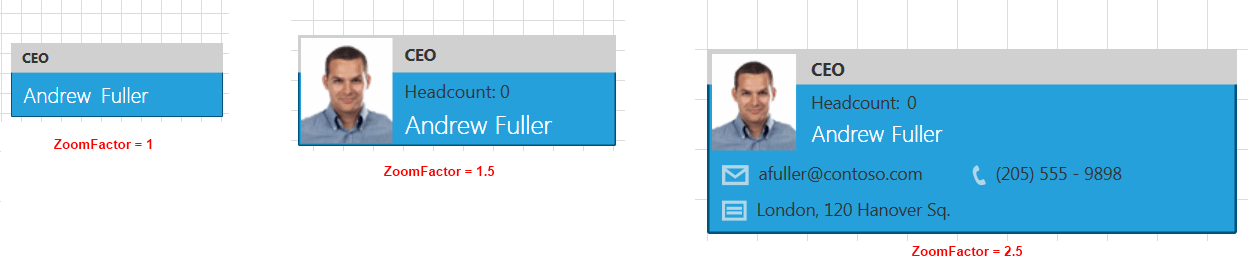
A semantic zoom feature is implemented in the Diagrams->OrgChart demo solution.