New to Telerik UI for WPF? Start a free 30-day trial
Polar Axis
Updated on Sep 23, 2026
To create a valid RadPolarChart, set its PolarAxis and RadialAxis properties to PolarAxis and NumericRadialAxis objects, respectively.
PolarAxis
The PolarAxis class plots points along the radius of the chart. It provides the following properties:
- MajorStep: Defines the major step between each axis tick.
- Minimum: Defines the user-defined minimum value of the axis.
- Maximum: Defines the user-defined maximum value of the axis.
- IsInverse: A boolean property inherited from
LineAxisthat determines whether the axis range is inverted (moving inward from the outer edge).
RadialAxis and NumericRadialAxis
The radial axis is the circular (angle) axis of the RadPolarChart.
RadialAxis provides the following properties:
- SweepDirection: A property of type
System.Windows.Media.SweepDirectionthat controls the direction in which the radial angles and numbers advance. By default, it is set toCounterclockwise. Setting it toClockwisereverses the sweep direction so values advance clockwise around the chart.
NumericRadialAxis extends RadialAxis to plot numerical angle values and defines:
- MajorStep: Gets or sets the step of the ticks on the axis ellipse.
- MinorTicksPerMajor: Gets or sets the number of minor ticks per major interval.
- MinorTickTemplate: Gets or sets the data template for minor ticks.
- MinorTickStyle: Gets or sets the style applied to minor ticks.
Example
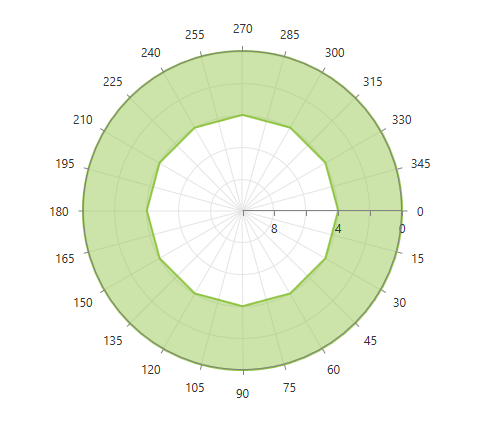
Below is an example of RadPolarChart that demonstrates configuring the polar axis and reversing the radial sweep direction using SweepDirection:
XAML
<telerik:RadPolarChart>
    <telerik:RadPolarChart.Grid>
        <telerik:PolarChartGrid/>
    </telerik:RadPolarChart.Grid>

    <telerik:RadPolarChart.PolarAxis>
        <telerik:PolarAxis LabelInterval="2"
                          MajorStep="2"
                                Maximum="10"/>
    </telerik:RadPolarChart.PolarAxis>

    <telerik:RadPolarChart.RadialAxis>
        <telerik:NumericRadialAxis/>
    </telerik:RadPolarChart.RadialAxis>
</telerik:RadPolarChart>