How to Create a Header CheckBox in VirtualGrid
Environment
| Product Version | Product | Author |
|---|---|---|
| 2019.1.219 | RadVirtualGrid for WinForms | Desislava Yordanova |
Description
This article aims to show you how to create a check box column in RadVirtualGrid that contains a check box in the header cell in order to check/uncheck all records.
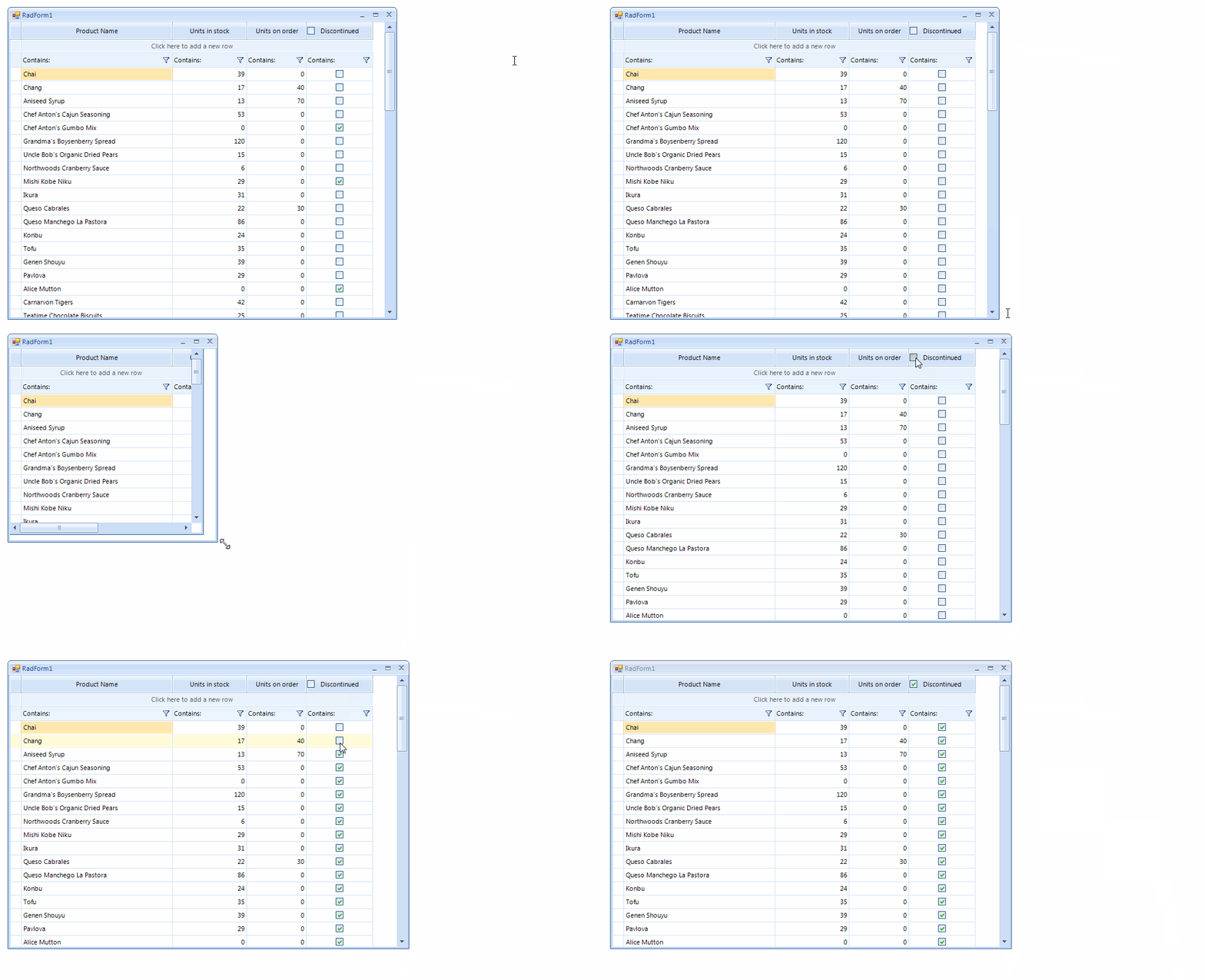
Solution
The CellValueNeeded event in RadVirtualGrid is responsible for populating the grid with data extracting the records from the external data source. The CellValuePushed event is the appropriate place to push the changes to the external source collection.
RadVirtualGrid supports a powerful and flexible mechanism for creating cell types with custom content elements, functionality and properties. A sample approach how to create a check-box column is demonstrated in the following help article: Creating custom cells. We will extend this example to include a header check-box that will check/uncheck all records in RadVirtualGrid.
1. Create a derivative of the VirtualGridHeaderCellElement class and add a RadCheckBoxElement in the CreateChildElements event. In the ToggleStateChanged event of the check-box you should update the toggle state of the records inside the grid:
Custom VirtualGridHeaderCellElement
        public class CustomVirtualGridHeaderCellElement : VirtualGridHeaderCellElement
        {
            RadCheckBoxElement headerCheckBox = new RadCheckBoxElement();

            protected override Type ThemeEffectiveType
            {
                get
                {
                    return typeof(VirtualGridHeaderCellElement);
                }
            }

            public override bool IsCompatible(int data, object context)
            {
                return data == 3;
            }

            protected override void CreateChildElements()
            {
                base.CreateChildElements();
                this.Children.Add(headerCheckBox);
                this.headerCheckBox.ToggleStateChanged += headerCheckBox_ToggleStateChanged;
            }

            public override void Synchronize()
            {
                base.Synchronize();
                this.headerCheckBox.ToggleStateChanged -= headerCheckBox_ToggleStateChanged;
                headerCheckBox.IsChecked = GetCheckState(this.ColumnIndex);
                this.headerCheckBox.ToggleStateChanged += headerCheckBox_ToggleStateChanged;
            }

            private bool GetCheckState(int columnIndex)
            {
                bool isChecked = true;
                for (int i = 0; i < this.TableElement.RowCount; i++)
                {
                    isChecked &= (bool)((CustomRadVirtualGridElement)this.TableElement.GridElement).GetCellValue(this.headerCheckBox.Checked, i, this.ColumnIndex, this.ViewInfo);
                    if (isChecked == false)
                    {
                        break;
                    }
                }
                return isChecked;
            }

            private void headerCheckBox_ToggleStateChanged(object sender, StateChangedEventArgs args)
            {
                for (int i = 0; i < this.TableElement.RowCount; i++)
                {
                    this.TableElement.GridElement.SetCellValue(this.headerCheckBox.Checked, i, this.ColumnIndex, this.ViewInfo);
                }
                this.TableElement.SynchronizeRows();
            }
        }
2. Handle the CreateCellElement event and for the header row (which row index is -1) use the custom header cell:
Apply the custom VirtualGridHeaderCellElement
        private void radVirtualGrid1_CreateCellElement(object sender, VirtualGridCreateCellEventArgs e)
        {
            if (e.ColumnIndex == 3)
            {
                if (e.RowIndex >= 0)
                {
                    e.CellElement = new MyVirtualGridCheckBoxCellElement();
                }
            }

            if (e.RowIndex == -1)
            {
                if (e.ColumnIndex == 3)
                {
                    e.CellElement = new CustomVirtualGridHeaderCellElement();
                }
            }
        }
3. Since you need to iterate the boolean values for all records in the virtual grid in order to determine the value for the header check-box, it is necessary to create a public GetCellValue method for the RadVirtualGridElement. For this purpose, it is necessary to create a custom RadVirtualGrid as follows:
Create a custom RadVirtualGrid
        public class CustomVirtualGrid : RadVirtualGrid
        {
            public override string ThemeClassName
            {
                get
                {
                    return typeof(RadVirtualGrid).FullName;
                }
            }

            protected override RadVirtualGridElement CreateElement()
            {
                return new CustomRadVirtualGridElement();
            }
        }

        public class CustomRadVirtualGridElement : RadVirtualGridElement
        {
            public object GetCellValue(object value, int rowIndex, int columnIndex, VirtualGridViewInfo viewInfo)
            {
                VirtualGridCellValueNeededEventArgs args = new VirtualGridCellValueNeededEventArgs(rowIndex, columnIndex, viewInfo);
                this.OnCellValueNeeded(args);
                return args.Value;
            }
        }
A complete solution providing a C# and VB.NET project is available here.