New to Telerik UI for WinForms? Start a free 30-day trial
Validate user action when removing items from RadAutoCompleteBox
Updated over 1 year ago
Environment
| Product Version | Product | Author |
|---|---|---|
| 2021.1.223 | RadAutoCompleteBox for WinForms | Nadya Karaivanova |
Description
A common requirement is to validate the user action when he/she wants to remove a tokenized item from the text box field in RadAutoCompleteBox. This article will demonstrate how you can achieve this by displaying a message box which ensures whether the item should be removed or not.
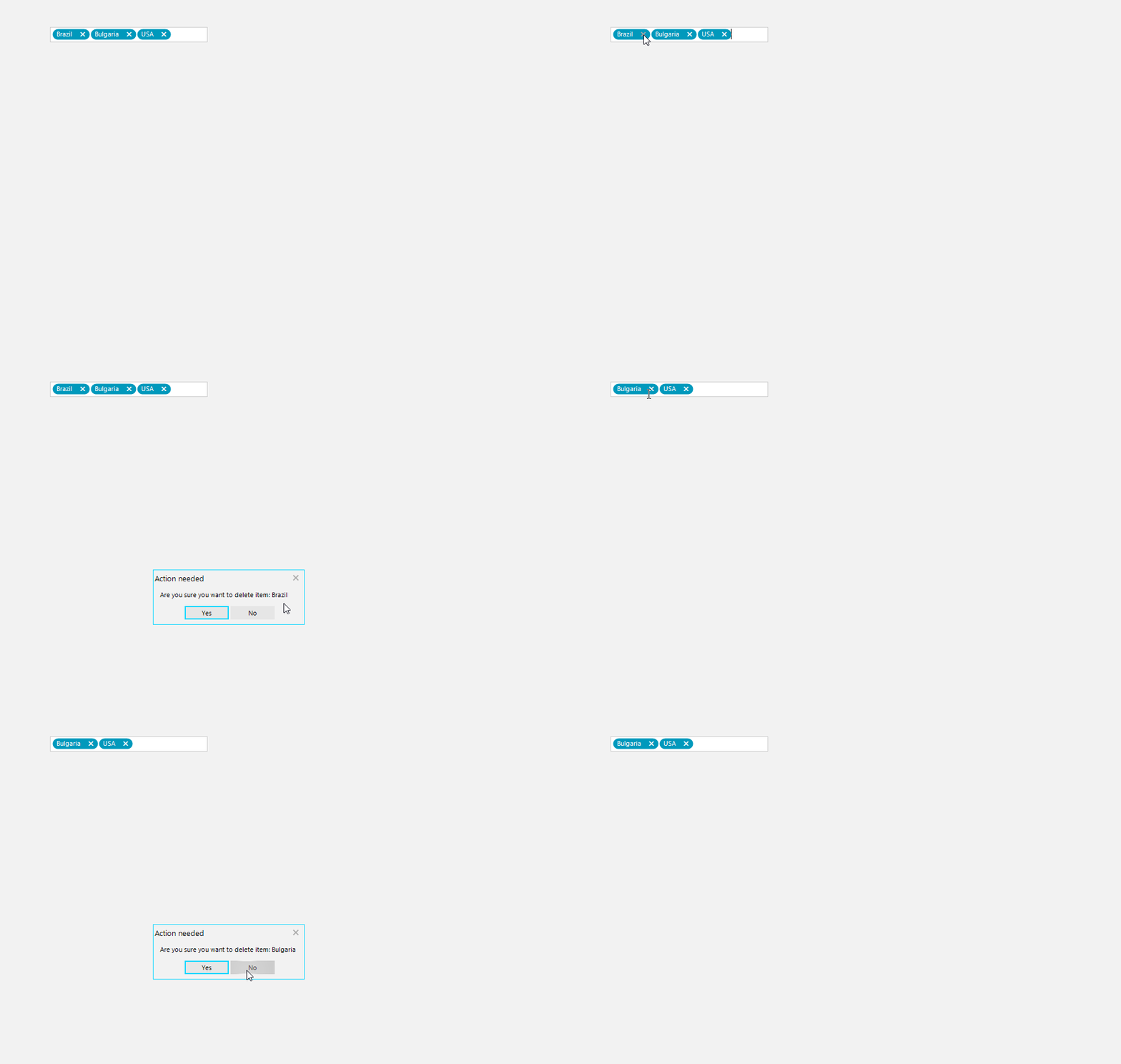
Solution
This can be achieved with using a custom text block element. First, it is necessary to create a custom class that inherits from the TokenizedTextBlockElement class. Then, override the OnRemoveButtonClick method where the actual removing of items is happening:
C#
public class MyTokenizedTextBlockElement : TokenizedTextBlockElement
{
    protected override void CreateChildElements()
    {
        base.CreateChildElements();

    }

    protected override void OnRemoveButtonClick()
    {
        if (RadMessageBox.Show("Are you sure you want to delete item: " + this.Item.Text, "Action needed",
            MessageBoxButtons.YesNo) == System.Windows.Forms.DialogResult.Yes)
        {
            base.OnRemoveButtonClick();
        }
    }
    protected override Type ThemeEffectiveType
    {
        get
        {
            return typeof(TokenizedTextBlockElement);
        }
    }
}
Then, you should replace the default item with the newly created custom one in the CreateTextBlock event:
C#
public RadForm1()
{
    InitializeComponent();

    List<Country> items = new List<Country>();
    items.Add(new Country(1, "Germany"));
    items.Add(new Country(2, "USA"));
    items.Add(new Country(3, "Brazil"));
    items.Add(new Country(4, "Bulgaria"));
    items.Add(new Country(5, "Greece"));
    this.radAutoCompleteBox1.AutoCompleteDataSource = items;
    this.radAutoCompleteBox1.AutoCompleteDisplayMember = "Name";
    this.radAutoCompleteBox1.AutoCompleteValueMember = "Id";
    this.radAutoCompleteBox1.ShowRemoveButton = true;
    this.radAutoCompleteBox1.CreateTextBlock += this.RadAutoCompleteBox1_CreateTextBlock;
}

private void RadAutoCompleteBox1_CreateTextBlock(object sender, CreateTextBlockEventArgs e)
{
    TokenizedTextBlockElement element = e.TextBlock as TokenizedTextBlockElement;
    if (element != null)
    {
        e.TextBlock = new MyTokenizedTextBlockElement();
    }
}

public class Country
{
    public int Id { get; set; }

    public string Name { get; set; }

    public Country(int id, string name)
    {
        this.Id = id;
        this.Name = name;
    }
}