New to Telerik UI for WinForms? Start a free 30-day trial
TimeSpan editor in RadListView
Updated over 1 year ago
Environment
| Product Version | Product | Author |
|---|---|---|
| 2019.1.219 | RadListView for WinForms | Desislava Yordanova |
Description
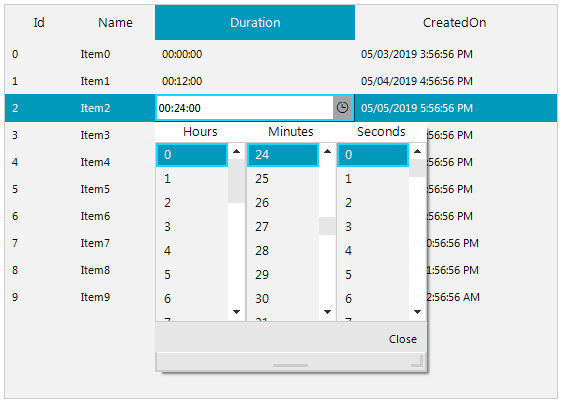
If you have a TimeSpan property displayed in a column in DetailsView, you may want to activate an appropriate editor to manipulate the TimeSpan value.
Solution
RadListView offers the EditorRequired event where you can specify what editor to be used for the respective property. Telerik UI for WinForms offers a RadTimeSpanPicker control which provides full control over picking a specific time span and duration using the built-in components for days, hours, minutes, seconds and milliseconds. You can create a custom editor that uses internally a RadTimeSpanPickerElement. The RadListView.EditorInitialized event is fired when the editor is already initialized. This is the appropriate place specify the TimeSpan format:
ListViewTimeSpanEditor implementation
C#
        public RadForm1()
        {
            InitializeComponent();

            DataTable dt = new DataTable();
            dt.Columns.Add("Id", typeof(int));
            dt.Columns.Add("Name", typeof(string));
            dt.Columns.Add("Duration", typeof(TimeSpan));
            dt.Columns.Add("CreatedOn", typeof(DateTime));

            for (int i = 0; i < 10; i++)
            {
                dt.Rows.Add(i, "Item" + i, TimeSpan.FromMinutes(i * 12), DateTime.Now.AddDays(i).AddHours(i));
            }

            this.radListView1.DataSource = dt;
            this.radListView1.ViewType = Telerik.WinControls.UI.ListViewType.DetailsView;

            this.radListView1.EditorRequired += radListView1_EditorRequired;
            this.radListView1.EditorInitialized += radListView1_EditorInitialized;
        }

        private void radListView1_EditorInitialized(object sender, ListViewItemEditorInitializedEventArgs e)
        {
            ListViewTimeSpanEditor editor = e.Editor as ListViewTimeSpanEditor;
            if (editor != null)
            {
                RadTimeSpanPickerElement element = editor.EditorElement as RadTimeSpanPickerElement;
                element.Format = "HH:mm:ss";
            }
        }

        private void radListView1_EditorRequired(object sender, ListViewItemEditorRequiredEventArgs e)
        {
            if (e.ListViewElement.CurrentColumn.FieldName == "Duration")
            {
                e.EditorType = typeof(ListViewTimeSpanEditor);
            }
        }

        public class ListViewTimeSpanEditor : BaseInputEditor
        {
            public override object Value
            {
                get
                {
                    RadTimeSpanPickerElement editor = (RadTimeSpanPickerElement)this.EditorElement;
                    return editor.Value;
                }
                set
                {
                    RadTimeSpanPickerElement editor = (RadTimeSpanPickerElement)this.EditorElement;

                    editor.Value = value;
                }
            }

            public override void BeginEdit()
            {
                base.BeginEdit();

                RadTimeSpanPickerElement element = this.EditorElement as RadTimeSpanPickerElement;
                element.MaskedEditBox.TextBoxItem.HostedControl.Focus();
                element.ValueChanged += new EventHandler(RadTimeSpanPickerElement_ValueChanged);
            }

            void RadTimeSpanPickerElement_ValueChanged(object sender, EventArgs e)
            {
                this.OnValueChanged();
            }

            public override bool EndEdit()
            {
                ((RadTimeSpanPickerElement)this.EditorElement).ValueChanged -= RadTimeSpanPickerElement_ValueChanged;
                return base.EndEdit();
            }

            protected override RadElement CreateEditorElement()
            {
                return new RadTimeSpanPickerElement();
            }

            public override Type DataType
            {
                get
                {
                    return typeof(TimeSpan);
                }
            }
        }